TL;DR: Eleven of the 14 consulting PSA and resource planning tools we checked in November 2026 have an official MCP server that Claude or ChatGPT can connect to: Operating, Scoro, Productive, Harvest, Rocketlane, Teamwork.com, Kantata, Cinode, Float (beta), Projectworks and Avaza. The big difference is what the assistant may change, and only Operating, Kantata, Projectworks and Avaza document writes to staffing, meaning bookings or allocations. Productive and Float can read the resource plan but not change it. Filter the matrix below by access, data area or plan to get your own shortlist.
Which PSA tools have an MCP server?
An MCP server is the connector that lets an AI assistant such as Claude or ChatGPT read and change data in another app. MCP stands for Model Context Protocol, an open standard that Anthropic introduced in November 2024. For a consulting firm, it means asking "who is free in March with data skills?" in your usual chat. The answer comes from the live PSA, not from last week's export.
The matrix has one row per vendor, each linked to the page we used, and when you set the three filters the tools that don't match disappear. You can copy a link to your filtered view and drop it into the tool review. Operating makes one of these tools. Every row, ours included, shows only what the vendor documents.
| Tool | MCP server | Claude | ChatGPT | Copilot | Staffing | Time | Invoices | Budgets | Plan | Safety notes | Source |
|---|---|---|---|---|---|---|---|---|---|---|---|
| OperatingMakes this page | Official | Yes, custom connector and Claude Code | Yes, connector | No, not working yet | Read + writeCreate, update, move, delete positions and allocations | Read + writeRead entries, log time | Read + raiseIts MCP page says an agent can raise the invoice | Read + write | Every plan (all integrations included) | Live writes, no sandbox; tools switchable per user | operating.app |
| Kantata | Official | Yes | Yes | None found | Read + writeResource requests, workspace allocations | Read + writePlus timesheet approve and reject | Read + writeCreate and update | Read + writeExpense budgets | Kantata AI plus Expertise Engine Premium | No deletes via MCP; per-tool allow, approve or block | Kantata KB |
| ProjectworksScope thinly documented | Official page | Yes | Yes | Named | Read + writeExample: move a team's bookings | ReadPlanned vs logged hours | None found | None found | Not stated | Sees only what you can see; no sandbox found | projectworks.com |
| AvazaSmall-team PSA | Official | Yes | Yes | None found | Read + writeBooks people; tools not listed on page | Read + writeLog time, approve timesheets | Read + draftNothing sent until you say so | None found | Not stated | Deletions previewed and confirmed; AI access per module and user | avaza.com |
| Productive | Official | Yes, custom connector | Yes, one click from Apps | None found | Read onlyBookings, time off, allocations are view only | Read + writeEntries, timers, submissions | Read + create | ReadVia reports | Ultimate plan, with Productive AI on | Sandbox server; one organization per connection | Productive help |
| Harvest | Official | Yes, custom connector and Claude Code | Developer Mode | None found | Assign onlyAssign people to projects; no schedule | Read + writeOwn entries; others if your role allows | Read + draftSending stays in Harvest | Read | Not stated (active account) | Acts as you; no sandbox found | Harvest help |
| Scoro | Official | Yes, chat and Claude Code | Yes | Yes, Copilot Studio | None found | Read + write | Read onlyAlso bills, expenses, quotes | None found | All packages | Deletes only items created via MCP | scoro.com |
| Rocketlane | Official | Yes, plus Claude Code | Yes | Named | None found | Read + writeLog time, timesheets | None found | None found | Any license, no extra cost | Admin enables it; no sandbox found | rocketlane.com |
| Teamwork.com | Official | Yes | Yes | Named | ReadWorkload listed; write scope not stated | Read + writeTime logs and timers | None found | ReadListed; write scope not stated | All paid plans | Acts as your account; no sandbox found | Teamwork help |
| Cinode | Official | Yes | Yes | None found | ReadAvailability, utilization, skills; writes not stated | None found | None found | None found | Paying customers, up to API limit | Set up via support | cinode.com |
| FloatBeta, read only | Official beta | Yes | Yes, Developer Mode on Team or Business | Named | Read onlyScheduled hours, capacity, time off | None foundLogged time not mentioned | None found | Read onlyBudgeted hours | Not stated; owners and admins only | No writes at all; logs a one-line intent summary | Float help |
| Runn | None found | None found | None found | None found | n/a | n/a | n/a | n/a | n/a | Community servers only | Community listing |
| Ruddr | None found | None found | None found | None found | n/a | n/a | n/a | n/a | n/a | Third-party bundle only | No vendor page found |
| BigTime | None found | None found | None found | None found | n/a | n/a | n/a | n/a | n/a | Community servers only | Community listing |
Checked November 2026 on each vendor's own page, and re-checked on publish day. "Can write" means the vendor documents that an assistant can create or update that data. Harvest can assign people to projects but has no schedule, so it is not counted as a staffing write. "Named" means the vendor lists the client without setup steps. "None found" means we found no mention, not that the feature cannot exist.
After the matrix we go area by area through what each server can change. Then plan gating and setup, then safety. At the end there's a 30-minute test script you can run in any vendor demo.
Professional services PSA vs MSP PSA: why "PSA MCP" shows Autotask
Search for "PSA MCP server" and most results are about Autotask, ConnectWise PSA and HaloPSA, often hosted by third parties such as Pipedream or shared on GitHub. Those are MSP PSAs: ticketing and contract billing tools for managed IT providers. A professional services PSA plans people on projects, tracks their time and bills it. Same three letters, different job.
This page covers the second kind. Operating is a project and resource PSA for consulting and IT services firms, not a helpdesk or ticketing PSA like Autotask or ConnectWise. If your work runs on tickets and SLAs, an MSP PSA is the right shelf. If it runs on projects and people's hours, use the matrix above. Our guide to what PSA software is explains the split in more detail.
| Consulting PSA | MSP PSA | |
|---|---|---|
| Unit of work | Project, position, allocation | Ticket, device, service contract |
| Typical question for an assistant | Who is free for a 3-month project from April? | Which tickets are about to breach their SLA? |
| Money question | What is the margin on this client this quarter? | What do we bill on this contract this month? |
| Examples | Operating, Kantata, Productive, Scoro | Autotask, ConnectWise PSA, HaloPSA |
Read vs write: what each MCP server can change
Every official server in the matrix can read something. So what may an assistant change? We went area by area.
Staffing and resource plans
Operating lets an assistant create, update, move and delete positions and allocations. Kantata documents create and update tools for resource requests and allocations. Projectworks shows an assistant moving a team's bookings when a start date slips, and Avaza says its assistant books your team. Neither lists its tools. Harvest can assign a teammate to a project. That is not a schedule. Productive and Float only read the plan. Cinode reads availability, utilization and skills and does not say whether it writes.
Time entries
Time is the area most vendors open up: eight of the eleven servers let an assistant log time. Harvest limits you to your own entries unless your role allows more, and Kantata adds timesheet approve and reject.
Invoices
Vendors are most careful here. Scoro keeps invoices read-only. Operating's MCP page says an agent can raise the invoice as well as read it. Harvest and Avaza only create drafts. Productive and Kantata can create invoices. If finance owns invoicing, read-only is what you want.
Budgets
Operating and Kantata write budgets. Harvest, Productive, Teamwork.com and Float read them. Scoro, Rocketlane, Cinode and Avaza don't mention budgets.
Eleven consulting PSA tools now ship an official MCP server. Only four of them let Claude or ChatGPT change who is booked on what.
Resource planning over MCP: can Claude update allocations?
Yes, if the PSA allows writes to its resource plan. Four of the eleven do. In Productive and Float the assistant can only read the plan. Why care? Most resource planning work is moving people around, and a report moves nobody. "Move Anna from Project A to Project B for March at 60%" is one sentence in a chat. In a read-only tool, it becomes a chat answer plus ten minutes in the planner.
Read-only access still has its uses. "Which consultants are below 70% utilization next month?" needs no writes, and if your resource manager mostly needs answers like that, Float's beta or Cinode may be enough. To rebalance the plan, filter for Staffing and Can write. Our article on whether Claude or ChatGPT can do resource planning shows where this works and where it breaks.
Plans and setup: where the friction hides
Plan gating varies more than features do. Scoro includes its MCP server in all packages, Teamwork.com in all paid plans and Rocketlane with any license. Cinode gives it to paying customers up to their API limit, set up through support. Productive needs the Ultimate plan. Kantata needs Expertise Engine Premium. Harvest, Float, Projectworks and Avaza state no plan. Operating's pricing page says every plan includes all integrations.
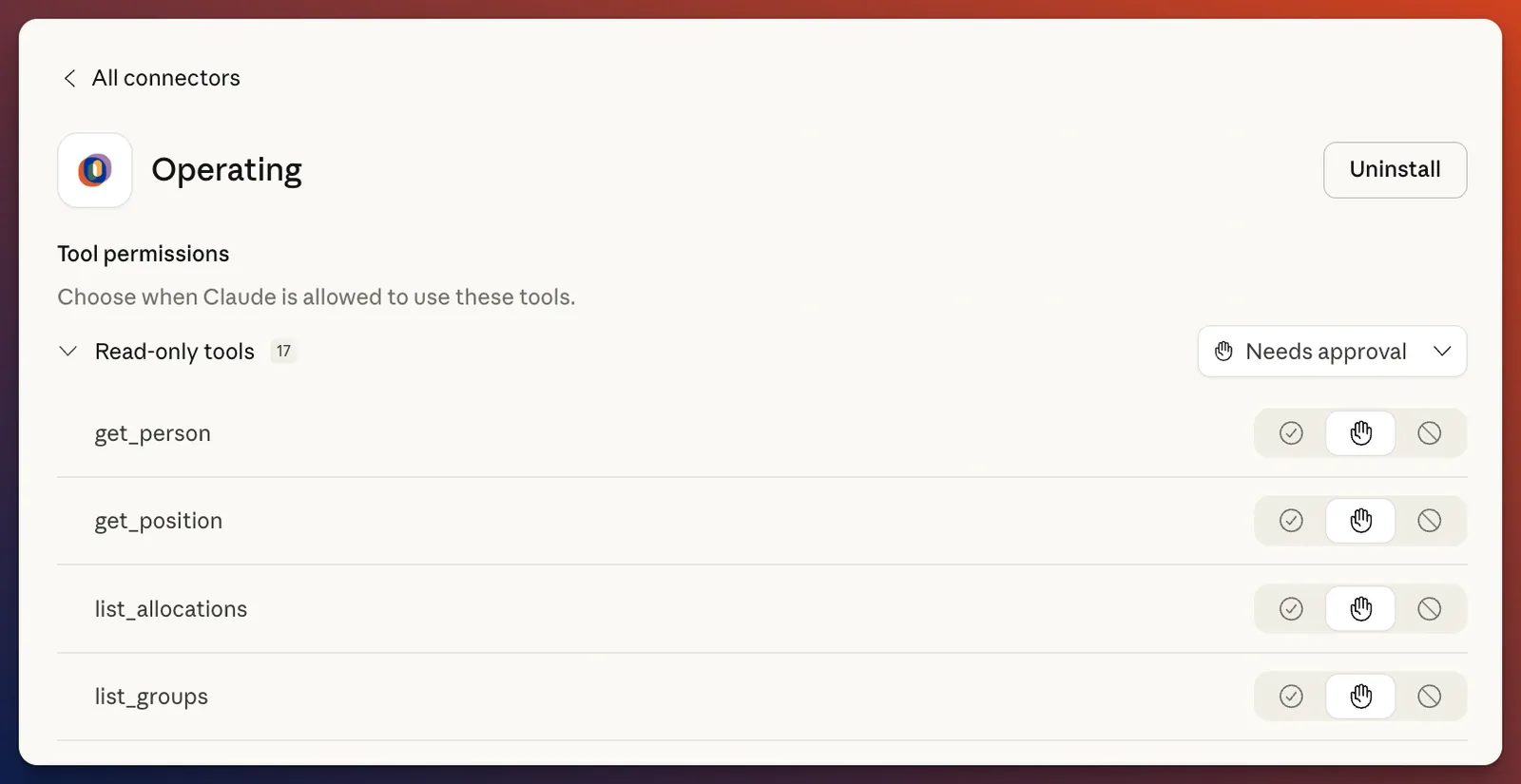
Setup friction depends on the assistant. In Claude, most servers are a custom connector: paste the address and sign in. In ChatGPT, Productive is one click from the Apps directory. Harvest and Float need Developer Mode, and Float lets only owners and admins connect. Microsoft Copilot is the weak spot: Scoro documents Copilot Studio, a few vendors name Copilot without steps, and Operating says Copilot does not connect yet.
Permissions and safety: sandbox, approvals and live writes
Every official server in the matrix acts as the person who signed in, so the assistant sees what that person sees. The differences show up when it writes. Productive has a sandbox server whose actions do not touch your live data. Scoro limits deletes to items created through MCP. Kantata allows no deletes and describes per-tool settings to allow, require approval or block. Avaza previews deletions and asks for confirmation. Float doesn't write at all.
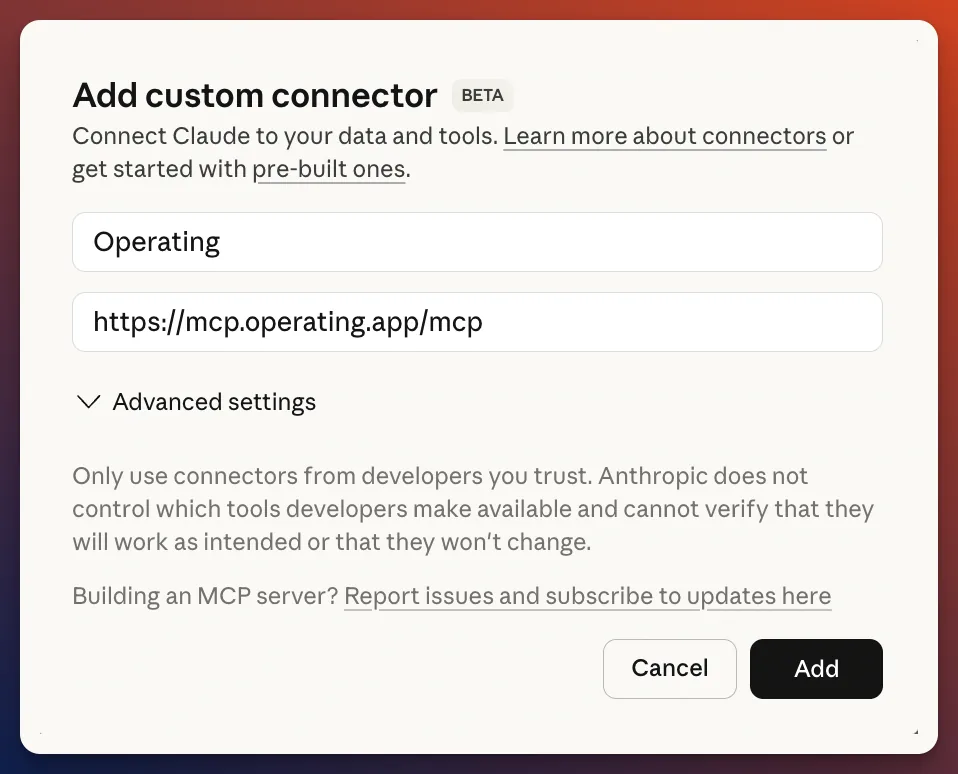
Operating's trade-off: writes are live, with no sandbox and no draft mode. Control comes from three gates. MCP is switched on for the tenant, granted to named people, and single tools can be switched off per person, so the assistant never sees them. There is no shared service account. Without a sandbox, the safe way in is to test on a project you are happy to change and to give write tools to one person first.
Tools with no official MCP server found
For Runn, Ruddr and BigTime we found no first-party MCP page in November 2026. Community-built servers for Runn and BigTime appear in MCP directories, and Ruddr shows up only in a third-party bundle. Certinia takes a different route: its Veda agents run inside Certinia and in Slack and Microsoft Teams, and its launch material does not mention MCP.
Community wrappers are fine for testing. Before you trust one with client data, ask who holds your API key, what it can write, and who fixes it when the vendor's API changes. If you are on Float or Runn and want staffing writes, our Float alternatives comparison covers the options.
Other consulting tools with MCP: CRM, Jira and docs
A PSA is not the only system an assistant needs. HubSpot's remote MCP server reads and writes contacts, companies, deals and engagements, while users, teams and campaigns are read-only. Atlassian's covers Jira and Confluence, and admins set what it may read and write, and whether it may delete. It works best when CRM and PSA sit in the same chat, because then "which deals closing next quarter can we staff?" gets one answer. Our page on PSA for HubSpot shows how deals become tentative projects.
How to test a PSA MCP server in a 30-minute demo
A feature list won't show you how an MCP server behaves with your data. A live call will. Ask the vendor to connect a demo tenant to Claude or ChatGPT on the call and run these six checks, and send them the script and your matrix link the day before.
| Minutes | Ask the assistant | Pass if |
|---|---|---|
| 0 to 5 | Connect with your own login in Claude or ChatGPT | OAuth sign-in, no API key pasted, and you see only what your role sees |
| 5 to 10 | "Who is free for a 3-month data project starting in April, by role?" | Names and hours match the resource planner on screen |
| 10 to 15 | "Show allocation conflicts next month across all projects." | Same list as the planner, with no invented people |
| 15 to 22 | "Move [Name] from [Project A] to [Project B] for March at 60%." | The change shows in the planner, or the vendor says plainly that staffing is read-only |
| 22 to 26 | Repeat the move as a user without that permission | The tool is refused or never offered |
| 26 to 30 | "Raise an invoice for [Client] for October," then "Undo your last change." | You know exactly what is read-only, what is a draft and what is live |
Where Operating fits, and its limits
Operating makes one of these tools, so read this section with that in mind. Our MCP server runs at mcp.operating.app/mcp and works with Claude, Claude Code, ChatGPT and the Gemini CLI. An assistant can write projects, phases, positions, allocations, budgets, expenses, clients, people and time entries. It reads all of those plus invoices, rate cards and reports. The limits are in the matrix: live writes with no sandbox, and no Microsoft Copilot yet.
Eliza, an AI-native consulting firm that grew from its founding team to 85 people in 12 months, runs delivery on Operating. Sophia Ryterband, Strategy and Operations Lead at Eliza, says Operating gives their AI agents one place to read and write delivery data. For prompts by use case, see what is possible with a PSA and MCP.
Operating makes one of these tools. Vendor facts were checked on each vendor's own page in November 2026. Tell us if something changed and we will update the row.
PSA MCP server FAQ
Questions people ask about PSA MCP servers
Short answers, checked against vendor pages in November 2026.
Which PSA has an MCP server?
Operating, Scoro, Productive, Harvest, Rocketlane, Teamwork.com, Kantata, Cinode, Float (beta, read-only), Projectworks and Avaza document official MCP servers. For Runn, Ruddr and BigTime we found only community-built servers. Of those eleven, Operating, Kantata, Projectworks and Avaza document writes to staffing.
Does Harvest have an MCP server?
Yes. Harvest's official MCP server works with Claude, Claude Code, Cursor and ChatGPT in Developer Mode. It logs time, manages projects and tasks, and creates draft invoices only. It can assign people to projects but has no resource schedule.
Does Float have an MCP server?
Yes, in beta. Float's MCP server is read-only: it answers questions about scheduled hours, capacity, time off and budgeted hours, but cannot change the schedule. Only account owners and admins can connect it.
Can Claude update resource allocations?
Yes, when the PSA's MCP server allows staffing writes. Operating lets Claude create, update, move and delete positions and allocations. Kantata, Projectworks and Avaza also document staffing writes. Productive and Float only let Claude read the resource plan.
What is the difference between MSP PSA and professional services PSA?
An MSP PSA, such as Autotask or ConnectWise PSA, runs tickets and service contracts for managed IT providers. A professional services PSA, such as Operating or Kantata, plans people on projects, tracks their time and bills it. Searches for "PSA MCP" mix the two.
What is the Model Context Protocol (MCP)?
MCP is an open standard that lets AI assistants such as Claude and ChatGPT connect to other software. A PSA with an MCP server lets the assistant read live data and, where allowed, make changes, instead of working from a pasted export.
Is client data secure when using a PSA MCP server?
The servers in this comparison act as the signed-in user, so the assistant sees only what that person can see. Check whether writes are live, whether there is a sandbox, and whether an admin can switch off tools per user. Your AI provider's own data policy also applies.
Do PSA MCP servers need custom engineering to connect?
Usually not. Most are hosted by the vendor and connect with a server address and a sign-in. Watch for plan gating, Developer Mode in ChatGPT, admin-only connection and setup through support, which add steps.
Sources, checked November 2026: Operating MCP server; Operating for Claude; Operating for ChatGPT; Operating pricing; Scoro MCP; Productive MCP server; Harvest MCP; Rocketlane MCP; Teamwork.com MCP launch and setup guide; Kantata MCP Server Overview; Cinode MCP; Float MCP beta; Projectworks MCP; Avaza homepage, AI section; Certinia Veda launch; HubSpot MCP; Atlassian remote MCP; Pipedream ConnectWise PSA MCP; Anthropic, Introducing the Model Context Protocol.