TL;DR: Float is a fast scheduler, and if a schedule plus timesheets is all you need, stay on it. Teams look for a Float alternative when they outgrow scheduling: they want invoices built from approved hours, CRM deals on the plan before they close, or project budgets in the same tool. For that upgrade, look at Operating (we make it), built for consulting and IT services firms that sell in HubSpot, Salesforce or Pipedrive and bill from approved time. If you want Float-style scheduling with more forecasting, look at Runn. Agencies that want budgets and invoices in one tool should look at Productive, and teams that live in task lists at Teamwork.com. Resource Guru is the budget option. Take the 1-minute check below to see if you have outgrown Float.
Have you outgrown Float? Take the 1-minute check
Float is a good scheduler. The question is whether the work around the schedule now matters more than the schedule. Answer five questions and you'll know whether to stay, or which tool to look at first.
Five yes-or-no questions. Your answer updates as you tap.
Each yes is something Float doesn't do today, based on Float's own pricing, integrations and help pages, checked November 6, 2026. Operating makes one of the tools on this page.
Disclosure: Operating makes one of the tools compared here. Every fact about Float comes from Float's own pricing page, integrations page or help center, listed in the sources at the end. Where Float is the better choice, we say so.
Below: why teams leave Float, a side-by-side table and five alternatives sorted by need. At the end there's a two-week switch test you can copy.
Why teams look for Float alternatives
Float is a good scheduler, used by more than 4,500 teams, according to Float. People look elsewhere for five reasons.
1. Timesheets move everyone to Pro. Float's time tracking is only on Pro and Enterprise. Pro costs $12 per scheduled person a month paid yearly, or $14 paid monthly, against $7 or $8.50 on Starter. Float bills for every person on the schedule, and only people on the schedule can log time, so if 4 people in a 40-person team need timesheets, all 40 seats move to Pro. That's $2,400 a year more.
2. There is no invoicing. Pro has client rate cards and budgets, and it reports on margin. Float still doesn't create invoices. Xero and QuickBooks aren't on its integrations list either. NetSuite connects through a partner, Staria. So at month end, someone exports the hours or types them into the billing tool again.
3. Placeholders are capped. A placeholder, or open role, is a slot for someone you haven't hired or picked yet. Starter includes 1 and Pro includes 5. Firms that staff deals before they close often need more.
4. CRM deals arrive through Zapier. Float connects HubSpot and Salesforce with Zapier templates that the Account Owner sets up, and Zapier needs a paid plan to run them. Someone has to map the fields and keep the Zaps running.
5. The AI connector can read but not act. Float MCP is in beta and read-only, and only Account Owners and default Admins can connect it. Claude or ChatGPT can tell you who is free next week. They can't book that person.
What Float does well
Guests are free. Planners and finance people can sign in without a seat. Timesheets pre-fill from the schedule, can log automatically and lock after a deadline. The 30-day trial runs on Pro and needs no credit card. And at $7 a person, Starter is a cheap way to get a schedule everyone can read.
Operating vs Float: side by side
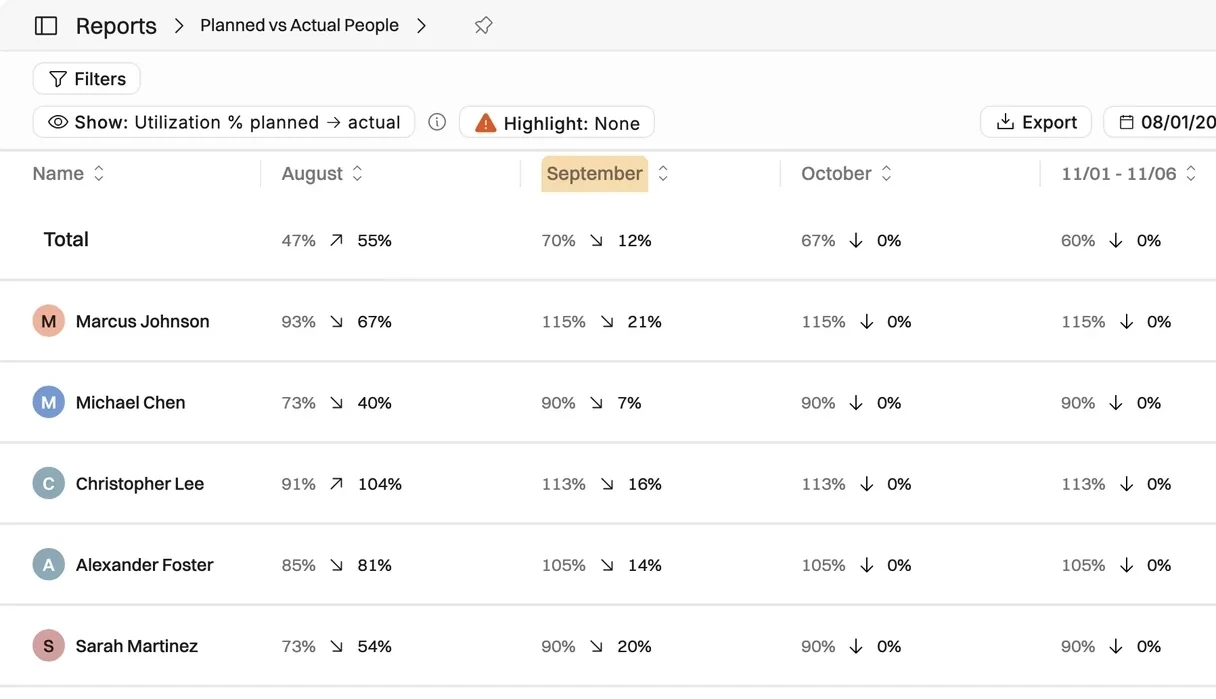
Both tools plan people on a timeline and compare planned with logged hours. The difference is before and after the schedule: Operating starts from CRM deals and ends with an invoice, Float stays with the schedule and the timesheet.
| Operating | Float | |
|---|---|---|
| Built for | Consulting and IT services firms that staff from a CRM pipeline and bill for time | Agencies and delivery teams that want a fast visual schedule |
| Timesheets | Plan & Track and up, with approval flows and planned vs actual hours | Pro and Enterprise, pre-filled from the schedule, with auto-log and locking |
| Placeholders (open roles) | On every plan | 1 on Starter, 5 on Pro, custom on Enterprise |
| CRM | Native HubSpot, Salesforce and Pipedrive sync: deals become tentative projects | HubSpot and Salesforce through Zapier templates |
| Invoicing | Full Suite: invoices built from approved time, saved to Xero or QuickBooks Online | None |
| AI assistants (MCP) | Live MCP server that reads and writes people, projects, allocations, time and budgets | Float MCP in beta: read-only, Account Owners and default Admins only |
| SSO | Every plan | Pro and Enterprise |
| Free trial | Yes | 30 days on Pro, no credit card |
| G2 rating | 4.7 stars | 4.2 stars |
Checked on operating.app, float.com and support.float.com on November 6, 2026. G2 ratings checked the same day.
Where Float is the better choice
When the schedule is the whole job. If you need a fast, visual schedule plus timesheets, already bill from a separate tool that works, and don't staff from a CRM pipeline, Float is the simpler and cheaper buy. Anyone who isn't scheduled can join free as a guest.
When to upgrade to Operating
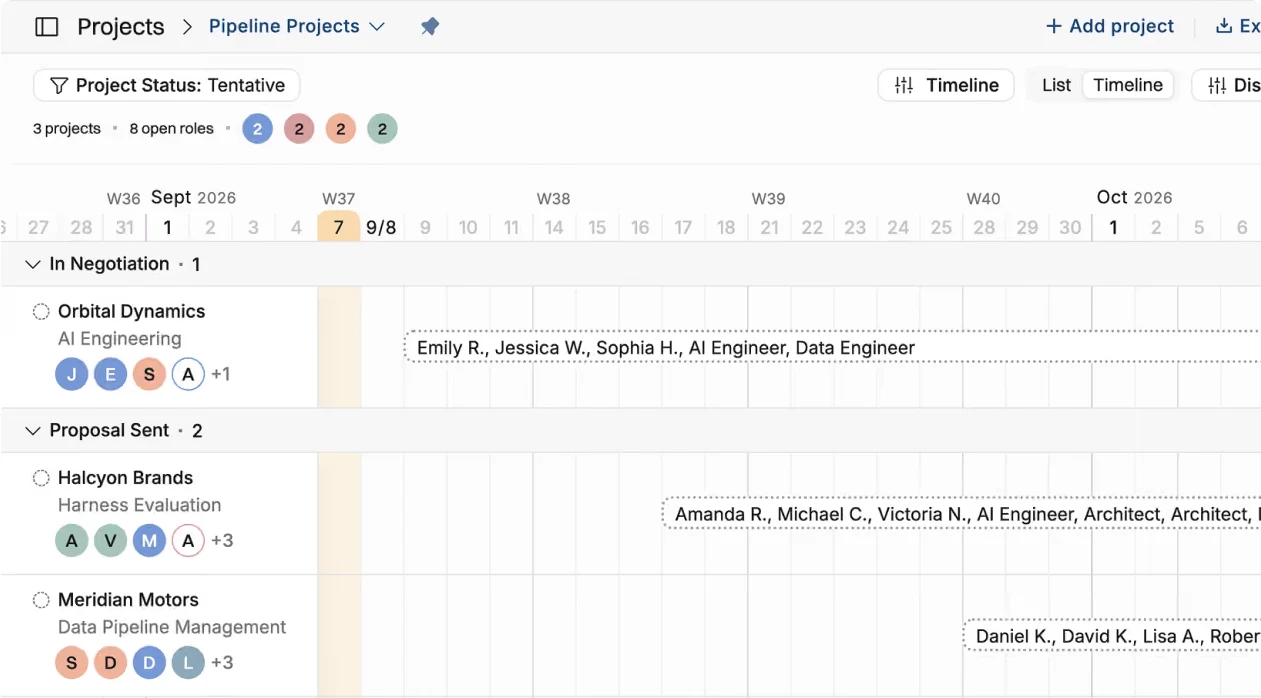
When the plan starts in the CRM and ends in an invoice. Deals from HubSpot, Salesforce or Pipedrive show up in Operating as tentative projects, with open roles you can staff before the deal closes. Full Suite builds invoices from approved time and saves them to Xero or QuickBooks Online. If you track time in Harvest, it syncs both ways and you can keep it. And Operating's MCP server lets Claude or ChatGPT write allocations and log time, not only read them. Operating also has tasks on projects, and people log time against them.
Yes, Operating costs more per seat than Float. It's a different kind of tool. Float schedules people. Operating runs the whole path from deal to staffing to timesheet to invoice, which is why firms move to it once the schedule is no longer the hard part. It's the same reason a growing sales team moves from a simple CRM to a bigger one: not to save money, but because it needs what the bigger tool does.
Not sure you need the upgrade yet? Take the 1-minute check at the top of this page.
5 Float alternatives by what you need
Each tool gets the same questions: who should pick it, what it costs and what it is missing. The table shows who each one is for. Prices are in each tool's section below.
| Tool | Best for | Who pays | Placeholders | Invoicing |
|---|---|---|---|---|
| Float | A fast schedule plus timesheets | Everyone on the schedule; guests free | 1 or 5 | No |
| Operating | CRM-led consulting and IT services firms | Every user plus everyone scheduled | Every plan | Full Suite, $21 |
| Runn | Scheduling with forecasting | Every person in the planner; at least 20 seats | Unlimited | Not on its pricing page |
| Resource Guru | The lowest price per person | Everyone added, signed in or not | 1, 5 or 10, then paid | No |
| Productive | Agencies that want projects and billing in one tool | Every user | None on Essential, 5 on Professional | Yes |
| Teamwork.com | Teams that live in tasks | Every user | Optimize plan only | Basic, from logged time |
Checked on each vendor's site on November 6, 2026. Teamwork.com needs its Optimize plan for placeholders, which has no public price.
1. Operating: best if you sell through a CRM and bill from the same tool
Pick Operating if you run a consulting or IT services firm, share people across projects and want one place for the whole path from deal to staffing to timesheet to invoice.
Price: Planning costs $13 per person a month paid yearly, Plan & Track $17 with timesheets and Full Suite $21 with invoicing. Paid monthly, they cost $15, $19 and $23. SSO and every integration come with every plan, and so does the full API. Enterprise starts at 100 people with custom pricing.
On every plan, CRM deals become tentative projects. What Operating doesn't have: a built-in CRM, because it works with the one you already use. There is no native NetSuite connector yet either, though NetSuite works through the REST API. It has 4.7 stars on G2.
2. Runn: best for Float-style scheduling with forecasting
Runn is for teams who like how Float works but want more forecasting and scenarios, plus unlimited placeholders.
Price: Lite costs $7 per resource seat a month paid yearly, or $9 monthly, and you sign up for it through sales. Standard costs $11, or $13 monthly. It adds timesheets and integrations, plus API access. Plans start at 20 resource seats. Every person in the planner needs a seat.
Every Runn plan has tentative projects and placeholders, and project budgets too. The gaps? Runn's pricing page doesn't list invoicing. CRM connections run through partners or Zapier, and the Harvest and Clockify syncs are on the Advanced plan only. G2 rating: 4.5 stars.
3. Resource Guru: best for the lowest price per person
Resource Guru suits teams that want simple bookings at the lowest price and can live without invoicing.
Price: Grasshopper costs $4.16 per person a month paid yearly, or $5 monthly, without reports. Blackbelt costs $6.65, or $8 monthly, and adds timesheets and reports along with project budgets. Master costs $10, or $12, and adds approvals and SSO. You pay for everyone you add, whether they sign in or not.
Placeholders are free up to 1, 5 or 10 depending on the plan, then cost the per person rate. The plan comparison also lists an MCP integration for AI assistants. There is no invoicing and no CRM connection. It has 4.6 stars on G2.
4. Productive: best for agencies that want projects and billing in one tool
Productive fits teams that want one system for everything: tasks and docs, budgets, planning, time, invoices.
Price: Essential costs $10 per person a month paid yearly, or $12 monthly. Professional costs $25, or $29 monthly. It adds rate cards and approvals, plus invoicing integrations. Ultimate, with HubSpot sync, has no public price.
The catch is placeholders: Essential has none, and Professional caps them at 5. Our Productive alternatives page has the detail. G2 gives it 4.6 stars.
5. Teamwork.com: best for teams that live in tasks
Choose Teamwork.com if your work runs on project plans and task lists, and scheduling comes second.
Price: Accelerate costs $24.99 per user a month paid yearly. It adds workload planning and invoices from logged time. It also connects to HubSpot and QuickBooks. Every plan, even the free one for up to 5 users, can connect Claude or ChatGPT.
Placeholders need Optimize, which has no public price. So do tentative projects and turning a CRM pipeline into projects. Teamwork.com rates 4.4 stars on G2.
Want more scheduling-first tools? See the best resource planning platforms for consulting firms, or compare full PSA tools in the best PSA software for consulting firms.
When to stay with Float
Stay if your problem is the schedule, not what sits around it. If you bill from a separate tool that already works, staff mostly signed work and rarely need more than 5 placeholders, Float does the job for less money. Free guests also save money if many people only need to view the schedule.
Look again when you start staffing deals before they close, invoicing takes days at month end, or you want an AI assistant to change the plan.
Switching from Float: a two-week test
Don't switch on a demo. Run this test with one team. Then decide.
| When | Do this | Done when |
|---|---|---|
| Day 1 | Write down the one or two things Float doesn't do for you. Take the 1-minute check at the top of this page. | You know what Float is missing for you |
| Days 2 to 3 | Shortlist two tools from the table. Book demos and bring one real deal and one live project. | Both vendors have shown your case, not theirs |
| Days 4 to 5 | Export people, projects and the next 8 weeks of allocations from Float, through its API. | One clean file per tool |
| Week 2 | Run one team in the new tool next to Float: plan, log a week of time, draft one invoice. | Planned vs logged hours match in both tools |
| Day 14 | Compare the trial with Float on the two things from day 1. Decide, then set the cutover for the start of a month. | A yes or no, with a date |
Want to run the test on Operating? Book an intro and bring one real deal, or start a free trial and connect your CRM.
Float alternatives FAQ
Short answers, checked November 6, 2026.
What is the best Float alternative?
It depends on why you are leaving. Operating fits firms that staff from a CRM and want invoicing. Runn fits teams that want Float-style scheduling with forecasting. Resource Guru is the cheapest per person. Productive and Teamwork.com add projects and tasks.
How much does Float cost?
Float Starter costs $7 per scheduled person a month paid yearly, or $8.50 paid monthly. Pro costs $12, or $14 paid monthly, and adds time tracking. Enterprise is quoted by sales on an annual contract. Prices checked on float.com on November 6, 2026.
What does pay per scheduled person mean in Float?
You pay for every person you add to the Schedule for resourcing. People who are not scheduled can join as guests for free: they can sign in and view the schedule. Only people on the Schedule can log time, so everyone who tracks time needs a paid seat.
Does Float have invoicing?
No. Float has rate cards, budgets and margin reports, but it does not create or send invoices, and Xero and QuickBooks are not on its integrations list. Float teams bill from a separate tool.
Which Float plan includes time tracking?
Pro and Enterprise. Starter has no timesheets. Float applies one plan to the whole team, so timesheets mean the Pro rate for everyone on the schedule.
Does Float integrate with HubSpot or Salesforce?
Yes, through Zapier. Float provides Zapier templates that create projects or clients in Float from HubSpot or Salesforce records. The Account Owner sets them up, and running Zaps needs a paid Zapier plan. Operating connects HubSpot, Salesforce and Pipedrive natively on every plan.
Does Float have an MCP server for Claude or ChatGPT?
Yes, in beta. Float MCP is read-only, and only Account Owners and default Admins can connect it. It can answer who is free, but it cannot change the schedule. Operating's MCP server can read and write allocations, projects and time.
How we compared these tools
On November 6, 2026 we checked each vendor's pricing page and plan comparison, plus its integrations page and help center. Prices are in US dollars per person per month before tax and discounts. G2 ratings were checked the same day. Sources: Float pricing, Float integrations, Float help: time tracking, Float help: log your time, Float help: HubSpot via Zapier, Float help: Float MCP beta, Operating pricing, Operating integrations, Runn pricing, Runn integrations, Resource Guru pricing, Productive pricing, Teamwork.com pricing.