TL;DR
The best Clockify alternatives for consulting firms in 2026 are Operating, Toggl, Harvest, Paymo, Productive, BigTime and Forecast, which Accelo now sells as Accelo Forecast PSA. Toggl is the closest like-for-like switch. Operating and Forecast fit firms that need to plan staff by skill and pipeline. Paymo and BigTime fit firms where fixed fees and billing come first.
Most people search for Clockify alternatives because of the 2026 free plan cut. Free workspaces now keep 5 active users, export PDF only and show 31 days of reports at a time. If that is your only problem, a paid Clockify plan is still the cheapest fix: Standard costs $5.49 and Pro $7.99 per seat per month, billed annually.
Move away from Clockify when the problem is no longer the timer. That means fixed-fee and retainer billing, invoices that sync both ways with QuickBooks Online or Xero, or planning work you have not sold yet. Clockify does none of those well, and its paid plans do not change that.
Leaving Harvest instead? Read our guide to Harvest alternatives for consulting teams. Comparing full PSA platforms? See the best PSA software for consulting firms.
Clockify alternatives at a glance
Six of the seven tools publish an entry price, and Forecast is quote only. The table shows who each tool fits, its public price and the main trade-off compared with Clockify.
What changed at Clockify in 2026
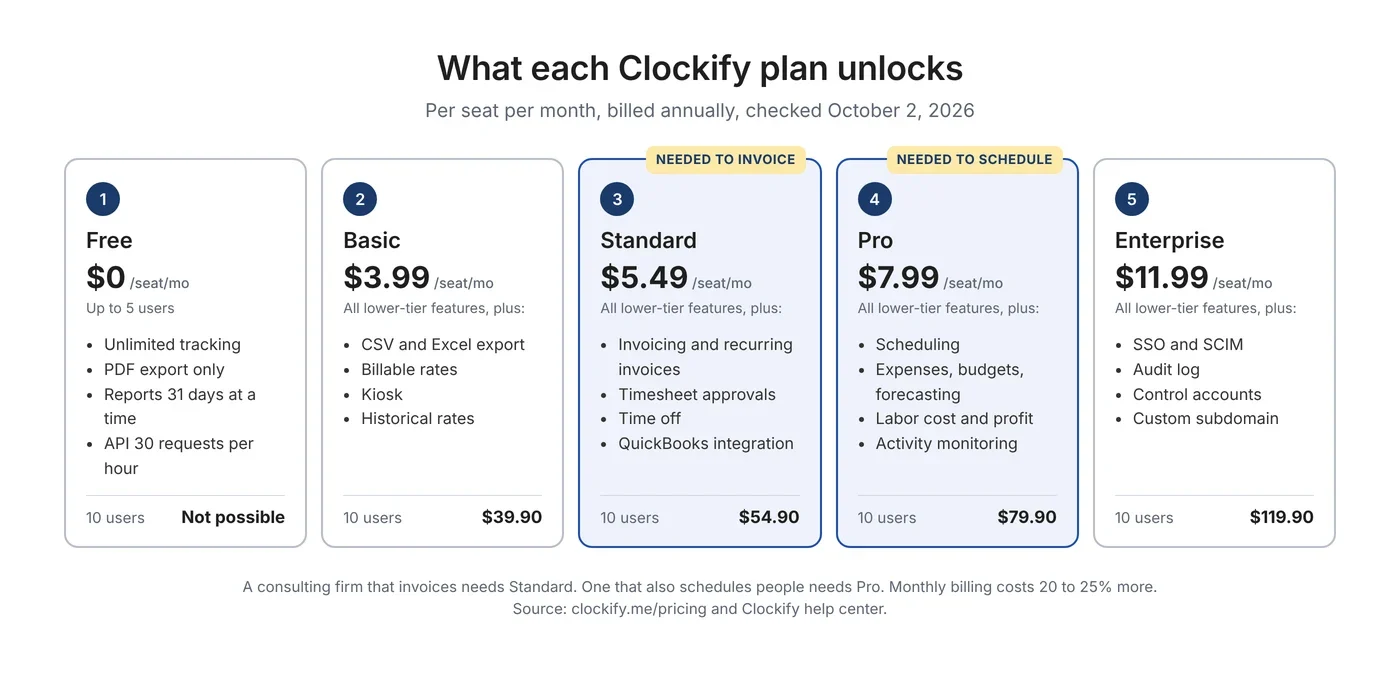
Clockify shrank its free plan in 2026. CAKE.com, the company behind Clockify, announced the change in late April, and by June existing free workspaces had lost features users relied on. Clockify's free plan help page lists the new limits: 5 active users including the owner, reports limited to 31 days at a time, CSV and Excel export only on paid plans, all projects public, and 30 API requests per hour. Billable rates moved to the paid Basic plan.
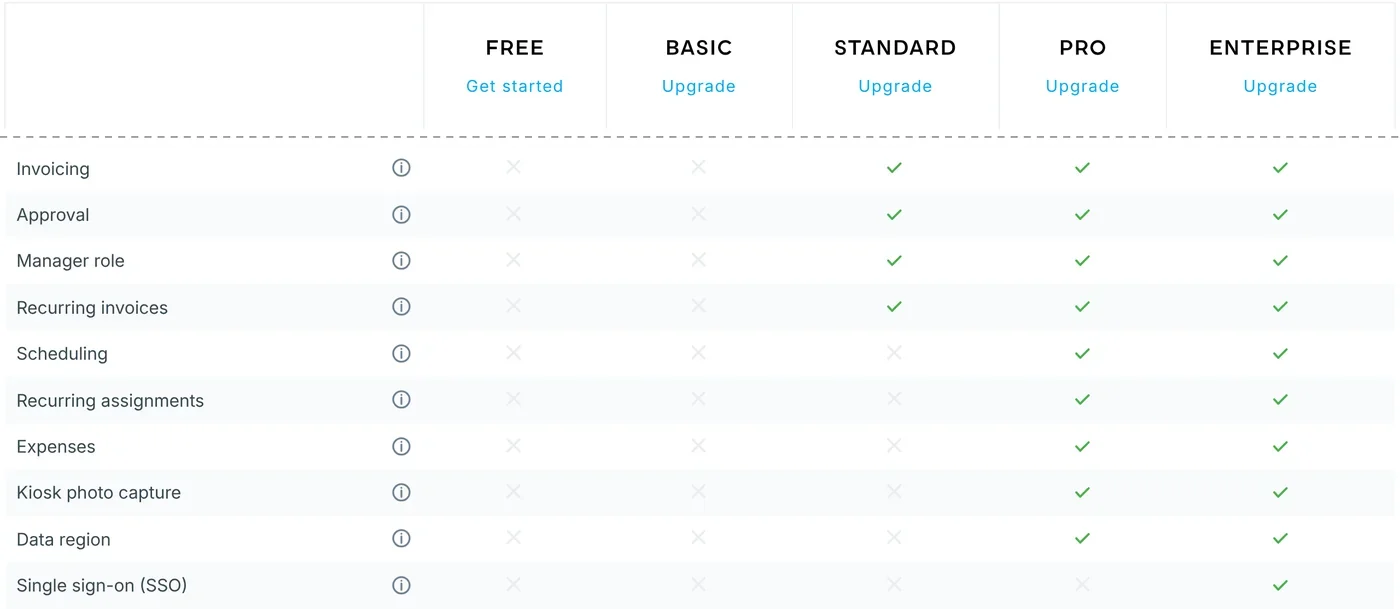
For a consulting firm, the cut matters less than what it reveals. Clockify sells its features in five tiers, and the ones that run a services business sit above Basic. Invoicing and timesheet approvals start at Standard. Scheduling, expenses, budgets and labor cost start at Pro. SSO needs Enterprise. So when you compare an alternative with Clockify, compare it with the plan you would actually need, not with the free one.
The free plan cut also changed how users feel about the product. Long-time free users had built billing on it, and many say they only noticed when features disappeared.
“I had a whole workflow for creating invoices based around that export to Excel function, that I've been using for years.” u/Red_St3am, r/clockify, June 2026
“The new limitation of one month makes this useless to me. I routinely work on a single project across several months.” u/inknose, r/clockify, July 2026
“the new five user limit effectively takes us from paying nothing to around £1,800 a year for something we use relatively lightly.” Trustpilot review from a UK charity, September 2026
Not everyone agrees the change is a problem. In a Spanish freelancer thread, one reply to a team of four put it bluntly: “€7 makes it unusable? There's a bigger issue if 7€ is making u rethink”. That is a fair point for a consulting firm too. If Clockify does everything else you need, paying for Standard or Pro is cheaper than any switch.
What 449 Clockify reviews say
Firms that sell time complain about the structure around Clockify's timer, not the timer itself. We read and coded 449 public Clockify reviews from January 2024 to September 2026, from Capterra, G2, TrustRadius, Product Hunt, Trustpilot, Google Play and the Apple App Store. Each complaint was tagged with one or more themes. The method and its limits are in the methodology section at the end.
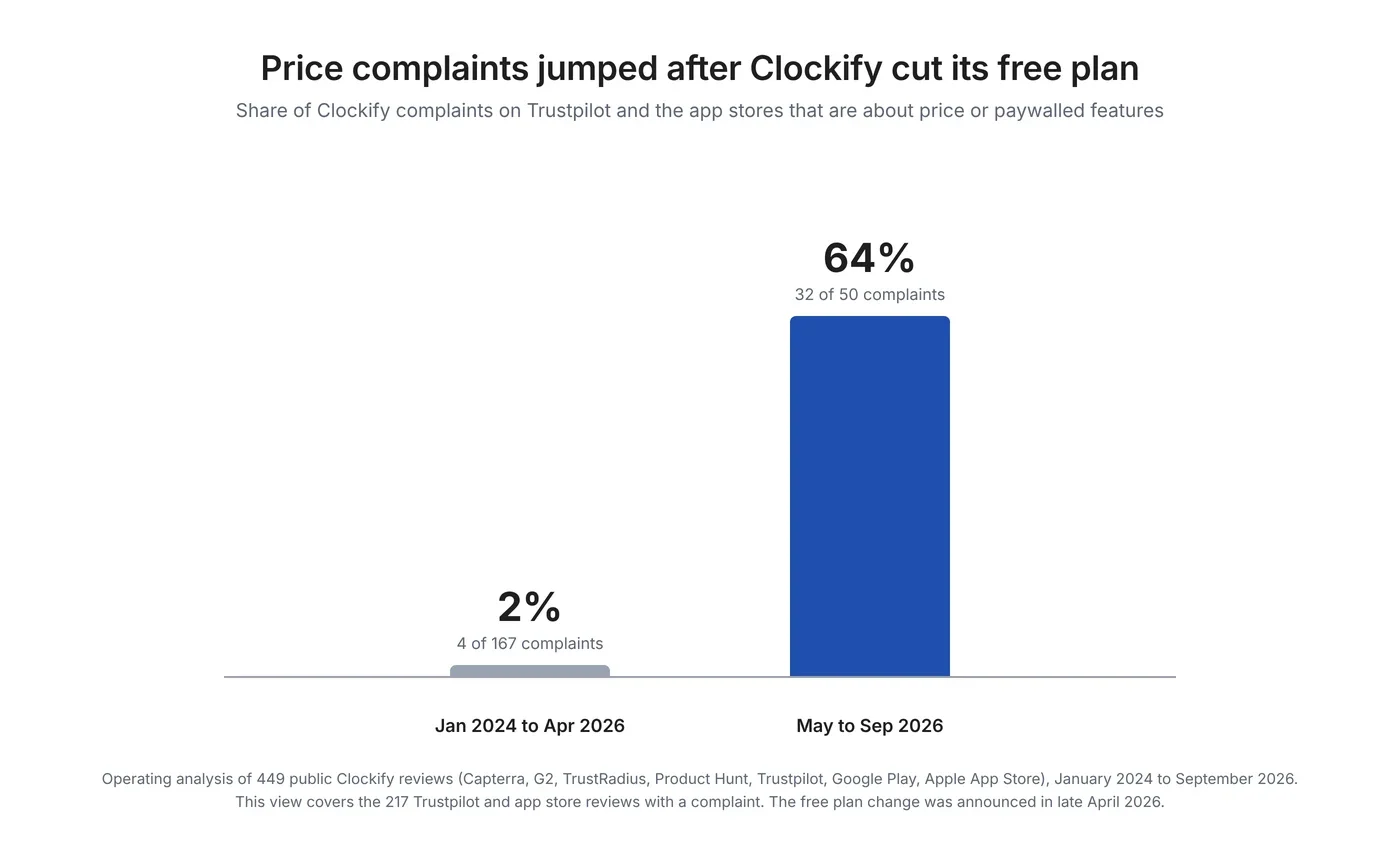
The first finding is about timing. Before May 2026, price was almost never the problem. Afterwards it was the main one.
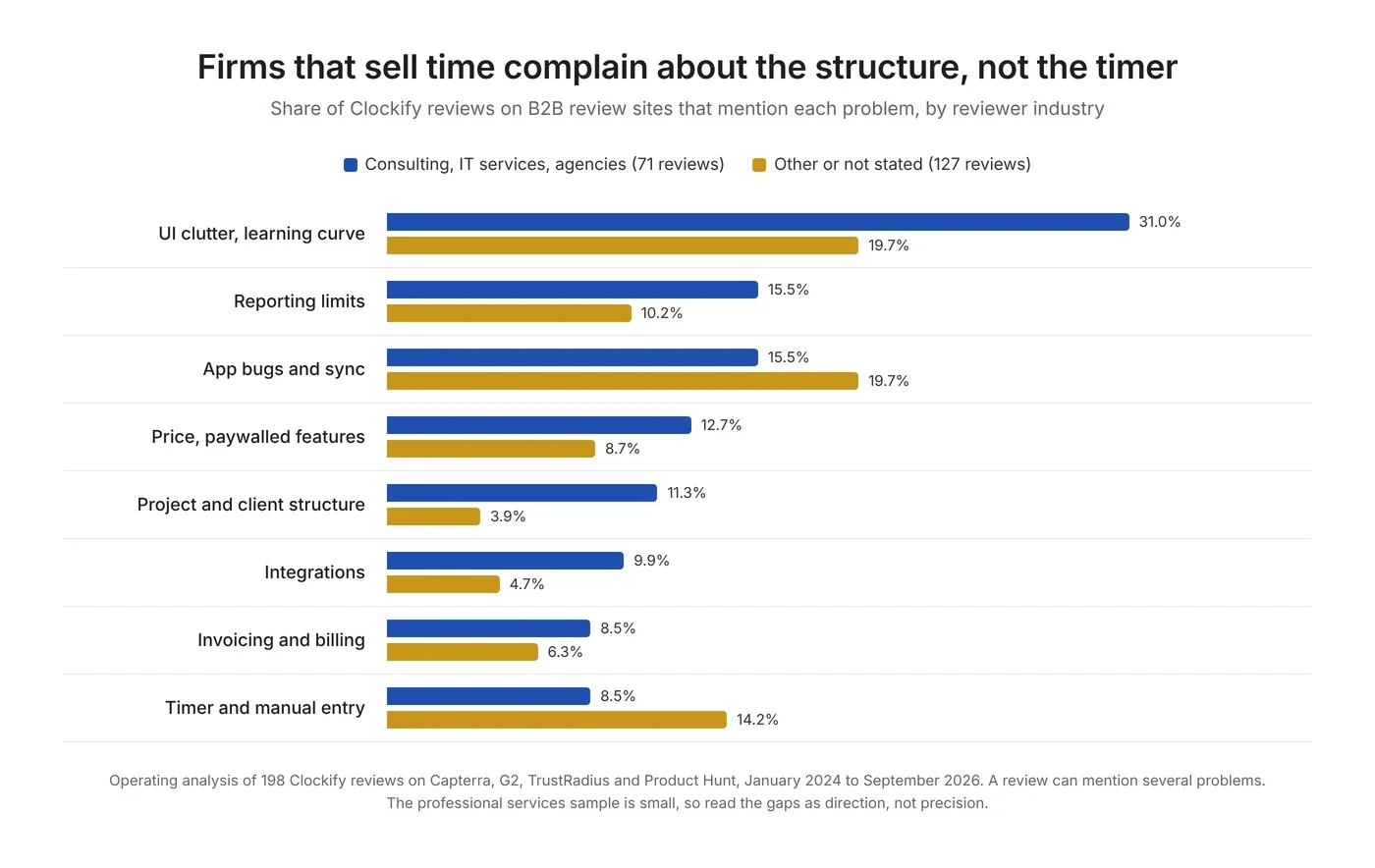
The second finding is about who complains, and about what. On B2B review sites, reviewers from consulting, IT services and agencies were more likely than other reviewers to mention a cluttered interface (31% against 20%), reporting limits (15.5% against 10.2%), project and client structure (11.3% against 3.9%) and integrations (9.9% against 4.7%). Hourly-worker reviewers complained more about clocking in and timers. In plain terms, Clockify works well as a stopwatch and gets harder to live with as the number of clients, projects and rules grows.
A project manager at a design firm and a virtual assistant who bills several clients put it this way on Capterra: “Limited advanced reporting, UI can feel cluttered at scale, and some useful features sit behind paid tiers”, and “its not super user friendly to keep track of time taken off of a retainer. and the PDF invoice isn't super great”.
The ratings tell the same story from another angle. Clockify scores 4.8 from 9,268 reviews on Capterra, where review requests are common, and 3.1 from 83 reviews on Trustpilot, where people mostly arrive on their own. Ease of use was the most praised point, named in half of the 221 positive reviews we coded. Reporting, client and project setup and the low price followed.
Why consulting firms leave Clockify
Consulting firms rarely leave Clockify because time tracking is weak. They leave when they need to bill fixed fees, plan work before it is sold, or connect sales and accounting to delivery. These limits come from Clockify's own plan table and help center, checked on October 2, 2026. For the general version of this argument, see our guide to the signs you have outgrown a time tracker.
Scheduling covers named people only
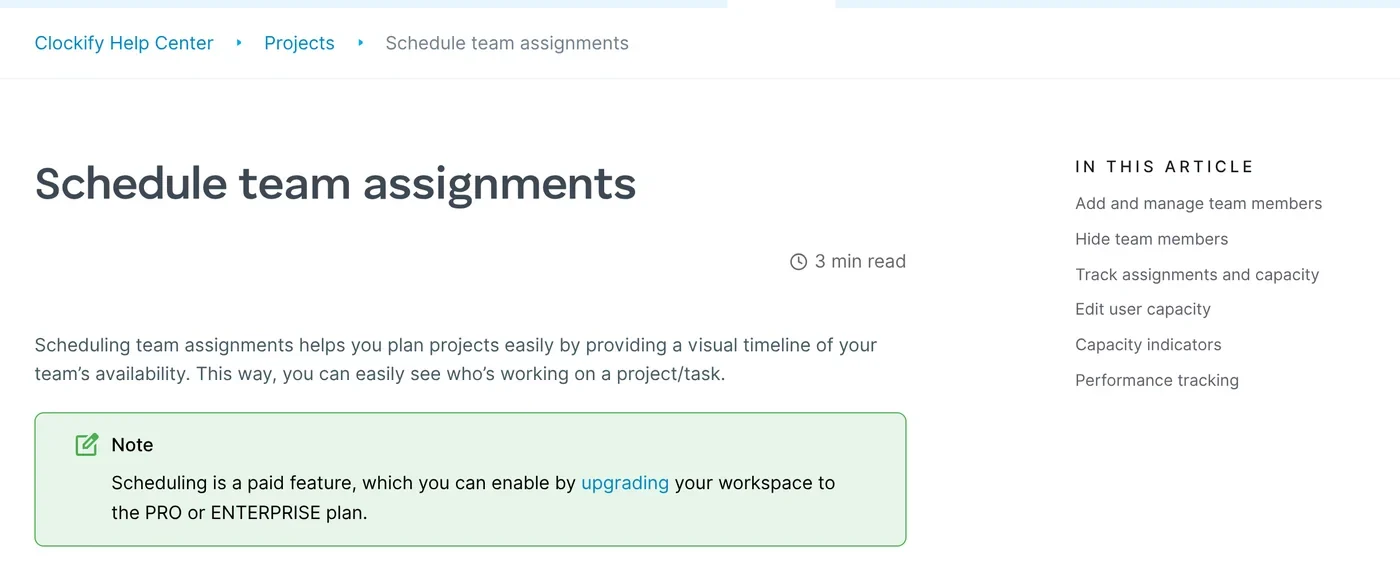
Scheduling needs the Pro plan, per Clockify's scheduling help article. You can draft assignments before you publish them, but they are drafts for named people. We found no placeholders for an unfilled role, no pipeline or tentative work and no skills in the docs. A firm that wants to know whether it can staff a deal before it closes has to do that in a spreadsheet.
No fixed-fee or retainer billing type
Clockify invoices billable time and billable expenses. Its expenses docs suggest using an expense to record fixed fees, day rates and retainers, and expenses need Pro. That works for one invoice. It does not tell you how much of a fixed fee you have burned, or what a retainer earned against the hours it used. If your contracts mix models, our guide to fixed-price vs time and materials contracts explains what each one needs from your tools.
QuickBooks Online gets time entries, not invoices
The QuickBooks integration sends time entries one way, on Standard and up. Edits you make in Clockify after sending do not follow, and accounts with QuickBooks payroll need a separate paid add-on. Xero is different: a $4.99 per month add-on sends invoices to Xero and brings payment status back.
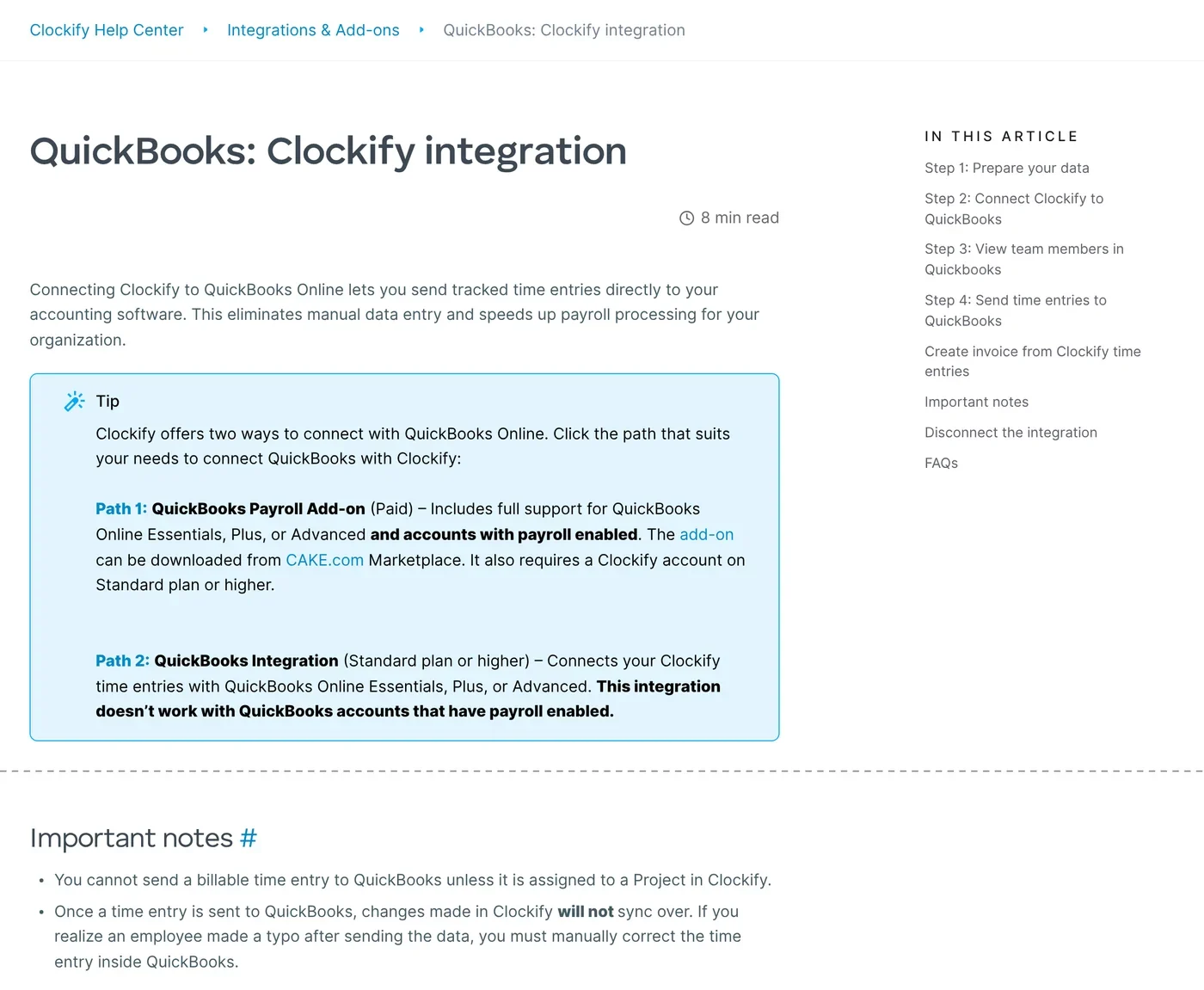
This is where a lot of real firms get stuck. In a thread about a law firm running Monday, Clockify and QuickBooks side by side, the most useful reply was a question: “How do the hours get from Clockify into QuickBooks at the new firm today, does somebody type them in?”
CRM integrations are timer buttons
Clockify's HubSpot, Salesforce and Pipedrive integrations add a timer inside the CRM through a browser extension. A won deal does not become a project, and open deals do not show up as demand.
Security, data regions and AI sit in upper tiers
Data regions (US, EU, UK and Australia) start at Pro. SSO, SCIM and the audit log need Enterprise at $11.99 per seat per month, per Clockify pricing. Clockify's official MCP server for AI agents is documented in its help center but still labelled “coming soon”. Clockify also added activity monitoring with screenshots to Pro in September 2026, which some users did not welcome. “This update is gross.” was one reaction in r/clockify.
How we picked
We started from what consulting firms ask for when a time tracker stops being enough. We scored every tool on the same six points: time entry (timer, timesheet, approvals), billing models (time and materials, fixed fee, retainers), accounting sync (whether invoices and payments reach QuickBooks Online or Xero, or only time), resource planning (capacity, tentative work, skills), API and MCP (which plan, and whether an official MCP server is live today), and the real price for 5 and 10 users on the plan that has those features.
We left out tools built mainly for monitoring hourly staff or for attendance, such as Hubstaff and Jibble, because consulting firms rarely want screenshots of their consultants' screens. We list them, and other popular trackers, in a short section after the top seven. Every fact below comes from the vendor's own pages. We did not run paid trials of every tool.
The 7 best Clockify alternatives for consulting firms
1. Operating: best for staffing, time and invoicing in one system
Best for: consulting, IT services and engineering firms that want staffing, time and invoicing in one place, including small firms that plan to grow and want the structure early.
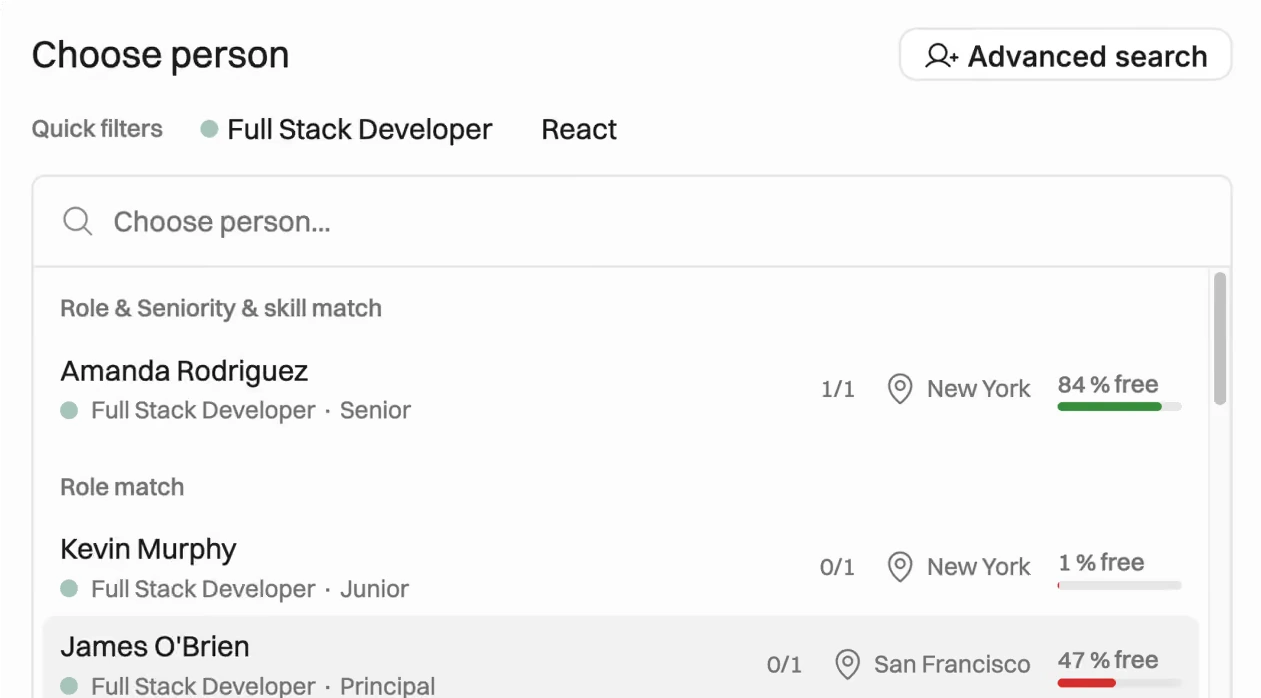
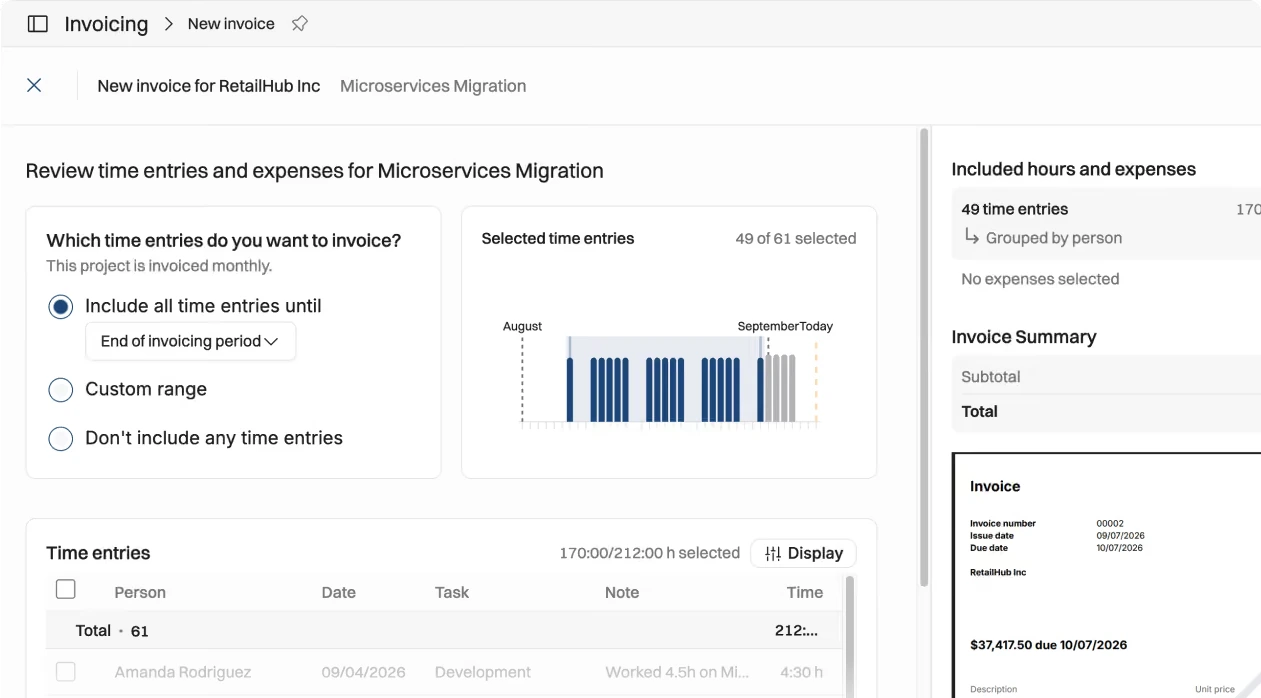
Why it is a Clockify alternative: Operating starts where Clockify's scheduling stops. You plan people against open positions by role, seniority and skills, and open CRM deals show up as tentative projects weighted by win probability. Planned hours then appear next to each entry on the timesheet, and invoices are built from approved time and budgets.
Where it differs from Clockify: time is logged in a weekly timesheet, a day list with copy previous day, a browser timer (in beta) or through an AI assistant over MCP. Billing types are time and materials, capped time and materials and fixed price, with milestone invoicing on fixed-price budgets. Native HubSpot and Pipedrive integrations are on every plan, and Salesforce is in beta pending its AppExchange listing. The REST API and an MCP server with 59 tools work with Claude and ChatGPT on every plan, and so does SSO, which Clockify keeps for Enterprise. Data migration, training and support are included. Operating also has a two-way Harvest integration, which helps firms that run both tools during a switch.
Be aware: Operating's own billing types article says there is no real support yet for a retainer billing type, so retainers are run as back-to-back fixed-price budgets for now. Its September 2026 changelog lists retainer invoicing as next, with early access on request. The QuickBooks Online and Xero integrations send invoices and bring payment status back, and were being rolled out to customers in September 2026. Ask about both in a demo.
Where Clockify may still be the better fit: Clockify costs much less if you only need time and invoices. It has native desktop, mobile and browser apps, a kiosk mode and a Google and Outlook calendar integration. Operating runs in the browser, has no calendar integration today, and needs Full Suite for invoicing.
Pricing: Planning $13, Plan & Track $17 and Full Suite $21 per person per month billed annually, or $15, $19 and $23 monthly. Time tracking starts in Plan & Track and invoicing in Full Suite. People who are only scheduled cost $11 annually. For 5 people on Full Suite that is $105 a month billed annually, and $210 for 10. See pricing.
See Operating on your own pipeline. Book a 30-minute walkthrough of staffing, time and invoicing with Lauri, our CEO. Book an intro
2. Toggl: the closest like-for-like switch
Best for: small and mid-sized teams, consultancies included, that want an easy time tracker with some capacity planning and invoice in another tool.
Why it is a Clockify alternative: Toggl is the smallest step away from Clockify. Since June 2026 Toggl sells one product to new teams, Toggl 2.0 (renamed from Toggl Focus), which adds a timeline, capacity and draft projects to time tracking. Toggl Track stays supported for existing users.
Where it differs from Clockify: draft projects let you model work before you commit to it, from the Starter plan. Fixed fee projects, labor costs, profitability reports and timesheet approvals are on Premium. Toggl has an official MCP server on every plan, including Free, per Toggl's MCP docs, and SOC 2 Type II and ISO 27001 per its compliance page. Toggl also markets itself against screenshot-style monitoring, the opposite of where Clockify went in September.
Where Clockify may still be the better fit: Toggl's invoices are PDFs built from a report. Its help center says generated invoices are not saved in the Track app and there is no built-in way to mark them as paid. QuickBooks Online is the only accounting link, it is one way, and there is no Xero. Clockify's Standard plan invoices more fully for less money.
Pricing: Starter $9 and Premium $16 per user per month billed annually, or $12 and $24 monthly, on Toggl's pricing page. Some Toggl Track help articles still list Premium at $18, which looks like the older Track price. Enterprise is on request.
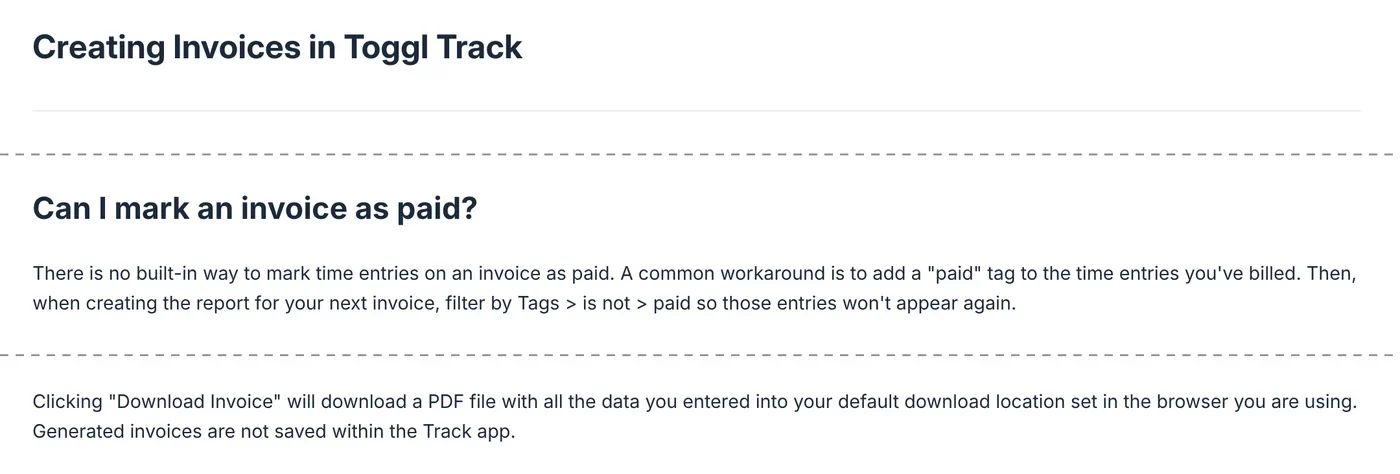
Toggl is also where some people land after giving up on all-in-one billing. One Clockify user wrote: “I gave up on finding a time tracker that would meet my invoicing needs so I actually moved my invoicing and payment processor back to QuickBooks, and moved to Toggl for just the time tracking.” That works, but it brings back the double entry most firms are trying to remove.
3. Harvest: polished time tracking and simple invoicing
Best for: small teams that want polished time tracking and simple invoicing, and can live with scheduling in a second tool.
Why it is a Clockify alternative: Harvest covers the same ground as Clockify's Standard plan: timers, timesheets, expenses, invoices and accounting integrations, with a mature interface many consultancies already know.
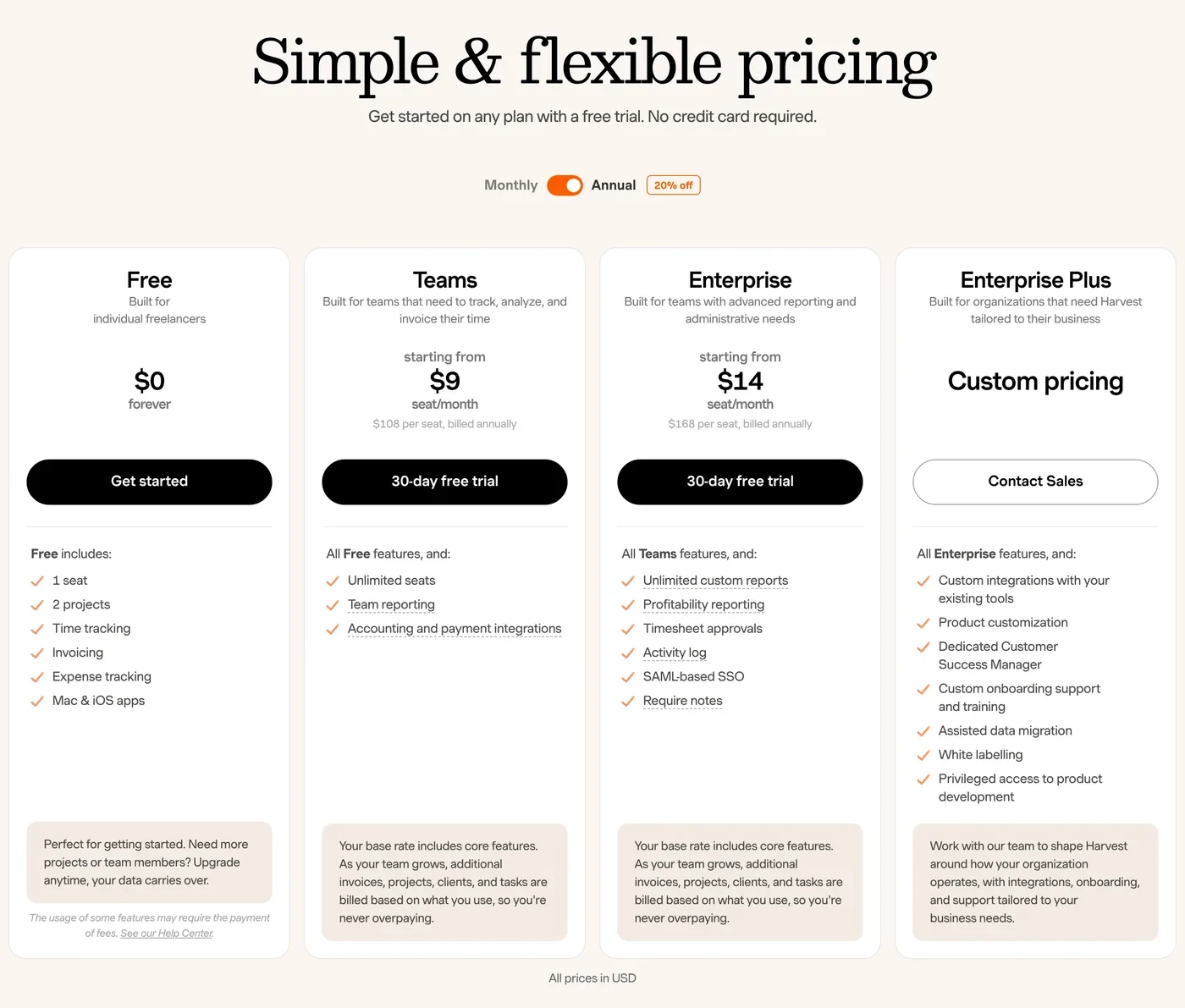
Where it differs from Clockify: QuickBooks and Xero integrations are on the Teams plan. An official Harvest MCP server starts and stops timers and creates draft invoices from uninvoiced time. Profitability reports, timesheet approvals and SAML SSO are on Enterprise. Scheduling lives in a separate product, Harvest Forecast, at $5 per person per month billed annually.
Where Clockify may still be the better fit: Harvest changed its pricing in 2026. Extra invoices, projects, clients and tasks are now billed by usage, and Harvest does not publish the unit prices. We cover that in Harvest alternatives after the 2026 price increase. The change pushed a lot of Harvest users the other way, toward Clockify. On Hacker News one wrote: “They doubled my bill from $130 to $280 per year and graciously also offered me a $19,000 per year plan [1]. I declined and am now using Clockify.” If you are on Clockify and cost is the worry, Harvest is not the answer.
Pricing: Teams from $9 and Enterprise from $14 per seat per month billed annually, or $11 and $17.50 monthly, on Harvest's pricing page. Harvest Forecast is $5 per person annually. Usage fees come on top. If you are leaving Forecast too, see our list of Harvest Forecast alternatives.
4. Paymo: tasks, time and invoices for small firms
Best for: small agencies, consultancies and freelancers that want task management, time tracking and invoicing in one low-cost tool.
Why it is a Clockify alternative: Paymo adds the billing Clockify lacks. Projects can be time and materials, flat rate or retainer, per Paymo's project types, and invoices can recur.
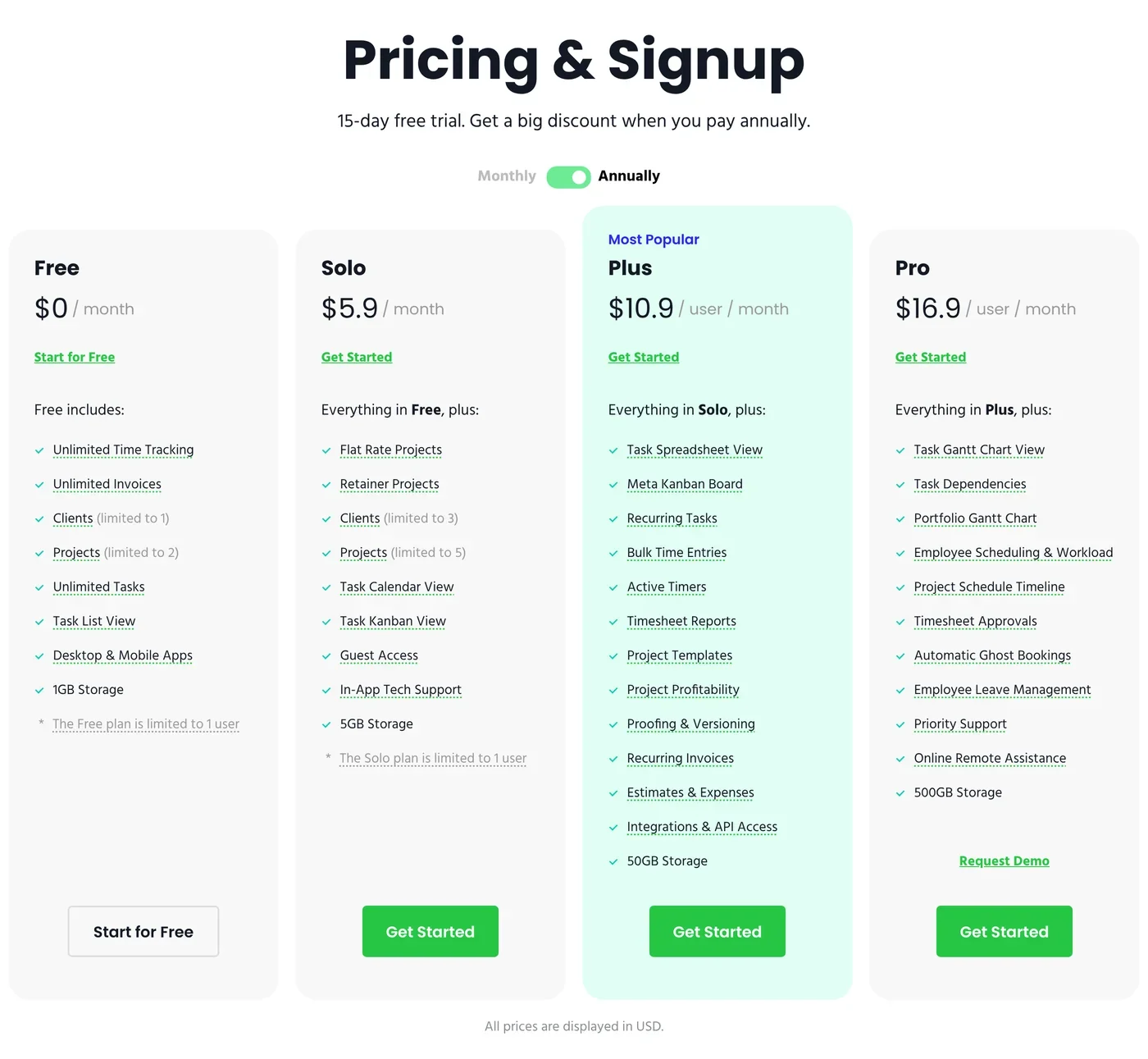
Where it differs from Clockify: recurring invoices start on Plus. QuickBooks Online receives invoices, and payments recorded there sync back, per Paymo's QuickBooks article. Pro adds employee scheduling, a leave planner and timesheet approvals. Full task management with Gantt charts and dependencies is included.
Where Clockify may still be the better fit: scheduling is Pro only, and one account cannot mix plans, so every user pays the Pro rate. Scheduling works from task dates, and we found no placeholders, skills or pipeline work. There is no native CRM integration and no official MCP server, only community ones. Paymo does not publish SOC 2, ISO 27001, SSO or a data region.
Pricing: Plus $10.90 and Pro $16.90 per user per month billed annually, or $15.90 and $23.90 monthly, per Paymo's pricing article. For 5 users on Pro that is $84.50 a month billed annually.
5. Productive: delivery management for agencies
Best for: creative and digital agencies, and smaller consultancies, that want projects, scheduling, budgets and a light CRM in one tool.
Why it is a Clockify alternative: Productive adds full project management, budgets and resource scheduling to time tracking, with retainers built in as recurring budgets. On Hacker News one founder called it “in a kind of ideal spot in the current market for small agencies and consultants”.
Where it differs from Clockify: tentative bookings and a built-in sales pipeline are on every plan. Professional adds scheduling placeholders (up to 5), billable time approvals, recurring budgets, rate cards and accounting integrations. SOC 2 Type II and SSO are on all plans.
Where Clockify may still be the better fit: Productive puts HubSpot, Salesforce, skill-based resource requests and its MCP server in the Ultimate plan, which has no public price. Every plan needs at least three seats. For time and invoices alone it costs several times more than Clockify. See our guide to Productive.io alternatives and what they cost.
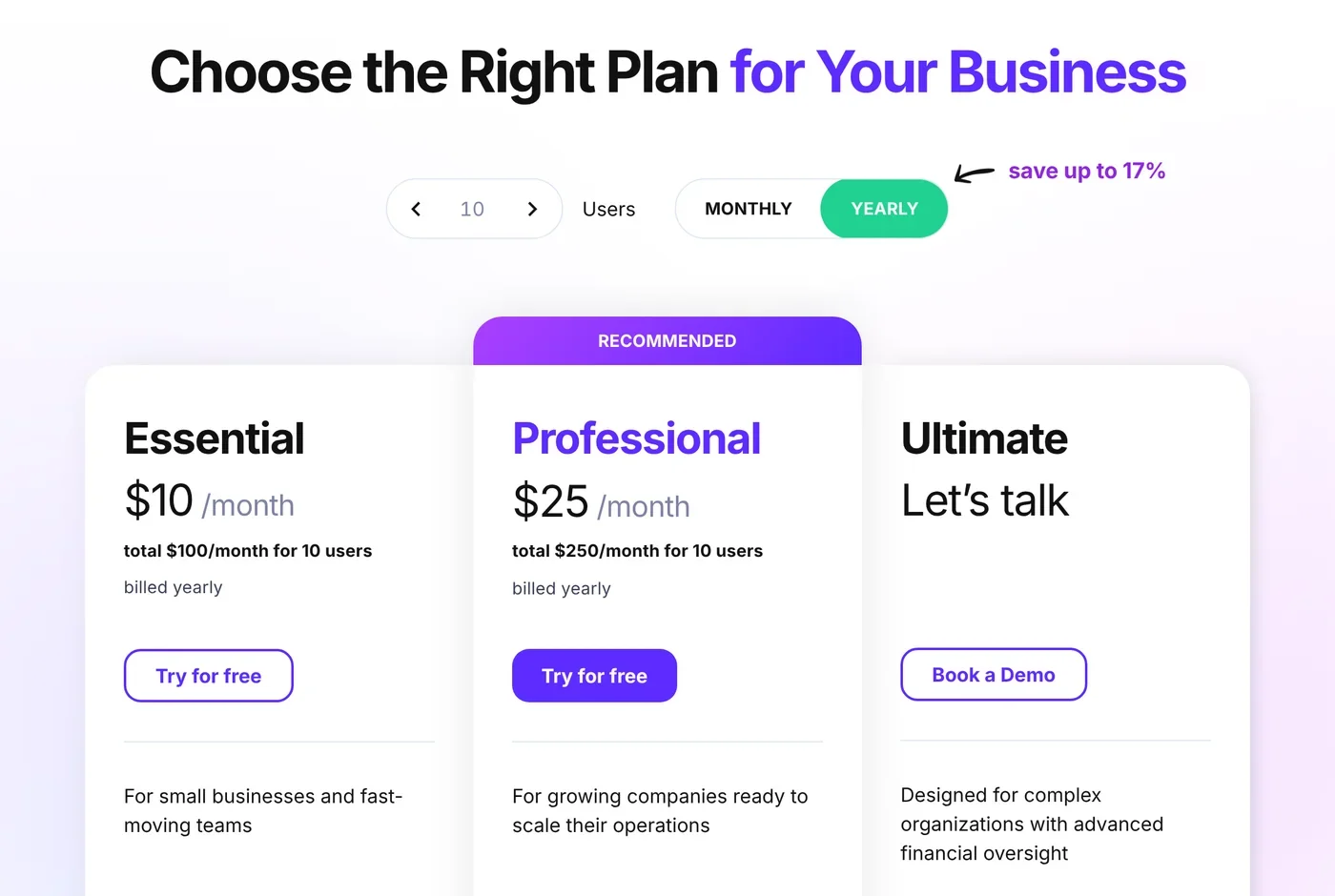
Pricing: Essential $10 and Professional $25 per user per month billed annually ($12 and $29 monthly). Ultimate is on request. See Productive pricing.
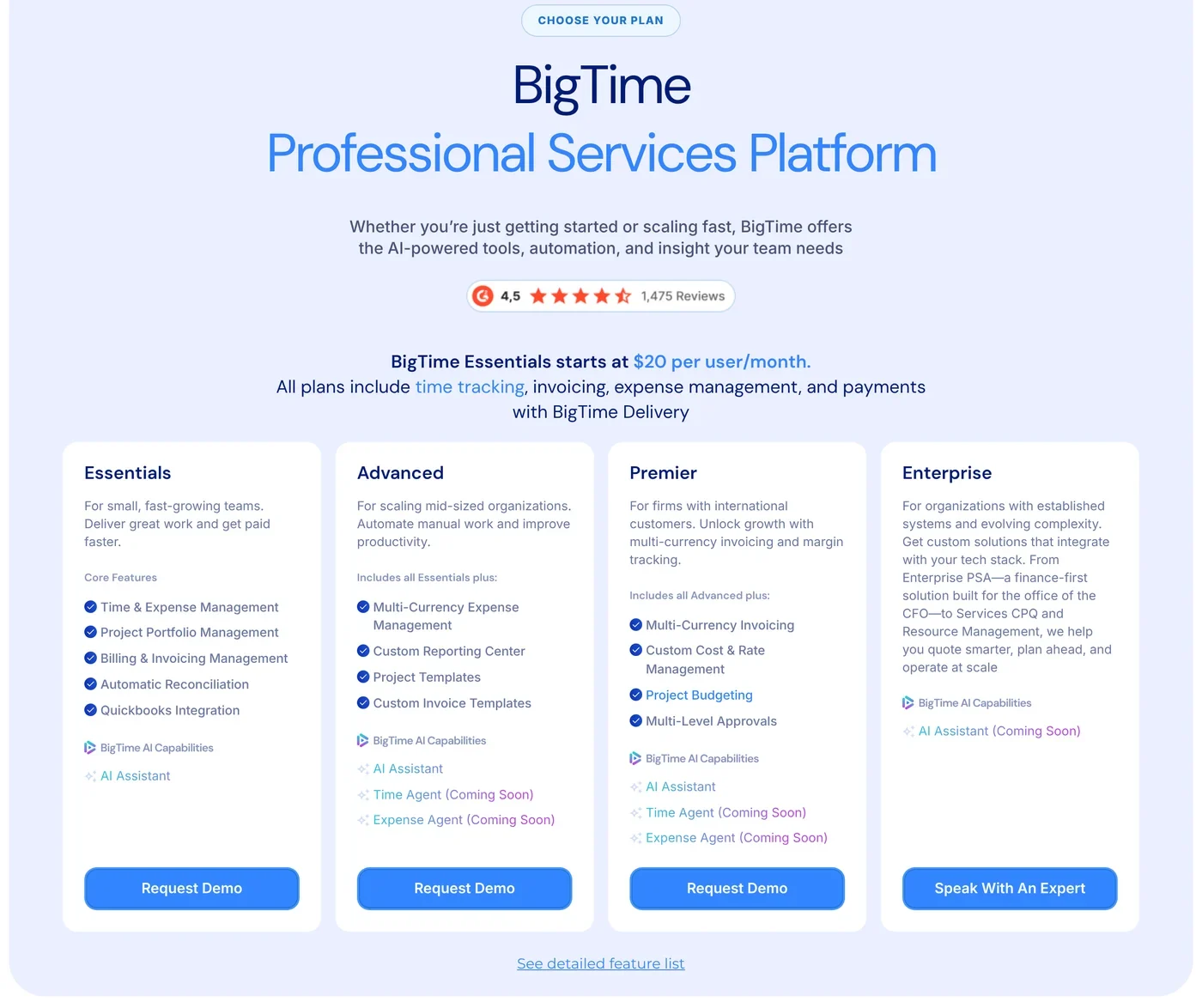
6. BigTime: billing-heavy US firms
Best for: US accounting, engineering and consulting firms where time capture, billing and getting paid are the main problems.
Why it is a Clockify alternative: BigTime is built around time, billing and payments. Every plan includes time tracking, invoicing, expenses and payments.
Where it differs from Clockify: time and materials, fixed fee, milestone and retainer billing, with card and ACH payments built in. QuickBooks is included from Essentials. BigTime publishes SOC 1 Type 2 and SOC 2 Type 2 reports on its trust center, and an AI assistant is on every tier.
Where Clockify may still be the better fit: full resource management is a paid add-on. Plans above Essentials have no public price. Data is hosted only in the US. Read Operating vs BigTime for a direct comparison.
Pricing: Essentials starts at $20 per user per month. Advanced, Premier and Enterprise are on request. See BigTime pricing.
7. Forecast (Accelo Forecast PSA): deep capacity planning
Best for: professional services firms that plan capacity against a weighted sales pipeline and run time and materials, fixed price and retainer work in one tool.
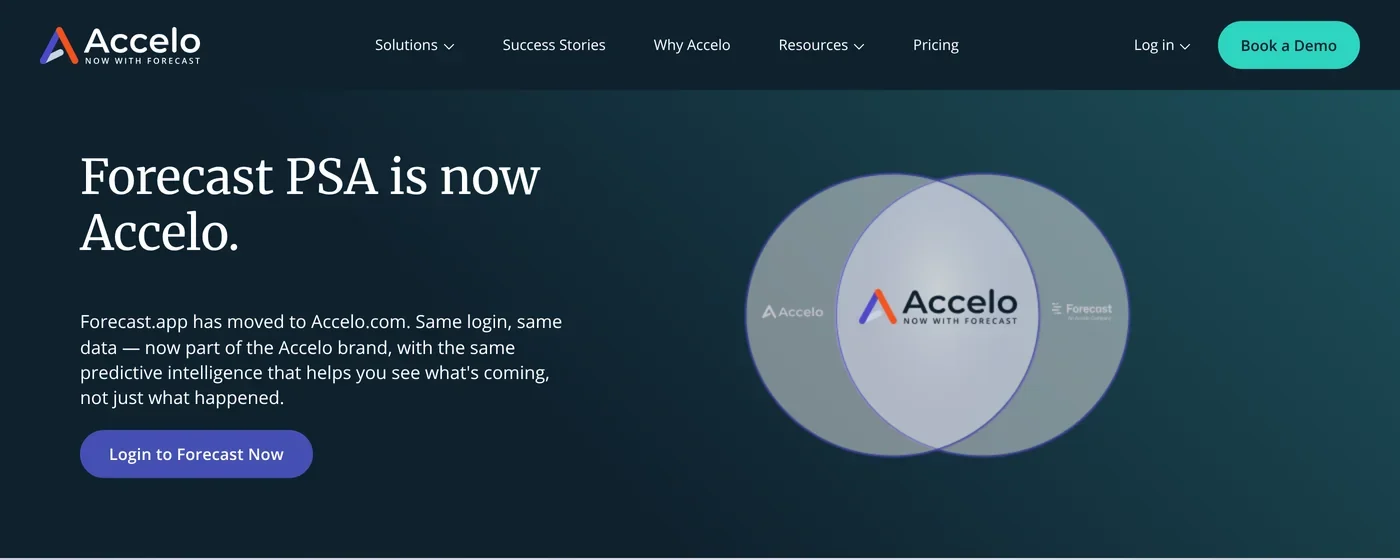
Why it is a Clockify alternative: Forecast is the most complete resource planner on this list. Accelo bought Forecast in July 2025, and since June 2026 forecast.app redirects to accelo.com.
Where it differs from Clockify: placeholders hold demand for a role or skill, with soft and hard allocations, per Forecast's placeholder docs. Skills, capacity weighted by each deal's win chance, and invoices that sync to QuickBooks Online and Xero are part of the product.
Where Clockify may still be the better fit: Forecast publishes no prices, and every seat goes through a contract. Data stays in the EU by default, per Accelo's security page. Its July and August 2026 release notes still list the MCP server as coming. Turning calendar events into time entries is a beta you must ask to join.
Pricing: quote only, through Accelo's quote form.
Other Clockify alternatives we looked at
Most other Clockify alternatives lists include TimeCamp, My Hours, Timely, Everhour, Hubstaff and Jibble. They are good tools, but each solves a different problem from the one consulting firms usually have when they leave Clockify. We did not check their prices for this guide.
Full comparison
The biggest differences are in billing models, accounting sync, resource planning and MCP. Clockify is the benchmark in each table. If you want one system for both, see how to consolidate time tracking and invoicing.
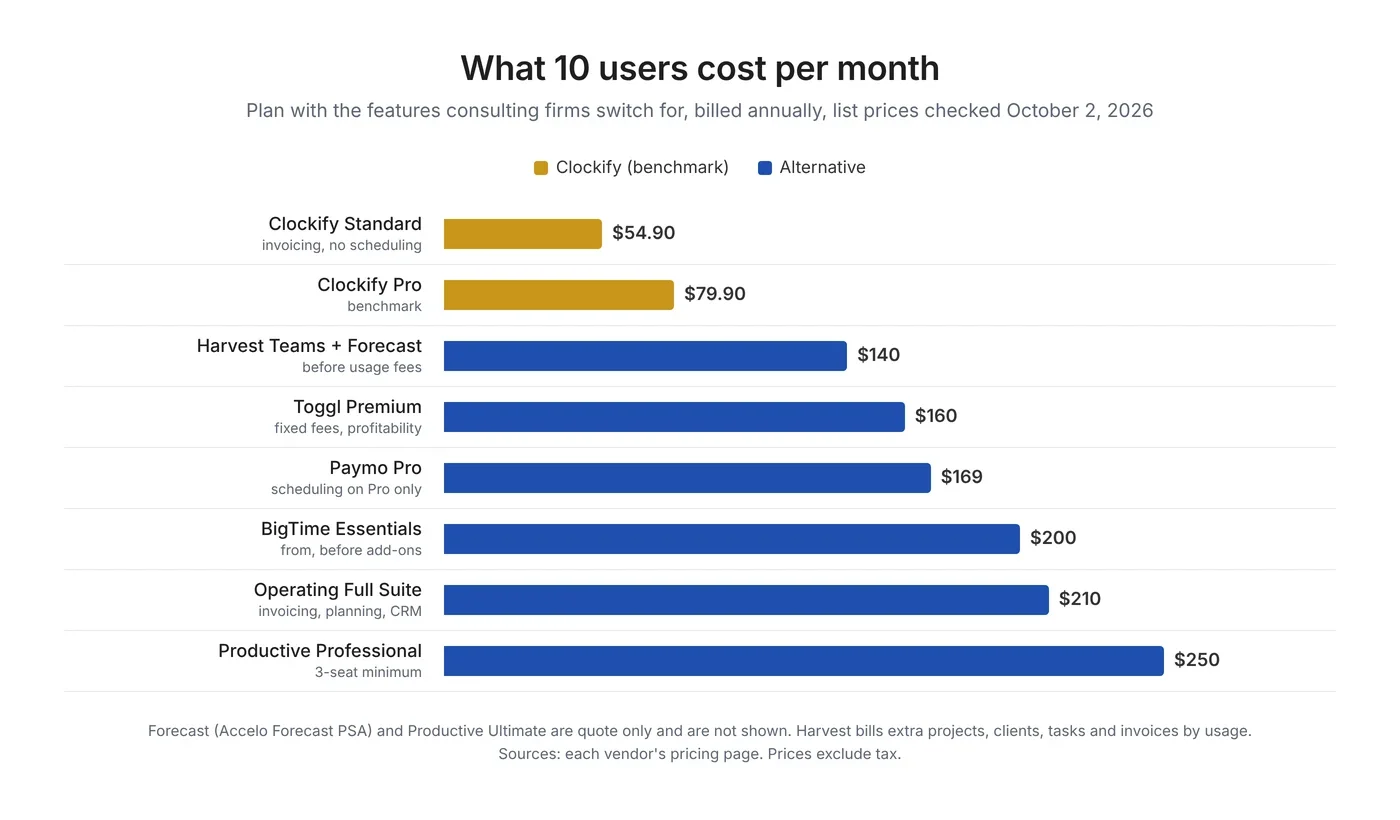
Pricing compared for 5 and 10 users
Clockify is the cheapest tool here with time, invoicing and scheduling in one plan. The fair comparison is the plan that has the features you are switching for, so the chart and table use that plan for each tool, billed annually.
Clockify vs Toggl vs Harvest
Clockify is the cheapest of the three, Toggl has the cleanest tracking and the most open AI access, and Harvest has the most mature invoicing but the least predictable bill. None of the three plans work by skill or from your sales pipeline.
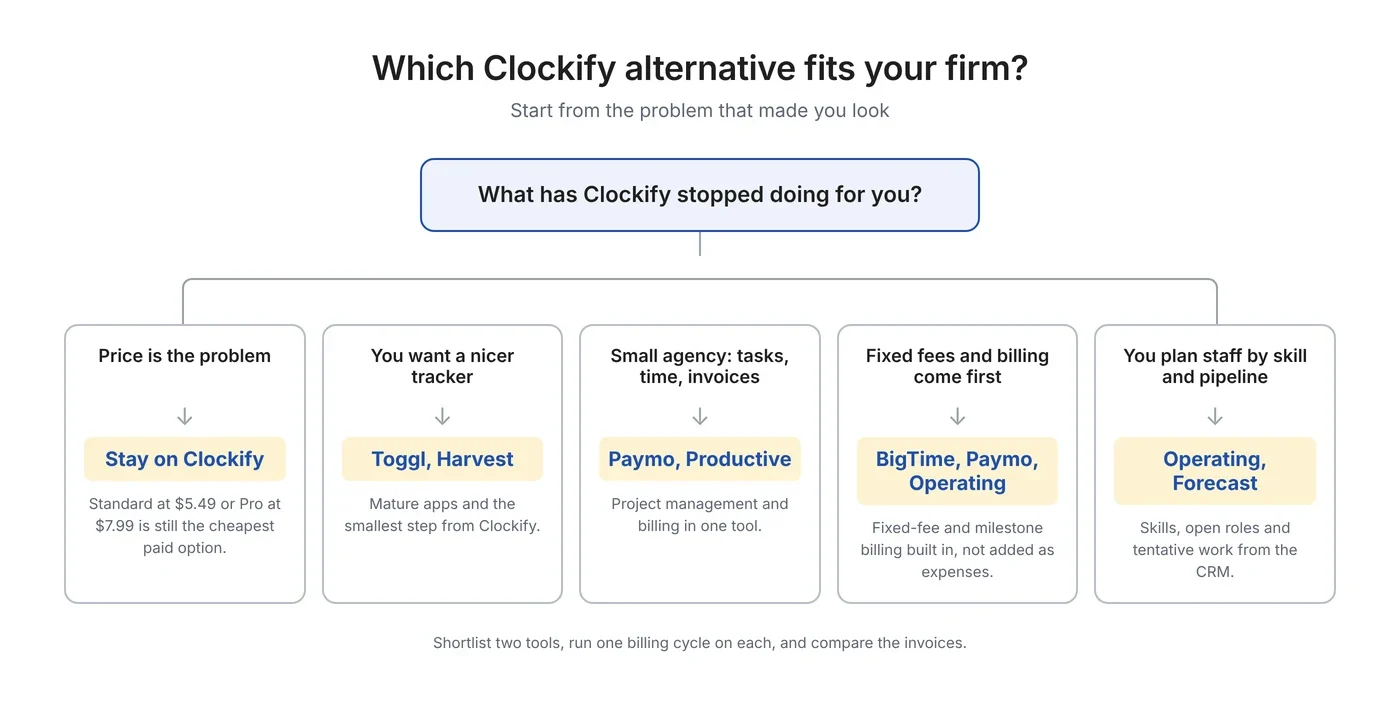
Best Clockify alternative by use case
Start from the problem you want to fix. The diagram and table map common needs to a short list worth a trial, including the case where staying on Clockify makes sense.
Not sure your firm has outgrown a time tracker? Bring your current Clockify setup to a 30-minute call, and we will show you what the same month looks like with staffing, time and invoicing in one place. Book an intro
How to switch from Clockify
Plan a Clockify migration as a short project with a test phase. Export your data on a paid plan, load one team, check the totals match, run both tools for one billing cycle, then switch invoicing last.
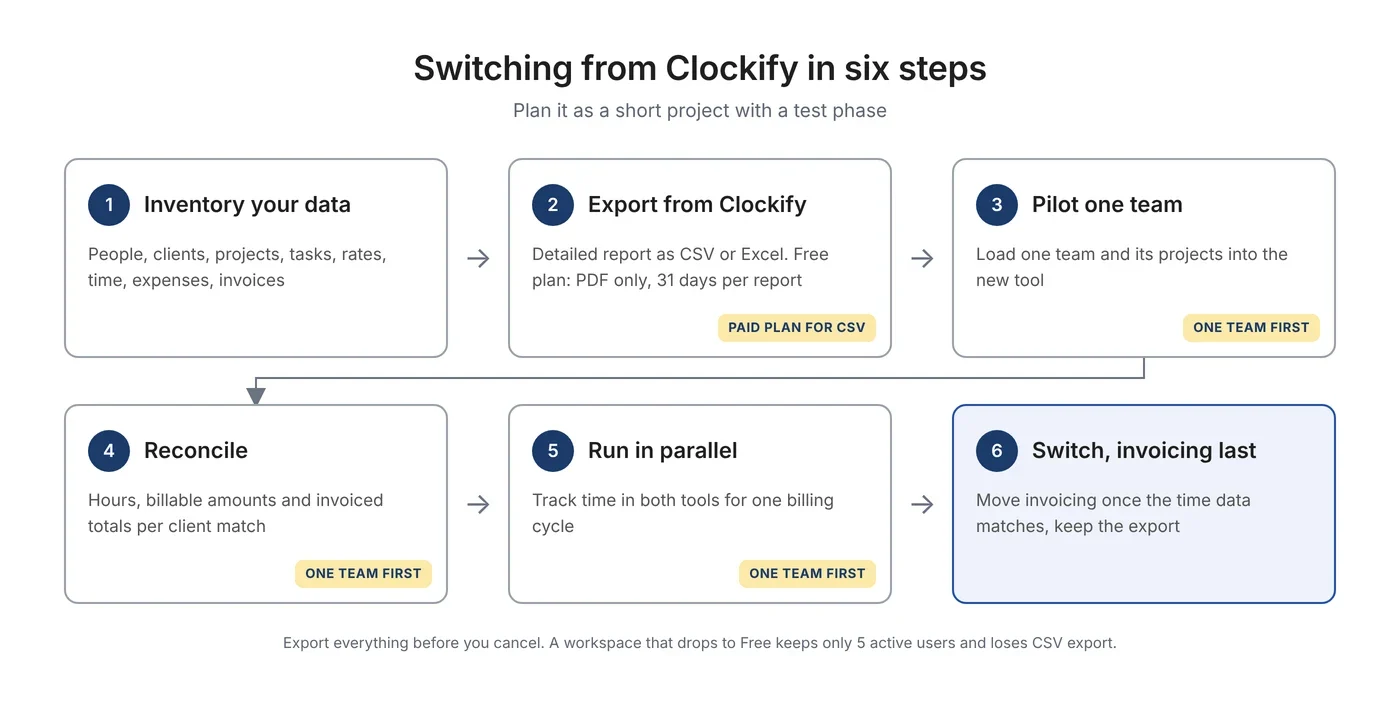
- Inventory your data. List people, clients, projects, tasks, billable and cost rates, time entries, expenses and invoices.
- Export. Clockify exports time entries from the Detailed report as CSV or Excel on any paid plan, per its export docs. Free workspaces export PDF only, 31 days at a time, so upgrade for a month or use the API before you leave. Clockify support has offered trials to users who needed their data back.
- Pilot one team. Load one team into the new tool. Operating imports time entries together with people, clients and projects from a CSV file. You can test a new time tracking platform in a week.
- Reconcile. Check hours, billable amounts and invoiced totals per client against Clockify. Imports often need hand fixes. One Harvest user moving to Clockify “had to manually input some of the hours”, and the same is true in the other direction.
- Run in parallel. Track time in both tools for one billing cycle and compare the invoices.
- Switch. Move invoicing last, once the time data matches. Keep the Clockify export for your records, because invoices you already sent stay in Clockify and your accounting system.
In Operating, data migration, training and support are included in every plan.
FAQ
What are the best Clockify alternatives for consulting firms in 2026?
The best Clockify alternatives for consulting firms in 2026 are Operating, Toggl, Harvest, Paymo, Productive, BigTime and Forecast (Accelo Forecast PSA). Operating and Forecast fit firms that plan staff by skill and pipeline. Toggl and Harvest fit teams that want a better time tracker. Paymo and Productive fit small agencies, and BigTime fits billing-heavy US firms.
Is Clockify still free in 2026?
Yes, but the free plan is much smaller. Since the 2026 change, a free workspace keeps 5 active users including the owner, shows reports 31 days at a time, exports PDF only and allows 30 API requests per hour. Billable rates need the Basic plan at $3.99 per seat per month billed annually.
Is there a free alternative to Clockify?
Harvest has a free plan for 1 seat and 2 projects, and Toggl has a free plan with limits. Open source tools such as Kimai and SolidTime are free if you host them yourself. For a team that bills clients, no free plan replaces paid invoicing and approvals, so compare paid plans instead.
What is the closest alternative to Clockify?
Toggl is the closest like-for-like switch. It covers timers, timesheets, reports and light capacity planning with a similar learning curve. It costs more than Clockify per seat, from $9 per user per month billed annually, and its invoices are PDFs that cannot be marked as paid.
Is there a cheaper alternative to Clockify?
Not for time tracking with invoicing and scheduling. Clockify Standard at $5.49 and Pro at $7.99 per seat per month billed annually were the cheapest options we checked. Toggl Starter and Harvest Teams start at $9. Alternatives cost more because they add billing models, accounting sync or resource planning that Clockify does not include.
Does Clockify do resource planning?
Clockify has scheduling on its Pro plan, with capacity per person, time off and recurring assignments. Its docs describe no placeholders, no pipeline or tentative work and no skills. Firms that need to plan unsold work or staff by skill usually look at Operating or Forecast.
Can Clockify invoice fixed-fee and retainer work?
Clockify invoices billable time and expenses, and it supports recurring invoices from Standard. It has no fixed-fee or retainer billing type. Its docs suggest recording fixed fees and retainers as expenses, which needs Pro. BigTime, Paymo and Forecast have fixed-fee and retainer billing built in, and Operating has fixed price with retainers in early access.
Does Clockify integrate with QuickBooks?
Yes, from the Standard plan, but it sends time entries only, one way. Edits made in Clockify after sending do not sync, and QuickBooks accounts with payroll need a paid add-on. Paymo and Forecast send invoices to QuickBooks Online and bring payments back.
Does Clockify integrate with HubSpot or Salesforce?
Clockify's HubSpot, Salesforce and Pipedrive integrations are timer buttons added to the CRM through a browser extension. No deal data flows into a Clockify project. Operating and Forecast turn CRM deals into tentative projects that show up as planned demand.
Does Clockify have an MCP server?
Clockify documents an official MCP server in its help center, but the page is still labelled coming soon as of October 2, 2026, and its public roadmap lists it as in progress. Operating, Toggl and Harvest have official MCP servers that are live. Paymo has community MCP servers only.
How do I export my data from Clockify?
Export time entries from Clockify's Detailed report as CSV or Excel on any paid plan. The free plan exports PDF only and limits reports to 31 days, so upgrade for a month or use the Clockify API before you cancel. Projects export as CSV, and the API reads clients and invoices too.
When should a consulting firm stay on Clockify?
Stay on Clockify if you mainly need cheap, reliable time tracking and simple invoices, and you plan staffing in a spreadsheet or another tool. Pay for Standard or Pro rather than switching over the free plan cut. Move when you need to plan work before it is sold, bill fixed fees and retainers, or connect your CRM and accounting to delivery.
Methodology and sources
We checked every product against its own pricing page, docs and help center on October 2, 2026. Screenshots of vendor pages were taken the same day and are dated in their captions. Capterra scores and counts were read the same day. G2 blocked our checks, so G2 scores are left out.
Review study. We read and coded 449 public Clockify reviews dated January 2024 to September 2026: 198 from B2B review sites (Capterra 152, G2 43, TrustRadius 2, Product Hunt 1, all ratings), 66 from Trustpilot (all ratings) and 185 rated 1 to 3 stars from Google Play and the Apple App Store. Each complaint was tagged with one or more of 17 themes. Reviewers in consulting, IT services, marketing and advertising, software, accounting, legal, design and similar industries were grouped as professional services (71 reviews). One person coded all reviews, Capterra skews positive, and the app store sample is negative by design, so read the percentages as direction. Quotes come from pages we opened, with links.
Reddit and forums. Quotes from Reddit and Hacker News were checked word for word against the original post text. We left out posts that read as vendor promotion.
Pricing: list prices from each vendor, per user per month, before tax and discounts. MCP: counted as live only when the vendor's docs describe setup and do not call it coming soon or beta. Not published: Forecast prices, Productive Ultimate and BigTime upper-tier prices, Harvest usage fees, and Paymo's security certifications and data region. Disclosure: Operating publishes this page.
Sources: Clockify
- Pricing
- Subscription plans
- Updates to the free plan
- Scheduling
- Expenses and fixed fees
- Invoicing tracked time and expenses
- QuickBooks integration
- Xero integration
- HubSpot time tracking
- MCP server (labelled coming soon)
- Exporting reports
- Data regions
- Roadmap
- CAKE.com security
Sources: Operating
- Pricing
- Integrations
- QuickBooks Online integration
- MCP server
- Help: billing types
- Help: AI chat via MCP (59 tools)
- Help: importing data from a CSV file
- Changelog
- Security
Sources: other vendors
- Toggl: pricing
- Toggl: creating invoices
- Toggl: MCP and CLI
- Toggl: Toggl 2.0 announcement
- Harvest: pricing
- Harvest: Forecast pricing
- Harvest: Harvest MCP
- Paymo: pricing
- Paymo: QuickBooks Online integration
- Productive: pricing
- BigTime: pricing
- BigTime: trust center
- Forecast: Accelo Forecast PSA
- Forecast: release notes, July and August 2026
Sources: reviews and community
- Capterra: Clockify
- Trustpilot: Clockify
- Capterra: Operating
- Capterra: Toggl
- Capterra: Paymo
- Capterra: Forecast
- r/clockify: free plan changes thread
- r/HarvestApp: switching after the price change
- Hacker News: Harvest pricing thread
Written by Lauri Eurén, CEO of Operating. Last updated October 2, 2026.