TL;DR: Capacity planning software compares the hours your people have, by role, with the hours that signed work and your sales pipeline will need, so you know when to hire, when to sell and when to move people around. The best pick depends on your setup. Runn is the strongest dedicated planner if you invoice in another tool. Float and Resource Guru are the cheapest, from about $4 to $7 per person a month. Productive puts tasks and capacity in one tool, Kantata is the enterprise option and Mosaic leads with AI. Operating (we make it) turns CRM deals into demand by role. Answer three questions below to see which fits your team.
Which capacity planning software fits you?
Answer three questions and the picker suggests two of the nine tools on this page, with the reason, the price and the catch for each. The rules are printed under it. We make Operating, so check our reasoning.
Three questions. You get two tools to try first and why, from the nine on this page.
Everyone who gets booked on client work.
Make it more accurate
How it picks: Runn needs 20 seats and doesn't invoice. Float and Resource Guru are the cheapest schedulers but don't invoice. Productive and Teamwork.com win when you want tasks in the same tool. Kantata fits several hundred people. Mosaic, Kantata and Accelo publish no price. Operating wins when work starts in a CRM and you have about 20 people or more. Facts and prices from vendor sites, checked November 6, 2026. Operating makes one of these tools.
Below: the six features that separate these tools, all nine side by side, a short verdict on each, and a 15-minute weekly capacity check that works with any tool.
What capacity planning software does, and what this page is not about
Capacity planning answers one question: do we have enough of the right people for the work that is coming? If you want the theory and the different kinds, our guide to the types of capacity planning covers it. This page is about the software.
Search for capacity planning tools and you get three things. Manufacturing tools plan machines. IT capacity tools plan servers and cloud. Services tools plan people. Everything below is the third kind.
Nor is it resource planning software. Resource planning books named people onto projects for the next few weeks. Capacity planning steps back to the totals: supply by role against demand by role over the next one to six months, including work you have not won yet. Our list of resource planning software for consulting firms judges tools on booking people; this page judges them on the forward view. More on the difference: capacity planning vs resource planning.
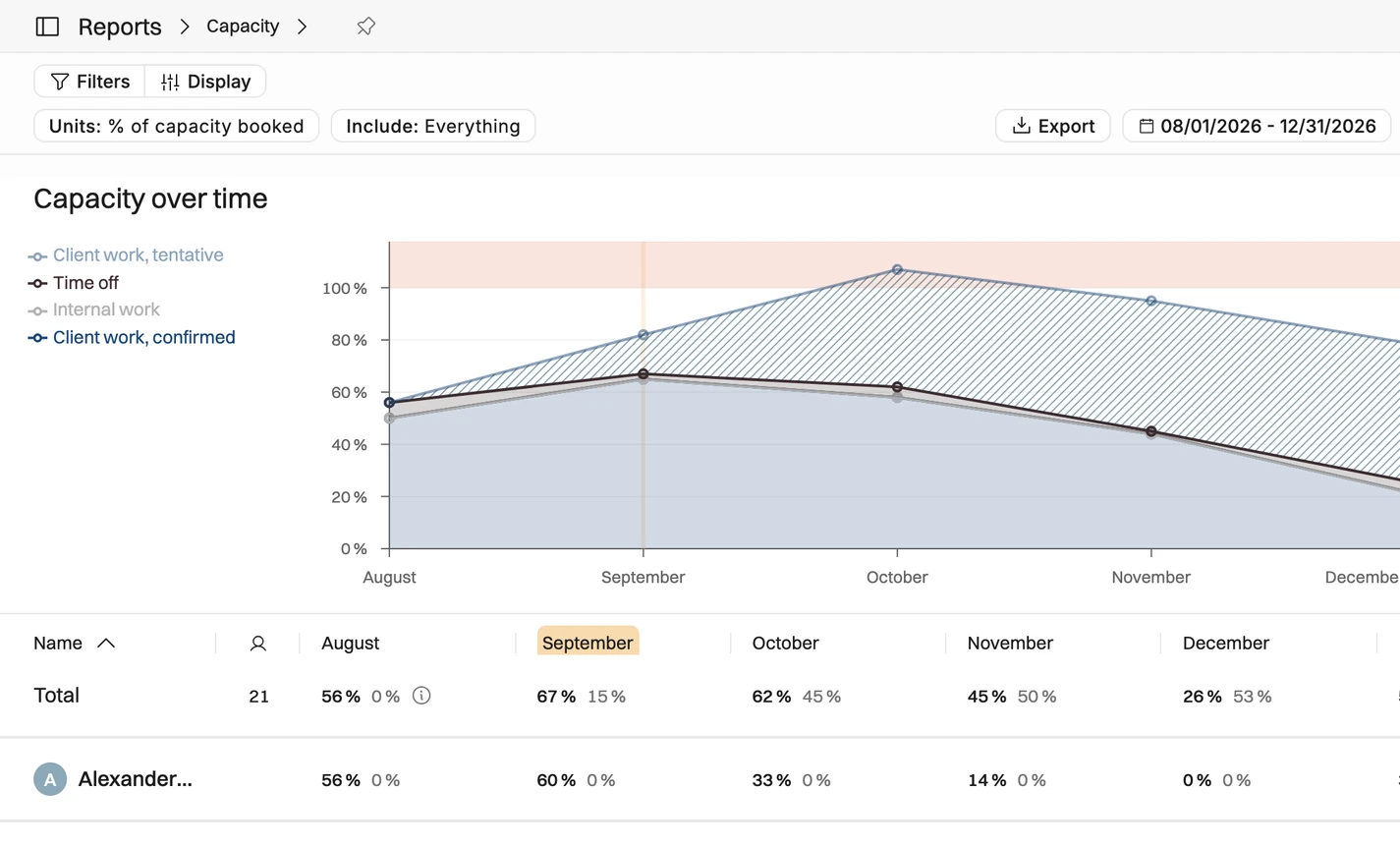
A capacity tool needs four inputs: who you have by role, with actual working hours; signed work; pipeline work, weighted by how likely it is to close; and a way to test a change before you commit. Here is what that looks like.
Six features that separate capacity planning tools
Every tool on this list shows who is busy this week, but these six features decide whether it can answer the gap question for you, before the gap arrives.
1. Capacity by role and skill
You need supply and demand grouped by role, ideally by skill and seniority too, in the forward report and not only as a schedule filter. A firm that is 80% booked can still have its only two data engineers at 140%.
2. Placeholders for roles nobody fills yet
A placeholder is an open role, such as a senior designer three days a week from March, booked before you know who will do it. It is how unstaffed demand shows up in the numbers. Watch the limits: Resource Guru and Float cap free placeholders by plan, and Productive has none on its cheapest plan.
3. Pipeline demand, weighted
Signed work alone shows the gap too late. The tool should hold tentative projects and weight them by a probability you set or by CRM deal stage. Count every tentative deal at 100% and you will hire for work you never win. Our agency capacity planning guide explains how to calibrate the weights.
4. What-if scenarios
Can you ask what happens if you win one deal, lose another and push a third by a month, without breaking the live plan? Runn saves named scenarios, Float uses draft projects, Productive has a Scenario Builder on its top plan, and Mosaic builds three pipeline cases. Others only let you switch tentative work on and off.
5. A link to time tracking
A capacity plan that never meets actual hours repeats last quarter's mistakes. Track time in the same tool or sync it in, and compare plan with actuals monthly. Our utilization calculator shows what the difference costs in revenue.
6. Price, and who counts as a seat
Most tools charge for every scheduled person, logged in or not. Seat minimums change the bill: Runn starts at 20 seats, Productive at 3 and Teamwork.com at 5. And four of the nine sell the plan you need only on a quote.
Capacity planning tools compared: 9 tools side by side
Pick what you can't live without and the tools that lack it drop out. The price column shows the cheapest published plan with placeholders and tentative work, often not the headline plan.
| Tool | Capacity by role or skill | Placeholders | Pipeline and tentative demand | What-if scenarios | Time tracking link | Lowest price with placeholders and tentative work |
|---|---|---|---|---|---|---|
| RunnCapacity planner | Roles and skills; demand by role report | Unlimited on every plan | Tentative projects on every plan | 3 saved scenarios per user on Standard, unlimited on Advanced | Timesheets from Standard | Lite $7 (20-seat minimum) |
| FloatResource scheduler | Departments, roles, skills and tags | 1 on Starter, 5 on Pro | Tentative projects, phases and allocations | Draft projects stay off the live schedule | Timesheets and planned vs actual on Pro | Starter $7 |
| Resource GuruResource scheduler | Find people by skill, team and role | 1, 5 or 10 by plan | Tentative bookings and a waiting list | None listed | Timesheets from Blackbelt | Grasshopper $4.16 |
| ProductiveAll-in-one agency platform | Roles and skills on each person | None on Essential, 5 on Professional, 10 on Ultimate | Tentative bookings; built-in CRM with deal probability | Scenario Builder on Ultimate (quote) | Time tracking on every plan | Professional $25 (3-seat minimum) |
| Teamwork.comClient project management | Scheduling by role or skill on Optimize | On Optimize | Tentative work and CRM pipeline to projects on Optimize | Says you can explore scenarios; no saved scenarios listed | Time tracking from Basics | Optimize: quote (Accelerate $24.99 has workload only) |
| KantataEnterprise PSA | Skills inventory; filter demand by skill, role or project | Unnamed resources, soft allocated only | Demand from the project pipeline | Compare resource plans; AI Staffing Optimizer | Time tracking in the same system | Quote |
| MosaicAI resource planner | Heatmaps by department, team and role; role demand reports | Open roles before anyone is assigned | Proposals weighted by probability | Base, growth and conservative pipeline cases | Timesheets and planned vs actual | Quote (per seat yearly, plus a platform fee) |
| Accelo (ex Forecast)PSA for client work | Availability by division, role or skill | Role-based placeholders for pipeline deals | Soft allocations and pipeline-weighted AI forecast | None named on its public pages | Time tracking in the same PSA | Quote |
| OperatingPSA linked to your CRMOur product | Role, skill, site or team, 1 to 6 months out | Open positions on projects | CRM deals as tentative work, weighted by probability | Test a deal before it closes; no saved scenarios listed | Timesheets and planned vs actual on Plan & Track | Planning $13 |
Prices per person a month, billed yearly, from each vendor's pricing page on November 6, 2026. Quote means no public price for that plan. A feature counts only if the vendor's own pages or help center show it. Disclosure: Operating makes one of these tools. On small screens, swipe the table sideways.
The 9 capacity planning tools, one by one
Grouped by type, from dedicated planners to full PSAs. This is not a ranking. Prices are per person a month, billed yearly, checked on November 6, 2026. For total cost at your team size, see our PSA pricing comparison.
Runn: the dedicated capacity planner
Runn is built for the forward view. Every plan has unlimited placeholders and tentative projects, plus skills and capacity charts. Placeholders carry a role, so a report can forecast demand by role and show which project asks for it. Standard adds timesheets and three saved scenarios per user. Advanced makes scenarios unlimited and adds SmartMatch AI (Beta).
Price: Lite $7 and Standard $11 per resource seat ($9 and $13 billed monthly). Advanced is sold through sales. Plans start at 20 seats.
There is no invoicing and no native CRM connector (a partner builds custom Salesforce links). Runn suits firms of 20 or more that plan months ahead and invoice elsewhere.
Float: capacity on a visual schedule
Float is a scheduling tool with capacity built into the schedule. Each person carries roles and skills plus their own working hours, and over-capacity warnings show as you plan. Projects can be tentative (outlined on the schedule) or draft, which keeps them off the live schedule so admins can test team setups; Float calls this scenario planning. Pro adds timesheets and planned vs actual.
Price: Starter $7 and Pro $12 per scheduled person ($8.50 and $14 monthly), with 1 and 5 placeholders. Viewers join free.
Float doesn't invoice, and we found no win-probability weighting for tentative work. Pick it if you plan weeks ahead and want a schedule everyone can read.
Resource Guru: the cheapest way in
Resource Guru is a booking tool with a capacity layer on top. Availability bars and heatmaps show who is over or under booked, split into billable and non-billable time. What is coming shows up as tentative bookings and placeholders, plus a waiting list, and you can find people by skill, team and role. Blackbelt adds timesheets, reports and budgets. Master adds booking approvals for in-demand people.
Price: Grasshopper $4.16, Blackbelt $6.65 and Master $10 per person ($5, $8 and $12 monthly), with 1, 5 or 10 free placeholders; extras cost the per-person rate.
You won't get saved scenarios or pipeline weighting, and Grasshopper has no reports. It's the pick for small teams that want the lowest price.
Productive: capacity inside an all-in-one platform
Productive runs tasks, budgets, time, invoicing and resource planning in one tool. For capacity it adds tentative bookings, placeholders you can also put on deals, and its own CRM with a probability per stage. The Scenario Builder compares versions of a project or deal with different people, start dates or costs, potential hires included.
Price: Essential $10 and Professional $25 per user ($12 and $29 monthly), with a 3-seat minimum. Ultimate is quote only. Placeholders: none on Essential, up to 5 on Professional, up to 10 on Ultimate. Scenario Builder and HubSpot sit on Ultimate.
The catch: scenarios have no published price, and your whole team moves onto its task manager. It fits agencies and smaller consultancies that want one tool for work and capacity.
Teamwork.com: project management with capacity on top
Teamwork.com is project management for client work. Accelerate gives you a workload planner with live capacity, plus time tracking and time budgets. The forward-looking pieces sit on Optimize: placeholders to hold future capacity, tentative projects, turning CRM pipeline into projects, and scheduling by role or skill. Its forecasting page promises availability three or more months ahead.
Price: Accelerate $24.99 per user, at least 5 users; annual billing saves about 29%. Optimize is quote only.
The plan that does capacity planning has no published price. Teamwork.com makes most sense for delivery teams that want tasks and capacity in one tool.
Kantata: capacity inside an enterprise PSA
Kantata, formerly Mavenlink, is a full PSA. It plans demand from the project pipeline, keeps a skills inventory and filters staffing requests by skill, role or project. Unnamed resources act as placeholders and stay soft, since hard allocations are only for named people. You can compare several resource plans, and an AI Staffing Optimizer tests staffing scenarios. Time tracking lives in the same system.
Price: quote only, tailored to company size.
There's no public price or quick start. Kantata fits firms of several hundred people buying one enterprise PSA.
Mosaic: AI forecasting on top of your ERP
Mosaic is a resource planner that leads with AI. Heatmaps show capacity by department, team or role, a bench report shows who is free, and role demand reports say which role to hire and when. Open roles can be planned before anyone is assigned. Pipeline proposals are weighted by probability, and Mosaic builds three cases: base counts deals above 50%, growth above 25%, conservative above 75%. Timesheets are included.
Price: no public number. Mosaic charges per seat, billed yearly, falling as headcount grows, plus a platform fee and one-time onboarding.
No price before a demo. Mosaic is a good match for firms that want AI forecasting next to an ERP such as Deltek or NetSuite.
Forecast, now part of Accelo
Accelo bought Forecast, an AI resource planner, in 2025. Since May 28, 2026 forecast.app redirects to Accelo, and users keep their login and data. Role-based placeholders model pipeline deals before they close, soft and hard allocations split tentative from committed work, and an AI forecast weights demand by the pipeline. Availability shows by division, role or skill, with time tracking in the same PSA.
Price: custom quote based on team size.
There's no public price, and we found no named scenario feature on its public pages. It suits firms that want capacity inside a full PSA and don't mind buying through sales.
Operating: capacity that starts in the CRM
Disclosure: Operating makes this one. Operating is a PSA for consulting and IT services firms. Deals from HubSpot, Salesforce or Pipedrive arrive as tentative projects, weighted by their probability, and open positions hold demand for unfilled roles. The capacity report sets confirmed and tentative work against actual hours, one to six months out, by role, skill, site or team. You can test what winning a deal does before it closes, but there is no saved-scenario list. Plan & Track adds timesheets, Full Suite adds invoicing, and an MCP server lets Claude or ChatGPT answer capacity questions.
Price: Planning $13, Plan & Track $17 and Full Suite $21 per person ($15, $19 and $23 monthly). Pricing is custom from 100 people.
Operating has tasks on projects, and people log time against them. It has no saved scenarios, and it isn't built for firms under about 20 people. It works best for firms of 20 or more whose demand starts in a CRM. More on the capacity planning page.
A firm-wide number can say 102% and still hide a role that is 17% over capacity. Plan by role, or you will hire for the wrong job.
Where AI fits in capacity planning
Most vendors now sell AI on top of the plan. Runn's SmartMatch and Accelo suggest the best-fit person, Kantata's Staffing Optimizer tests staffing scenarios, and Mosaic's Chello answers questions about the plan. Operating, Teamwork.com and Float (in beta, read only) have official MCP servers, and Resource Guru lists an MCP integration on its plan comparison, so Claude or ChatGPT can tell you which roles are short in March.
AI helps with arithmetic and search. It cannot fix bad inputs: wrong roles, hours or deal probabilities just give you a wrong forecast faster.
How to choose: start from your verdict
Start from the problem you need the tool to solve. It tells you which features to weigh first.
| If your problem is | What you need most from the software | Look first at |
|---|---|---|
| You need to hire ahead of demand | Pipeline weighted by probability, placeholders by role, and a view three to six months out | Runn, Mosaic, Kantata, Operating |
| Signed work already overbooks people | A schedule you can change in minutes, with contractors counted in capacity | Float, Resource Guru, Productive, Teamwork.com |
| People sit on the wrong projects | Roles and skills on every person, one schedule across projects, and somewhere to test moves before you make them | Float (drafts), Runn (scenarios), Productive (Scenario Builder), Kantata |
| You have people on the bench | A bench view by role that sales can see, and pipeline deals you can staff before they close | Resource Guru (availability bars), Mosaic (bench report), Runn, Operating (CRM deals) |
| The plan never matches reality | Planned vs actual hours, so the plan stays true month to month | Any tool with time tracking in the same place |
Then test two or three tools on your own data during a free trial. Three tests show more than any demo:
- Load one recent quarter: people with roles and hours, your signed projects and your five biggest open deals. If that takes more than a day, the tool will not stay current.
- Ask the gap question for month three. Which roles are short, by how many FTE, with and without the pipeline? You should see it in one view.
- Move a deal by a month and see how fast the capacity view updates. You will do this every week.
Still in a spreadsheet? That works while one person staffs under about 20 people, and it breaks once several managers edit it or deals need weights. Agencies comparing the booking side should read our agency resource management software comparison.
A 15-minute weekly capacity check
Plans go stale without a routine. Run these five steps weekly with the people who staff projects and the people who sell them.
- Update supply: new joiners, leavers, part-time changes and time off for the next eight weeks.
- Update demand: dates and hours on signed projects; probability and start date on every open deal.
- Read the gap by role at three horizons. Weeks one to four for bookings, weeks five to eight for contractors and start dates, months three to six for hiring.
- Pick one action per short or spare role. Hire, subcontract, move a date, sell, or lend people across roles. Write down who owns it.
- Once a month, compare plan with actual hours. Find the role with the biggest miss and fix its inputs.
Operating's capacity report does steps one to three from your CRM and HR system, so the meeting time goes to decisions. Start a free trial or book an intro with Lauri. For the formula and benchmarks behind utilization targets, see how to improve consultant utilization.
Capacity planning software FAQ
Questions buyers ask about capacity tools
Short answers. The sections above have the detail.
What is capacity planning software?
Software that compares the hours your people have, by role or skill, with the hours signed work and the sales pipeline will need over the coming months. It shows where you are short or have spare people, so you can hire, sell or move work in time. In services firms it plans people, not machines or servers.
What is the best capacity planning software for a consulting firm?
It depends on where demand starts. Runn is the strongest dedicated planner if you invoice elsewhere, Productive puts tasks and capacity in one tool, and Kantata fits large firms buying an enterprise PSA. Operating suits firms of 20 or more whose deals live in HubSpot, Salesforce or Pipedrive. Operating makes one of these tools.
What are the best capacity planning tools for small firms?
Under about 20 people, Resource Guru ($4.16 per person a month) and Float ($7) are the cheapest tools with placeholders and tentative work, billed yearly as of November 6, 2026. Runn starts at 20 seats. A shared spreadsheet also works while one person staffs everyone.
Is there free capacity planning software?
None of the nine tools here has a free plan with placeholders and pipeline demand. Runn, Float and Resource Guru offer 30-day free trials, Productive and Teamwork.com offer 14 days, and Operating has a free trial too.
How far ahead should a services firm plan capacity?
Use three horizons: the next four weeks for booking named people, weeks five to eight for contractors and start dates, and months three to six for hiring, because hiring takes longest to change capacity.
How do you include the sales pipeline in capacity planning?
Estimate the hours each deal needs by role, multiply by a realistic win probability, and add that to signed work. Rule of thumb: when signed work fills 80% of a role and weighted pipeline adds 20% more, you have the case for a hire.
What does capacity planning look like for a consulting firm with 30 concurrent engagements?
One weekly view of supply and demand by role, not 30 project plans. Each engagement holds booked hours or placeholders, pipeline deals sit next to them as tentative work, and the firm reviews the gap by role weekly and planned vs actual monthly. At that size a spreadsheet usually breaks.
What is the difference between capacity planning and resource planning?
Capacity planning asks whether you have enough of the right people for the work ahead, over months, including deals not yet won. Resource planning decides which named person works on which project in the next weeks.