



By Lauri Eurén, CEO of Operating. Disclosure: Operating (operating.app) publishes this page and sells a PSA. We say clearly where a time tracker or a resource planner is the better choice. Last updated October 1, 2026.
Short answer: A time tracker records work that already happened. A resource planner plans the work people should do next. A professional services automation (PSA) platform connects both to the sales pipeline, rates, costs, budgets and billing, so one staffing change updates utilization and margin forecasts. If your problem starts after the timesheet is submitted, a better timer will probably not fix it.
One correction for 2026: Harvest, Toggl and Clockify now do much more than record hours. Many firms that think they need PSA actually need better planning. Some need nothing new. This guide helps you tell the cases apart by symptoms, not headcount.
TL;DR
| You need | When |
|---|---|
| A better time tracker | The pain is time capture, approvals, timer UX or historical reports. |
| A resource planner | The pain is future staffing, capacity or forecast utilization, and billing already works. |
| A PSA | Pipeline, staffing, delivery actuals and project economics must agree, and people reconcile them by hand every month. |
| A weak trigger | Headcount. Vendor guides put the line anywhere from about 15 to over 200 people. |
| A strong trigger | Coupling: a won deal changes staffing, staffing changes cost, actuals change margin, contract type changes revenue. |
Time Tracking vs Resource Planning vs PSA
The categories overlap. The clearest way to separate them is by the record each one is built on.
Three layers, three records
| Layer | Core question | Built on | Time horizon |
|---|---|---|---|
| Time tracker | What work happened? | Time entries | Past and present |
| Resource planner | Who should work on what, and do we have capacity? | Allocations, availability, tentative work | Present and future |
| PSA | What does the work mean for delivery and money, from deal to invoice? | Projects, people, plans, actuals, rates, costs and contract rules on one model | Past, present and future |
SAP describes PSA as covering the service lifecycle "from sales and staffing to billing and reporting" (SAP). A PSA does not need to replace your CRM, task tool or general ledger. What makes it different is that planning, time, rates, costs and billing share one project and resource model.
What Modern Time Trackers Can Actually Do
Many PSA comparisons still describe trackers as timers with reports. That is out of date. Here is what the vendors' own documentation shows as of September 2026.
What trackers do (vendor docs, September 2026)
| Capability | Harvest (+ Forecast) | Toggl | Clockify |
|---|---|---|---|
| Timesheet approvals | Enterprise plan | Premium and Enterprise | Standard and up (docs) |
| Cost rates and profit | Cost rates on Teams; profitability report on Enterprise | Labor costs and profitability report on Premium | Labor cost and profit on Pro |
| Utilization | Tracked hours ÷ capacity | Billable hours ÷ scheduled work hours on Premium | No dedicated utilization report |
| Scheduling and capacity | Through Harvest Forecast, billed separately | Timeline and workload views in the current Toggl product | Scheduling and forecasting on Pro |
| Planned vs actual | Estimates vs actuals with Forecast connected | Time actuals vs estimates on Premium dashboards | Assigned vs actual hours on Pro |
| Invoicing | Standard, recurring and retainer invoices | PDF invoices from reports | Invoices on Standard and up |
| CRM deals as staffing demand | Not found | Not found | Not found |
| Revenue recognition methods | Not found | Not found | Not found |
So "trackers cannot plan capacity" and "trackers cannot calculate profit" are false for these products. Two things were missing from the documentation we reviewed: a native path from CRM deals to staffing demand, and revenue recognition methods. That is where the category boundary starts.
If you mostly bill time and materials (T&M), staff from stable teams, and your tracker already shows cost and profit, you may not need anything new.
Actual vs Planned vs Forecast
Most confusion in this category comes from mixing three datasets.
Actual, planned and forecast
| View | Question | Examples | Usual system |
|---|---|---|---|
| Actual | What happened? | Time entries, billable hours, historical utilization, project cost to date | Tracker or PSA |
| Planned | What do we intend to happen? | Allocations, availability, time off, capacity, planned utilization | Resource planner or PSA |
| Forecast | What might happen if pipeline converts? | Tentative bookings, pipeline demand, forecast utilization, hiring needs, bench risk, forecast revenue and margin | Planner with tentative work, or PSA connected to CRM |
A time report can show that your cloud architects were under-used last month. It cannot tell you that three likely deals will need two more architects in six weeks. That needs future supply (who is free after time off and bookings) and future demand (confirmed plus tentative work).
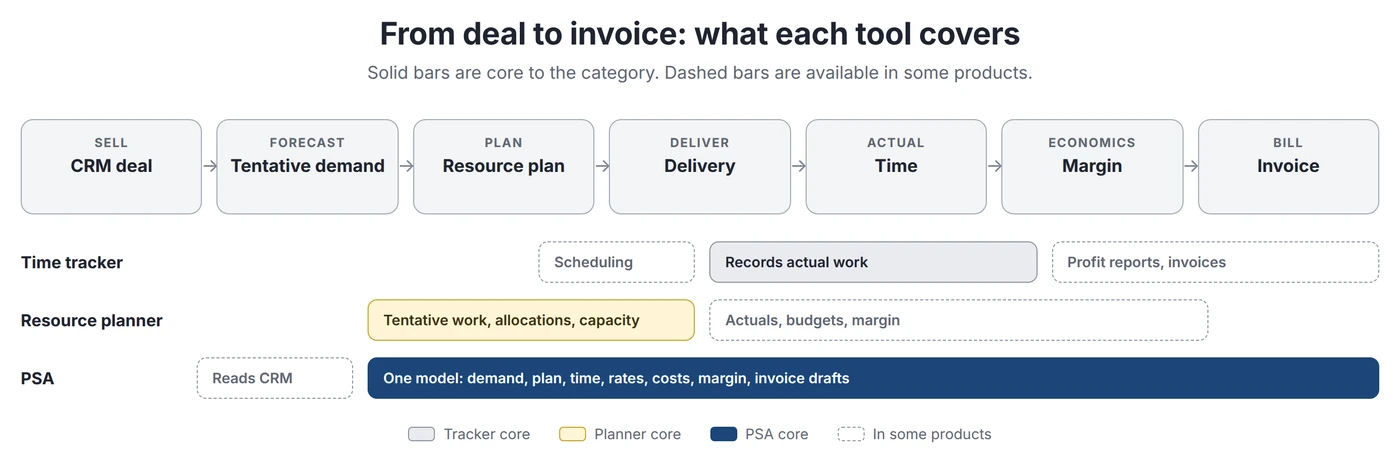
The chain runs from CRM deal to tentative demand, resource plan, delivery, time, margin and invoice. A tracker enters at delivery. A planner covers demand and the plan. A PSA connects the chain, so a change at one step updates the next.
Seven Signs You've Outgrown Time Tracking
No single sign proves you need PSA. The signal is several at once, each forcing someone to reconcile data by hand.
1. Staffing lives in spreadsheets
Timesheets are accurate, but allocations live in a sheet. The sheet says 80% on a project. Actuals say 110%. Nobody sees the drift, because plans and actuals are not linked.
Better tracker: partly, as Toggl and Clockify now schedule. Planner: usually the first fix. PSA when allocations must also drive cost, margin forecasts and billing. Exception: a few stable teams on long engagements.
2. Pipeline affects hiring and staffing
When likely deals decide whether you hire, subcontract or keep people free, the plan must hold uncertain work apart from confirmed work. The mechanism: deal, dates, role mix, hours, probability, weekly demand, capacity gap, decision.
Better tracker: rarely. Planner: often. Runn supports tentative projects and scenarios (Runn help). PSA when the deal must become a project with a budget, rates and billing terms. Exception: fast hiring or predictable start dates.
3. Utilization problems are discovered after they happen
Last month's timesheets show a bench problem only after the hours are gone. Forecast utilization, built from allocations and working hours, gives you weeks to react.
Better tracker: some show workload against scheduled hours. Planner: yes. PSA when the forecast must include pipeline and feed revenue and margin. Exception: firms that sell outcomes, not hours.
4. Profitability requires spreadsheet reconciliation
Someone exports hours, adds cost rates from HR and expenses from finance, then matches it to contract value, because rates, costs and terms sit in different systems.
Better tracker: for simple T&M, yes. Planner: Float and Runn link schedules to rates and margin. PSA when fixed-fee, capped and T&M work share one portfolio and you need forecast margin, not just margin to date.
5. Planned versus actual is disconnected
Planned-versus-actual reports alone are not a PSA feature. Toggl, Harvest with Forecast, and Runn offer them. The PSA signal is what the variance should change. If a project burns 20% more hours than planned, that should update capacity, the completion forecast, cost, forecast margin and the billing outlook. If a person carries that by hand into four places, your systems are not connected.
6. Multiple billing models create operational complexity
In T&M, an hour creates revenue. In capped T&M, it does until the cap. In fixed price, it creates cost but no extra revenue. Milestones, retainers and recurring fees move invoice timing away from earned revenue. Under IFRS 15, revenue is recognised as performance obligations are satisfied (IFRS Foundation).
Trackers handle fixed fees and recurring invoices. The issue is a mixed portfolio that needs one view of earned revenue, invoiced revenue and margin.
7. Finance rebuilds operational data every month
Export timesheets, chase missing time, join project data, fix rates, map contract types, add expenses, find unbilled work, work out earned amounts, draft invoices, post to accounting, rebuild reports. Thomson Reuters defines work in process (WIP) as "billable time and expenses that haven't yet been billed" (Thomson Reuters).
This is the strongest single sign when it exists because systems do not share IDs, rates, contract rules and approval status. A tracker or planner rarely fixes it. Exception: a short, controlled export routine is not worth a new system.
Better Tracker, Resource Planner or PSA?
Diagnostic: which category fixes it?
| Symptom | Likely cause | Better tracker | Resource planner | PSA |
|---|---|---|---|---|
| Poor timesheet compliance | Friction, no reminders or approvals | Yes | No | Overkill |
| Bad timer UX | Capture interface | Yes | No | No |
| Weak historical reports | Reporting gaps | Usually | No | Sometimes |
| Manual staffing | No allocation model | Partly | Yes | If staffing must drive cost and billing |
| Unclear future capacity | No supply and demand view | Basic views | Yes | Yes |
| Pipeline-driven hiring | Sales demand not in the plan | Rarely | Often | Yes, when deals must become budgets |
| Forecast utilization | No future demand model | Some | Yes | Yes, when it must include pipeline and margin |
| Planned-vs-actual gaps | Plan and actuals kept apart | Some | Yes | Yes, when the gap must move the margin forecast |
| Margin discovered too late | Cost, revenue and plan kept apart | Partly | Partly | Strong signal |
| Multiple billing models | Contract rules differ by project | Partly | Rarely | Strong signal |
| Monthly data reconciliation | No shared model across teams | No | No | Strong signal |
A simple rule: if the problem happens before or while someone submits a timesheet, test a better tracker. If it happens when you decide who does future work, test a resource planner. If sales, staffing, delivery and finance each hold a different version of the same project, test a PSA.
Why Project Economics Change the Equation
These are industry conventions. Firms define them differently, so write your definitions down before comparing tools.
Key terms and formulas
| Term | Meaning | Formula or note |
|---|---|---|
| Billable utilization | Share of available time spent on billable work | Billable hours ÷ available hours × 100 (Kantata). Denominators vary; Operating makes both parts configurable. |
| Forecast utilization | The same ratio for a future period | Forecast billable allocations ÷ forecast available hours × 100 |
| Realization | How much of standard value is billed | Billed amount ÷ standard value (Practice CS) |
| Bench | Available people not on client work | Available hours − committed client hours − other planned work |
| Cost rate | Internal cost of one hour | Salary, loaded or standard cost by role |
| Rate card | What you charge per hour | By role, seniority, client or date |
| Project margin | Profit as a share of revenue | (Revenue − labor cost − external costs − expenses) ÷ revenue × 100 |
| Unbilled work (WIP) | Billable time and expenses not yet billed | Grows when approvals or invoicing lag |
| Invoicing lag | Delay between billable and invoiced | Invoice date − period end or milestone approval |
| Forecast revenue | Expected revenue at completion | Actual revenue to date + planned revenue after the cutoff |
| Forecast margin | Expected margin at completion | (Forecast revenue − forecast cost) ÷ forecast revenue × 100 |
Why hours × rate is not profitability
Hours × billing rate is what the hours would be worth at list price. It leaves out labor cost, external costs, discounts, write-offs and non-billable delivery time. For fixed-fee work it is not even the revenue.
Illustrative example: a $60,000 fixed-fee project is planned at 400 hours at a $90 average cost rate. Planned cost is $36,000 and planned margin 40%. The team logs 520 hours. Cost rises to $46,800 and margin falls to 22%. Revenue stays at $60,000. At a $150 rate card, 520 hours "look" like $78,000, which says nothing about the result. On fixed-price work, earned revenue also follows a recognition method such as cost-to-cost, while invoices follow a billing schedule.
When a Time Tracker Is Enough
Keep your tracker, or upgrade within the category, when most of these are true:
- One person can see who is free without a planning system.
- Projects are similar and teams are stable.
- Pipeline rarely changes hiring or start dates.
- Billing is mostly T&M or simple fixed fee.
- Your tracker's cost and profit reports answer your margin questions.
- Month-end reconciliation is short and controlled.
When a resource planner is enough
Add a planner, and keep your tracker and accounting, when the pain is future staffing and billing already works. Runn offers tentative projects, scenarios and financial forecasts (Runn). Float links schedules to budgets, rates and margin, and says its profitability tools do not replace accounting systems (Float help).
Why headcount is a weak trigger
Vendors disagree. Birdview says firms under about 15 to 20 billable employees with simple T&M can often stay on a tracker (Birdview). BigTime writes about firms "scaling past 30-50 employees" (BigTime). Toggl says the tracker case is strong below 100 people and PSA is likely above 200 (Toggl).
A 60-person firm with stable teams can be simpler than a 20-person consultancy sharing specialists across ten projects. Count concurrent staffing decisions, shared specialists, pipeline volatility, billing models and manual month-end steps. See is a PSA worth it for a 30-person firm.
What Moving to PSA Changes
From a fragmented stack to an operational layer
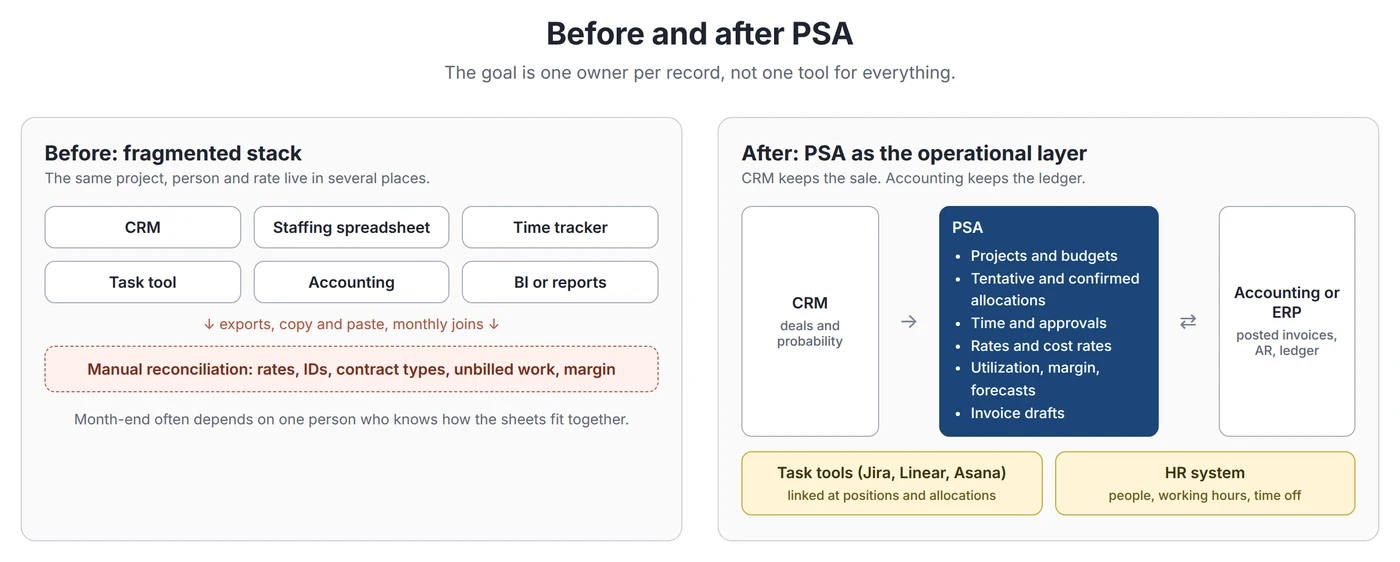
Before: CRM, a staffing sheet, a tracker, a task tool, accounting, and manual reports joining them. The problem is not the number of tools. It is that the same project, person and rate live in several places with no clear owner.
After: CRM to PSA to accounting. Task tools can stay, connected at the level of positions and allocations rather than tasks (PSA vs project management software).
Who owns which record
Likely system of record
| Record | Usual owner | Note |
|---|---|---|
| Opportunities | CRM | Stage, value and probability |
| Customers | CRM or accounting | Agree on one owner for names and IDs |
| Projects | PSA | Often created from a tentative or won deal |
| Resources | HR system, synced to PSA | PSA owns availability and skills for staffing |
| Allocations | PSA or planner | Confirmed and tentative |
| Time | PSA or tracker | Only one should be authoritative |
| Rates and cost rates | PSA, set by finance policy | Restrict who sees costs |
| Invoices | Drafted in PSA, posted in accounting | Accounting holds the legal record |
| Accounting transactions | Accounting or ERP | PSA does not replace the ledger |
Aim for one authoritative owner per record, with controlled handoffs. That beats "one system for everything".
A transparent cost case
Skip generic ROI percentages. Put your own numbers in separate buckets. This example is illustrative, not a benchmark.
Illustrative example: 60-person consultancy, monthly
| Line | Assumption | Monthly effect |
|---|---|---|
| Ops reconciliation removed | 15 of 25 hours × $70 loaded cost | +$1,050 |
| Finance reconciliation removed | 8 of 16 hours × $80 | +$640 |
| Unbilled work recovered | Half of $1,500 a month found in your own write-off records | +$750 |
| Hard benefits | +$2,440 | |
| Licenses | 60 people × $21 (Operating Full Suite, annual billing, as of September 2026) | −$1,260 |
| Internal implementation time | 120 hours × $70, spread over 24 months | −$350 |
| Ongoing admin | 8 hours × $70 | −$560 |
| Costs | −$2,170 | |
| Contingent: bench sold | 60 hours × $90 contribution, only if demand exists | Up to +$5,400 |
| Cash timing: invoices 5 days earlier | $3M annual billings, 8% cost of capital | About +$270, not revenue |
Here, hard benefits only just cover the cost. The case depends on whether freed capacity can be sold. That is the honest shape of most PSA decisions, and only your own data shows whether the value is real. Add migration, training and change-management time before you decide.
What to migrate
Migrate what the new process calculates from: active customers, projects, people, rates, cost rates, budgets, open allocations, active work, and enough time history for open projects and unbilled work. Keep older history read-only in the old tool unless audits need it.
Operating's migration guide recommends a parallel pilot group and retiring the old tool at a month end so invoicing runs there one last time (Operating help). Common mistakes: duplicates from unstable IDs, carrying old rates and task lists across, importing time before project and rate mappings are right, and involving finance late. See our PSA implementation rollout plan.
Where Operating fits
Operating (operating.app) is a PSA layer between CRM and accounting. As of September 2026, its documentation shows:
- HubSpot deals, Salesforce opportunities and Pipedrive deals create tentative projects, one way. Capacity and portfolio reports can weigh tentative work by probability (help).
- Resource planning, skills, time off, configurable utilization and a utilization forecast.
- Timesheets and approvals on Plan & Track and above. Four billing types, rate cards, cost rates, margin and three fixed-price revenue recognition methods.
- Invoicing on Full Suite with Xero and QuickBooks Online sync. NetSuite through the REST API. Native Harvest sync.
- REST API and a read and write MCP server. No native Jira or Linear connector.
- $13, $17 or $21 per person per month billed annually ($15, $19, $23 monthly). Enterprise from 100 people, with SLA, custom contract and on-site onboarding (pricing).
- SOC 2 Type 2, GDPR, AWS hosting in Frankfurt and SSO on every plan (security).
Check fit if you run retainers: there is no dedicated retainer billing type yet, so teams use fixed-price budgets back to back (billing types).
Where the PSA Argument Breaks Down
Advanced trackers already cover a lot
Harvest with Forecast, Toggl and Clockify Pro cover scheduling, estimates versus actuals, cost and profit. A firm on them may not have outgrown anything.
A planner may solve the real problem
If time and accounting work but staffing does not, a planner is a smaller change. Float publishes a story in which Metalab moved from Certinia, a PSA, to Float (Float). It is a vendor claim, but the pattern is real.
Consolidation moves complexity
Someone still owns billing rules, utilization formulas, permissions, rates and integrations inside the PSA. Unusual contracts may not fit its model. Best-of-breed tools can be better in their domain. The case for PSA is fewer uncontrolled handoffs, not fewer logos.
Forecasts depend on inputs
No PSA fixes stale allocations, invented close dates or wrong cost rates. Integration removes mechanical errors, not forecasting errors.
Change can cost more than fragmentation
If your stack needs little reconciliation, a rollout may cost more than it saves. Poor timer UX or one capacity sheet is a reason to fix one layer, not rebuild the stack.
PSA is justified when interdependent problems need one model. It is not a stage every growing firm must reach. If the seven signs describe your month, compare the best PSA tools or book an intro with Lauri.
FAQ
What is the difference between time tracking software and PSA?
Time tracking software records and reports on work already done, and modern trackers add budgets, scheduling and profit reports. PSA connects sales demand, resource plans, time, rates, costs and billing on one project model, so plans and actuals update project economics together.
Is PSA the same as time tracking?
No. Time tracking is usually one part of a PSA, which also covers resource planning, project financials and billing.
Does PSA include time tracking?
Usually, but check the plan. Operating includes timesheets on Plan & Track and Full Suite, not on Planning.
When should a consulting firm move to PSA?
When pipeline, staffing, actuals, project economics and billing are reconciled by hand every month and that work keeps growing. Not at a set employee count.
How many employees should a company have before using PSA?
There is no evidence-based threshold. Vendor guides range from about 15 to over 200 people. Operational complexity is a better predictor.
Can time trackers calculate utilization?
Yes. Toggl divides billable hours by scheduled work hours on Premium. Harvest divides tracked hours by capacity. Check the formula before comparing numbers.
Can time trackers manage capacity?
Some can. Harvest Forecast, Toggl and Clockify Pro offer scheduling and capacity views. The usual gap is pipeline demand and financial forecasting.
What is forecast utilization?
The share of future available hours expected to go to billable work. State whether it counts only confirmed allocations, tentative work or probability-weighted pipeline.
Can PSA replace Harvest?
Often, if its time tracking and invoicing suit your team. You can also keep Harvest and connect it. Operating has a native Harvest sync.
Can PSA replace project management software?
Sometimes, for simple coordination. Engineering and creative teams often keep Jira, Linear or Asana while the PSA owns staffing and project economics.
Is PSA worth the cost?
Only if removed reconciliation, recovered unbilled work and better staffing decisions exceed licenses, implementation, migration, training and admin. Model your own numbers.
What should be migrated from a time tracker to PSA?
Active customers, projects, people, rates, cost rates, budgets, open allocations and enough recent time for open projects and unbilled work.
What should stay outside PSA?
Usually CRM pipeline history, detailed task management, HR master records and the general ledger.
What are signs a firm has outgrown time tracking?
Spreadsheet staffing, pipeline-driven hiring, late utilization surprises, profitability rebuilt in sheets, disconnected planned versus actual, mixed billing models and monthly finance rebuilds.
What is the difference between capacity and utilization?
Capacity is how much working time is available or booked. Utilization is the share of working time spent on a chosen type of work.
Methodology
We built this guide from vendor documentation, accounting sources and current search results. Research closed on September 30, 2026.
- Time trackers: Harvest, Toggl and Clockify were checked against their pricing pages and help centers, not tested hands-on. "Not found" means we did not find it in their documentation.
- Resource planners: Runn and Float help centers and product pages.
- Economics: IFRS 15, Thomson Reuters Practice CS and Kantata. This page is not accounting advice.
- Operating: operating.app product, pricing, security and integration pages and the help center, as of September 2026.
- Examples: the fixed-fee project and the cost case are illustrations, not benchmarks.
- Disclosure: Operating publishes this page and sells a PSA.
Sources
Category and standards
- SAP: What is PSA software?
- IFRS Foundation: IFRS 15 Revenue from Contracts with Customers
- Thomson Reuters Practice CS: Work in Process Summary report
- Thomson Reuters Practice CS: Billing Analysis report
- Kantata: Measuring and improving billable utilization
Time trackers
- Harvest: Pricing
- Harvest: Forecast pricing
- Harvest: Utilization rate in the Detailed Time report
- Harvest: Profitability report
- Harvest: Estimates vs actuals with Forecast
- Harvest: Standard, recurring or retainer invoices
- Toggl: Homepage
- Toggl: Pricing
- Toggl: Workload and utilization report
- Toggl: Profitability report
- Clockify: Pricing
- Clockify: Approvals
- Clockify: Labor cost and profit
- Clockify: Forecasting
- Clockify: Invoicing
Resource planners
- Runn: Tentative projects
- Runn: Scenario planning
- Runn: Financials
- Float: Budget, utilization and profitability
- Float: Metalab customer story
Vendor thresholds referenced
- Birdview: PSA vs time tracking software
- BigTime: PSA time tracking
- Toggl: Time tracking software for professional services
Operating sources
- Operating: Pricing
- Operating: Security
- Operating help: Security and privacy FAQ
- Operating help: Billing types
- Operating help: How utilization is calculated
- Operating help: Reports available in Operating
- Operating help: Allocation probability
- Operating help: How revenue recognition works
- Operating help: How Operating decides the cost rate
- Operating help: Migrating from your old time tracking tool
- Operating: HubSpot integration
- Operating: Salesforce integration
- Operating: Pipedrive integration
- Operating: Xero integration
- Operating: QuickBooks Online integration
- Operating: NetSuite integration
- Operating: Harvest integration
- Operating: MCP server
- Operating: REST API
- Operating: PSA vs project management software



