TL;DR: The HubSpot MCP server lets Claude and ChatGPT (and other AI assistants) read and update your HubSpot CRM in plain language. It is free and works on every HubSpot plan. It reads deals in detail (amount, close date, stage, line items) and can create or update deals, and add notes and tasks. It cannot tell you whether you have the people to deliver a deal, because HubSpot does not know who is free. For a services firm, the fix is to run HubSpot's MCP next to a PSA's MCP in the same chat: HubSpot gives the pipeline, the PSA gives capacity, and the assistant turns the two into a staffing plan. Below are three workflows that do this, with prompts you can copy.
First, what HubSpot's MCP server can read and write. Then why it cannot answer "can we deliver this?" and three workflows that join pipeline and capacity. The last part is about keeping two write-capable connectors safe.
What is the HubSpot MCP server?
The HubSpot MCP server is HubSpot's official Model Context Protocol server at mcp.hubspot.com. MCP is the standard way an AI assistant connects to a business tool. HubSpot moved the server out of beta on April 13, 2026, for all HubSpot accounts. Every action runs as the person who connected it, so the assistant sees and changes only what that person can in HubSpot.
You meet it in two places. In Claude it is the HubSpot connector, and in ChatGPT it is the HubSpot app. Both use the same server and work on every HubSpot plan, including the free CRM, though Claude needs a paid plan for connectors. They can read, create and update contacts, companies, deals, tickets and line items, among other records. They can't delete anything or write more than 10 records in one request, and only Super Admins, or people a Super Admin approves, can connect them.
Can Claude read HubSpot deals?
Yes. Claude can search deals and return their details (name, amount, close date, stage, owner, associated line items). It can also update a deal, for example by moving it to Closed won. HubSpot's own help article suggests asking for "a summary of active deals organized by name, amount, and stage, and sorted by closing date". Each deal stage has a probability in your pipeline settings, and HubSpot's weighted amount is the amount times that probability. That is all a weighted pipeline needs.
HubSpot's developer docs list two limits worth knowing. The query tool does no currency conversion, so a multi-currency pipeline needs a rate in your prompt. And if Sensitive Data is on in your account, the assistant is blocked from notes, calls or emails.
Why HubSpot alone cannot answer "can we deliver this deal?"
Ask Claude, with only HubSpot connected, "if Acme closes, do we have a senior developer free in March?" It will find Acme. It will not find the answer. HubSpot knows the deal is worth $180,000, closes on February 20 and sits at 60%. It does not know how many hours each person has, who is booked on what, or which roles a project needs. Those are delivery facts, and they live in a PSA or a spreadsheet.
Line items help a little. If you sell roles as products ("Senior developer, 40 days"), the assistant can read them, so it knows what the deal needs. It still cannot compare that with who is free. Our guide to HubSpot project management covers this edge in detail. This page sticks to one question. How do you get an assistant to see both sides at once?
Running HubSpot MCP and a PSA MCP in the same chat
Claude can use more than one connector in a conversation, and so can ChatGPT once each app is enabled in the chat. Turn on HubSpot and a PSA, and the assistant reads the pipeline from one and capacity from the other, then works across both. We use Operating in the examples because we make it. Any PSA with a write-capable MCP server works the same way.
Operating's MCP server reads the planning data (people, projects, positions, allocations, time entries) and runs the planned and actual reports by person, project or client. Positions and allocations can also be created, updated, moved or deleted. A position is an open role with no named person yet, which is how you pencil in a deal before it closes.
| Workflow | Ask | From HubSpot | From Operating | You get |
|---|---|---|---|---|
| 1. Weighted pipeline to capacity check | "Can we staff what is likely to close next quarter?" | Open deals: amount, close date, stage probability, line items | Free hours per person and role, by month | Gaps by role and month, and which deals to pencil in |
| 2. Closed-won deal to staffed project | "Acme is won. Set it up." | The deal, its line items and owner | The tentative project; new open positions | Open roles on the plan, and a task on the deal for the owner |
| 3. Utilization what-if | "If Acme closes, who goes over 85% in March?" | The deal's close date and probability | Planned hours per person for March | Named people at risk, before you say yes to a start date |
The HubSpot column uses only reads, plus creating a task, which HubSpot's connector supports. The Operating column uses reads and position writes.
Do you need HubSpot MCP if Operating already syncs HubSpot?
Fair question. Operating's HubSpot integration already turns deals in the stages you choose into tentative projects, each with its amount and owner, plus close date and probability. Its forecast counts each deal in proportion to that probability. So for the weighted forecast itself, you do not need MCP at all.
HubSpot MCP adds three things the sync does not. It reads line items, so the assistant knows which roles a deal needs. It reaches deals in early stages you chose not to import. And it can write back: the sync never changes HubSpot, but through MCP the assistant can leave a note or a task on the deal, so sales hears about a staffing risk where they work.
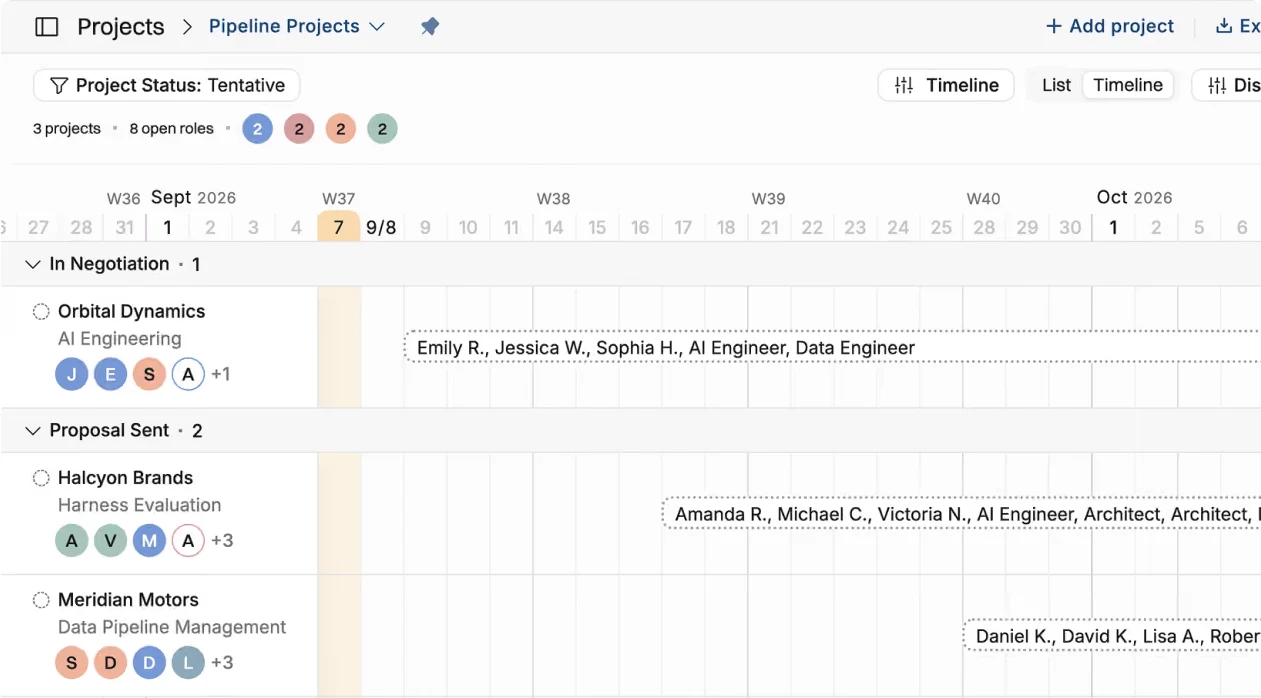
Workflow 1: turn your weighted pipeline into a capacity check
Weighted pipeline answers "how many people will we need?" It does not answer "whom do we book?" Take three deals. Acme needs three people for four months at 60%. Northwind needs two people at 80%. Globex needs one consultant at 30%. Weighted, that is 1.8 + 1.6 + 0.3 = 3.7 people. If all three close, it is 6.
Nobody can staff 0.6 of a developer. If Acme closes, it needs a whole one. So use the two numbers for two jobs. Plan hiring and contractors from the weighted total, because that is your best guess of the average. Book tentative positions per deal once it passes a probability you trust, because that is what you will actually have to staff.
In a chat with both connectors on, ask in two steps. First HubSpot: "List open deals closing next quarter with amount, close date, stage probability and line items." Then Operating: "Compare the roles and months those deals need with free hours by role. Show gaps by role and month, and which deals to pencil in as open positions. Show me the list and wait for my yes before you create anything."
Workflow 2: closed-won deal to staffed project
When a deal closes, the risk is the gap between the signature and the first named person on the plan. With both connectors on, it is one conversation.
- Read the deal in HubSpot: "Show the Acme ERP rollout deal: owner, close date, line items."
- Find the project in Operating: "Find the tentative Acme ERP rollout project. List its open positions." If you use the HubSpot integration, it is already there.
- Create what is missing: "Create open positions for a project manager, a senior consultant and a developer from March 1 to June 30. Show me the list first."
- Tell sales where they work: "In HubSpot, create a task for the deal owner: confirm the start date with the client by Friday."
Naming people stays a human decision. The assistant gets it ready, and your delivery lead makes the call.
Workflow 3: what happens to March utilization if this deal closes?
This is the question a managing partner asks before promising a start date. Ask it in two parts. First HubSpot: "What are the close date and amount of the Acme deal, and what is its stage probability?" Then Operating: "Using planned figures by person for March, list everyone in the developer and senior consultant roles above 85%. Then add 160 hours for one developer and 80 for one senior consultant, spread over March, and show who would go over."
If two developers are already at 90%, you know before the call that March needs a contractor or a later start. To see what your own utilization numbers should be, try our utilization calculator. For the bigger picture of sales against delivery, read about the book-to-bill ratio.
Permissions across two connectors
Both connectors can write, and both write live. Treat that as the main design decision.
| HubSpot MCP | Operating MCP | |
|---|---|---|
| Acts as | The HubSpot user who connected it | The Operating user who connected it |
| Who may connect | Super Admins and users with App Marketplace Access, or anyone a Super Admin approves | Users an admin has granted MCP access, after MCP is switched on for the tenant |
| Limit what it can do | The user's own HubSpot permissions | The user's permissions, plus single tools switched off per user |
| Deletes | Not possible | Possible for positions, allocations, budgets and expenses |
| Draft mode | None. HubSpot suggests setting write tools to Needs Approval in Claude or ChatGPT | None. Writes are live in your tenant |
| Rate limit | HubSpot's API limits; 10 records per write | 200 requests a minute per user |
Sources: HubSpot Knowledge Base connector articles and developer docs; Operating's MCP server page (checked against the product on September 27, 2026).
Three habits keep it safe. Set every write tool in Claude or ChatGPT to ask for approval, for both connectors. End each write prompt with "show me the list and wait for my yes". And give people who only need answers a read-only setup: in Operating, switch off the writing tools for them, and the assistant never even sees those tools.
How to connect HubSpot and Operating to Claude or ChatGPT
- Add HubSpot. In Claude, open Settings, then Connectors. Click Browse and pick HubSpot. In ChatGPT, open Settings, then Apps, where you pick HubSpot. Sign in and choose the permissions to allow.
- Add Operating. In Claude, add a custom connector pointing at https://mcp.operating.app/mcp. In ChatGPT, add Operating as a connector with the same address. Sign in with your Operating account; it uses OAuth, so there is no API key to paste. Details for Claude and ChatGPT.
- Switch both on in the chat. In Claude, click + and turn on both connectors. In ChatGPT, enable the connector in each chat where you want it.
- Set write tools to Needs Approval. Do this for both connectors before your first write prompt.
- Test on one deal. Run the Workflow 1 prompts with one deal you know well. Check the numbers against HubSpot by hand once.
One limit to know: you can link only one HubSpot account to a Claude or ChatGPT account at a time. If you also want Claude to answer resourcing questions without HubSpot, see whether Claude or ChatGPT can do resource planning, and compare consulting tools with MCP servers.
HubSpot MCP FAQ
HubSpot MCP questions
Short answers, checked November 2026.
What is the HubSpot MCP server?
It is HubSpot's official Model Context Protocol server at mcp.hubspot.com. It lets AI assistants such as Claude and ChatGPT read and update HubSpot CRM data in plain language, as the signed-in user. It became generally available to all HubSpot accounts on April 13, 2026.
Can Claude read HubSpot deals?
Yes. With the HubSpot connector, Claude can search deals and read the amount, close date, stage, owner and line items, and it can create or update deals. It needs a paid Claude plan (Pro, Max, Team or Enterprise) and works with any HubSpot plan.
How do I connect HubSpot to Claude?
In Claude, open Settings, then Connectors, click Browse, pick HubSpot and click Connect. Log in, choose the permissions to allow and click Connect app. Then turn the connector on in a chat from the + menu. Users without App Marketplace Access need a Super Admin to approve it first.
Does HubSpot's MCP server work with ChatGPT?
Yes. Add HubSpot in ChatGPT under Settings, then Apps. It works on all HubSpot plans and can read, create and update contacts, companies, deals, line items and activities. Neither the ChatGPT nor the Claude connector can delete records.
Can I forecast capacity from HubSpot pipeline?
Not from HubSpot alone. HubSpot has the amount, close date and stage probability, but no hours or availability per person. Connect a PSA with its own MCP server, or a PSA that imports HubSpot deals, and ask the assistant to compare weighted demand with free capacity by role and month.
Is the HubSpot MCP server free?
Yes. HubSpot says the connector for Claude is free, and its help articles list it for all HubSpot products and plans. You still need an account with the AI assistant, and Claude requires a paid plan for connectors.