TL;DR: Agency resource management software shows who is free across all your clients and books people and freelancers on retainers and projects. Then it compares the plan with the hours people actually log. There are three kinds. Schedulers (Resource Guru, Float, Runn) cost about $4 to $12 per person a month but don't invoice. All-in-one agency platforms (Productive, Teamwork.com, Scoro, Ravetree, Accelo) add retainers and tasks, plus billing, for $10 to $57 or a quote. Operating sits in between: it links HubSpot deals, the staffing plan and invoices, with plans from $13 and invoicing on Full Suite at $21. Use the filter below to see which fit your agency.
Compare 9 agency resource management tools: filter by what you need
Pick your team size and what the tool must handle. Tools that can't do it drop out, with the reason. The plan and price update to the cheapest plan that covers everything you picked. Your answers stay in your browser.
9 of 9tools fit your agency.Pick your size and needs to narrow the list.
Published list prices per person a month, billed yearly, from each vendor's pricing page on November 6, 2026. Scoro shows bundle prices and gives 13 to 17% off for annual billing. Quote means no public price. A tool stays on the list only if its public pages show the feature; native connectors only, Zapier doesn't count.
Below: what agencies need that consulting firms don't, a short verdict on each of the nine tools, four tests to run in a free trial, and who pays for which seat. At the end there's a five-number retainer health check you can run every month, whatever tool you pick. Disclosure: Operating makes one of these tools. Same rules as the rest.
What agency resource management software does, and why agencies need different things
Resource management software answers three questions every week. Who is free? What is coming in? And did last month's plan match the hours people logged? Every tool on this list answers the first one. The rest comes down to how well each one copes with the way agencies work: lots of small jobs, monthly retainers, freelancers, clients who move dates.
A consulting firm usually staffs a few long engagements with full-time people. An agency runs dozens of small jobs at once, many of them under monthly retainers, with freelancers filling gaps and clients moving deadlines every week. That changes what you should look for. If you run a consultancy, our list of resource planning software for consulting firms is the better guide. This one is for agencies: creative, digital, marketing, development.
| What changes | Typical consulting firm | Typical agency | So the tool needs |
|---|---|---|---|
| Shape of the work | A few long engagements | Many small jobs plus monthly retainers | Budgets that reset every month, and fast booking of short jobs |
| Who is on the plan | Mostly full-time staff | Staff plus freelancers and part-timers | A contractor type with its own cost, and fair seat pricing |
| How often the plan changes | Monthly | Daily, whenever a client moves a date | Drag-and-drop rebooking and an obvious clash warning |
| Where margin leaks | Low utilization | Over-servicing and unbilled scope | Planned vs actual hours per retainer, and a way to bill extras |
Retainers deserve the most attention. A retainer sells a fixed number of hours or deliverables each month for a fixed fee. Say the team spends 30 hours on a 20-hour retainer. Who sends an invoice for the extra ten? Nobody. A good tool shows that burn mid-month. Freelancers come second. They solve capacity problems, but if your tool can't hold their cost rate, your margin report is wrong for every project they touch.
Client changes are the third. A tool that takes five clicks to move a two-week job will be abandoned for a spreadsheet by spring. We'll come back to that in the trial tests. No demo shows it.
Agency resource management vs agency project management software
Search for agency project management software and you get a mix of three kinds of tools. They overlap, which is why it pays to know which shelf you are shopping from before you start comparing prices across vendors.
Schedulers plan people. Float, Resource Guru and Runn show a timeline of who works on what, by day or week, with time off and capacity. Some add timesheets. None of them sends invoices. Money stays in your accounting tool.
All-in-one agency platforms run the work itself. Productive, Teamwork.com, Scoro and Ravetree combine tasks and time tracking with budgets and resource planning, all the way to invoicing. Accelo, which bought Forecast, belongs here too. You get one system, but you also move your whole team onto its task manager, which is a bigger change than most owners expect.
PSA tools run the business around the work. Operating plans people, tracks time against the plan and invoices from approved hours, and it connects to the CRM where deals start. Projects can have tasks too, so time is logged against the actual work. Our guide to what PSA software is explains the category.
A quick rule: if your biggest pain is "who is free next week", a scheduler is enough. If it's "which retainers lose money", you need budgets and time in the same place. If it's "we sell work we can't staff", you need the CRM in the plan, and that's exactly the split the filter at the top uses to sort the nine tools.
The 9 tools, with an agency verdict
The list runs from the simplest schedulers to the broadest platforms, not by rank. Prices are list prices per person a month, billed yearly, from each vendor's pricing page on November 6, 2026. For totals at your team size, see our PSA pricing comparison.
1. Resource Guru: the cheapest scheduler, and it books rooms too
Resource Guru is a booking tool. You book people on projects by the hour or day, mark bookings as tentative, and get a warning when someone is double-booked. It also books meeting rooms and equipment as "other resources", which suits studios that share edit suites, cameras or shoot space. Blackbelt adds weekly timesheets and reports, plus project rates and budgets. Master adds approvals and SSO.
Price: Grasshopper $4.16, Blackbelt $6.65 and Master $10 per person a month billed yearly ($5, $8 and $12 monthly). Plans include 1, 5 or 10 placeholders, and extra placeholders cost the per-person rate. It has no invoicing, retainer budgets, contractor type or HubSpot connector. Small studios that want a schedule everyone understands in a day are the natural fit.
2. Float: a visual schedule for creative teams
Float is the scheduler many creative agencies already know. Allocations sit on a drag-and-drop timeline, and people can be marked as employee, contractor or placeholder. Pro adds time tracking, client rate cards and cost rates, along with project budget and margin tracking. Float also has an MCP server, so an AI assistant can read the schedule.
Price: Starter $7 and Pro $12 per scheduled person a month ($8.50 and $14 monthly). Viewers join free as guests, but anyone on the schedule needs a paid seat, freelancers included, so count your contractors before you compare. Missing: invoicing, recurring retainer budgets and a native CRM connector (HubSpot works through Zapier). It suits studios that want a simple schedule and bill in another tool.
3. Runn: forecasting for agencies of 20 or more
Runn is a dedicated resource and capacity planner. Every plan includes unlimited placeholders and tentative projects. On top of that come skills and project budgets, plus rate cards and planned vs actual hours. Standard adds timesheets and integrations. Contractors sit on the planner as resources, so their hours count in capacity.
Price: Standard is $11 per resource seat a month ($13 monthly). Lite ($7) and Advanced go through sales. Plans start at 20 seats, so a 12-person studio pays for 20. You won't find invoicing or retainer budgets, and there's no HubSpot connector. Harvest sync is on Advanced only. Runn fits agencies of 20 or more that plan months ahead and invoice elsewhere.
4. Productive: the all-in-one built for agencies
Productive was built for agencies. It shows. Tasks, docs, time tracking, budgets, resource planning with placeholders and invoicing live in one tool. Professional adds recurring budgets, which is how Productive handles retainers, and it creates draft retainer invoices for you. Purchase orders to vendors cover freelancer costs.
Price: Essential $10 and Professional $25 per user a month ($12 and $29 monthly), with a three-seat minimum. Ultimate is quote only. What's missing is HubSpot at a published price, since the integration is on Ultimate. And moving everyone onto its task manager? A project in itself. If CRM sync is your gap, our Productive.io alternatives compare the options. Pick Productive if you want your tasks and retainers in the same tool as your invoices.
5. Teamwork.com: project management first, resourcing second
Teamwork.com is a project management tool for client work. Accelerate is the plan agencies need. It adds workload planning with live capacity, plus time budgets and retainers. Invoices are built from logged time, and there are HubSpot and QuickBooks connectors. Clients can be invited into projects, and proofing helps creative approvals. An MCP server connects Claude or ChatGPT.
Price: Accelerate is $24.99 per user a month, billed yearly, with at least 5 users. Optimize is quote only, and that's the catch: tentative work, turning pipeline into projects and scheduling by role or skill all live on Optimize, which has no public price. It fits delivery teams that live in tasks and want retainers next to them.
6. Scoro: quote to cash in one system
Scoro is eight apps that you combine: CRM and quoting at one end and invoicing at the other, with resource planning in between. It runs retainer, fixed-fee and time-and-materials work side by side, and tracks retainers period by period to catch over-servicing. HubSpot and Salesforce sync so won deals become projects, and on the accounting side Xero, QuickBooks or Sage Intacct keep the books in step.
Price: bundles start at $17 per user a month for time and billing. Projects & Resources costs $29 and End-to-end, which adds invoicing and the rest, costs $57. The minimum is 5 users, and annual billing is 13 to 17% cheaper. Resourcing plus billing isn't cheap here. Self-onboarding covers teams of up to 15 people, and larger teams move to assisted or expert-led onboarding plans. Choose Scoro if you want one system from quote to cash.
7. Ravetree: one flat price for marketing agencies
Ravetree is an all-in-one platform with a strong retainer module. Each retainer shows its remaining budget and earned and unearned revenue. Recurring tasks come from templates. Request forms keep scope creep in check, because new work has to be requested before it becomes a task. Invoices sync both ways with QuickBooks and Xero, and purchase orders link to vendors.
Price: one plan at $29 per user a month billed yearly, $34 quarterly or $39 monthly, with free onboarding. The HubSpot sync is shallow: contacts and companies only, no deals. Ravetree is built for marketing agencies that run on retainers and want everything at one price.
8. Accelo, including what happened to Forecast
Accelo is a PSA for client work that runs fixed-fee projects and retainers side by side. It connects to HubSpot and Salesforce on the CRM side and to Xero and QuickBooks for accounting. It is also where Forecast went. Accelo acquired Forecast in July 2025, and since May 28, 2026 forecast.app redirects to Accelo. Forecast users keep their login and data.
Price: custom quote based on team size. There's no public price, and we found no description of freelancer costs on its public pages. It suits retainer-heavy agencies happy to buy through a sales process.
9. Operating: staffing linked to HubSpot, time and invoices
Disclosure: Operating makes this one. Operating connects the CRM pipeline to the staffing plan, and the plan to timesheets and invoices. HubSpot deals arrive as tentative projects with amount, owner, probability, close date, so you can staff a pitch before it closes. Monthly client budgets show the burn. Contractors and part-timers count in capacity, and Full Suite invoices approved time for retainer, recurring, fixed price and time and materials work. Harvest and HiBob connect natively, as do Xero and QuickBooks, and an MCP server lets Claude or ChatGPT answer staffing questions.
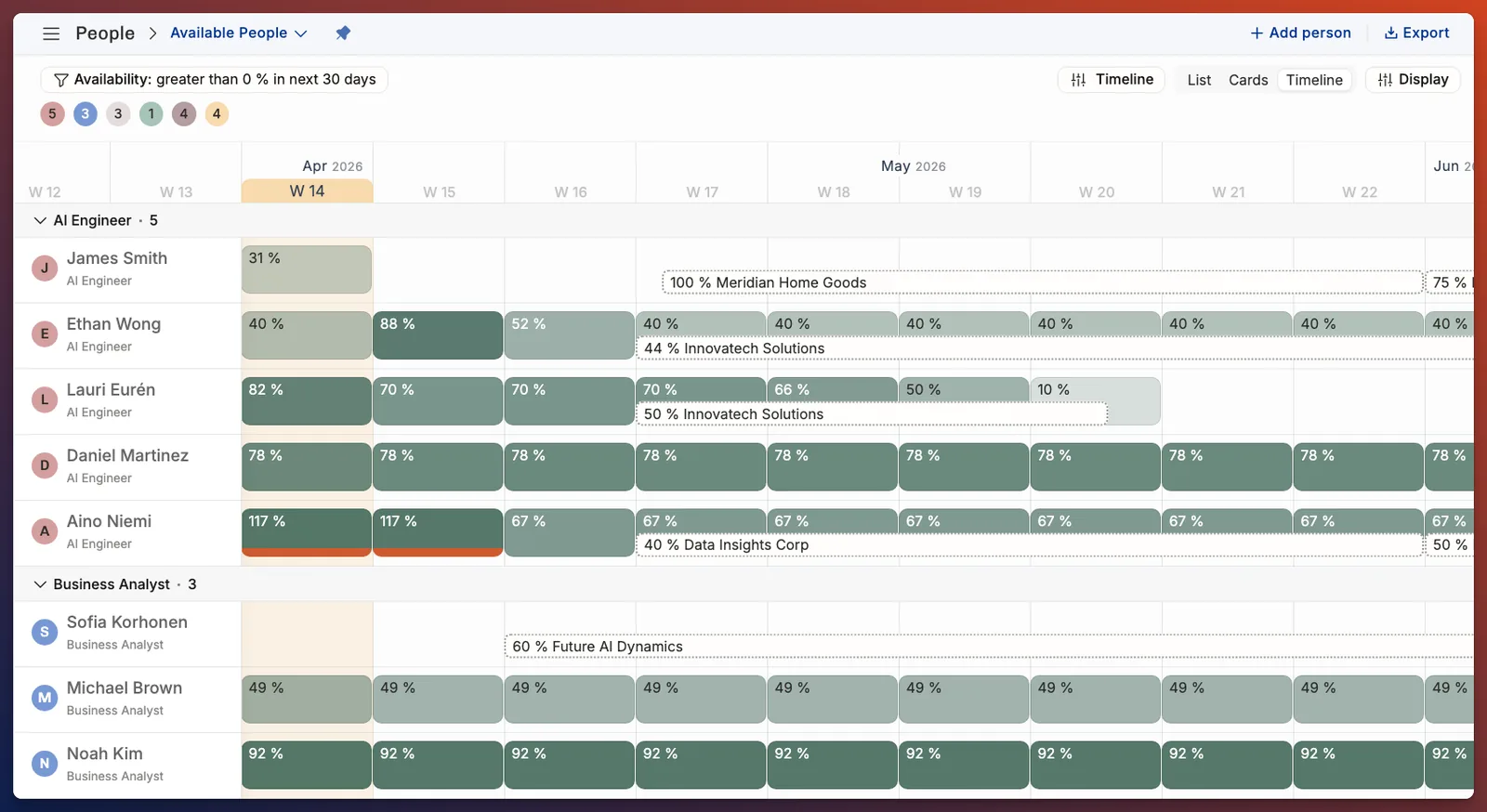
Price: Planning $13, Plan & Track $17 and Full Suite $21 per person a month billed yearly ($15, $19 and $23 monthly). Projects can have tasks, with time logged against them. It isn't built for agencies under about 20 people. Best fit: agencies of 20 or more that sell through HubSpot. Anna Lehto, CEO of 70/30 Digital, credits it with helping them reach "40% growth".
Over-servicing is a pricing problem you can see in a timesheet. Inventive.io absorbed $250,000 of unbilled work in one year and $25,000 the next.
How to choose: four agency tests to run in a free trial
Feature lists look alike. These four tests, run on your own data during a 14- or 30-day free trial (most of the tools here offer one), show the differences in an afternoon.
- Over-service a retainer on purpose. Set up one live retainer with its monthly hours and fee. Log 20% more time than it allows by the 15th. Does the tool warn anyone, and where do you see it?
- Add a freelancer with a day rate. Book them for three days on a project and check the project margin. If the margin doesn't move, the tool can't see freelancer cost. Then check your bill.
- Move a client deadline by two weeks. Shift a live job and everything booked on it. Count the clicks. Does the clash with other clients show up straight away?
- Close a month. Approve a week of time and produce the invoice, or the export your accountant needs. If that takes a spreadsheet in between, that step will cost you hours every month.
If your deals start in HubSpot, add a fifth test: push one deal to the stage where you would start planning and see whether it appears in the plan without retyping. That's where agencies lose the most hours between tools. Alisha David, COO at Supreme Optimization, used to spend about 3 hours a week moving CRM data into resourcing sheets. Now, she says, "it only takes me 15-20 minutes". Our guide to HubSpot and PSA covers the setup.
What agency resource management software costs, and who pays for a seat
Look at who counts as a seat before you look at the list price. Agencies have more people who are scheduled but never log in (mostly freelancers), and the seat rule can change your bill more than the headline price.
| Tool | Starting price with resource planning | Who counts as a seat |
|---|---|---|
| Resource Guru | $4.16 (Grasshopper) | Every person you schedule. Extra placeholders cost the per-person rate. |
| Float | $7 (Starter) | Everyone on the schedule, freelancers included. Viewers join free as guests. |
| Productive | $10 (Essential) | Each user, with a minimum of 3 seats. |
| Runn | $11 (Standard; Lite $7 through sales) | Each resource on the planner, contractors included. Minimum 20 seats. |
| Operating | $13 (Planning) | All users plus anyone scheduled. |
| Teamwork.com | $24.99 (Accelerate) | Each user, with a minimum of 5. |
| Scoro | $29 (Projects & Resources) | Each user, with a minimum of 5. |
| Ravetree | $29 (one plan) | Each user. |
| Accelo | Quote | Priced on team size. |
Per person a month, billed yearly. From each vendor's pricing page, November 6, 2026. Scoro's price is a bundle price.
Two things to price before you sign. First, the plan you'll actually need: retainers, invoicing or HubSpot often sit one plan up from the entry price, which the filter above shows. Second, the cost of moving your team. An all-in-one platform replaces your task manager too, so budget the weeks it takes everyone to switch. Billable utilization at services firms averaged 66.4% in 2025, the lowest SPI Research has recorded in 19 years. A tool that lifts it by a point or two pays for itself quickly, and one that nobody uses doesn't. For full cost tables, see the PSA pricing comparison.
Your monthly retainer health check
Whatever tool you choose, these five numbers tell you whether a retainer makes money. Check them on the 15th and on the last working day of each month. The red flags are rules of thumb, so set your own once you have three months of data.
| Number | How to work it out | Red flag |
|---|---|---|
| 1. Burn vs calendar | Hours used divided by hours agreed, next to days passed divided by days in the month | Burn is more than 15 points ahead of the calendar |
| 2. Effective rate | Retainer fee divided by hours logged this month | Below your blended target rate |
| 3. Out-of-scope hours | Hours logged on requests the retainer doesn't cover | Any hours with no change order or extra invoice |
| 4. Freelancer share | Freelancer cost divided by the retainer fee | Rising two months in a row |
| 5. Next month booked | Hours booked for next month divided by hours agreed | Under 80% by the 25th, so either the plan is stale or the team will sit idle |
Numbers 1 and 5 need the plan and the timesheets in the same place, or a sync between them. Numbers 2 to 4 need cost rates and budgets per retainer. All five in under ten minutes? Your setup works. For the weekly routine around it, see our guide to agency capacity planning.
Agency resource management software FAQ
Questions agencies ask before they pick a tool
Short answers. The sections above have the detail.
What is agency resource management software?
It is software that shows who is free across all your clients, books staff and freelancers on projects and retainers, and compares planned hours with logged hours. Some tools stop at scheduling. Others add timesheets, retainer budgets, invoicing and CRM links.
What is the best resource management software for agencies?
It depends on what you need beyond the schedule. Resource Guru and Float are the cheapest schedulers at about $4 to $12 per person a month. Productive, Teamwork.com, Scoro and Ravetree add retainers and invoicing. Operating links HubSpot deals, the plan and invoices for agencies of 20 or more. Operating makes one of these tools.
Is there free resource management software for agencies?
None of the nine tools here has a free plan with resource planning. Teamwork.com has a free plan for up to 5 users, but workload planning starts on Accelerate. Most offer a free trial of 14 or 30 days instead.
Which agency resource management tools integrate with HubSpot?
Operating brings HubSpot deals in as tentative projects on every plan. Teamwork.com connects HubSpot on Accelerate, Scoro syncs contacts, deals and companies, Productive has it on its quote-only Ultimate plan, Accelo lists it, and Ravetree syncs contacts and companies only. Float connects through Zapier.
How do agencies plan freelancers in resource management software?
Add each freelancer as a person with their own cost rate and contracted hours, so capacity and margin include them. Float has a contractor person type, Runn treats contractors as resources, and Productive and Ravetree track vendor costs through purchase orders. Check the seat rule, because most tools bill every scheduled person.
What happened to Forecast.app?
Accelo acquired Forecast in July 2025. Since May 28, 2026, forecast.app redirects to Accelo, and existing users keep their login and data. Accelo sells on a custom quote.
What is the difference between agency project management and resource management software?
Project management software runs tasks and deadlines. Resource management software plans people across all projects and shows who is over- or underbooked. All-in-one agency platforms such as Productive and Teamwork.com do both, while schedulers and PSA tools sit next to your task manager.
Do agencies need a PSA?
Usually once more than one person staffs the team, retainers are a big share of revenue and month-end invoicing takes days. That tends to happen somewhere between 20 and 50 people. Smaller agencies often do fine with a scheduler and their accounting tool.
How we compared: on November 6, 2026 we opened each vendor's pricing page and plan comparison, plus its integrations or help pages. Prices are USD list prices per person a month with no unpublished discounts. A feature counts only if the vendor's public pages show it. Customer quotes for Operating come from its customer pages. SPI Research data comes from its 2026 benchmark press release.