



Disclosure: Operating (operating.app) publishes this page. We say clearly where spreadsheets are still the better choice, and we label customer results as customer-reported. Last updated September 28, 2026.
Short answer: Stay on spreadsheets while one person can keep project dates, hours, rates, budgets and billing in sync, and the margin you see at month-end matches what you expected during the month. Move to PSA (professional services automation) software when those facts have different owners in different systems, and keeping them aligned has become a job of its own.
The limit of Excel and Google Sheets is not calculation. It is synchronization. In a growing firm, the fee lives in the CRM, hours in the time tool, rates with finance, bookings with resource managers, and the billing schedule in someone's inbox. A spreadsheet can combine them only after someone copies the latest version in. A PSA keeps them connected, so one change reaches margin, invoices and reports.
This guide is for founders, COOs and finance leads who need to trust project margins and billing. It compares PSA vs spreadsheets from deal to invoice, lists the signs you have outgrown spreadsheets, and explains what to migrate. If your main problem is staffing and capacity, start with resource planning software vs spreadsheets instead.
TL;DR
| Question | Answer |
|---|---|
| Stay on spreadsheets if... | One owner keeps the model current, billing is simple, and month-end margin holds no surprises. |
| Evaluate PSA if... | Several teams own inputs that must stay in sync, invoices are rebuilt from exports every cycle, and margin is only trusted after month-end. |
| Biggest difference | A spreadsheet stores a copy of the facts. A PSA connects them, so a change to a deal, a booking or an approved hour reaches margin and invoices. |
| Migration principle | Move active operating data, integrate data that other systems own, archive closed history, and rebuild formulas as business rules. |
| Keep Excel for | Pricing models, one-off scenarios and ad hoc analysis. Demote it from system of record to analysis tool. |
PSA vs Spreadsheets at a Glance
Spreadsheets win on flexibility and cost when operations are simple and owned by one person. PSA wins when the same project data must stay in sync from the deal to the invoice and the margin report.
PSA vs spreadsheets by workflow (September 2026)
| Workflow | Spreadsheets (Excel, Google Sheets) | PSA software | What it means for the decision |
|---|---|---|---|
| Deal to project | Deal value, scope and dates are copied from the CRM by hand. | CRM deals create projects that stay tentative until signed. | Matters when scope or dates change often. |
| Staffing and utilization | Bookings live in a grid that the margin model does not see. | Bookings are the cost plan, so capacity and margin update together. | Matters when bookings change every week. |
| Project profitability | Good for one-off margin models. In-flight margin needs fresh inputs. | Budget burn and forecast margin update as approved time arrives. | Value rises with fixed-fee and capped work. |
| Time tracking | A separate tool. Plan and actuals are matched later. | Time is logged against the planned project and phase. | Approved hours reach billing and margin the same day. |
| Billing and invoicing | Billable hours, rates and schedules are rebuilt every cycle. | Approved time, rates and schedules flow into the invoice draft. | Reduces unbilled work and rework. |
| Month-end close | A rebuild: exports, rate fixes and a manual margin update. | A check: time, invoice drafts and margin are already current. | Matters when close takes days. |
| Forecasting and reporting | Flexible, but depends on the person who maintains the workbook. | Shared definitions and standard reports, plus exports and APIs. | Matters when leaders need answers without the spreadsheet owner. |
| Integrations and control | CSV exports and scripts. No states such as approved or invoiced. | Connectors, APIs, approvals and permissions. | Matters when several people change the same records. |
See your deal-to-invoice flow in Operating. A 30-minute walkthrough of how Operating connects your CRM, time, margins and invoices. Book an intro with Lauri
When Are Spreadsheets Still Enough for Professional Services?
Spreadsheets are still enough when one owner can keep the operating model coherent and the cost of keeping it in sync is small. That usually means one billing model, few active contracts, a quick month-end and low reporting pressure.
Excel is still the best tool for pricing models and one-off margin analysis. There is also no reliable headcount threshold: BigTime, for example, says firms outgrow spreadsheets at around 20 to 30 people, and other vendors use other numbers. Treat these as vendor heuristics. Complexity is a better guide than size.
When spreadsheets are enough
| Condition | Why spreadsheets still work | Warning sign |
|---|---|---|
| One operational owner | That person checks every date, rate and hour. | Nobody else can safely edit the file. |
| One billing model | T&M on one rate card is easy to calculate. | Fixed fee, capped T&M and several rate cards in one month. |
| Few active contracts | Each invoice can be checked line by line. | Invoices are rebuilt from several exports. |
| Few handoffs | The same person sells, delivers and bills. | Sales, delivery and finance each keep their own version. |
| Quick month-end | Close takes hours, not days. | Close needs rate fixes and missing-time chases. |
| Low reporting pressure | Leaders review margin once a month. | Leaders want in-flight margin every week. |
A simple test (framework): if a leader can answer “what is this project's margin today, and which approved hours are not invoiced yet?” in a few minutes without calling a meeting, the spreadsheet is still doing its job.
Where Spreadsheet-Based Operations Start to Break
Spreadsheet operations break when the facts they depend on change in other systems faster than people can copy them in. The formulas stay correct, but the inputs go stale, so different teams make decisions from different versions of the same project.
Illustrative example: on Friday, sales adds a phase to a project and moves its start date in the CRM. By Monday, the staffing sheet still has the old date, hours are logged to a phase name that is not in the plan, and the finance sheet uses the old budget and cost rate. Nothing is wrong mathematically. The project just has four versions.
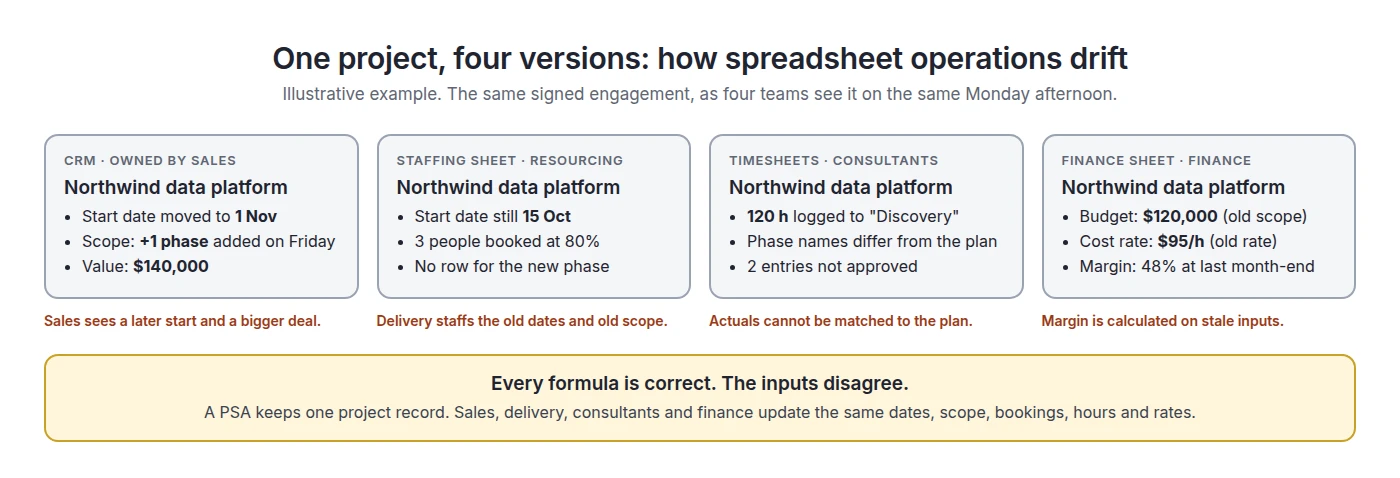
The drift usually shows up in five places:
- Scope drift. A change request is agreed, but the budget and billing schedule keep the old scope.
- Date drift. Dates move, but bookings and the revenue forecast do not.
- Rate drift. A rate changes, and project margin keeps using the old one.
- Actuals drift. Hours arrive late, unapproved or on the wrong phase, so margin and invoices use incomplete time.
- Booking drift. The team changes, and the cost forecast updates only when someone copies it across.
Collaboration features do not fix this. Show Changes in Excel lists recent cell edits, but a spreadsheet has no business states such as approved, invoiced or paid, and it cannot pull in a new CRM date or a fixed timesheet by itself.
Formula errors matter too: a 2024 peer-reviewed review of 35.5 years of research found that faults often exist in operational spreadsheets and can compromise decisions (Poon et al., Frontiers of Computer Science). But for most firms the bigger cost is correct formulas working on stale inputs.
PSA vs Spreadsheets for Project Profitability
A spreadsheet can calculate project margin very well, but the result is only as fresh as the last time someone pasted in hours, rates and scope. A PSA calculates planned and actual project economics from the records the team already works in, so margin problems show up while the project is still running.
Margin depends on inputs that change on different schedules: approved hours, bill rates or fees, cost rates, and scope. The bill rate is what the client pays for an hour; the cost rate is what that hour costs you. In spreadsheet setups, the two often sit in different files with different owners.
On fixed-fee work, extra hours lower margin; on time-and-materials, they raise revenue; on capped work, they help until the cap. For fixed-fee work, two formulas do most of the job:
- Estimate at completion (EAC) = actual cost to date + forecast cost of the remaining work.
- Forecast margin = (fee − EAC) ÷ fee.
Example: margin drift on a fixed-fee project
| Point in time | Hours | Labor cost (at $60/h) | Margin on $120,000 fee |
|---|---|---|---|
| Plan at kickoff | 1,000 h planned | $60,000 | 50% |
| 60% complete, 700 h used | 700 h actual + 470 h remaining = 1,170 h at completion | $42,000 + $28,200 = $70,200 EAC | 41.5% forecast |
| Seen in a monthly sheet | Visible after month-end close | Too late to change the plan for this phase | Discovered weeks later |
The numbers are illustrative. When approved time reaches the project every week, the drop to 41.5% is visible while you can still change the team mix or discuss scope.
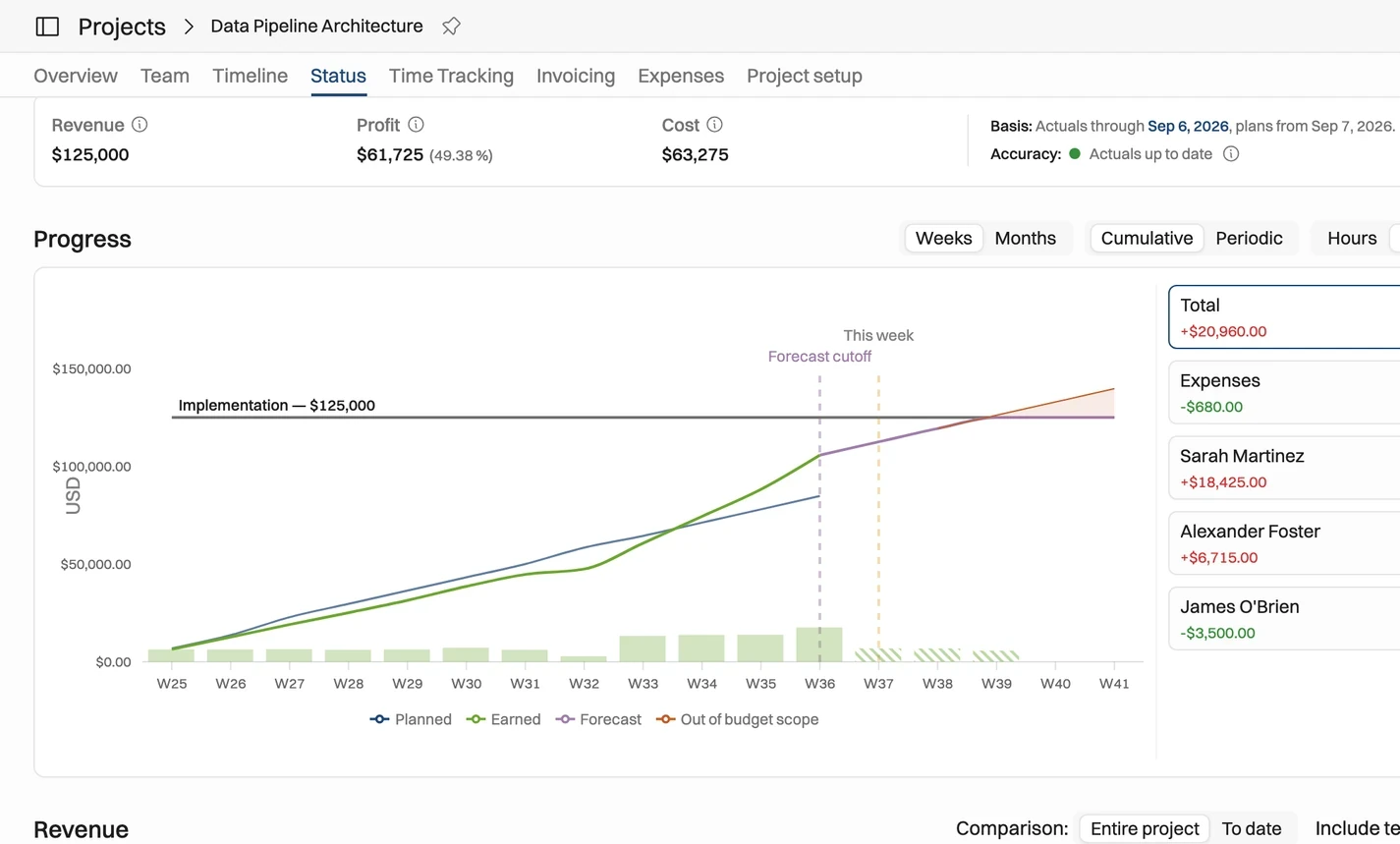
PSA vs Spreadsheets for Time Tracking and Planned vs Actual
In a spreadsheet setup, the plan and the timesheet live apart, so someone matches them after the period closes. In a PSA, time is logged and approved against the planned work, so hours reach margin and invoices as soon as they are approved.
The loop is plan, log, approve, compare and bill. With spreadsheets, someone exports timesheets, matches project codes, chases missing entries, and then picks which version of the plan counts as the baseline. If the plan changed three times this month, which one do you compare against?
In a PSA, the plan is the starting point for the timesheet. Operating, for example, prefills timesheets from the plan, so people confirm hours instead of rebuilding their week, and approval flows let project managers approve project hours (see time tracking). Our guide to planned vs actual hours explains how to read the variance.
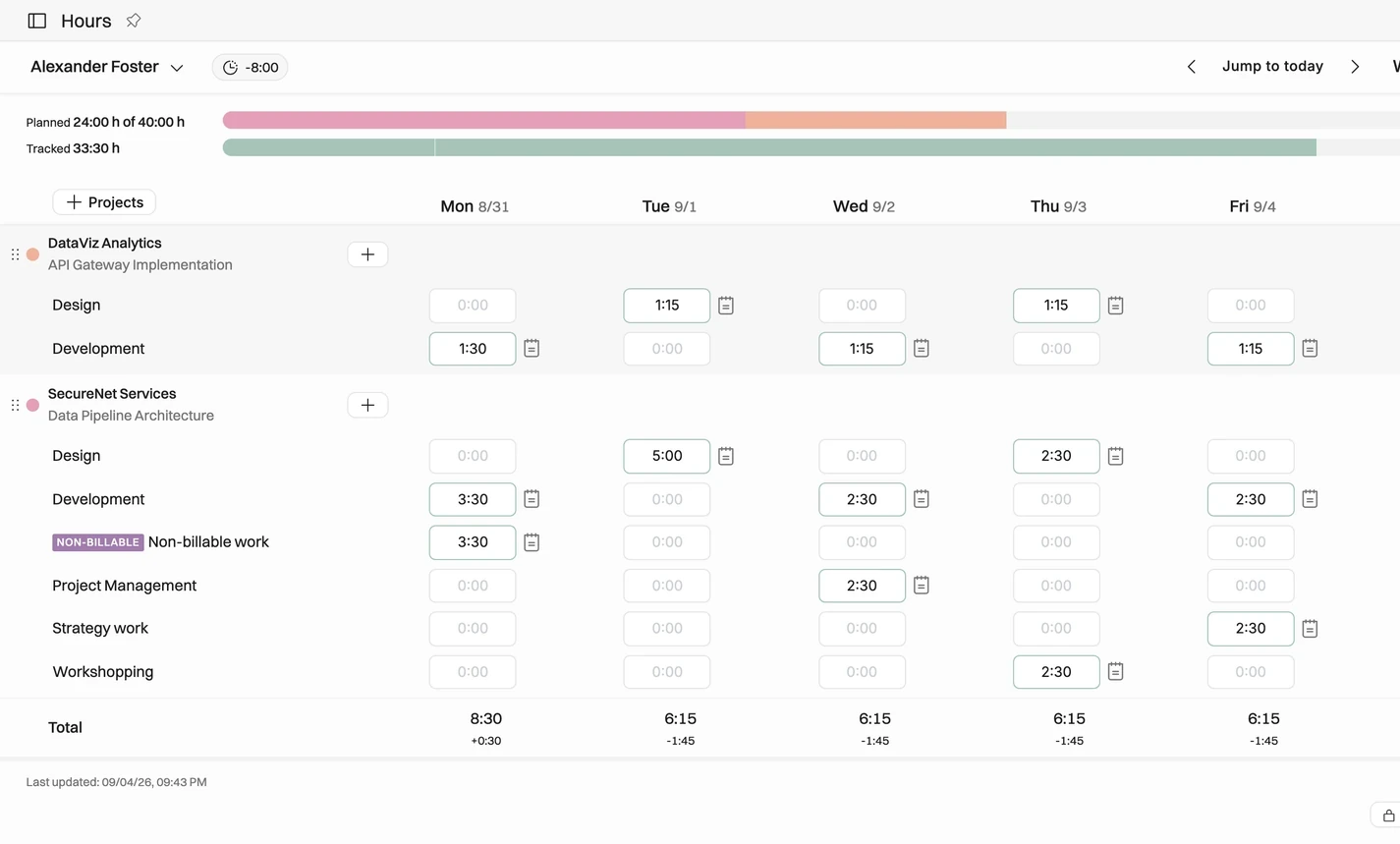
PSA vs Spreadsheets for Billing and Invoicing
Spreadsheet billing means rebuilding each invoice from timesheets, rate cards and contract terms. A PSA builds the invoice draft from approved time, rates, expenses and billing schedules, and passes it to accounting, which removes the handoffs where billable work slips through.
Where spreadsheet billing leaks, and what PSA changes
| Leak point | On spreadsheets | In a PSA |
|---|---|---|
| Inputs | A timesheet export, a rate-card tab and a contract in another file. | Approved time, rates and the billing schedule sit on the project. |
| Late or missing time | Hours logged after the invoice run wait a month, or are never billed. | Unsubmitted and unapproved hours are visible before the run. |
| Wrong project code | Hours on the wrong project are billed to the wrong client, or not at all. | Time is logged against the planned project and phase. |
| Approvals | Approval happens in email, not linked to the hours. | Hours are approved before they can be billed. |
| Stale rates | Old rates survive in old tabs and templates. | Rate cards attach rates to roles and people. |
| Missed schedule | A milestone is forgotten when the owner is away. | The billing schedule shows what is due and when. |
| Approved but not invoiced | Nobody sees approved hours that missed the invoice. | Uninvoiced approved hours stay visible until billed. |
Inventive.io's COO says the firm absorbed $250,000 in unbilled work in the year before it used Operating, and $25,000 the year after (Operating customers page). That is one customer's reported result, not a benchmark.
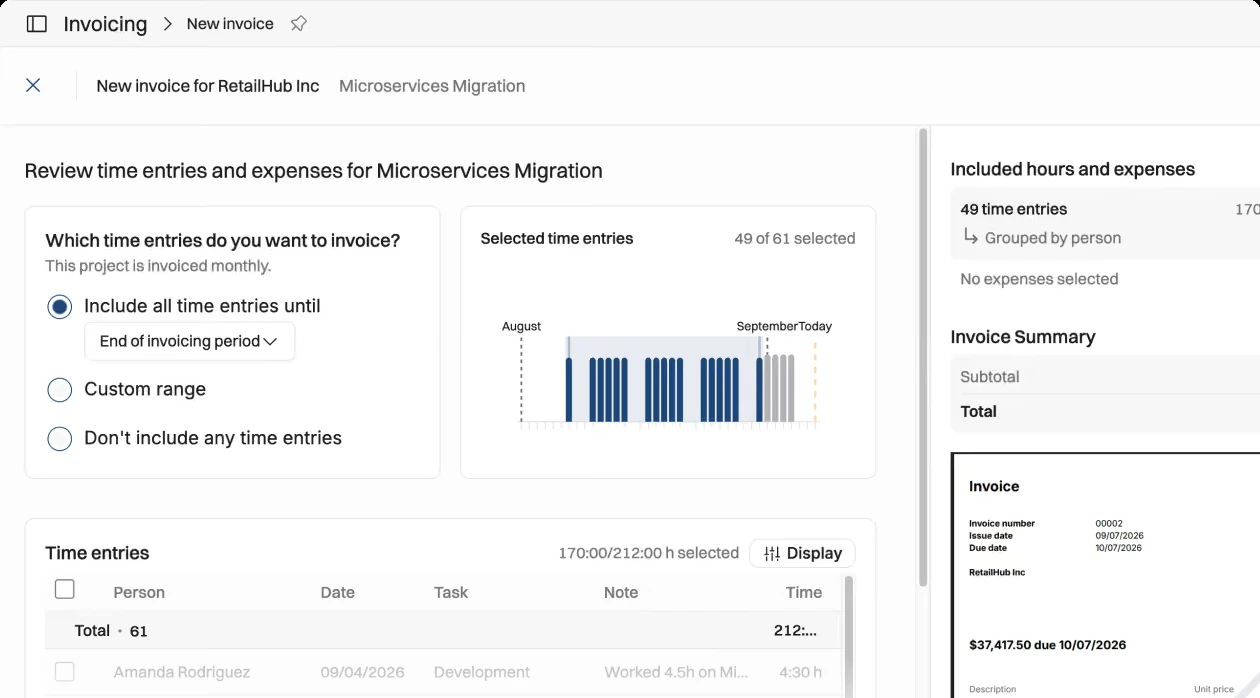
As of September 2026, Operating builds invoices from rates, approved time, expenses and the agreed schedule, supports milestones and multi-company invoicing, and syncs two ways with Xero and QuickBooks (see invoicing). One limitation: there is no native retainer billing type yet, so teams use back-to-back fixed-price budgets (billing types help article). Who should own the posted invoice is covered in PSA vs ERP.
What Month-End Looks Like on Spreadsheets vs PSA
On spreadsheets, month-end is a rebuild: someone collects timesheets, fixes rates, matches project codes and recalculates margin before invoices go out. In a PSA, month-end is a check, because time, invoice drafts and margin were kept current during the month.
Month-end close: spreadsheets vs PSA
| Step | On spreadsheets | In a PSA |
|---|---|---|
| Time cut-off | Missing timesheets are chased by email, then pasted in. | Unsubmitted and unapproved hours are listed by person and project. |
| Approvals | Managers approve in email, and someone records it. | Managers approve in the system, and hours are ready to bill. |
| Rates and fees | Each tab is checked for the current rate and fee. | Rates come from the rate card, fees from the budget. |
| Invoices | Rebuilt from exports, then typed into accounting. | Drafts built from approved time and schedules, then sent to accounting. |
| Margin report | Rebuilt after invoicing; leaders see the month for the first time. | Already current; month-end confirms it. |
Measure close time and manual adjustments for two months. If close takes a day and adjustments are rare, the spreadsheet still works. If it takes several days with rate fixes and late time every month, the coordination cost is already high.
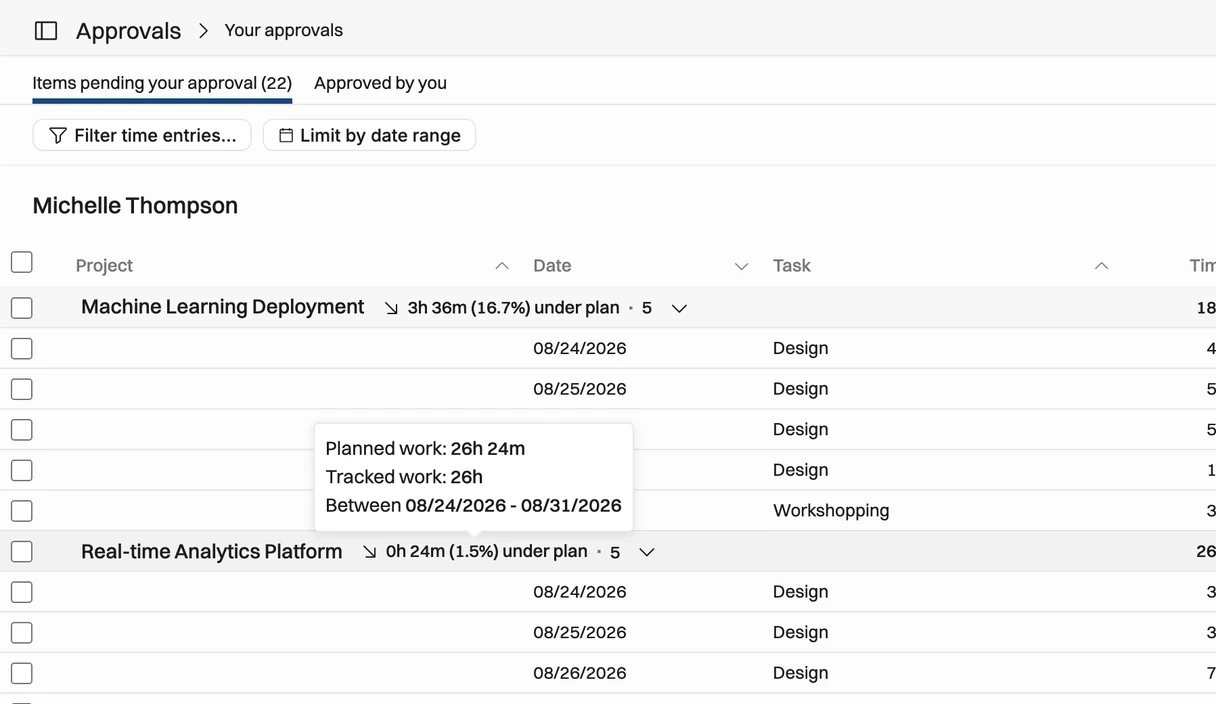
PSA vs Spreadsheets for Revenue Forecasting and Reporting
Spreadsheets are fine for a one-off revenue forecast and weak for one that must refresh every week from signed work, pipeline and actuals. A PSA keeps those inputs connected, so the revenue and margin forecast changes when a deal, a booking or an approved hour changes.
Next quarter's revenue has three parts: remaining value on signed projects, recurring work and pipeline. In a spreadsheet, each comes from a different export. In Operating, tentative projects from CRM deals are weighted by deal probability, while confirmed work counts in full (allocation probability help article).
A spreadsheet pack is usually rebuilt once a month by one person. A PSA report is the same view for everyone, any day of the month.
Be realistic about depth. As of September 2026, Operating's built-in reports cover portfolio, projects, capacity, people, planned vs actual and utilization; custom analysis runs through CSV, Excel or the REST API (reports help article). Firms that need heavy custom reporting inside the tool may find more flexibility in some legacy enterprise setups.
PSA vs Spreadsheets for Staffing and Utilization
A staffing spreadsheet records who is booked where. A PSA links each booking to the project, the person's availability, their skills and the pipeline, and shows planned utilization next to actual. For this decision, staffing matters mainly because it drives cost: every booking change also changes project margin and future revenue.
In a spreadsheet, a booking change reaches the margin model only when someone copies it across. In a PSA, the booking is the cost plan, so the margin forecast moves with it. The staffing mechanics (availability after time off, confirmed and tentative bookings, skills, roles and bench) get their own comparison in resource planning software vs spreadsheets. It also covers when moving resource planning out of Excel is worth it even if billing stays in spreadsheets. For the metric itself, see our guide to billable utilization.
What Changes When You Move From Spreadsheets to PSA?
The main change is that each step of the client lifecycle hands its data to the next step automatically, instead of through a copied spreadsheet. A deal becomes a project, the project creates demand by role, bookings become planned hours, approved time becomes actuals, and actuals drive margin, invoices and reports.
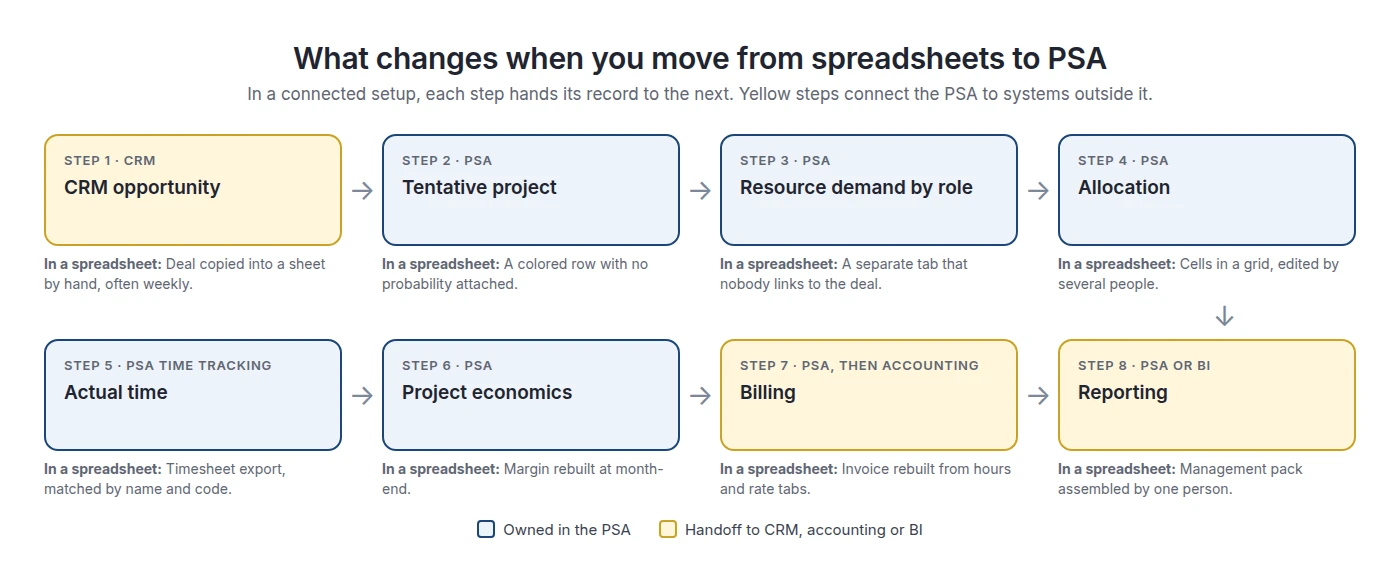
- A CRM deal creates a tentative project.
- The project reserves demand by role.
- When the deal closes, roles become named bookings.
- Bookings become planned hours and the cost plan.
- Approved time and expenses become actuals.
- Margin and remaining budget update.
- Billing inputs become invoice drafts for accounting.
- Reports read the same records for everyone.
At the first step alone, Supreme Optimization's COO says copying CRM data into allocation sheets took three hours a week, and now takes 15 to 20 minutes with Operating connected to HubSpot and Harvest (customer-reported; Supreme Optimization case study).
Do not ban Excel. Demote it. Keep it for pricing models, scenarios and analysis. Stop using it as the shared record that sales, delivery and finance depend on.
AI is a newer reason to connect operations: assistants work much better with structured, permissioned records than with copied sheets. Eliza, which grew to 85 people in 12 months, says its AI agents read and write data through Operating's MCP server and REST API (Eliza case study). As of September 2026, the MCP server offers 59 read and write tools (MCP help article).
Signs Your Firm Has Outgrown Spreadsheets
You have outgrown spreadsheets when your team spends more time assembling operational facts than deciding what to do with them. Look for observable signals such as repeated reconciliation, invoices rebuilt from exports and margin you only trust after month-end, not for a headcount number.
Signs you have outgrown spreadsheets
| Signal | What you see | What to measure |
|---|---|---|
| Latency | “What is this project's margin today?” takes hours or a meeting. | Time to answer a standard margin or billing question. |
| Divergence | The CRM, the plan and finance show different dates, scope or budgets for the same project. | Mismatches found per month. |
| Duplication | Deal data, hours or rates are typed into more than one tool. | Admin hours per week spent copying data. |
| Forecast surprises | Next month's revenue changes every time someone rebuilds the forecast. | Forecast error one and three months out. |
| Late margin | Project margin is trusted only after month-end close. | Days from a delivery change to a visible margin change. |
| Exception load | Month-end depends on rate fixes, missing time and special formulas. | Close duration and manual adjustments per close. |
| Billing lag | Billable work waits because hours or rates were not ready. | Unbilled approved hours and value; days from work to invoice. |
| Key-person risk | Only one person can safely edit the master workbook. | Number of people who can run the weekly and monthly process. |
Before you compare prices, put a number on the current setup: spreadsheet coordination cost = admin time + reconciliation time + revenue leakage + decision delay + control risk. The first three are measurable from your own hours and unbilled work. If they are small, a spreadsheet is probably still the rational choice. For a worked example, see is a PSA worth it for a 30-person firm.
What Data Should You Move Into PSA?
Move the data you need to run current and future work: people, roles, skills, rates, active clients and projects, current allocations and open budgets. Integrate data that another system owns, archive closed history, and rebuild spreadsheet formulas as business rules instead of copying them.
What to move, integrate, archive or rebuild
| Data | Recommended treatment | Why |
|---|---|---|
| People, roles, seniority, skills, working hours | Move, or sync from the HR tool | This is the base for cost rates and bookings. |
| Active clients, projects, phases and dates | Move | Needed for time entry and billing from day one. |
| Current and future allocations | Move | The go-live cost plan must match reality on the first day. |
| Rate cards and cost rates, with effective dates | Move | Project economics depend on which rate applied when. |
| Open budgets, milestones, billing schedules | Move selectively | Only what active work needs to continue. |
| Unbilled approved time, open invoices, work in progress | Move or reconcile with accounting at cutover | Prevents double billing and lost billing. |
| CRM pipeline, HR records, general ledger | Integrate, do not copy | Another system already owns these records. |
| Closed projects and old timesheets | Archive read-only, unless reporting or audit needs them | History adds import work and noise without helping current operations. |
| Duplicates, test rows, old file versions | Do not migrate | Conflicting history brings the old ambiguity into the new system. |
| Custom formulas and helper columns | Rebuild as configuration or reports | Keep the business rule, not the cell mechanics. |
Why not migrate all history? Each year of old data needs cleaning and mapping, and most of it will never drive a billing or margin decision. Move history only for a real need, such as open balances, audit rules or a margin baseline, and archive the rest where you can still read it.
How to Move From Spreadsheets to PSA
Define who owns each record first, then clean and import only current operating data, pilot with one team, and retire the old sheets as the system of record. The software setup is usually the easy part. The hard part is agreeing on ownership and changing the weekly and monthly routines.
- Define ownership of customers, projects, people, time, rates and invoices.
- Clean the active data: remove duplicates, standardize roles, rates and codes.
- Design the minimum workflow from deal to invoice. Do not rebuild every old tab.
- Import current data first and archive history.
- Connect CRM, HR and accounting around the ownership rules.
- Pilot one team for a month and compare budgets, invoices and margins with numbers you trust.
- Cut over the routines: run billing, month-end and staffing in the new system, and make old sheets read-only.
Timelines depend on data quality, integrations and finance scope. Treat fixed plans, such as Projectworks' 30-day roadmap, as plans, not promises. As of September 2026, Operating's pricing page lists data migration, training and support as included in every plan. For the full rollout, see our PSA implementation and rollout plan.
After go-live, treat shadow spreadsheets as signals. SPI Research's 2026 PSA End-User Survey found that PSA value depends on breadth of use, integration, data quality and management commitment (SPI Research). A new sheet usually shows which of those is missing.
PSA or Spreadsheets: A Decision Framework
Stay on spreadsheets while complexity is low on most dimensions. Start evaluating PSA when several dimensions are high at the same time, especially mixed billing models, many handoffs between systems, the need for in-flight margin and pipeline-driven planning.
Stay on spreadsheets or start evaluating PSA
| Dimension | Stay on spreadsheets if... | Start evaluating PSA if... |
|---|---|---|
| Ownership | One owner keeps the model current. | Several teams own inputs that must stay in sync. |
| Handoffs | The same person sells, delivers and bills. | Sales, delivery and finance each own part of the project. |
| Financial model | You use one billing model and one rate card. | You mix fixed fee, T&M and capped T&M with several rate cards. |
| Planning horizon | You mostly report what already happened. | You need in-flight margin and forward revenue forecasts. |
| Pipeline | The pipeline does not change revenue or hiring plans. | The pipeline must shape revenue forecasts and hiring. |
| Month-end | Close takes hours and needs few adjustments. | Close takes days and needs rate fixes and late-time chases. |
| Process maturity | Your process still changes every month. | The operating model is stable enough to standardize. |
If your main pain is finance control, such as several legal entities or consolidation, the next question is whether you need PSA or ERP.
Not sure which side of the line you are on? Bring one project's spreadsheet, from deal to invoice, to a 30-minute call. We will show what would move into Operating and what should stay in Excel. Book an intro
Where Operating Fits, and Where It Does Not
Operating (operating.app) is a PSA for consulting and technical services firms that want resource planning, time, project financials and invoicing in one system, next to their CRM and task tools. It typically fits firms of about 30 to 500 people; above 500, fit depends on entities, security, governance and ERP needs.
Where it fits well (as of September 2026):
- HubSpot, Salesforce and Pipedrive deals become projects that stay tentative until they are signed.
- Timesheets are prefilled from the plan, with approval flows.
- Project status shows planned, earned and forecast value against the budget.
- Invoices are built from approved time, rates, expenses and schedules, and sync two ways with Xero and QuickBooks.
- An MCP server and a REST API for AI assistants and other tools, within user permissions.
- Data migration, training and support are included in every plan, and pricing starts from $13 per person per month (pricing).
Where to check fit carefully:
- Retainers: there is no native retainer billing type yet.
- Reporting: built-in reports are standard views; deep custom reporting runs through exports or the API.
- Task management: Operating plans at project, phase and allocation level and is not meant to replace Jira, Asana or Linear (see PSA vs project management software).
- NetSuite: connected today through the REST API; a native connector is on the roadmap (NetSuite integration).
PSA vs Spreadsheets FAQ
What is the difference between PSA and spreadsheets?
A spreadsheet stores a copy of operational facts that someone must keep current. PSA software stores those facts as connected records, so deals, bookings, time, project margin and billing update from one model. Spreadsheets are more flexible for one-off analysis. PSA is better when several teams must work from the same, current data.
When should a consulting firm stop using spreadsheets?
When keeping the spreadsheet in sync becomes a job of its own. Typical signals are invoices rebuilt from exports every cycle, margin you only trust after month-end, CRM deals copied by hand, and approved hours that miss invoices. These signals matter more than headcount, because a small firm with mixed billing models can hit them earlier than a larger firm with simple contracts.
Can Excel replace PSA software for a small consulting firm?
Yes, for a while. A small firm with one operations owner, few active contracts and simple billing can run well on Excel or Google Sheets. Excel is also better than most tools for pricing models and one-off analysis. The limit comes when several people and systems must keep the same records in sync every week.
What does PSA automate that Excel does not?
PSA automates the handoffs between steps. CRM deals become projects, bookings become the cost plan, timesheets are logged against the plan, approved time flows into invoices, and margin updates from the same records. Excel can calculate each step, but a person has to move the data between them.
How do I know if my firm has outgrown spreadsheets?
Measure the cost of coordination. Track how long it takes to answer “what is this project's margin today?”, how many hours a week go into copying data between tools, how long month-end takes, and how much approved work is not yet invoiced. If these numbers keep growing, you have outgrown the spreadsheet.
Is there a team size at which you need PSA?
No reliable threshold exists. Vendors suggest different numbers, such as 20 to 30 people, but these are heuristics. Complexity decides it: how many billing models you use, how many handoffs a project has, how often plans change and how many systems must stay aligned. Team size is only a rough proxy for those factors.
What data should I migrate from spreadsheets to PSA?
Migrate what you need to run current and future work: people, roles, skills, working hours, active clients and projects, current allocations, rate cards with effective dates, and open budgets. Integrate CRM, HR and accounting data instead of copying it. Rebuild spreadsheet formulas as business rules, and leave duplicates and old versions behind.
Should historical project data be migrated to PSA?
Usually not all of it. Move history only when it serves a clear need, such as open balances, audit requirements or a year-over-year margin baseline. Archive the rest in a read-only format. Importing years of old timesheets adds cleaning and mapping work but rarely improves current billing or margin decisions.
Can I keep Excel after implementing PSA?
Yes. Most firms keep Excel for pricing models, one-off scenarios and analysis. What should change is its role: it stops being the shared system of record for time, billing and margin. A useful rule is that any number used to staff, bill or report should come from the PSA, not from a copy.
How long does it take to move from spreadsheets to PSA?
It depends on data quality, the number of integrations and how much finance scope you include. A single team with clean data can pilot within weeks, while multi-entity billing and accounting integration take longer. Treat fixed timelines, such as 30-day plans, as planning aids rather than promises, and measure success against a baseline.
Is PSA worth it if we already use a CRM, project management and accounting software?
Often yes, because those tools do not cover the middle of the lifecycle: bookings, approved time, project margin and billing inputs. PSA connects the CRM pipeline to delivery and delivery to accounting. It is not worth it if one person can keep those links current in a spreadsheet with little effort.
How do spreadsheets cause unbilled work?
Mostly through timing and handoffs. Hours are logged after the invoice run, coded to the wrong project, approved in an email the biller never sees, or billed at an old rate. Each gap is small, but it repeats every cycle. Track approved hours that are not invoiced, and days from work to invoice, to see the size of the leak.
Methodology
We built this comparison from first-party and independent sources, not from other comparison articles. Research closed on September 28, 2026.
- Spreadsheet capabilities: checked against Microsoft's own Excel documentation, so we do not claim spreadsheets lack features they have.
- Independent evidence: SPI Research's 2026 PSA End-User Survey and a 2024 peer-reviewed review of spreadsheet quality research.
- Operating capabilities: checked against operating.app product pages, pricing and the Operating help center as of September 2026.
- Customer results: Supreme Optimization, Inventive.io and Eliza results are customer-reported and published by Operating. They are examples, not benchmarks.
- Frameworks and examples: the coordination-cost formula, the leakage and month-end tables, the decision framework and the fixed-fee margin example are frameworks and illustrations created for this article.
- Screenshots: Operating product images only. We did not reproduce other vendors' interfaces.
- Disclosure: Operating publishes this page.
Sources
Independent research and documentation
- SPI Research: The 2026 PSA End-User Survey Report (August 2026)
- Poon, Lau, Yu and Tang: Spreadsheet quality assurance, a literature review. Frontiers of Computer Science (2024)
- Microsoft: Get help with Show Changes in Excel
Vendor sources referenced
- BigTime: How to move from spreadsheets to a PSA platform (vendor heuristic on firm size)
- Projectworks: A 30-day roadmap for transitioning from spreadsheets to PSA software
Operating sources
- Time tracking
- Invoicing
- Pricing
- Help: What is allocation probability?
- Help: What are the billing types? (known limitations)
- Help: Reports available in Operating
- Help: AI chat via MCP
- Case study: Supreme Optimization
- Case study: Eliza
- Customers (Inventive.io quote)
Published by Operating (operating.app). Author: Lauri Eurén. Last updated September 28, 2026.



