



Last updated September 26, 2026.
Short answer: Excel is enough for resource planning when one planner can keep availability, allocations and demand current, and most people can do most of the work. Move to resource planning software when shared people, frequent changes, time off, skills and pipeline demand make the plan hard to keep in sync. The problem is not the grid. It is the number of updates that must flow into it every week.
Excel is not bad at resource planning. It supports co-authoring, data validation and scenarios, and it is fast to change. What becomes hard is keeping one model of supply, demand, allocations, skills, time off and actual hours current when those facts come from different people and systems at different speeds.
That connected model is what we mean by integrated resource planning: a staffing plan linked to your CRM, HR tool, projects and timesheets. (In the energy sector, the same phrase describes long-term power-system planning, which is a different topic; see WRI.) This guide compares resource planning software vs spreadsheets for staffing, allocation, capacity, skills, pipeline demand, utilization and planned vs actual.
Resource Planning Spreadsheet vs Software at a Glance
A resource planning spreadsheet records a plan. Resource planning software keeps a shared model of people, time and work in sync as inputs change. The table compares them on the planning needs that matter in consulting and professional services.
See your own staffing plan in Operating. Book a 30-minute walkthrough of allocations, capacity and pipeline demand using your real team and deals. Book an intro with Lauri
When Is Excel Still Good Enough for Resource Planning?
Excel is good enough when the planning model is small, one person owns it and changes are rare. It is also the better tool while you are still working out how you want to plan, because changing a spreadsheet is faster than configuring software.
- One planner owns the plan and checks every change.
- Few projects run at once, and staffing changes once or twice a month.
- People are mostly interchangeable, so hours are a fair proxy for capacity.
- Signed work drives staffing; the pipeline rarely changes who is booked.
- Planned vs actual is easy to check by hand at the end of the month.
- The sheet still answers “who is free, for what, and when?” without a meeting.
Even vendors say this. Float's own comparison with spreadsheets describes them as a reasonable starting point and suggests switching once you manage several projects, rates and margins. Excel's Scenario Manager also handles one-off what-if questions well, with up to 32 changing values per scenario.
Spreadsheets also stay useful after you buy software. In a 2025 study of 50 organizations by the Resource Management Institute and ProServe Metrics, 79% used PSA, PPM or resource planning tools, and 70% also used Excel or Google Sheets for resource management (RMI / ProServe Metrics). The useful question is not “Excel or software?” but “which part of the plan must be shared and current?”
How Resource Planning Actually Works in a Spreadsheet
A serious staffing spreadsheet has more than one grid. It separates supply (people and availability), demand (projects, roles and pipeline) and allocations (the decisions that connect them), and it adds actuals to check the plan.
The key design rule is that capacity, demand and allocation are three different things. Demand can exist before anyone is named. A person can have free hours and still not fit a project. An allocation can be tentative. Stronger templates reflect this: Accelo's 2026 resource planning template, for example, is built around role and skill capacity gaps rather than one big grid.
A realistic weekly routine with this workbook looks like this:
- Refresh supply: new starters, leavers, contracted hours, time off and internal work.
- Refresh confirmed demand: check project dates and role needs before touching named bookings.
- Refresh the pipeline: stage, probability, expected start and role mix from the CRM.
- Recalculate gaps by role and skill, not only in total.
- Resolve named allocations: fix overbooking, unfilled demand and bench.
- Compare last week's actuals with the plan.
- Log the decisions, so next week starts from what was agreed.
This routine works. The question is how many hours it takes each week, and how often the inputs have already changed by the time the planner finishes.
Where Resource Planning Spreadsheets Begin to Break
Resource planning spreadsheets break when changes arrive from several people and systems every week, and each change has to be copied into several tabs by hand. The formulas keep working. The update process is what fails.
Worked example: time off after the booking. Jane has a 40-hour week and is booked for 32 project hours, so she shows 80% loaded. She then books 16 hours of time off. Her real capacity is 40 minus 16, or 24 hours, so her load is 32 ÷ 24, or 133%. A grid that stores “32 of 40” still shows 80% until someone reconciles the leave. The formula was right. The event never reached it.
Three quieter failures make this worse:
- Semantic drift. One manager defines “available” as not booked on client work. Another also subtracts time off and internal work. Both formulas are correct, and the combined plan is wrong.
- Time-grain collision. Time off is daily, bookings are weekly, sales starts are monthly and finance forecasts are quarterly. Someone has to decide how a Wednesday start counts in a weekly grid.
- Status collision. A 50% deal and a signed project look the same in a cell, or the tentative work is left out and the plan shows false free capacity.
Collaboration features do not solve this. Co-authoring lets several people edit at once, and Google Sheets can protect ranges, although Google says protection should not be used as a security measure. Neither pulls an approved leave request, a new deal date or a corrected timesheet into the plan. That synchronization is what resource planning software is for.
Resource Allocation in Excel vs Resource Planning Software
In Excel, an allocation is a number in a cell. In resource planning software, it is a record with a person, project, dates, effort and status, which lets the tool tell confirmed work from tentative work and flag overbooking without a manual check.
Example: two tentative deals, one scarce person. One senior data engineer is free from November. Deal A (70%) and Deal B (50%) both need her at 60% from the same week. In a spreadsheet, the planner usually picks one of two bad options: book her on both and create a hidden 120% load, or book her on neither and create a phantom bench. A better model keeps both bookings tentative, shows the conflict, and sets a rule, such as confirming her on the first deal that reaches contract stage and lining up a contractor for the other.
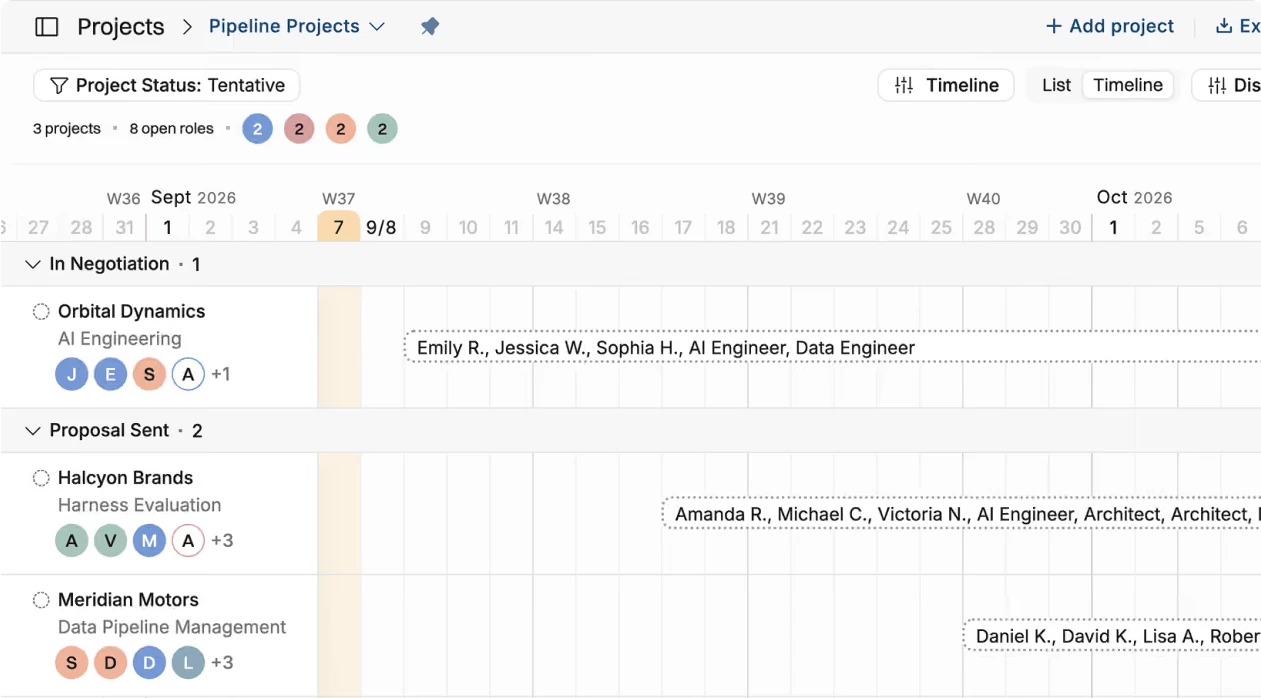
In Operating, each allocation is either confirmed or tentative, and unfilled positions can specify role, site, seniority and skills before a person is named (positions and allocations help article). Tentative projects can come straight from HubSpot, Salesforce or Pipedrive deals.
Capacity Planning in Excel vs Resource Planning Software
Capacity planning compares future supply with future demand. Excel can do the math, but supply and demand change in different systems, so the comparison is only as current as the last manual refresh. Software recalculates it as bookings, time off and deals change.
Do not reduce capacity to “people × 40 hours”. A layered model shows what is really usable. The example below follows one consulting team for one month:
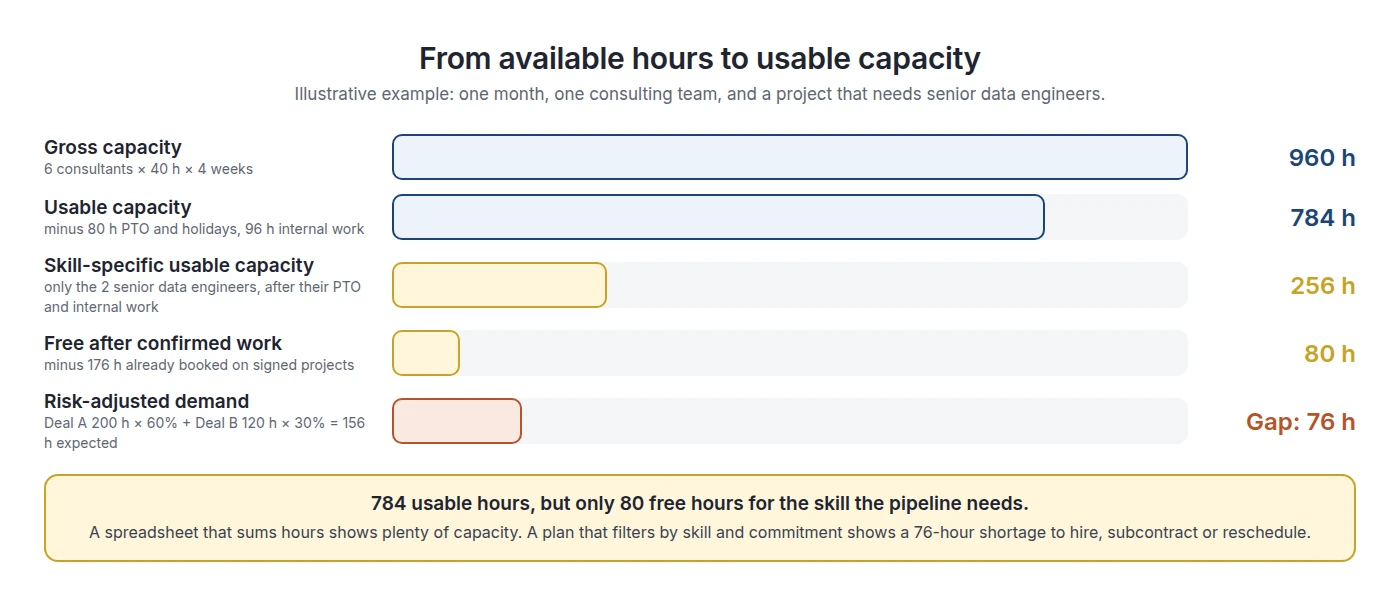
The gap is the start of a decision, not the end. The usual options are to hire (slow, but lasting), subcontract (fast, but lower margin), move a start date, move work from another project, or decline the work. Each option has a lead time, so the value of capacity planning depends on how early the gap becomes visible.
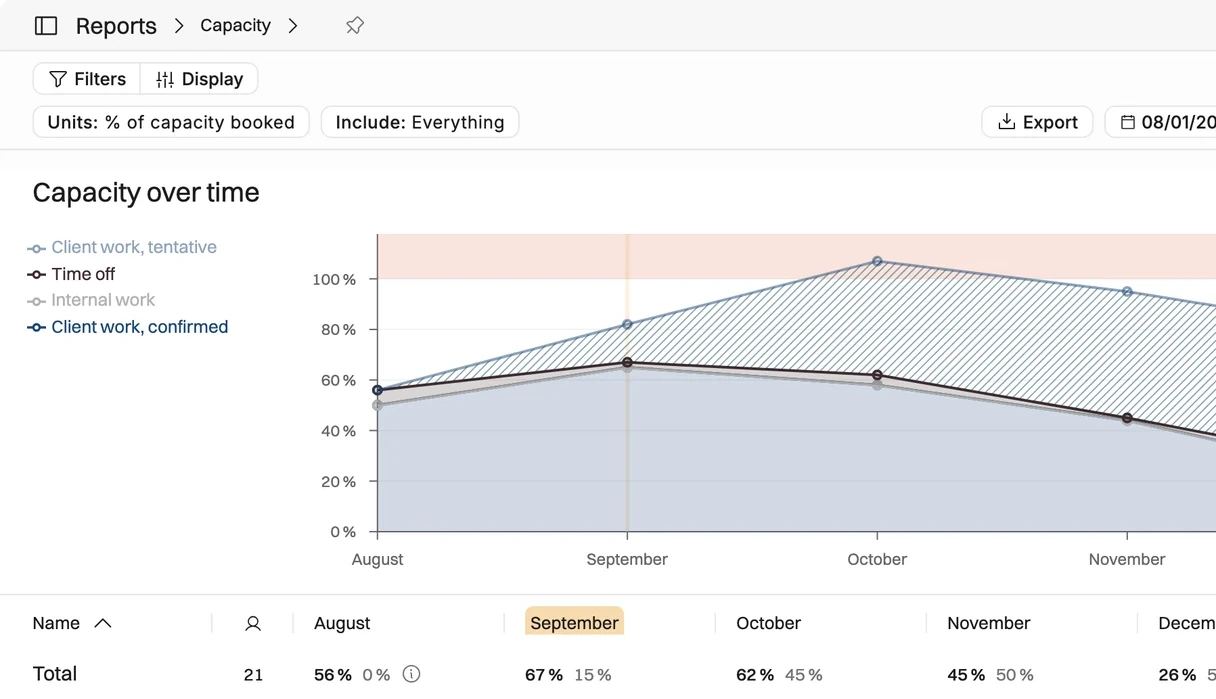
In Operating, the capacity view adds up confirmed and tentative work and sets it against the hours the team actually has, by role, skill or team, with gaps visible months out (capacity planning).
Why Available Hours Are Not the Same as Usable Capacity
An unbooked hour only counts as capacity if the right person can use it on the right work at the right time. Skills, seniority, certifications, location, client rules, security clearance and the length of the free window all reduce what is really usable.
- Skills and seniority: a junior analyst's free week does not cover a senior architect's demand.
- Certifications: some clients and platforms require certified staff.
- Geography and time zone: on-site work or overlapping hours can rule people out.
- Client restrictions: some clients exclude people who worked for a competitor, or require continuity from a previous project.
- Security clearance: public sector and regulated work may need cleared staff.
- The availability window: two free days in three different weeks rarely equal one usable week.
Research on consulting staffing backs this up. In the RMI and ProServe Metrics study, 97% of respondents used technical skills and availability when staffing, 73% used prior client or industry experience and 56% used billing rate or cost. Determining who is actually available was the top named challenge, at 52%, and finding people with the right skills was named by 48% (RMI / ProServe Metrics).
It also helps to split “bench” into four kinds (our framework):
- True bench: free and suitable for current demand.
- Structural bench: free in a role where demand is weak.
- Timing bench: free now but needed soon, so a new booking would create a later conflict.
- False bench: shown as free only because time off, internal work or a tentative booking was not recorded.
In short: unbooked capacity is not the same as deployable capacity, and spare hours across the firm are not the same as capacity for one role.
Skills-Based Resource Planning
Skills-based resource planning checks capacity by role and skill, not only in total. It explains how a firm can have free hours on the bench and still need to hire.
The total says the firm has 80 spare hours. The role view says it has a 120-hour architect shortage and 200 idle analyst hours. A spreadsheet that sums hours gives the first answer. A plan that filters by skill gives the second, which is the one you need for staffing, pricing and hiring.
Skills data also goes stale. A skills matrix that says someone “knows SAP” is less useful than one that records the level and when the skill was last used on a project. TSIA describes modern resource management as combining demand, supply and performance signals from PSA, CRM and HR systems (TSIA), and skills are part of that supply signal.
In Operating, you match people to projects by role, skills and availability, and you can narrow the search by skill level and by interest in a skill. The staffing view shows role, seniority and skill matches next to each person's free percentage.

Pipeline-to-Capacity Forecasting
Pipeline-to-capacity forecasting turns likely deals into expected demand by role and week, so you can see shortages before deals close. Use probability-weighted hours as a planning signal, not as a booking, and check your CRM probabilities against real win rates.
The starting formula is expected demand = role hours × probability. The table extends the capacity example above with a third, early-stage deal, and compares CRM probabilities with historical win rates at the same stage (illustrative numbers):
Against 80 free hours, the CRM view shows a 106-hour gap and the calibrated view shows a 49-hour gap. That difference can decide whether you open a permanent role or book a contractor. It is why stage probabilities should be checked against your own win rates, not accepted as labels.
- Separate the uncertainties. Probability of winning is not the same as probability of starting on the planned date, or of needing the planned role mix.
- Use forecast horizons. Look at 2, 4, 8 and 12 weeks ahead, and measure how wrong each horizon was last quarter.
- Keep two views. Weighted hours help aggregate planning. Tentative bookings test whether a named person can really cover the work. There is no such thing as 60% of a consultant in a real week.
- Let error change the decision. The less reliable the forecast at a horizon, the more you should prefer flexible options, such as contractors, over fixed hires.
As of September 2026, Operating creates tentative projects from HubSpot, Salesforce and Pipedrive deals. Weighted reports use probability × planned hours, can fall back to the linked CRM deal's probability, and always count confirmed work in full (allocation probability help article).
Planned vs Actual Resource Usage
Planned vs actual compares the hours you allocated with the hours people actually logged. It is the feedback loop that makes the next plan better, because repeated variance shows where estimates, allocations or capacity assumptions are wrong.
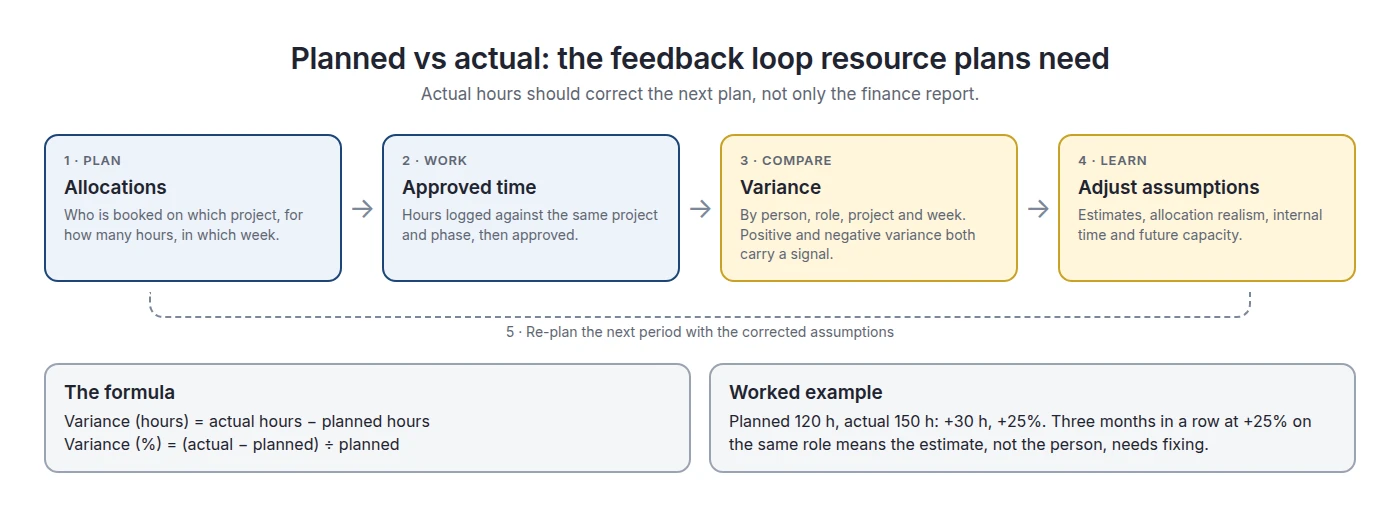
Read variance in both directions:
- Actual above plan can mean the work was underestimated, scope grew, a senior person did junior work, or internal time was booked as client work.
- Actual below plan can mean the work was overestimated, a dependency slipped, time was not logged, or capacity was held but not used.
A spreadsheet can do this math easily. What makes it expensive is the preparation: importing timesheets, matching people and project codes, fixing missing entries, and choosing which version of the plan is the baseline. The advantage of software here is that plan and actuals share the same people and project records, not better arithmetic.
Operating shows planned utilization from bookings next to actual utilization from approved timesheets, per person and period. For more, see planned and actual utilization in projects and planned vs actual hours.

Utilization Planning in Spreadsheets vs Software
Utilization planning sets target billable hours ahead of time and checks them against what happened. The formulas are simple. The difficulty is using one denominator everywhere and seeing utilization by role, not only as a firm-wide average.
The denominator problem. A consultant logs 32 billable hours in a 40-hour week, with 8 hours of fixed internal work. On gross hours, utilization is 32 ÷ 40, or 80%. On available hours, it is 32 ÷ 32, or 100%. Same week, two answers. Pick one definition, write it down, and use it in every report.
Averages also hide shortages. A firm at 75% average utilization can have architects at 110% and analysts at 55%. The average suggests there is room. The role view shows a hiring or pricing problem. We also avoid a universal “healthy” utilization figure: the right target depends on role, seniority and the amount of sales and internal work each role carries.
In Operating, planned utilization comes from bookings weeks ahead and actual utilization from approved timesheets, side by side, and the utilization formula can be customized once for the whole firm (resource utilization).
Scenario Planning for Resource Managers
Scenario planning asks “what happens to capacity if this changes?” before you commit. Excel can model scenarios, but each one is usually a copy of the workbook. Software runs the what-if against the same live data and then turns the chosen option into bookings.
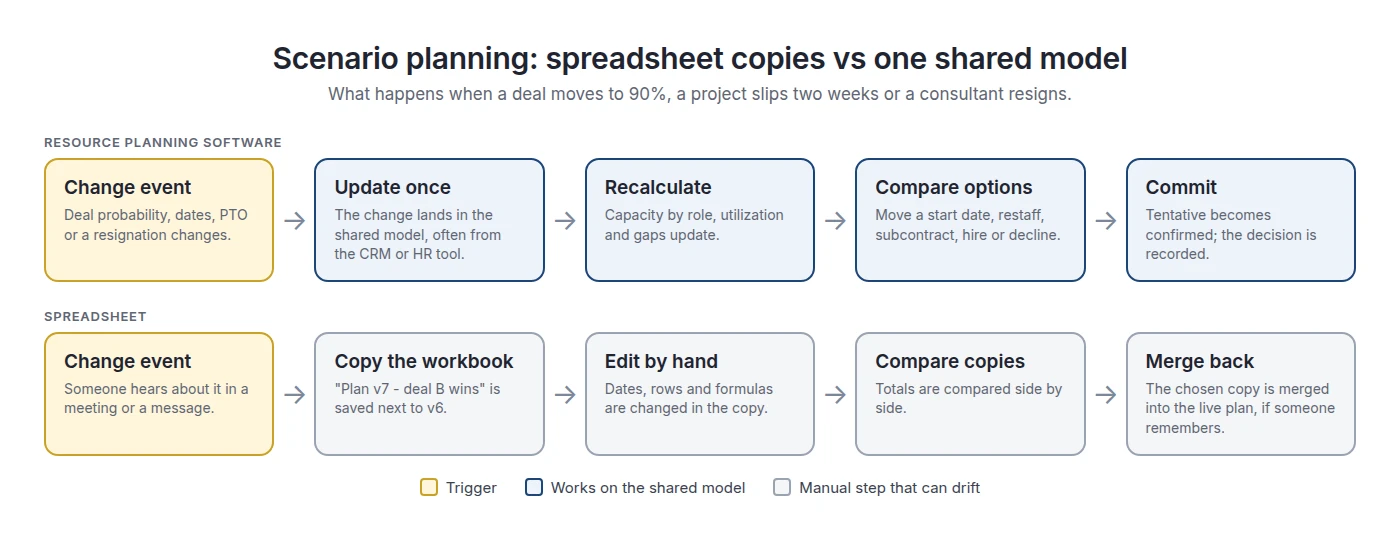
The weak point in spreadsheets is not the scenario itself. It is the step where the chosen copy has to be merged back into the live plan while other people keep editing the original. In Operating, you can test what winning a tentative deal does to capacity by role before you confirm it, and then confirm the bookings in the same plan (capacity planning).
When Should You Move Resource Planning Out of Excel?
Move resource planning out of Excel when maintaining the plan costs more time and trust than the staffing decisions it supports. In practice, that means several of the triggers below are true at the same time. Headcount alone is not a reliable trigger.
The last trigger is easy to measure and often large. In the RMI and ProServe Metrics study, 44% of respondents spent 2 to 5 hours a week searching for information about people, skills, availability and project history, and another 44% spent more than 5 hours (18% at 6 to 10 hours, 11% at 11 to 15 hours and 15% at over 15 hours) (RMI / ProServe Metrics). If your planners are in the second group, you can compare that labor cost directly with the cost of software.
Want to test the switch on one team first? We will import one team's people, projects and bookings into Operating so you can compare the plan with your spreadsheet side by side. Book an intro
Resource Planning Software vs PSA
Resource planning software focuses on people, capacity and staffing. PSA (professional services automation) includes resource planning and adds time tracking, project financials, billing and broader delivery operations. Choose by how many spreadsheet workflows you need to replace.
If staffing and capacity are your only spreadsheet problem, a dedicated resource planning tool can be enough. If you also rebuild timesheets, project margins and invoices by hand, you need more than a scheduler. That is when staffing is not the only spreadsheet workflow you need to replace, and the broader comparison is PSA vs spreadsheets.
Operating is a PSA, but its entry Planning plan covers staffing, capacity, budgets and skills, with time tracking and invoicing in higher plans (from $13 per person per month as of September 2026; see pricing). So a firm can start with resource planning and add the rest later. If you are also deciding what your ERP or accounting system should own, see PSA vs ERP.
Resource Planning Software vs Spreadsheets FAQ
Can Excel be used for resource planning?
Yes. Excel can calculate capacity, allocations, utilization and scenarios, and it supports co-authoring and data validation. It works well for one planner with few shared people and stable schedules. It becomes costly when bookings, time off, deals and actual hours change every week in different systems and must be copied in by hand.
What is the best alternative to a resource planning spreadsheet?
Dedicated resource planning software, or a PSA if you also need time tracking, project financials and billing. The best alternative keeps confirmed and tentative bookings, skills, time off and pipeline demand in one model. Choose by the workflows you need to replace, not by feature count.
When should I move resource planning out of Excel?
When several triggers are true at once: people are shared across many projects, several managers edit bookings, the pipeline shapes staffing, skills limit who can do the work, and planners spend hours a week finding information. Measure these before you switch. Team size alone is not a reliable signal.
What does resource planning software do that Excel cannot?
It keeps bookings linked to people, projects, time off, skills and deals, so one change updates capacity, utilization and project views automatically. It separates confirmed from tentative work, flags overbooking and puts actual hours next to the plan. Excel can model all of this, but someone has to keep every link current.
Is resource planning software the same as PSA?
No. Resource planning software covers staffing, allocation and capacity. PSA includes resource planning and adds time tracking, project budgets and margin, billing and delivery reporting. Some PSAs, such as Operating, let you start with resource planning and add the other parts later.
How do consulting firms forecast resource capacity?
They compare future supply with future demand by role and week. Supply is usable capacity after time off and internal work. Demand is confirmed work plus probability-weighted pipeline demand. Strong forecasts check CRM probabilities against real win rates and measure forecast error at several horizons, such as 2, 4 and 8 weeks.
How should tentative projects be included in capacity planning?
Keep them separate from confirmed work. Use probability-weighted hours for aggregate capacity forecasts, and tentative bookings to test whether named people can cover the work. Do not let a 60% deal look identical to a signed project, and do not leave it out, or the plan will show false free capacity.
How do skills change capacity planning?
Skills turn total hours into usable capacity. A firm can have 400 free hours and still be 120 hours short of solution architects. Plan capacity at the narrowest level that affects staffing, usually role and skill, and keep skill data current with level and recent use.
How do you track availability, PTO and allocations in one plan?
Start from contracted hours, subtract public holidays, time off and fixed internal work, and set bookings against what is left. The key is syncing time off from the HR tool, so capacity drops when leave is approved. Otherwise a person can look 80% loaded while really being overbooked.
How do planned and actual hours improve resource forecasts?
Planned vs actual shows where plans are regularly wrong. If one role runs 25% over plan for three months, the estimates for that role need fixing. Feeding that variance back into the next plan improves staffing accuracy, pricing and capacity forecasts, instead of repeating the same errors every cycle.
How do you avoid overbooking consultants across multiple projects?
Keep all bookings for a person in one plan, include time off and internal work in capacity, and separate tentative from confirmed bookings. Software can flag when bookings go above capacity. In a spreadsheet, check the total per person and week after every change, not only at month-end.
What is integrated resource planning in professional services?
In professional services, integrated resource planning means a staffing plan connected to the CRM, HR tool, project records and timesheets, so pipeline demand, time off, bookings and actual hours stay in sync. In the energy sector, the same phrase means long-term power-system planning, which is unrelated.
Methodology
We compared spreadsheet and software resource planning against first-party documentation and independent research, not other comparison pages. Research closed on September 26, 2026.
- Spreadsheet capabilities: checked against Microsoft Excel and Google Sheets documentation.
- Independent research: the Resource Management Institute and ProServe Metrics Q4 2025 study of 50 organizations, and TSIA on resource management. Where we added percentages, we say so.
- Operating capabilities: checked against operating.app product pages and the Operating help center as of September 2026.
- Examples: the 6-person capacity model, the skills example, the pipeline calibration table and the time-off example are illustrations created for this article, not customer data.
- Frameworks: the capacity layers, the four types of bench and the switch triggers are our frameworks.
- Screenshots: Operating product images only.
- Disclosure: Operating publishes this page.
Sources
Independent research and documentation
- Resource Management Institute and ProServe Metrics: Next Generation Resource Management Solutions (Q4 2025)
- TSIA: Professional services resource management in the PS 2.0 era
- Microsoft: Collaborate on Excel workbooks at the same time with co-authoring
- Microsoft: Apply data validation to cells
- Microsoft: Switch between various sets of values by using scenarios
- Google Docs Editors Help: Protect, hide and edit sheets
- WRI: Integrated resource planning in the power sector
Vendor sources referenced
Operating sources
- Resource management
- Capacity planning
- Resource utilization
- HubSpot integration
- Pricing
- Help: What are positions and allocations?
- Help: What is allocation probability?
Published by Operating (operating.app). Author: Lauri Eurén. First published October 13, 2025. Last updated September 26, 2026.



