



Disclosure: Operating (operating.app) publishes this page. We sell a PSA, so we say clearly where an ERP, accounting software or a professional-services ERP is the better choice. Last updated September 26, 2026.
Short answer: PSA software runs the delivery side of a services firm: projects, staffing, time, utilization, project margin and billing inputs. ERP software runs enterprise financial control: the general ledger, payables, receivables, procurement, payroll, consolidation and statutory reporting. The two overlap on time, expenses, invoicing, revenue recognition and project accounting, and some ERPs include project modules deep enough to do the PSA job.
So the real PSA vs ERP question is not which category has more features. It is which system should own each record, how data should move between them, and whether your firm needs more professional-services depth than your ERP provides. Some firms run a PSA with lighter accounting software. Some run a PSA and an ERP side by side. Some run a professional-services ERP alone.
TL;DR
| Question | Answer |
|---|---|
| PSA owns | Delivery operations and project economics: resource planning, time, utilization, project margin and billing inputs. |
| ERP owns | Enterprise financial control: general ledger, AP, AR, procurement, payroll, consolidation, tax and statutory reporting. |
| Where they overlap | Time, expenses, invoicing, revenue recognition, project accounting and some resource management. |
| Common architecture | CRM to PSA to ERP or accounting, with the HR system feeding people data and BI reading from all of them. |
| Decision trigger | Delivery complexity points to PSA. Finance and entity complexity points to ERP. When both are high, you need both, or one suite that is deep enough in both. |
PSA vs ERP at a Glance
PSA is built around people, projects and time. ERP is built around ledgers, transactions and enterprise controls. Many capabilities appear in both, so the table shows where each is usually strongest and where the nuance is.
PSA vs ERP at a glance (September 2026)
| Dimension | PSA | ERP | Nuance |
|---|---|---|---|
| Core purpose | Run and improve client delivery. | Run and control the enterprise and its financial record. | Professional-services ERPs blur the line. |
| Primary users | Delivery leads, resource managers, project managers, consultants and project finance. | Finance, accounting, procurement and executives. | Most services firms have both groups. |
| Resource planning | Usually core and deep. | Ranges from limited to strong in project-centric ERPs. | Test the depth, not the category label. |
| Utilization | A native metric, planned and actual. | Available in some project modules. | Definitions and detail level differ. |
| Project profitability | Forward-looking operational margin during delivery. | Accounting margin from posted costs and revenue. | Both can show margin; timing and purpose differ. |
| Billing | Often owns billing rules and invoice drafts. | Usually owns AR, posting and the legal invoice record. | Avoid two sources of invoice truth. |
| Revenue recognition | May calculate schedules from project progress. | Usually authoritative for booked revenue. | Depends on the product and your compliance needs. |
| General ledger, AP, AR | Usually not included. | Core. | The clearest boundary between the two. |
| Procurement, consolidation, tax | Usually limited or absent. | Core in most ERPs. | ERP territory. |
Mapping your own PSA and ERP boundary? Book a 30-minute call. We will sketch which records Operating would own and what stays in your ERP or accounting system. Book an intro with Lauri
What Is PSA Software?
PSA (professional services automation) software manages the operational lifecycle of client work: projects, resources, time, utilization, project economics and billing inputs. Gartner describes PSA platforms as supporting services businesses from opportunity and planning through execution and delivery, including resource management, reporting and billing (Gartner Market Guide for PSA Platforms, 2025).
A PSA answers the questions a COO or resource manager asks every week. Can we staff this deal if it closes? Who is on the bench next month? Is this fixed-fee project still profitable? Which approved hours have not been invoiced yet?
PSA is not the same as project management software. Task tools such as Jira, Asana or Linear manage the work itself. A PSA manages the business around the work: who does it, what it costs, what it earns and when it is billed (see PSA vs project management software). Operating, for example, describes its scope as running a consulting firm “from resourcing to month-end close” (product overview).
What Is ERP Software?
ERP (enterprise resource planning) software is an integrated suite that runs core business processes on a shared data model, with finance and accounting at the center. Gartner defines ERP as an integrated suite of business applications that share a common process and data model across areas such as finance, HR, distribution, manufacturing, service and supply chain (Gartner glossary).
Vendor definitions match. Oracle lists accounting, procurement, project management, risk management, compliance and supply chain. SAP lists finance, HR, manufacturing, supply chain, sales and procurement on a single source of truth.
A common myth is that ERP is only for manufacturers. That was more true of older ERP systems. Today, Gartner's definition includes service, and several ERPs are designed for professional services, such as Deltek Maconomy for consulting, agencies and IT services and Unit4, which sells ERP software for professional services firms.
PSA vs ERP: The Main Difference
The main difference is the center of gravity: PSA is built around the economics of delivering client work with people, while ERP is built around controlled enterprise transactions and the financial books. That is a difference in focus, not a hard feature boundary, because modern products overlap.
The overlap is real and growing. Microsoft Dynamics 365 Project Operations covers project sales, resource management, time and expense, and project accounting, including invoicing and revenue recognition. NetSuite SuiteProjects Pro, formerly OpenAir, is a PSA sold by an ERP vendor. Workday PSA runs on the same platform as Workday Financial Management and HCM. So “ERP is for factories and PSA is for people” is too simple in 2026.
A better way to think about it: two systems can both generate an invoice. The architecture question is which system owns the billing logic, and which system owns the accounting transaction that results. The same logic applies to margin, time and revenue.
What Should PSA Own?
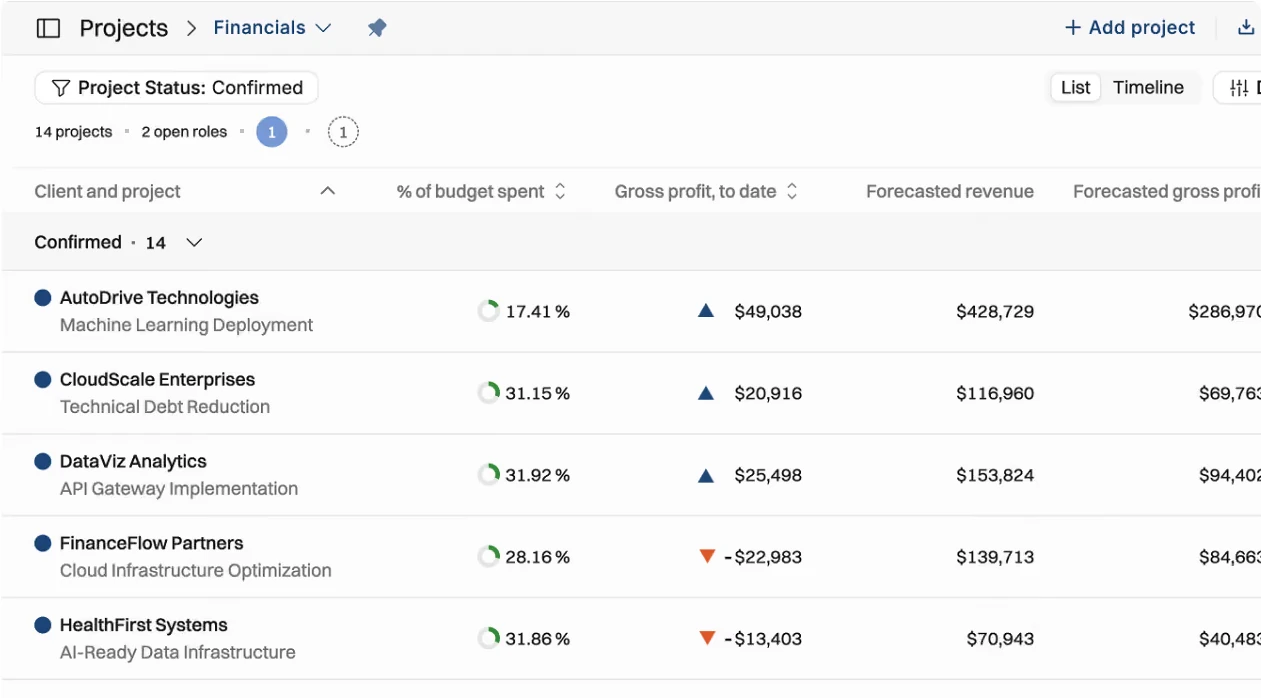
PSA should typically own the operational records that delivery teams change every day: projects and phases, resource demand and allocations, capacity and utilization, time and expense capture, and the forward-looking project economics built from them.
- The operational project record: phases, dates, budgets, status and the team.
- Resource planning and staffing: confirmed and tentative bookings, open positions and skills.
- Capacity and utilization: planned and actual, by person, role and team.
- Time and expense capture: entry and approval by the people doing the work.
- Project budgets and planned vs actual: hours, fees and costs against the plan.
- Operational project profitability: in-flight margin and forecast at completion.
- Billing inputs: rate cards, billing rules, schedules and invoice drafts.
- Delivery reporting: portfolio, project and people views for delivery leaders.
We say “typically” on purpose. A professional-services ERP can own some of these well. The test is depth: whether the system handles skills, tentative demand, bench, utilization and scheduling at the level your team needs. For what that depth looks like in practice, see the depth of staffing and capacity planning a services firm needs.
What Should ERP Own?
ERP or accounting software should own the financial record: the general ledger, accounts payable and receivable, procurement, payroll or its integration, consolidation, tax and statutory reporting, and the controls around them.
- General ledger: the chart of accounts and every posted journal.
- Accounts payable: vendor invoices, matching and payments.
- Accounts receivable: posted customer invoices, payments, credit and collections.
- Procurement: purchase orders, suppliers and spend control.
- Payroll: run in the ERP or HCM suite, or integrated from a payroll provider.
- Multi-entity finance: legal entities, currencies, intercompany and consolidation.
- Tax and statutory reporting: local tax rules, e-invoicing and statutory accounts.
- Financial controls and audit: approvals, segregation of duties and audit trails.
- Fixed assets and inventory: where the business has them.
This is the clearest boundary in the comparison. A PSA may show invoice and payment status, but it should not become an accidental ledger or consolidation engine. Professional-services ERPs such as Unit4 describe a single financial model across multiple entities and currencies as part of their core (Unit4).
Where PSA and ERP Overlap
PSA and ERP overlap on time, expenses, invoicing, revenue recognition, project accounting, reporting and some resource management. In each overlap area, both systems may hold data, but only one should be the authority for each step.
Overlap areas and the decision each one needs
| Overlap area | Why both may support it | Decision question |
|---|---|---|
| Time tracking | Time drives project economics and may feed payroll and accounting. | Where do consultants enter and approve time, and which system receives the approved result? |
| Expenses | Delivery needs project cost; finance needs reimbursement, tax and AP. | Where is expense approval authoritative? |
| Invoicing | The PSA knows billable hours and rules; the ERP owns AR and posting. | Where is the invoice drafted, and where is it posted and legally recorded? |
| Revenue recognition | Project progress drives it; accounting policy governs it. | Which system applies the policy and posts recognized revenue? |
| Project accounting | Delivery needs current economics; finance needs ledger-accurate figures. | Which margin is operational, and which is the official financial figure? |
| Reporting | Delivery and finance both report on projects. | Which figures are official, and which are forecasts? |
| Resource management | Some ERPs include project resource modules. | Does the ERP handle skills, tentative demand, utilization and scheduling at the depth you need? |
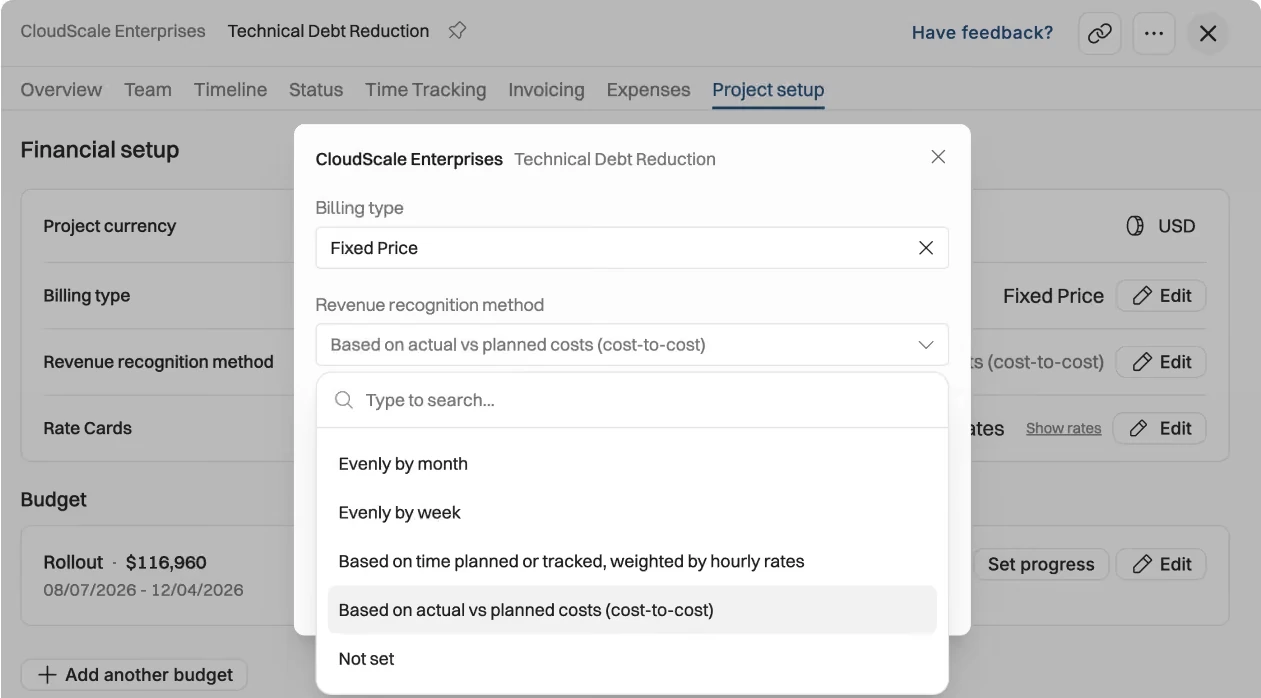
Revenue recognition needs the most care. IFRS 15 and ASC Topic 606 require revenue to be recognized as promised services are transferred, which for many consulting contracts means over time. A PSA can supply the evidence and calculate the schedule from hours, costs or milestones. The recognized revenue that goes into audited accounts should still post to, and reconcile with, the general ledger.
As of September 2026, Operating lets you set the revenue recognition method per project (cost-to-cost, month by month, or manual progress), is built for firms reporting under ASC 606 and IFRS 15, and shows order backlog and deferred revenue (revenue recognition). Those schedules are PSA outputs that your accounting system should book. For the detail, see how a PSA should handle revenue recognition.
PSA vs ERP Capability Ownership Matrix
For most professional services firms, PSA should own delivery capabilities, ERP should own ledger and control capabilities, and the overlap areas need an explicit rule. The matrix shows the typical owner of each capability. “Typical” matters, because a deep professional-services ERP can own delivery too.
Capability ownership matrix: PSA vs ERP
| Capability | Typical owner | PSA role | ERP role |
|---|---|---|---|
| Resource planning | PSA, or an ERP project module if deep enough | Bookings, open positions, skills and tentative demand. | Headcount and project resource summaries, if any. |
| Capacity forecasting | PSA | Supply vs demand by role, including the pipeline. | Workforce budgets and headcount plans. |
| Utilization | PSA | Planned and actual, by person, role and team. | Receives summaries for reporting. |
| Project delivery | PSA, with task detail in a PM tool | Phases, timelines, status and budgets. | The financial project record and codes. |
| Time tracking | PSA | Capture, approval and planned vs actual. | Receives approved time for costing or payroll. |
| Expenses | Split | Capture and allocation to projects. | Reimbursement, tax treatment and AP. |
| Project profitability | Split | Forecast and in-flight operational margin. | Official accounting margin from posted figures. |
| Budgets | PSA for project budgets; ERP for company budgets | Project fee, hour and cost budgets. | Company budgets and cost center plans. |
| Billing | PSA | Rate cards, billing rules, schedules and billable hours. | Receives billing events or invoice data. |
| Invoicing | Split | Drafts invoices from approved work. | Posts the invoice and owns numbering, tax and AR. |
| Revenue recognition | Split | Calculates schedules from project progress. | Applies policy and posts recognized revenue. |
| Project accounting | ERP for posted figures | Operational cost and revenue views. | Project subledger and journals. |
| General ledger | ERP or accounting | None. | Core: chart of accounts and journals. |
| Accounts payable | ERP | Subcontractor cost visibility at most. | Vendor invoices, matching and payments. |
| Accounts receivable | ERP | Shows invoice and payment status. | Customer balances, payments and collections. |
| Procurement | ERP | May track subcontractor cost per project. | Purchase orders, suppliers and spend control. |
| Payroll | Payroll or HCM system | Supplies approved hours if payroll needs them. | Runs payroll or integrates it. |
| Consolidation | ERP | None. | Legal entities, intercompany and currencies. |
| Compliance | ERP for financial compliance | Delivery approvals and audit history. | Statutory reporting, tax and financial controls. |
Which System Should Be the Source of Truth?
Each record should have one system of record, even when several systems display it. Typically, the CRM owns pipeline, the HR system owns employment data, the PSA owns projects, allocations, rates and time, and the ERP owns posted invoices, recognized revenue and financial actuals.
Source-of-truth matrix: who owns each record
| Record | Typical system of record | Sync direction | Notes |
|---|---|---|---|
| Client (account) | CRM for commercial data; ERP for the financial customer record | CRM to PSA; customer record to ERP when billing starts | Use one customer ID across systems. |
| Contact | CRM | CRM to PSA as needed | Delivery rarely needs to edit contacts. |
| Employee | HR system (HRIS) | HRIS to PSA and to ERP or payroll | Cost data may need tighter access than capacity data. |
| Project | PSA (operational record) | PSA to ERP as a project code | The ERP may also need a financial project record. |
| Opportunity | CRM | CRM to PSA | Feeds tentative projects and pipeline demand. |
| Bill rate and rate card | PSA or a contract system | PSA to ERP with invoice data | Keep billing logic in one place. |
| Cost rate | PSA, fed by HR or finance | HRIS or ERP to PSA | Needed for project margin; control who can see it. |
| Allocation | PSA | Stays in the PSA; summaries to BI | An operational plan, not a financial record. |
| Time entry | PSA | Approved time to ERP or payroll | Only approved time should move. |
| Invoice | ERP or accounting for the posted invoice; PSA for the draft | PSA to ERP; status back to PSA | The ERP is the legal record, even if the PSA drafts it. |
| Recognized revenue | ERP | PSA schedule to ERP journal | Must reconcile to project progress. |
| Financial actual | ERP | ERP to PSA or BI as summaries | The ledger is the official figure. |
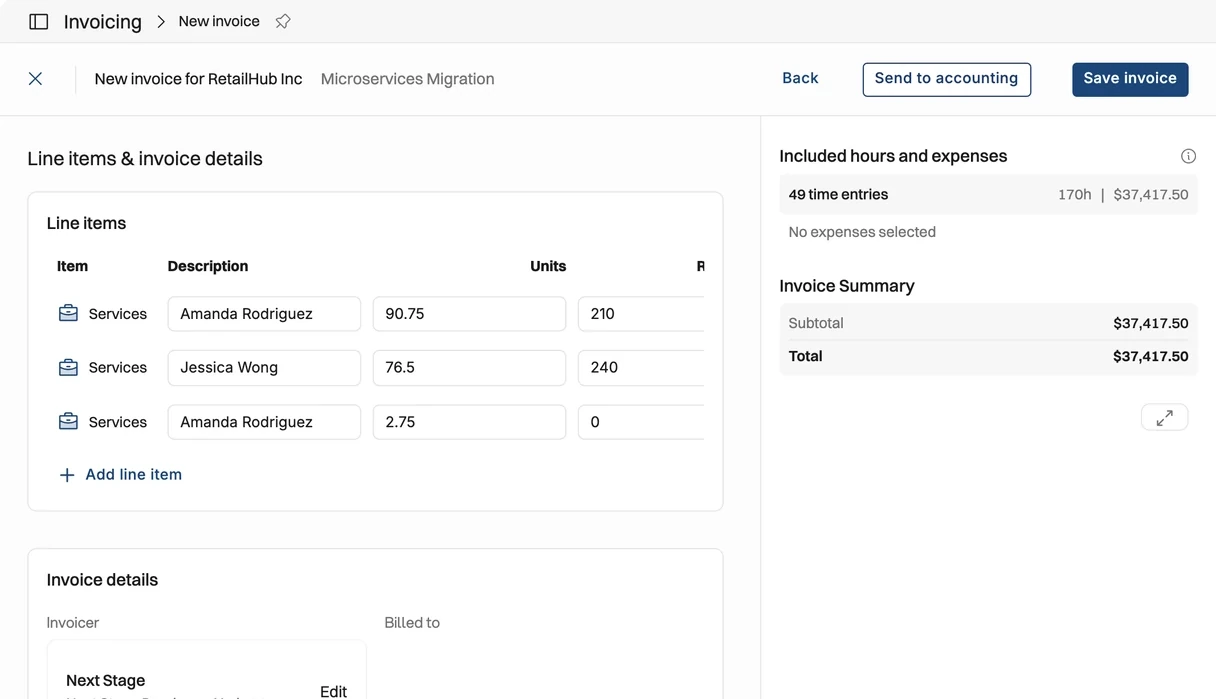
In practice, a clean handoff looks like this: the PSA builds the invoice from approved time, rates and expenses, the user sends it to accounting, and payment status comes back. As of September 2026, Operating syncs two ways with Xero and QuickBooks, sending invoice data out and getting payment status and tax rates back (accounting integrations).
Common PSA and ERP Architecture
The most common pattern is CRM to PSA to ERP or accounting. The CRM owns commercial intent, the PSA owns delivery and project economics, and the ERP owns financial control. An HR system feeds people data into both, and an optional BI layer reports across all of them.
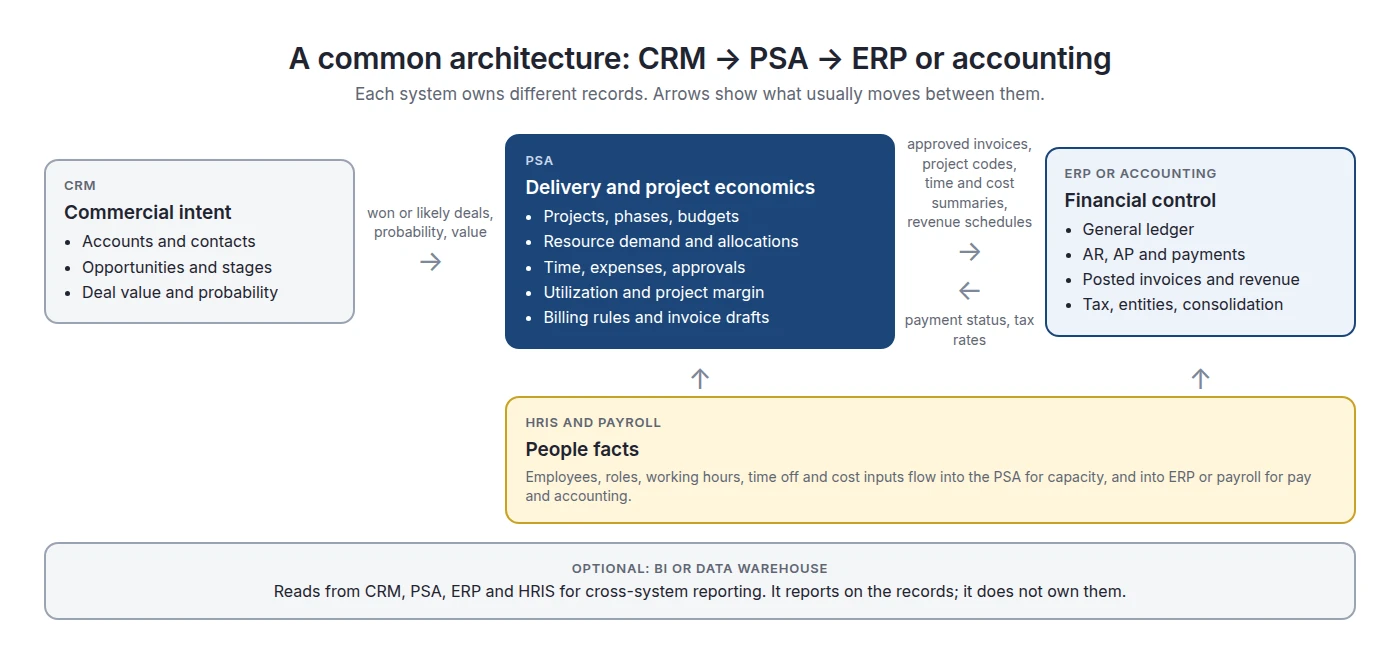
This is a standard pattern in the category. Kantata, for example, documents PSA integrations with CRM, ERP, HCM and middleware tools such as MuleSoft and Workato (Kantata). But it is not the only pattern:
Alternative PSA and ERP architectures
| Architecture | Best fit | Warning signs |
|---|---|---|
| PSA + accounting software | Delivery is complex; finance is simple, with one or a few entities. | Consolidation, procurement controls or statutory needs start to exceed the accounting tool. |
| Professional-services ERP only | The ERP's project and resource modules meet delivery needs, and one data model is a priority. | Delivery teams rebuild staffing and forecasts in spreadsheets. |
| PSA + ERP | Delivery and finance are both complex, and a specialist PSA is clearly deeper. | Duplicate project masters, duplicate invoices or conflicting revenue figures. |
| Integrated suite with PSA and finance | One vendor's suite is deep enough in both areas. | Assuming every module is deep enough without testing it. |
When Can a Professional Services Firm Use PSA Without ERP?
A firm can run PSA without a full ERP when its finance needs fit in accounting software: few legal entities, simple procurement, no heavy consolidation, and a main pain in staffing, utilization, time, project margin and billing. In that setup, PSA plus accounting gives the control the firm needs without ERP scope.
- The firm sells services only, with little or no inventory or complex purchasing.
- A cloud accounting package handles the ledger, AP, AR and tax.
- There are one or a few legal entities, without heavy intercompany work.
- The biggest problems are staffing, utilization, time capture, project margin and billing.
- A PSA to accounting integration gives finance the data it needs at month-end.
Be precise about what this means. “We do not need an ERP” does not mean “the PSA replaced accounting.” It means the CRM, PSA, accounting and payroll stack is enough, so an enterprise suite is unnecessary. Finance complexity, not headcount, decides this: a 300-person single-entity firm may be fine on accounting software, while a 60-person firm with entities in four countries may not.
This is the setup Operating is designed for. Its invoicing supports multiple companies for separate country entities and syncs with Xero and QuickBooks (invoicing).
When Should ERP Come First?
ERP should come first when finance and control problems are bigger than delivery problems. Typical cases are several entities or countries, complex statutory reporting, procurement or inventory, or a group-level mandate for one financial system. In those cases, fix the books first and add delivery depth after.
- The firm has several legal entities, countries or currencies, and consolidation is painful.
- Finance, procurement or audit problems are materially larger than staffing problems.
- The business also has products, inventory or complex purchasing that need one enterprise platform.
- A parent company mandates an ERP as the corporate system of record.
- The existing ERP's project module may already cover delivery well enough.
This matches the more balanced guides in the category. PSOhub, for example, frames the choice by the bottleneck: if delivery is what breaks, start with PSA; if finance and compliance break, start with ERP.
When Do You Need Both PSA and ERP?
You need both when delivery complexity and finance complexity are both high and no single product is deep enough in both. The two-system setup is a deliberate architecture, not duplication, as long as each record has one owner.
Delivery complexity vs finance complexity
| Lower finance complexity | Higher finance complexity | |
|---|---|---|
| Lower delivery complexity | Accounting software; spreadsheets may still work for planning. | ERP first; its project module may be enough. |
| Higher delivery complexity | PSA + accounting software. | PSA + ERP, or a professional-services ERP that passes the depth tests below. |
Example (illustrative): a 250-person consultancy has four legal entities in three countries, specialists shared across practices, and a mix of fixed-fee and time-and-materials work. The PSA owns staffing, time, project margin and invoice drafts. The ERP owns intercompany, consolidation, AR and statutory reporting. The integration moves project codes, approved invoices, revenue schedules and payment status, and nothing else.
A real customer example of this pattern: Sievo runs Operating synchronized with its NetSuite ERP and HiBob HR system, and reports saving several hours a week in resource planning after replacing separate Excel files for time tracking, vacation planning and resource allocation (customer-reported; Sievo case study).
Can ERP Replace PSA?
Sometimes, yes. A modern professional-services ERP can replace a separate PSA when its project and resource modules support how your firm actually staffs, plans, tracks time and forecasts margin. Test that against your real workflows instead of trusting the category label.
The product evidence is clear that “ERP cannot do professional services” is no longer true as a blanket claim. Dynamics 365 Project Operations, Oracle Fusion Cloud Project Management, Unit4 and Deltek Maconomy all document project, billing and project financial capabilities, and most also document resource planning. The question is whether they fit your delivery model.
Tests: can your ERP replace a PSA?
| Test | ERP-only is credible when... |
|---|---|
| Resource management | It supports your staffing model: skills, roles, availability, tentative and confirmed demand, time off and capacity by role. |
| Project control | Project managers plan and reforecast without falling back to spreadsheets. |
| Time and expenses | Consultants use it without complaint, and approvals are fast enough for your billing cycle. |
| Utilization | Managers see planned and actual utilization at the level they manage. |
| Commercial models | Time-and-materials, fixed fee, capped T&M, milestones and retainers work the way your contracts do. |
| Project economics | Forecast margin and estimate at completion are available during delivery, not only after month-end. |
| Adoption | Delivery teams do not keep shadow spreadsheets next to it. |
| Cost | Configuration and licenses cost less than a specialist PSA plus an integration. |
The strongest signal is behavior, not features. If staffing, capacity forecasts and planned vs actual already live in spreadsheets next to the ERP, the separation has happened informally. Making it deliberate, with a PSA and a clean integration, often costs less than more ERP customization.
Can PSA Replace ERP?
A standalone PSA usually cannot replace an ERP, because it does not provide a general ledger, AP, procurement, consolidation or statutory accounting. What a PSA can do is remove the need for a full ERP when a firm's finance needs fit in simpler accounting software.
Operating is a clear example of the boundary. It calculates project economics, revenue recognition schedules and invoice drafts, but it is not a general ledger. It hands those outputs to Xero, QuickBooks or, through its REST API, to an ERP such as NetSuite (as of September 2026, a native NetSuite connector is on the roadmap; see NetSuite integration).
There is one category exception. Some vendors sell PSA and full financials on one platform, such as Workday PSA with Workday Financial Management. In that case, the suite covers ERP territory, even though the delivery module is called PSA (Workday PSA datasheet).
PSA vs ERP vs Spreadsheets
Spreadsheets are best for flexible, early-stage modeling, PSA for running delivery and project economics, and ERP for enterprise financial control. Most growing services firms use all three, each in a different role.
ERP vs PSA vs spreadsheets
| Question | Spreadsheets | PSA | ERP |
|---|---|---|---|
| Primary job | Flexible modeling and early-stage processes. | Running service delivery and project economics. | Enterprise financial control and corporate processes. |
| Planning | Any model you can build, kept current by hand. | Staffing, capacity and pipeline demand on shared records. | Budgets and financial plans; resource planning varies by product. |
| Delivery | Trackers maintained by project owners. | Projects, bookings, time and approvals. | Project modules in some ERPs; depth varies. |
| Financial control | Weak: no ledger, limited controls. | Project-level economics and billing inputs. | Ledger, AP, AR, tax, consolidation and audit. |
| Scalability | Breaks when many owners and systems must stay in sync. | Scales with people, projects and practices. | Scales with entities, countries and transactions. |
| Integrations | CSV files, formulas and scripts. | CRM, HR, accounting and ERP connectors, plus APIs. | Broad enterprise integrations; often the hub for finance. |
| Reporting | Flexible but owner-dependent. | Operational delivery reporting. | Official financial reporting. |
| Source-of-truth role | Analysis and exceptions only, once a firm grows. | Operational truth for delivery. | Financial truth for the company. |
| Typical trigger to adopt | You are still discovering your process. | Delivery and resource complexity becomes material. | Finance, control or entity complexity becomes material. |
If you are still deciding whether to move beyond spreadsheets at all, start with PSA vs spreadsheets. That decision usually comes before the PSA vs ERP decision.
How PSA and ERP Should Integrate
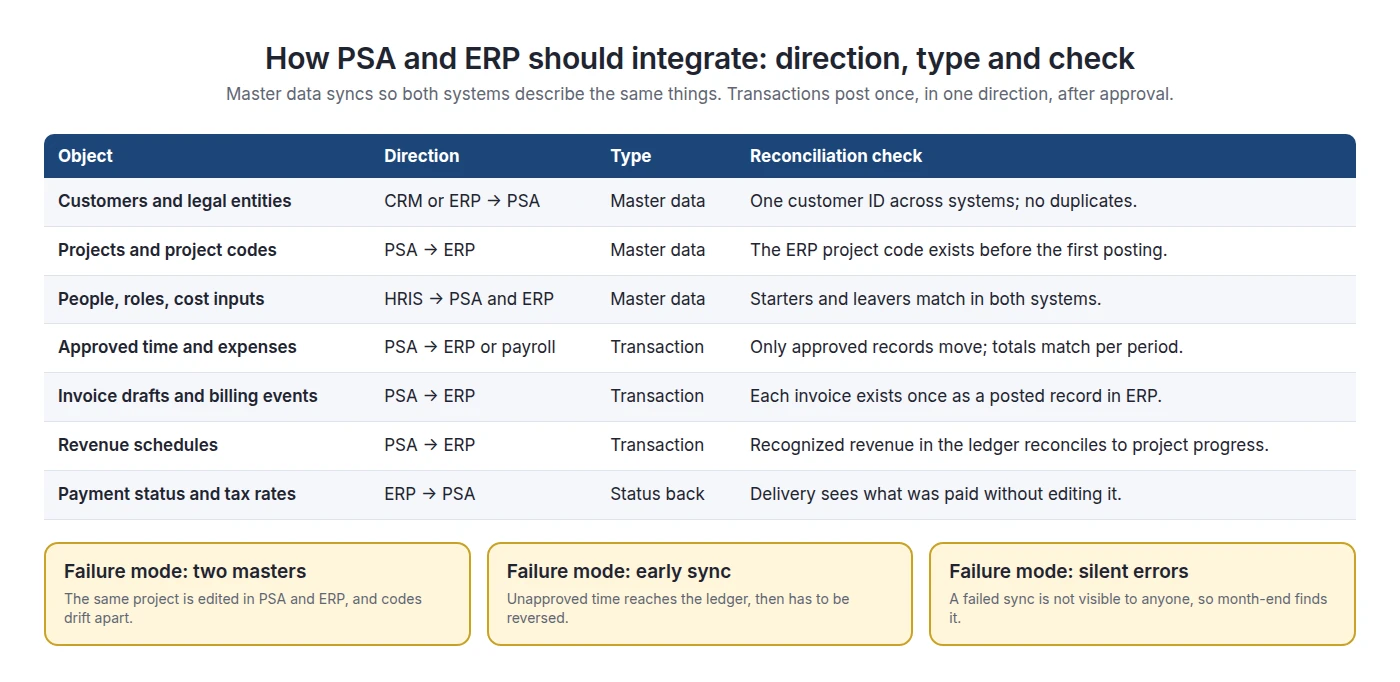
Integrate PSA and ERP around two flows: master data that both systems must describe the same way, and approved transactions that post once, in one direction. Then add reconciliation checks, so failures show up the same day instead of at month-end.
Data direction and master data
Master data describes the things both systems talk about: customers, legal entities, projects and project codes, people, currencies and cost centers. Each master record should be created in one place and copied to the other. For example, the PSA creates the project, and the ERP receives the project code before the first cost or invoice is posted.
Transaction flow
Transactions are business events: approved time, billing-ready milestones, invoices, revenue schedules and payments. They should move only after approval, and only once. Posted records should not be editable in both systems. Status, such as “paid”, should flow back so delivery teams can see it without changing it.
Integration patterns
PSA and ERP integration patterns
| Pattern | Best for | Objects that usually sync | Failure and reconciliation path |
|---|---|---|---|
| Native connector or API | Two supported products with a stable object mapping. | Projects, invoices, payment status. | Retry and an error queue; daily totals check. |
| iPaaS or middleware | Several systems, transformations or approvals in between. | Master data across CRM, HRIS, PSA and ERP. | Central monitoring and alerts on failed runs. |
| Batch or CSV | Low volumes or a transition period. | Monthly time or revenue summaries. | Reconciliation lag; manual checks each period. |
| Event-driven | Near-real-time needs. | Won deals, approved time, posted invoices, payments. | Events that can be replayed safely, with a queue for failures. |
Failure modes to design for
- Two masters: the same project is edited in both systems, and codes drift apart.
- Early sync: unapproved time reaches the ledger and has to be reversed.
- Silent errors: a failed sync is not visible, so month-end finds it.
- ID mismatch: the CRM, PSA and ERP each create their own customer record.
- Rate or tax mismatch: the PSA drafts an invoice with a rate or tax code the ERP does not recognize.
Month-end with two systems
With clear ownership, month-end is a comparison, not a rebuild. Delivery finishes first: time is approved, invoices are drafted and revenue schedules are checked against project progress. Finance then compares totals between the two systems, reviews unbilled work and deferred revenue, and drills into a project only when the numbers disagree. Auditors can check revenue recognition logic in the PSA and run the rest of the audit in an uncustomized ledger.
Operating's side of this, as of September 2026: two-way sync with Xero and QuickBooks, NetSuite through the REST API (Sievo runs it this way), HiBob for people data, and a documented REST API with full read and write access (developers and API).
Planning a PSA next to your ERP? We will map your CRM, HR and accounting setup to Operating and show exactly which records would sync, and in which direction. Book an intro
Where Operating Fits in a PSA and ERP Architecture
Operating (operating.app) is the PSA layer: it owns projects, staffing, time, project economics, revenue recognition schedules and invoice drafts, and hands them to your accounting system or ERP without replacing the general ledger. It is typically a fit for consulting and technical services firms of about 30 to 500 people; above 500, fit depends on entity structure, governance, security and ERP requirements.
Where it fits well (as of September 2026):
- CRM deals from HubSpot, Salesforce or Pipedrive become tentative projects for capacity planning.
- Resource planning, time, project budgets, invoicing and revenue recognition run on one model.
- Two-way accounting sync with Xero and QuickBooks; HiBob for people data.
- An MCP server with 59 read and write tools, so AI assistants work within each user's permissions (MCP help article).
- SOC 2 Type 2, GDPR and hosting on AWS in Europe (security).
- Data migration, training and support included in every plan.
Where to check fit carefully:
- Retainers: there is no native retainer billing type yet; teams use fixed-price budgets back to back (billing types help article).
- NetSuite: connected through the REST API today; a native connector is on the roadmap.
- Reporting: standard built-in reports; deep custom reporting runs through exports or the API into a BI tool.
- General ledger, AP, procurement and consolidation: these stay in your accounting system or ERP.
If you run NetSuite OpenAir or SuiteProjects Pro today, see our comparison of NetSuite OpenAir alternatives, and our wider guide to the best PSA software for consulting.
PSA vs ERP FAQ
What is the difference between PSA and ERP?
PSA software runs service delivery and project economics: staffing, time, utilization, project margin and billing inputs. ERP software runs enterprise financial control: the general ledger, AP, AR, procurement, payroll, consolidation and statutory reporting. They overlap on time, invoicing, revenue recognition and project accounting, so the key decision is which system owns each record.
Is PSA part of ERP?
Sometimes. Some ERP vendors sell PSA modules or PSA products, such as Dynamics 365 Project Operations or NetSuite SuiteProjects Pro, and Workday runs its PSA on the same platform as its financials. Many PSAs are standalone products that integrate with ERP or accounting software. PSA is a category of capability, not always a separate product.
Can ERP replace PSA?
Yes, when the ERP's project and resource modules fit how your firm staffs, plans, tracks time and forecasts margin. Test skills-based staffing, tentative demand, utilization, project reforecasting and adoption by consultants. If delivery teams keep planning in spreadsheets next to the ERP, it is not replacing the PSA in practice.
Can PSA replace ERP?
A standalone PSA usually cannot, because it has no general ledger, AP, procurement, consolidation or statutory accounting. A PSA combined with accounting software can remove the need for a full ERP when finance is simple, for example one or a few legal entities with light procurement.
Do professional services firms need ERP?
Not always. Firms with simple finance often run a PSA with cloud accounting software. Firms with several legal entities, countries, complex procurement or strict statutory reporting usually need an ERP. Finance complexity is a better trigger than headcount.
Can PSA and ERP integrate?
Yes, and they usually should. A typical integration sends project codes, approved time, invoice data and revenue schedules from the PSA to the ERP, and sends payment status and financial master data back. Use native connectors, APIs, middleware or scheduled files, and add reconciliation checks for each flow.
Which should a consulting firm implement first, PSA or ERP?
Start with the system that fixes your biggest bottleneck. If staffing, utilization, project margin and billing are the pain, start with PSA and keep simple accounting. If entities, consolidation, procurement or compliance are the pain, start with ERP. Firms with both problems often need both systems.
What data should live in PSA versus ERP?
The PSA should own projects, allocations, skills, time, rate cards and operational project margin. The ERP should own the general ledger, posted invoices, AR and AP, recognized revenue and financial actuals. The CRM owns pipeline and the HR system owns employment data. Each record should have one owner.
Who should own invoicing: PSA or ERP?
Usually both, for different steps. The PSA owns the billing logic and drafts the invoice from approved time, rates and schedules. The ERP or accounting system posts the invoice, owns numbering and tax, and manages receivables. Payment status then flows back to the PSA.
Who should own revenue recognition?
The PSA can calculate revenue recognition schedules from project progress, hours or costs. The ERP or accounting system should apply the accounting policy and post recognized revenue to the ledger, which must reconcile with IFRS 15 or ASC 606 requirements. Define the method per project and document it.
What is the difference between PSA and accounting software?
Accounting software records financial transactions: invoices, bills, payments and the ledger. PSA software plans and tracks the delivery work that produces those transactions: staffing, time, project budgets and margin. A common setup is PSA for delivery and accounting software for the books, connected by an invoice and payment sync.
Is PSA the same as project management software?
No. Project management software manages tasks, boards and the work itself. PSA manages the business around the work: who is staffed, what capacity is left, what the project costs and earns, and what gets billed. Many firms run both, with tasks in a PM tool and people and money in the PSA.
Methodology
We built this comparison from category definitions, vendor documentation and accounting standards, not from other comparison articles. Research closed on September 26, 2026.
- Definitions: Gartner's ERP glossary and its 2025 Market Guide for PSA Platforms (public summary), plus Oracle and SAP definitions.
- ERP capabilities: checked against Microsoft, Oracle, Unit4, Deltek, NetSuite and Workday product pages and documentation. We did not test these products hands-on.
- Accounting standards: IFRS 15 (IFRS Foundation) and ASC Topic 606 (FASB ASU 2014-09). This page is not accounting advice.
- Operating capabilities: checked against operating.app product pages, the Operating help center and the security page as of September 2026.
- Customer example: the Sievo result is customer-reported and published by Operating.
- Frameworks: the ownership matrix, the source-of-truth matrix, the complexity grid and the ERP replacement tests are our frameworks. The 250-person consultancy is an illustration.
- Screenshots: Operating product images only.
- Disclosure: Operating publishes this page and sells a PSA.
Sources
Definitions and standards
- Gartner: Market Guide for Professional Services Automation Platforms (October 2025)
- Gartner Glossary: Enterprise Resource Planning (ERP)
- Oracle: What is ERP?
- SAP: What is ERP?
- IFRS Foundation: IFRS 15 Revenue from Contracts with Customers
- FASB: ASU 2014-09, Revenue from Contracts with Customers (Topic 606)
ERP and PSA vendor documentation
- Microsoft Learn: Dynamics 365 Project Operations overview
- Oracle: Fusion Cloud Project Management
- Oracle: Using Project Revenue and Billing (26B)
- Unit4: Software and ERP for professional services
- Deltek: Maconomy
- Oracle NetSuite: SuiteProjects Pro
- Workday: Professional Services Automation datasheet
- Kantata: PSA integrations
Category guides referenced
Operating sources
- Product overview
- Invoicing
- Accounting integrations
- Revenue recognition
- Developers and API
- NetSuite integration
- Security
- Help: What are the billing types? (known limitations)
- Help: AI chat via MCP
- Case study: Sievo
Published by Operating (operating.app). Author: Lauri Eurén. First published June 10, 2026. Last updated September 26, 2026.



