
Short answer: Most professional services automation (PSA) rollouts go wrong because of unmade decisions, not broken software. Nobody agreed which system owns rates, which data to keep or who approves time. The safest plan for most firms is to pilot one group, check one real invoice cycle, then cut over at a month-end and add forecasting last.
Why PSA Rollouts Fail
The evidence points mostly at organisation and data. In Panorama Consulting's 2026 ERP survey, “organizational issues” were the most common cause of schedule overruns (Panorama, 2026). That is ERP data, but relevant. MGI Research names data migration, integration scope creep, change management and post-go-live stabilization as the most underestimated PSA costs (MGI Research, June 2026).
One correction: software fit still matters. G2 reviews of established PSA platforms often mention steep learning curves and partner-led setup (G2: Certinia; G2: Kantata). And a PSA does not fix delivery alone. In SPI Research's 2025 benchmark, firms using PSA reported higher billable utilization (70.2% vs 65.0%) but delivered fewer projects on time (72.6% vs 75.4%). Firms reporting an integrated PSA did better on on-time delivery (75.9% vs 72.1%) (SPI Research, 2025). These are correlations, not proof of cause. A rollout fails when nobody makes the decisions the software forces on you.
Phased Rollout vs Big-Bang Cutover
In a big bang, all modules and offices go live at once. A phased rollout has several smaller go-live dates (Panorama). More than a quarter of firms in Panorama's 2026 survey used a hybrid. PSA vendors lean phased. BigTime says a 300-person firm should “almost always” use “a phased go-live rather than a full-scope launch” (BigTime).
Phase by capability and role, but never split one person's timesheet across two systems. Operating's guide tells pilot users to stop using the old tracker (Operating help).
The Five-Phase PSA Rollout Plan
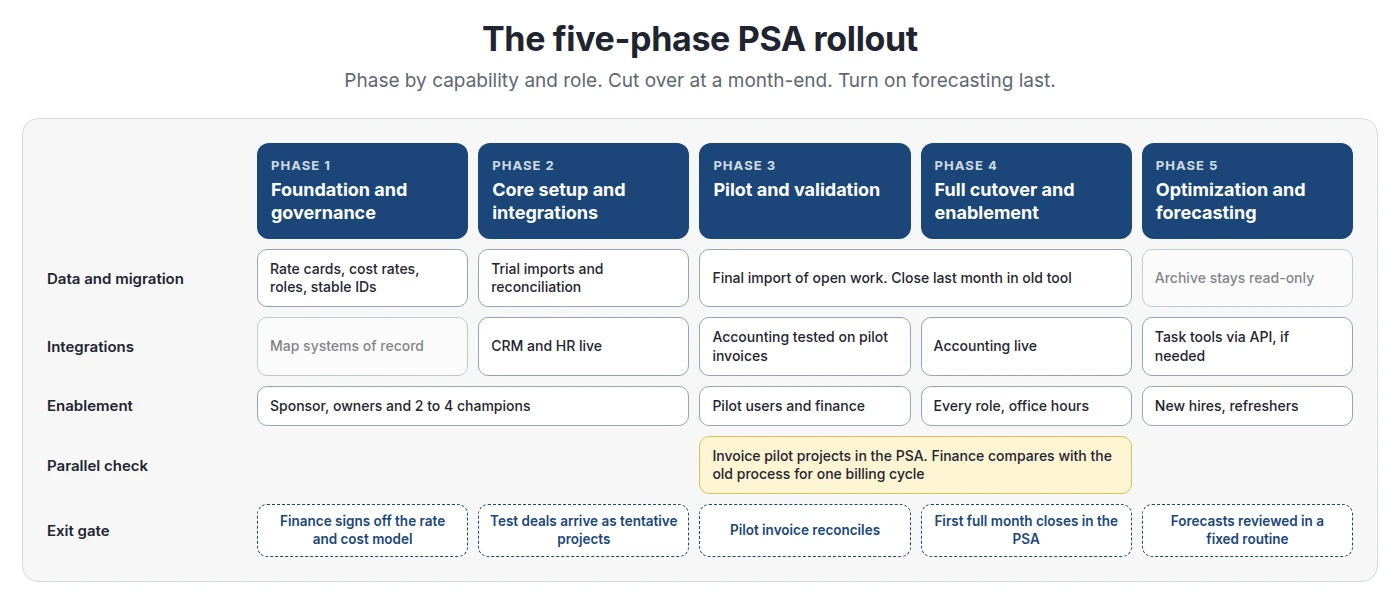
Phase 1: Foundation and governance
Name a sponsor and owners for implementation, finance and delivery. Write down decisions before you configure anything: project types, approvers, the billing types you really use. Operating's guide says “Reduce complexity if possible” (Operating help).
The economics to configure before migration
Under IFRS 15, an hourly contract may recognise revenue “in the amount to which the entity has a right to invoice” (IFRS 15, B16). For milestones, Deloitte notes the standard “does not conclude that milestones are the appropriate measure of progress” (Deloitte DART). Agree the method with your accountant.
Fix rates and costs before you import, because margin is calculated from them. In Operating, a shared rate card's rates lock once it is assigned to a project. To change rates, you add a new card from a start date (Operating help: rate cards). Time imported from Harvest keeps Harvest's billable rate, and imported costs keep their imported cost (Operating: Harvest; cost rate rules). Import first and fix rates later, and migrated projects show margins nobody trusts.
Phase 2: Core setup and integrations
Set up sites, roles, people and permissions. Check the default permission set: every new user gets it on first login, so a broad default means broad access (Operating help: permissions). Connect the CRM and HR system. Configure accounting, but send no real invoices yet.
Phase 3: Pilot and validation
Operating's migration guide suggests about 10 pilot users working across three or more billable projects. Invoice pilot projects in the new system and everything else as before. Finance and payroll then check the exports. Include one hard case, such as a fixed-fee project with expenses.
Phase 4: Full cutover and enablement
Retire the old system at a month-end, so it runs one final invoicing cycle. Announce the date early, then make the old tool read-only. The guide warns: “The longer you run two systems in parallel, the more likely it is that some reports... are incomplete.”
Phase 5: Optimization and forecasting
Turn on pipeline forecasting last. In Operating, probability weighting is a report option, off by default; a tentative allocation at 60% probability then counts 60% of its hours (Operating help). First check CRM stage probabilities against real win rates. If “50%” deals close one time in five, the forecast starts wrong.
Integration Sequence and Systems of Record
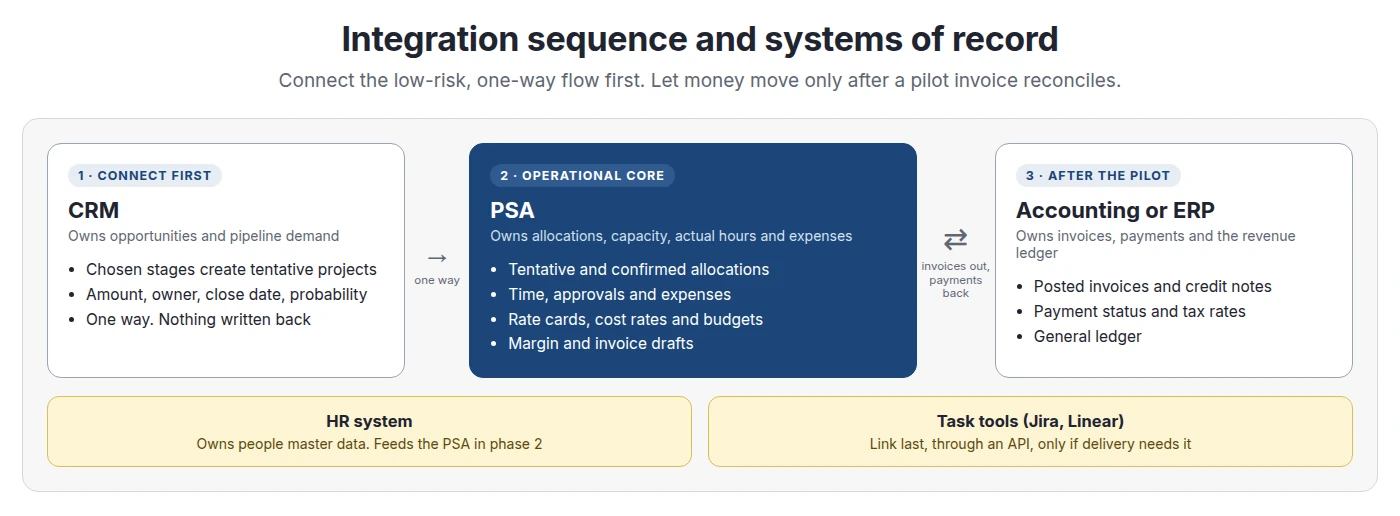
CRM goes first because the risk is low. Operating's HubSpot, Salesforce and Pipedrive connectors run one way on webhooks: deals in chosen stages become tentative projects, and nothing is written back. The HubSpot import creates a new client rather than guess a match, so plan time to merge duplicates (Operating: HubSpot; Salesforce; Pipedrive).
Accounting goes third because it depends on approved time, rate cards and invoice settings. In Operating's Xero connection, invoices go out when you press Send to accounting, and payments come back (Operating: Xero). QuickBooks Online works in a similar way (QuickBooks Online). As of October 2026, NetSuite has no native connector. Firms connect it through the REST API or with exports (Operating: NetSuite). Jira and Linear are not on Operating's integrations list, so treat them as API work. If billing is your main pain, bring invoicing forward, but test it on pilot projects first.
What to Migrate and What to Leave Behind
BigTime advises to “migrate open items only”. Birdview says: “Do not migrate task-level history from closed projects” (Birdview, August 2026). This is a choice, not a tool limit: Operating's Harvest connector can import full history (Operating: Harvest).
A clean cutover sequence
Operating's import guide sets the order: sites and roles, people, skills, tags, clients and projects, allocations, then time entries. Keep the same person, client and project IDs in every file (Operating help: CSV import). It lists the usual errors: IDs that change between imports, mixed date formats, decimal commas and broken encoding. Closing the final month in the old system also avoids migrating unbilled WIP mid-month.
Change Management and Role-Based Training
Prosci's practitioner survey found that 88% of projects with excellent change management met or beat their objectives. The figure for poor change management was 13% (Prosci). The data is self-reported, but the gap is large. Train people on their weekly tasks, not the whole product.
Timesheet compliance during the transition
Make the first weeks easy for billable staff. Operating can require notes and tasks on time entries; leave such rules off at launch unless billing needs them. Operating shows planned hours on the timesheet, so consultants start from their allocation (Operating). Chase gaps fast: Operating's month-end guide warns that “waiting two weeks makes it much harder” for people to recall their work (Operating help). Partners must log time too, or others stop.
Treat training as ongoing
Record short role sessions, hold office hours for the first invoicing run and repeat the basics for new hires. Name two to four power users as champions.
Seven Risks That Ruin PSA Adoption
Rollout Costs vs the Cost of Delay
Skip generic ROI claims and compare two lists. Rollout costs: license overlap, internal hours, any partner fees and a short productivity dip. Delay costs: double entry, unbilled hours and staff frustration. MGI estimates year-one total cost (licenses, internal staff, consulting) at $30K to $150K for 5 to 100 users, without publishing a method.
Here, internal time is the main rollout cost, and a three-month delay costs most of what the rollout does. The leakage rate drives the answer, so measure yours.
Readiness Diagnostic and Checklist
Choose support by complexity and data maturity.
As of October 2026, Operating's pricing page lists “Data migration, training, support”, SSO and all integrations on every plan. Enterprise, for 100 people and up, adds an SLA, a custom contract, on-site onboarding and custom integrations. Plans cost $15, $19 and $23 per person per month, or $13, $17 and $21 billed annually (Operating pricing). Operating lists solutions partners for larger projects (Operating partners). It is SOC 2 Type 2 certified, GDPR compliant and hosted on AWS in Frankfurt (Operating security FAQ).
Step-by-step checklist
- Name the sponsor and the implementation, finance and delivery owners. Start a decision log.
- Fix rate cards, cost rates and capacity rules. Get finance sign-off.
- Clean the master data and assign stable IDs.
- Agree the system of record for each record type.
- Set up people, permissions and SSO. Connect the CRM and pick the stages that create projects.
- Run trial imports; reconcile counts and budget totals.
- Pilot with real exceptions. Invoice the pilot projects in the PSA.
- Reconcile the pilot invoice and payroll export with finance.
- Announce the retirement date. Cut over at a month-end.
- Train by role and chase missing time daily.
- Go live with accounting sync after the pilot reconciles.
- Turn on probability-weighted forecasting after clean month-ends.
Where Formal PSA Rollouts Break Down
- Best-of-breed stacks. A tracker, a planner and accounting linked by API can be enough. See time tracking vs PSA.
- Very small teams. SPI recommends PSA above 20 employees. Below that, setup can cost more than it saves. See is a PSA worth it at 30 people.
- Single-rate T&M firms. One rate and one billing type rarely need project economics modelling.
- Over-customizing. Copying the old process into new software keeps the old problems.
- Bad timing. Delay if rates are undecided, year-end close is near or the sponsor cannot attend gates. Set an end date for the delay, because waiting costs money too.
FAQ
How long does a PSA implementation take?
There is no reliable average. MGI estimates 5 to 12 weeks for firms with 5 to 100 users and 3 to 9 months for the midmarket. Billing models, integrations, data clean-up and owner time drive the schedule.
What is the best rollout strategy for PSA software?
Pilot a representative group, invoice the pilot projects in the PSA, reconcile with finance, then cut everyone over at a month-end. Add pipeline forecasting once actuals are reliable.
Should we do a big bang or phased PSA rollout?
Phased or hybrid suits most firms with mixed billing. A big bang can work for one entity with simple billing and clean data. Never split one person's time tracking across two systems.
What data should be migrated from legacy tools to a PSA?
Active clients, open projects and budgets, future allocations, people with roles and sites, and current rate cards. Keep closed projects, old time entries and billing logs in a read-only archive.
How do you manage change when introducing a PSA?
Have the sponsor sign each phase gate. Train each role on its weekly tasks, name champions, make the first timesheet easy and chase gaps quickly.
Who should be on the PSA implementation team?
A sponsor, an implementation owner, a finance owner, a delivery or resourcing owner, an admin and two to four power users. In firms of 30 to 100 people, these can be part-time roles.
Should CRM or accounting be integrated into PSA first?
Usually CRM, because it is one-way and moves no money. Connect accounting after a pilot invoice reconciles, since it depends on approved time, rates and invoice settings.
How do you drive timesheet compliance during a software transition?
Keep required fields minimal, prefill planned hours, set one deadline, chase missing time within days and make leaders track time too. Measure on-time submission weekly.
Can you implement PSA while actively delivering client projects?
Yes. Pilot with a small group, keep invoicing other projects in the old system and retire it at a month-end. Only the pilot group changes tools first.
How much internal time does a PSA rollout require?
It depends on scope. Accelo says most of its rollouts need one owner at about 30% capacity for 4 to 8 weeks, a vendor claim. Plan extra time for finance, the pilot group and training.
Should you run old and new systems in parallel?
Run the invoice check in parallel, not the timesheet. Pilot users track time only in the PSA while finance compares outputs for one billing cycle. Then make the old tool read-only.
Methodology
We reviewed current PSA vendor implementation guides, Operating's product and help center pages, SPI Research's 2025 benchmark, MGI Research, Panorama Consulting, Prosci, G2 reviews and IFRS 15 guidance between September 30 and October 1, 2026. We checked current search results for PSA implementation, rollout, cutover and migration queries. Vendor statements are labelled as vendor claims. The cost example is illustrative and uses stated assumptions. We found no credible public average for PSA implementation time, cost or adoption, so we do not give one. Operating facts were checked against operating.app and support.operating.app on October 1, 2026.
Sources
Research and standards
- SPI Research: 2025 Professional Services Maturity Benchmark
- MGI Research: Seven steps to avoid a failed PSA implementation
- Panorama Consulting: 2026 ERP Report
- Panorama Consulting: Big bang implementation
- Prosci: Change management and project success
- IFRS Foundation: IFRS 15
- Deloitte DART: Measuring progress
Vendor guides and reviews
- BigTime: Enterprise PSA implementation timeline
- Birdview: PSA implementation timeline
- Accelo: PSA software implementation guide
- G2: Certinia PS Cloud reviews
- G2: Kantata reviews
Operating sources
- Operating: Pricing
- Operating: Partners
- Operating: Integrations
- Operating: HubSpot
- Operating: Salesforce
- Operating: Pipedrive
- Operating: Xero
- Operating: QuickBooks Online
- Operating: NetSuite
- Operating: Harvest
- Operating help: Migrating from your old time tracking tool
- Operating help: Importing data from CSV
- Operating help: Rate cards
- Operating help: Cost rate rules
- Operating help: Permission sets
- Operating help: Allocation probability
- Operating help: Month-end close
- Operating help: Security and privacy FAQ