



Quick summary: Planned vs. actual hours measures the variance between hours allocated to work and hours genuinely spent on it, and it can be read at company, team, project, and individual level. The gap exposes revenue leaks from unbilled allocated time, overwork when consultants log more than planned, and systematic under- or over-estimation that distorts pricing. Connecting a professional services automation platform like Operating to your time tracking makes the report continuous; Inventive.io cut absorbed unbilled work from $250,000 to $25,000.
How to Master Planned vs. Actual Hours to Boost Profitability in Professional Services
Effective management of planned versus actual hours is essential for agencies and consultancies focused on improving profitability and billable utilization. In fact, it's one of the most important agency metrics to follow. This metric sheds light on the accuracy of resource allocation compared to the actual effort spent on projects and tasks and is one of the great ways to improve your consulting firm's billable utilization. Many firms rely on tools for tracking billable hours and project capacity to make this process accurate and efficient.
What Are Planned vs. Actual Hours in Resource Planning?
Planned vs. actual hours measures the variance between hours allocated for work and the hours genuinely spent on those activities. This evaluation is important across the whole consultancy, from company to individual level. It could also be named Planned vs. Actual Utilization.
- At the Company Level, it serves as a comprehensive indicator of how well the company's planning aligns with execution, essential for top management's strategic KPIs. If the numbers vary a lot from each other, there might be systemic errors in how the company is executing the resource allocation process.
- For Teams or Competences, it helps leaders assess if resource planning for specific skills or teams matches with the actual hours spent, guiding leaders in managing consultant groups effectively.
- On Project or Account Levels, it's essential for account managers and project managers to track if projects stick to their planned resources, which is key for achieving project goals and keeping clients happy. Read our article on Planned And Actual Utilization In Projects.
- For Individuals, it allows consultants to assess their time management and helps managers keep project timelines on schedule and teams within their desired utilization levels.
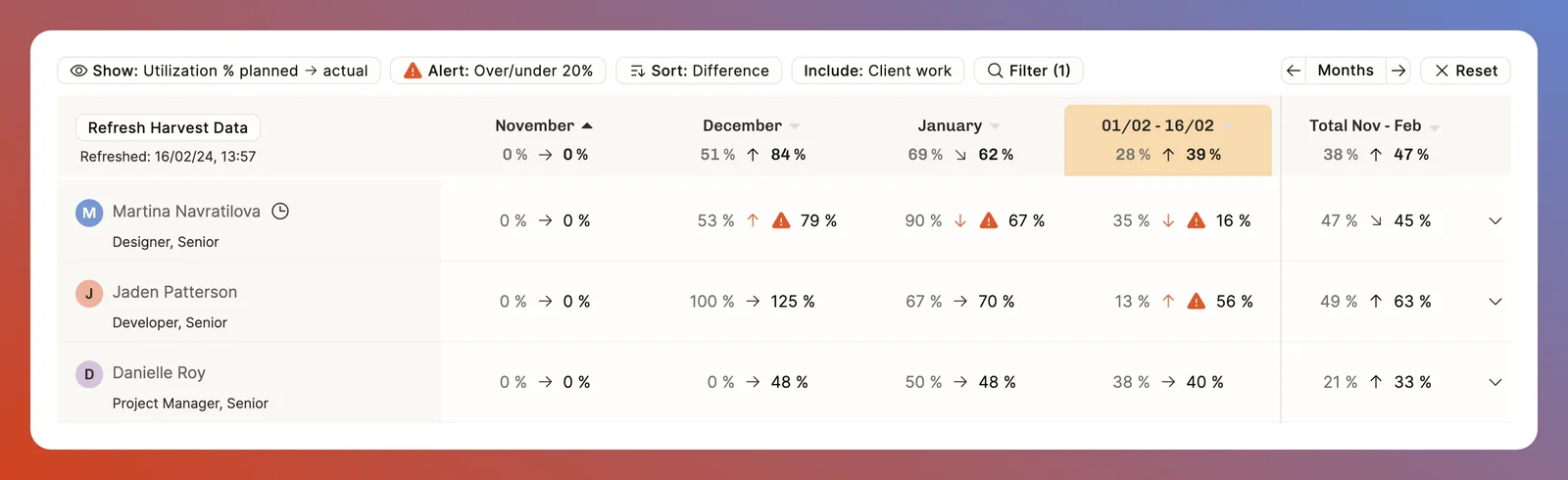
Key Insights from Planned vs. Actual Hours Analysis
The disparity between planned and actual hours can unveil several critical insights:
- Evaluating Resource Allocation Process: It indicates the effectiveness of the consulting firm's resource allocation and planning process, highlighting the adaptability of plans to real-world scenarios. If your plans are always different from the actuals, why to plan in the first place?
- Identifying Revenue Leaks: It uncovers scenarios where consultants don't fully utilize allocated hours, pointing to potential revenue not billed to clients — a direct hit on profitability.
- Detecting Overwork and Underutilization: When consultants log more hours than allocated, it signals possible overwork, risking burnout, and the inefficiency of not billing all possible hours. Conversely, underutilization points to a mismatch in resource planning.
- Assessing Pricing and Workload Balance: It helps in determining if the consulting company consistently underestimates or overestimates work, affecting project pricing and workload distribution. For fixed-price projects, completing tasks faster than planned is beneficial, but for time & materials projects, it suggests a need to expand the project scope given the budget is already reserved by the client.
How to use Operating to measure Planned vs. Actual Hours and Utilization
If you're the COO running a digital agency business, you should be capturing this metric.With Operating connected to your time tracking, it becomes a breeze. As one of the leading tools for tracking billable hours and project capacity, it helps customers capture thousands of dollars of revenue leak per month using the planned vs. actuals report

Connecting your time tracking tool
The report only becomes continuous once planning and time tracking talk to each other. In Operating you staff the project, set the budget and the rate card, and forecast capacity. Your time tracking tool captures the hours. The actual hours then flow back, so allocations and timesheets sit side by side.
Harvest is the clearest worked example. Confirming a won project in Operating creates the Harvest project in one click, and hours come back for client projects, internal work and time off. You can see which Harvest projects are linked, and move between the two without re-keying anything.
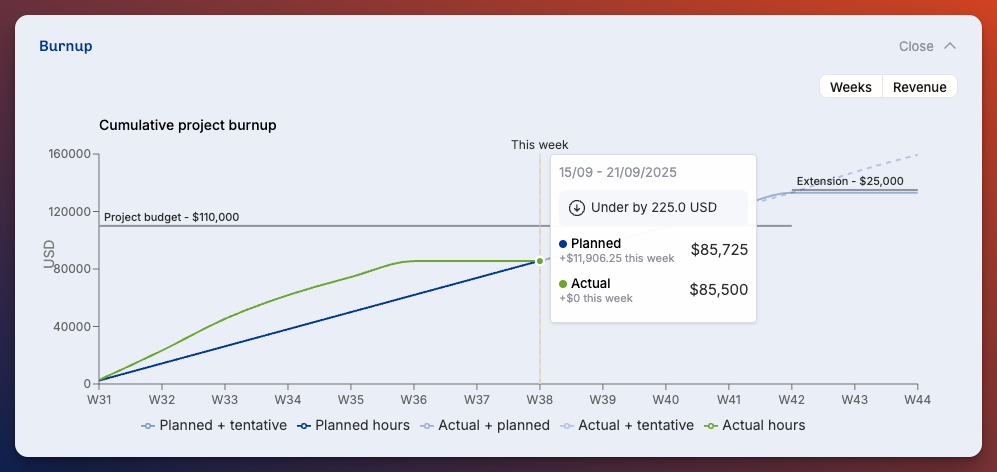
How to analyze planned vs. actual hours, step by step
Start by planning the work. Build the teams, then use the timeline to balance workloads before anyone logs an hour. Connect your time tracking tool from the Operating settings and map clients, projects and people across the two systems. You only do that mapping once.
Then make logging routine. Daily is better than weekly, and weekly is much better than monthly, because people reconstruct a month from memory and the variance you measure becomes fiction.
Review the report on a fixed rhythm. Weekly works, or twice a month at minimum, and always before month end rather than after it. Team leads should read their own team's numbers, project managers their projects, and consultants their own use of time. Drill into specific tasks or people when a gap looks large, then use what you find to correct the plan: scope creep, underestimated timelines, or consultants who are consistently over or under their planned hours.
Metrics to monitor
- Revenue leak. The difference between planned and actual work that turns into billable hours nobody invoiced.
- Variance, or deviation. The raw gap between planned and actual hours, which points at either revenue leak or overworked consultants.
- Billable utilization. Track it at individual, team, competence and company level, because a healthy company number can hide an unhealthy team.
- Overrun trends. Patterns of tasks or projects that repeatedly exceed their planned hours.
Best practices that make the number trustworthy
- Log time consistently. Set a routine and hold to it. Accuracy decays quickly with delay.
- Review early. Catch discrepancies mid-month, while you can still act on them.
- Favour transparency over micromanagement. The point is a healthier business, not more hours. Working efficiently does not mean working more, and teams that feel audited log defensively.
- Create a forum for learning. Make it normal to say out loud that a certain kind of project consistently runs ten days over.
- Give the systems a named owner. Somebody should understand how the integration works, so colleagues have a person to ask.
Case Study: Wasted work down 90% from the previous year by analyzing planned vs. actual hours
Operating helps us identify all billable work, improving our profitability
Operating helps Inventive.io, a Texas-based IT services company have a clear resource allocation process and effectively monitor the deviations in planned workloads and time spent on projects. Before Operating, they had to do a lot of manual work to put together the right reports weekly to monitor time spent in projects.
Last year, pre-Operating, we absorbed $250,000 in unbilled work due to inefficiencies. This year, it's down to $25,000.
James Shaw, COO, Inventive.io
Conclusion: monitoring planned vs. actual hours can have a significant impact on profitability
A detailed analysis of planned vs. actual hours is crucial for improving billable utilization and optimizing your resource allocation process. Professional services firms that effectively monitor and act on these insights can fine-tune their resource allocation, close revenue gaps, balance workloads, and adjust project pricing strategies. Ultimately, this leads to a more resilient, profitable, and competitive business. Inventive.io's example is a great one. A tiny process enhancement, a big effect on gross margins.
If you want to see how this works in action, just sign up for the free trial!
P.S. we have a complete article on top agency business metrics to follow.
FAQ
What are the best tools for tracking billable hours and project capacity?
Operating.app, Kantata and Runn all combine time tracking with resource allocation, which is what lets you compare planned hours against tracked hours rather than only reporting what was logged.
Why should consulting firms track billable hours and project capacity together?
Tracking both tells you how much work was billed and whether the team has capacity for what is coming. Looking at either one alone hides overbooking, underutilization and revenue leakage.
How does Operating help with billable hours and project capacity?
Operating is a consulting-focused PSA platform that brings planned vs. actual hours, utilization reporting and CRM-based capacity forecasting into one system, so billable hours and available capacity are read from the same data.
What does analyzing planned versus actual hours mean?
It compares the hours planned for a piece of work against the hours actually tracked against it, showing where delivery deviates from the plan and by how much.
How often should a consulting firm review planned vs. actual hours?
Weekly is ideal, and twice a month is the practical minimum. Review before month end rather than after it, so there is still time to correct a project rather than only explain it.
Which metrics matter most when analyzing planned vs. actual hours?
Revenue leak, variance between planned and tracked hours, billable utilization at several levels, and overrun trends on tasks or projects.



