



Disclosure: Operating publishes this page. Every product claim links to the vendor's own pricing page, docs or help center, and we say clearly where Ruddr is the better fit.
Last updated September 25, 2026. Rewritten after Ruddr launched its MCP server on September 22, 2026.
Operating vs Ruddr: The Short Answer
Choose Operating (operating.app) if resource planning, capacity and margin are your main problems. Its entry plan includes staffing, skills matching and capacity forecasting from $13 per person per month. Choose Ruddr if you want projects, time, expenses and invoicing in one tool at a low entry price, and your team has many non-billable staff.
As of September 2026, both products have an MCP server, so AI access alone no longer separates them. The real differences are plan packaging, seat rules and what an AI agent is allowed to change. Operating's MCP can create and update staffing, time and budgets. Ruddr's new MCP is broad for queries, but its documented write actions focus on time entries.
Operating fits consulting and technical services firms of 30 to 500 people that keep their CRM and task tool. Above 500 people, the best choice depends on your governance and finance needs.
Building a wider shortlist? See our Ruddr alternatives guide and our list of the best PSA software for consulting.
Ruddr vs Operating at a Glance: 2026 Comparison Table
Ruddr is a broad, all-in-one PSA with a cheap entry tier and a billable-only seat model. Operating is a resource-planning-first PSA that adds time and invoicing in higher plans and connects to the CRM and PM tools you already use.
Operating vs Ruddr at a glance (September 2026)
| Area | Operating | Ruddr |
|---|---|---|
| Best fit | Consulting and technical services firms of 30 to 500 people that plan staffing from their CRM pipeline. | Services firms that want projects, time, expenses and invoicing in one tool at a low entry price. |
| Entry plan | Planning at $13 per person per month (annual) covers staffing, capacity, budgets and skills. | Team at $14 per user per month (annual) covers projects, tasks, time, expenses and invoicing. |
| Resource planning | Included in the entry plan, with open positions matched by role, seniority and skills. | Resource Allocations, placeholders and soft bookings need the Pro plan at $24. |
| Capacity forecasting | 1 to 6 month view of confirmed work plus CRM deals weighted by probability. | Plan and forecast reports in Pro, driven by allocations. |
| Time tracking | Plan & Track plan: timesheets prefilled from the plan, with approvals. | Team plan: time and expense tracking; multistep approvals in Pro. |
| Invoicing | Full Suite plan: invoices, expenses, revenue recognition and multi-company. | Team plan: invoicing, payments and credit notes. |
| Retainers | Native retainer billing type: a recurring fee per period, with included hours and hourly overage. | Fixed Monthly billing plus a prepayments ledger for retainers. |
| Seat rule | All users plus anyone scheduled; scheduled-only seats cost less. | Only billable members pay, if at least 50% of members are billable. |
| CRM | Native HubSpot, Salesforce and Pipedrive on every plan. | HubSpot and Salesforce on Pro; no Pipedrive connector listed. |
| AI and MCP | MCP server with 59 tools on every plan; writes staffing, time, budgets and expenses. | MCP server launched September 22, 2026, with 91 query tools; writes focus on time entries. |
| Security | SOC 2 Type II, GDPR, hosted on AWS in Frankfurt; SSO on every plan. | ISO 27001 and GDPR; US hosting on AWS; SSO on the Team plan. |
| Onboarding | Data migration, training and support included free in every plan; live in weeks. | Paid onboarding packages of 1 to 6 weeks; price not published; 30-day free trial. |
See Operating on your own data. Book a 30-minute walkthrough of staffing, capacity and margins with your real pipeline. Book a time with Lauri
The Main Difference Between Ruddr and Operating
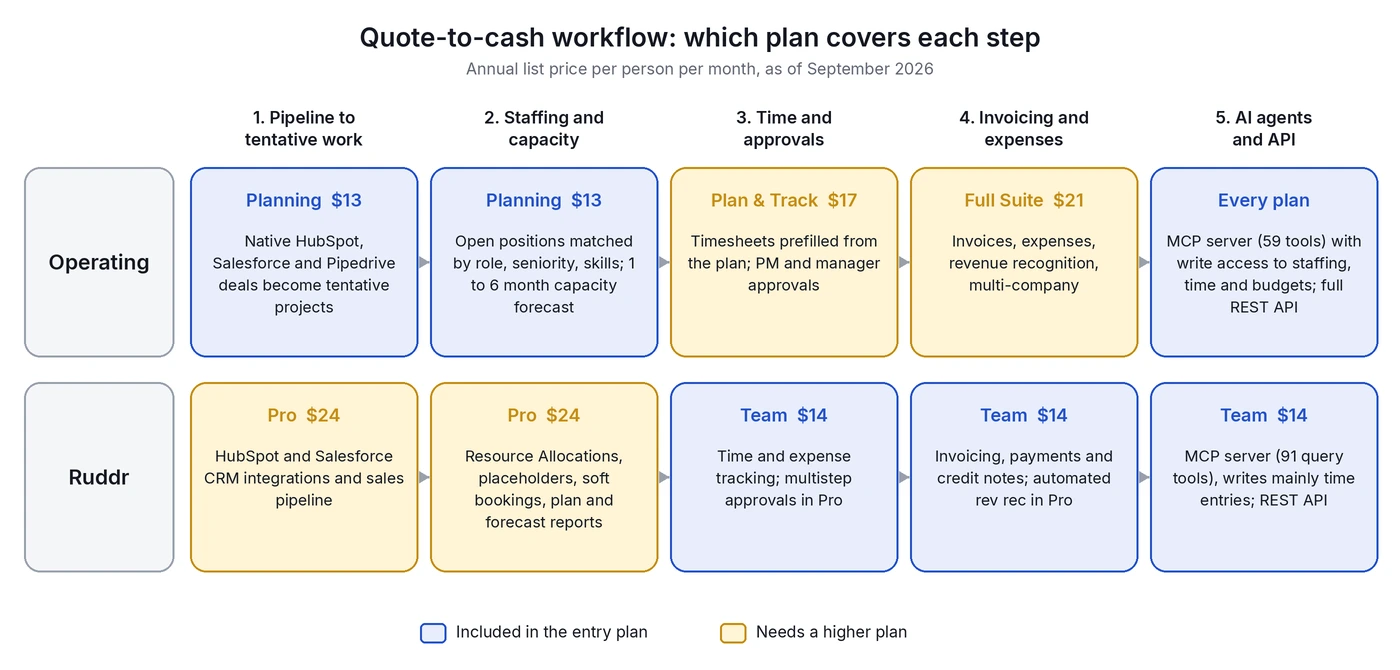
Ruddr starts from project delivery and billing, then adds resource planning in its Pro plan. Operating starts from resource and capacity planning, then adds time tracking and invoicing in higher plans. So each tool is cheapest for a different first problem.
This matters because most firms buy a PSA to fix one urgent problem first. If that problem is "who works on what next month, and can we take this deal?", Operating covers it in the entry plan. If the problem is "we need timesheets and invoices out of spreadsheets", Ruddr's Team plan covers it for $14.
The two products also think differently about your stack. Ruddr includes tasks, subtasks and Kanban boards, so it can replace a light project tool. Operating plans at project, phase and allocation level in a Gantt-style Timeline and leaves tickets in Jira, Linear or Asana.
Who Should Choose Operating vs Who Should Choose Ruddr
Pick Operating when staffing, capacity and margin forecasting are the problems you need to fix first. Pick Ruddr when you want cheap tool for projects, time and invoicing, and resource planning can wait.
Choose Operating if...
- You need resource planning at the entry price. Staffing, skills and capacity are in the $13 Planning plan, while Ruddr needs Pro at $24.
- You plan from the pipeline. HubSpot, Salesforce and Pipedrive deals become tentative projects, weighted by deal probability, on every plan.
- You want AI agents to do staffing work. Operating's MCP can create positions, update allocations and log time, within the user's permissions.
- You keep your own PM tool. Tickets stay in Jira, Linear or Asana, and Operating runs people, projects and money around them.
- You sell into enterprises that ask for SOC 2 Type II, or you need EU hosting. Operating is hosted on AWS in Frankfurt.
- You want fast, free onboarding. Migration, training and support are included in every plan.
Choose Ruddr if...
- You mainly need time, expenses and invoicing. Ruddr's Team plan covers them for $14, while Operating needs Full Suite at $21.
- You have many non-billable staff. Under Ruddr's Fair Pricing Policy, non-billable members are free if at least half the workspace is billable.
- You want long-term price protection. Ruddr locks pricing for 24 months, and later increases are capped at 10% per 24-month period.
- You want in-app reports and charts. Ruddr Assistant builds custom reports and charts inside the product on every plan.
- You want light task management in the same tool, with tasks, subtasks and Kanban boards.
Feature Comparison: Resource Planning, Time, Billing and Reporting
Both tools cover the core PSA chain: staffing, time, budgets and invoicing. Operating goes deeper on staffing and pipeline-based capacity in its entry plan. Ruddr goes wider on delivery, billing types and in-app reporting.
Resource planning and staffing
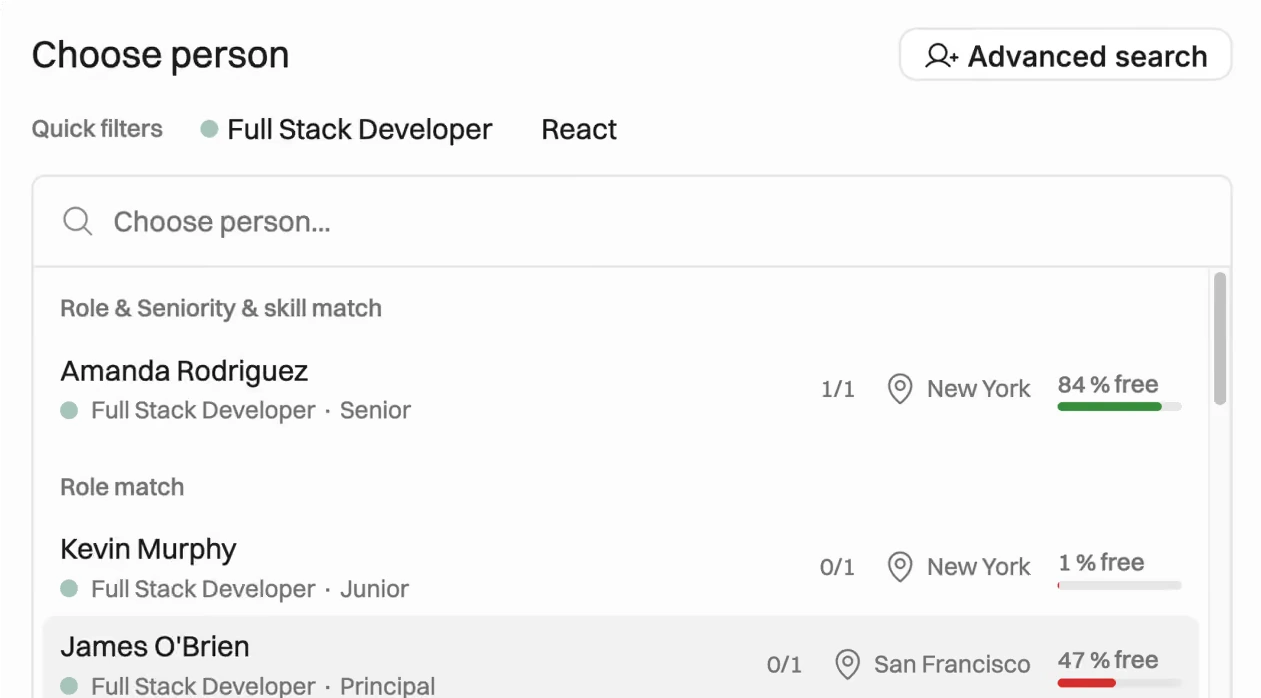
Operating puts resource planning at the center. You create open positions on a project, and Operating suggests people by role, seniority, skills and free capacity, with margin per position and a bench view. All of this is in the Planning plan.
Ruddr's resource allocations are solid but sit in Pro. They include a Schedule grid, placeholders with an average bill and cost rate, and confirmed or soft bookings. Members can have skills, which you can use to filter allocations.
Capacity planning and forecasting
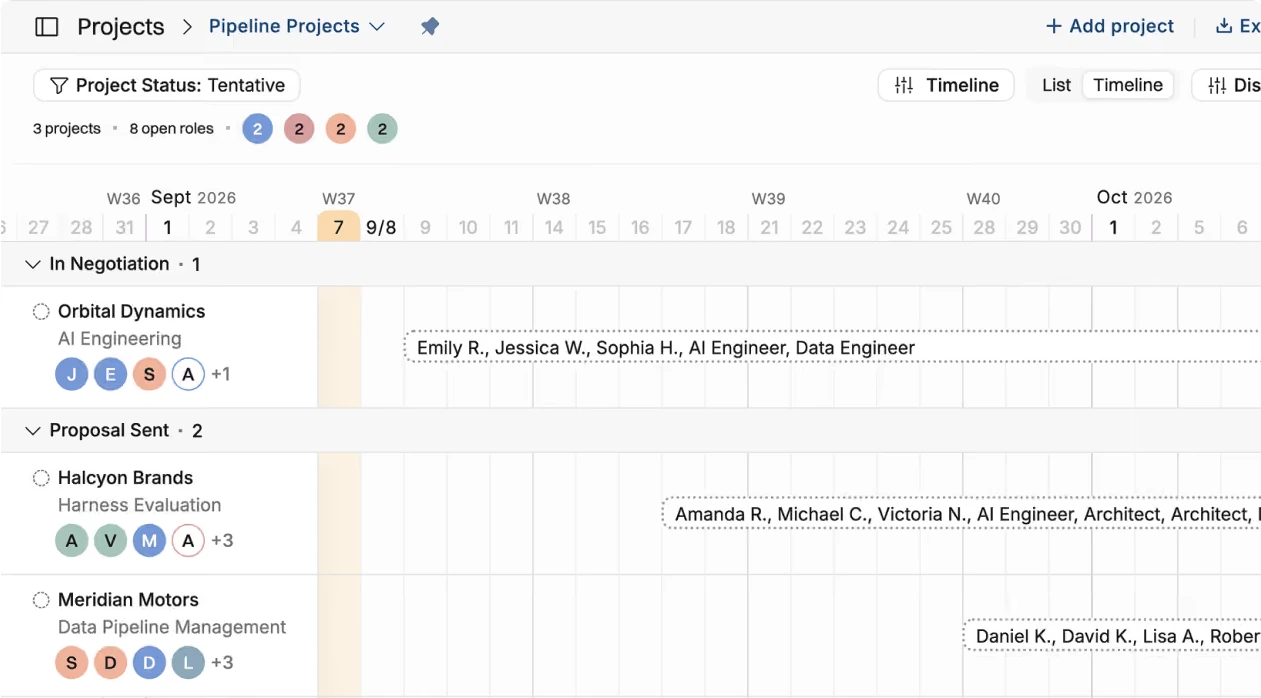
Operating shows a 1 to 6 month capacity view that mixes confirmed work with tentative work from your CRM, weighted by deal probability. It is built for hiring calls. Ruddr has plan, forecast and variance reports in Pro. Its opportunities carry a probability, but we found no feature that books people directly against an opportunity.
Utilization
In Operating, the utilization forecast comes straight from the staffing plan, and actuals come from time entries, with a formula you configure. Ruddr tracks utilization on the Team plan and shows each member's target attainment from allocations in Pro.
Project management
Ruddr has tasks, subtasks and Kanban boards on Team, and its help center describes a Gantt view with dependencies. Operating uses a Gantt-style Timeline for projects, phases and allocations, and does not try to replace your ticket tool.
Time and expenses
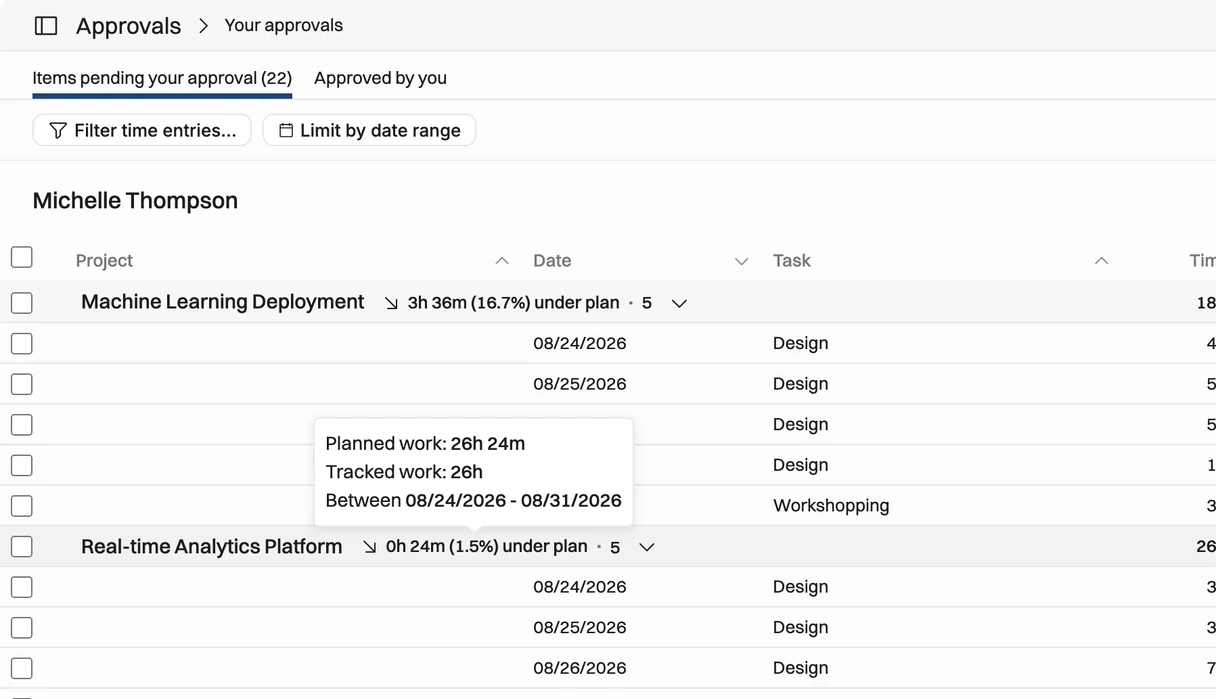
Operating prefills timesheets from the staffing plan and supports project manager and line manager approvals in Plan & Track. Expenses come with Full Suite. Ruddr includes time, time attachments and expenses on Team, and adds multistep approval workflows in Pro.
Billing and revenue recognition
Ruddr has more billing types. It supports time and materials, fixed fee with a milestone schedule, Fixed Monthly and non-billable work, plus a prepayments ledger. Its billing docs list five revenue recognition methods; the automated ones need Pro. Multicurrency is Pro only.
Operating supports time and materials, capped time and materials, fixed price, retainer and non-billable budgets, with ASC 606 and IFRS 15 revenue recognition and multi-company invoicing. A retainer bills a recurring fee per period and can carry a set number of included hours, with anything past them billed hourly at the project's rates.
Billing and financials compared (September 2026)
| Capability | Operating | Ruddr |
|---|---|---|
| Billing types | Time and materials, capped T&M, fixed price, retainer and non-billable. | Time and materials, fixed fee, Fixed Monthly and non-billable. |
| Retainers | Native retainer type, with included hours and hourly overage. | Fixed Monthly plus a prepayments ledger. |
| Revenue recognition | ASC 606 and IFRS 15, in Full Suite. | Five methods for fixed fee; automated methods need Pro. |
| Cost rates | Individual cost rate per person first, then role and seniority cost cards. | Per-member cost periods with labor and overhead; project overrides. |
| Multi-company or currency | Multi-company invoicing in Full Suite. | 150+ currencies, Pro only. |
| Accounting sync | Xero and QuickBooks Online; NetSuite listed as coming soon. | QuickBooks Online and Desktop, Xero and Sage Intacct. |
Project financials and profitability
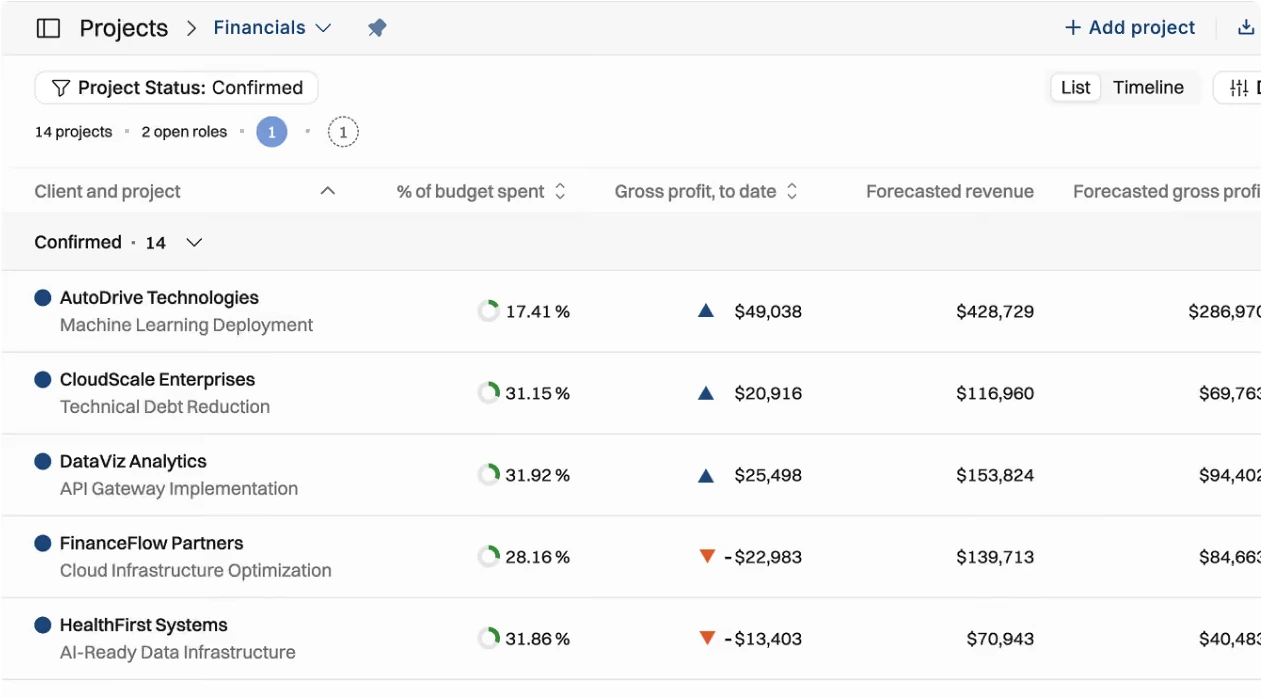
Both tools calculate margin from individual cost rates. Operating uses a person's own cost rate first, then falls back to role and seniority cost cards. Ruddr also supports per-member cost rates, so older claims that Ruddr only uses blended role averages are wrong.
Reporting and analytics
Ruddr is stronger here. It has ten report categories, personal, project and executive dashboards, and Ruddr Assistant can build custom reports and charts on every plan. Plan, forecast, variance and scheduled reports need Pro. Operating has built-in staffing, capacity, utilization and margin views, but custom reporting is less flexible than a BI tool. Many teams send Operating data to BI through the API or ask an AI agent through MCP.
Integrations and API
Neither tool has a native Asana, Jira or Linear connector. Operating includes every integration on every plan. Ruddr puts its CRM integrations in Pro.
Integrations compared (September 2026)
| Category | Operating | Ruddr |
|---|---|---|
| CRM | HubSpot, Salesforce and Pipedrive, native on every plan. | HubSpot and Salesforce on Pro. |
| Accounting | Xero and QuickBooks Online. | QuickBooks Online and Desktop, Xero, and Sage Intacct (added September 2026). |
| HR | HiBob and Flowcase. | BambooHR and Rippling. |
| Time and expenses | Harvest, plus built-in timesheets. | Built-in time, Expensify and a Slack app. |
| PM tools | No native Asana, Jira or Linear; connect through the API or an AI agent. | No native Asana or Jira listed. |
| API | Full REST API on every plan. | REST API on every plan. |
Security and enterprise controls
Operating is SOC 2 Type II certified, GDPR compliant and hosted on AWS in Frankfurt, with SSO on every plan. Ruddr says it is ISO 27001 certified and GDPR compliant, with an annual audit and penetration test. Its privacy policy lists AWS in the United States. We could not confirm a Ruddr SOC 2 report from its public pages, so check its Trust Center if you need one.
One Operating gap: SCIM provisioning is not supported yet. Users are created the first time they sign in with SSO. We found no SCIM mention in Ruddr's help center either.
Ruddr MCP vs Operating MCP: How the AI Integrations Compare
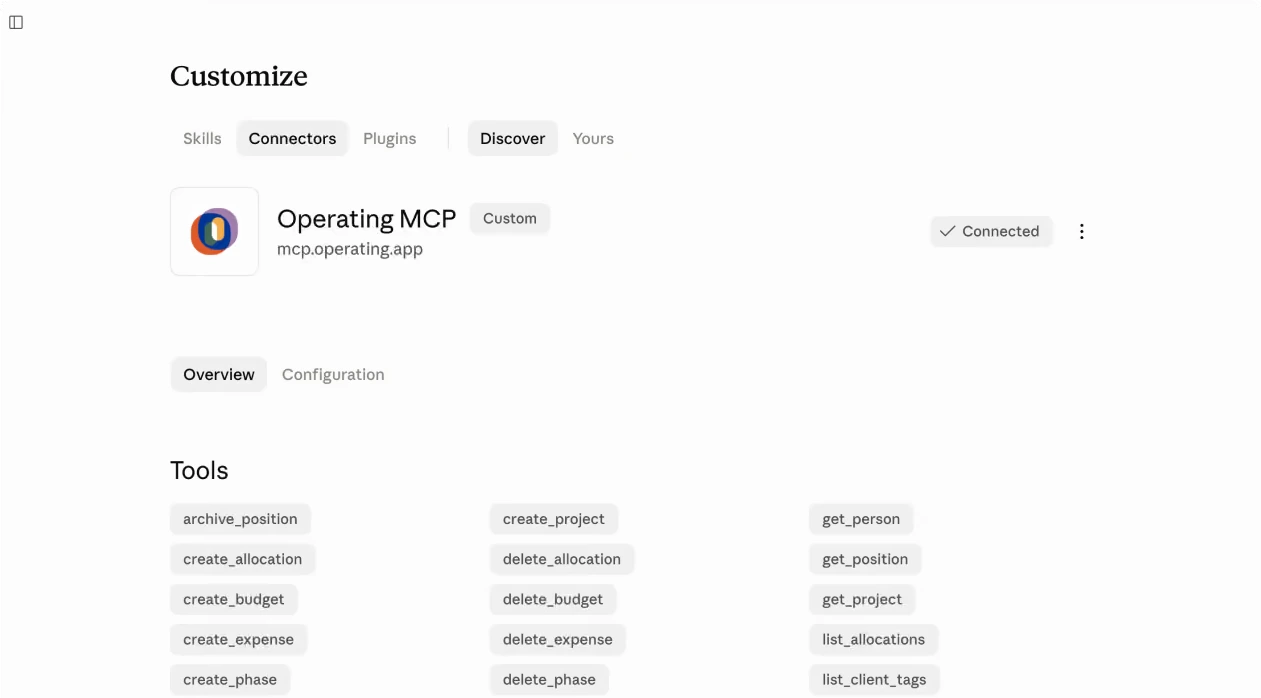
Both tools now have an MCP server that works with Claude and ChatGPT and respects user permissions. Ruddr's is larger for reading data (91 query tools). Operating's lets agents change more of the operating model, including staffing, allocations, budgets and expenses.
Ruddr launched its server on September 22, 2026. Its launch post describes 91 query tools across 19 namespaces behind two tool definitions, ruddr-query and ruddr-command. Access is read-only by default, and writes need an extra scope. The documented write action is time tracking, and the agent must confirm with the user before each final write.
Operating's MCP server has 59 tools and is included in every plan. Agents can read and write people, projects, positions, allocations, time, budgets, phases and expenses. Invoices and reports are read-only.
AI and MCP compared (September 2026)
| Dimension | Operating | Ruddr |
|---|---|---|
| Status | Live; tool list last updated August 10, 2026. | Launched September 22, 2026. |
| Tools | 59 tools. | 91 query tools across 19 namespaces, behind two tool definitions. |
| Plans | Every plan, no add-on listed. | Listed from the Team plan; Ruddr Assistant must be switched on. |
| AI clients | Claude, Claude Code, ChatGPT and Gemini CLI. | Any MCP client; guides for Claude, ChatGPT Business or Enterprise and Codex. |
| Access model | OAuth; agents see only what the signed-in user can see. | OAuth; runs as the member, read-only unless write scope is granted. |
| Write actions | People, projects, positions, allocations, time, budgets, phases and expenses. | Time entries and support tickets, with a confirmation step. |
| Deletes | Allocations, budgets, phases and expenses. | None documented. |
| Built-in assistant | None; you use the AI tool your team already has. | Ruddr Assistant in the app on all plans, with custom reports and charts. |
In practice, the difference shows up in workflows. With Operating, a resource manager can paste a signed SOW into Claude and have the agent create phases, open positions and suggest people with free capacity. With Ruddr, an agent is best at answering questions about plan, actuals and forecasts, and at logging time. Operating customer Modus Create, a 350-person engineering consultancy, uses the MCP server to build team plans on live availability (vendor-reported).
Ruddr Pricing vs Operating Pricing: Seat Economics Explained
As of September 2026, Ruddr costs $14 (Team) or $24 (Pro) per user per month billed annually, and only billable members pay. Operating costs $13, $17 or $21 per person per month billed annually, and counts all users plus anyone scheduled. Which is cheaper depends on your headcount mix and which plan you need.
List prices per person per month (September 2026)
| Plan | Monthly billing | Annual billing | What it adds |
|---|---|---|---|
| Operating Planning | $15 | $13 | Staffing, capacity, budgets, rate cards, skills, MCP. |
| Operating Plan & Track | $19 | $17 | Adds timesheets, approvals and planned vs actual. |
| Operating Full Suite | $23 | $21 | Adds invoicing, expenses and multi-company. |
| Operating scheduled-only seat | $13 | $11 | For people who are scheduled but do not sign in. |
| Operating Enterprise | Custom | Custom | From 100 people: volume pricing, SLA, custom contract. |
| Ruddr Team | $17 | $14 | Projects, tasks, time, expenses, invoicing, API, MCP, SSO. |
| Ruddr Pro | $30 | $24 | Adds allocations, forecasting, CRM, rate cards, rev rec, SLA. |
Ruddr's Fair Pricing Policy is a real advantage. Non-billable members are free as long as at least 50% of the workspace is billable. If fewer than half are billable, Ruddr charges for 50% of all members. Pricing is locked for 24 months, and later increases are capped at 10% per 24-month period. Operating does not publish a renewal cap.
Monthly cost scenarios at annual list prices
| Scenario | Operating | Ruddr | What it shows |
|---|---|---|---|
| 50 billable people, staffing is the main need | Planning: 50 x $13 = $650 | Pro: 50 x $24 = $1,200 | Operating is $550 a month cheaper when you need resourcing. |
| 50 billable people, staffing plus time and invoicing | Full Suite: 50 x $21 = $1,050 | Pro: 50 x $24 = $1,200 | Operating is still $150 a month cheaper for the full chain. |
| 40 billable plus 10 ops staff, time and invoicing only | Full Suite: 50 x $21 = $1,050 | Team: 40 x $14 = $560 | Ruddr is much cheaper when you do not need resource planning. |
| 80 billable plus 20 ops staff, full PSA | Full Suite: 100 x $21 = $2,100 | Pro: 80 x $24 = $1,920 | Free non-billable seats give Ruddr a $180 edge at this mix. |
These are list prices only. Operating adds volume discounts from 100 people on Enterprise, and Ruddr offers volume pricing for large Pro workspaces on annual terms. Ask both vendors for a quote on your exact headcount.
Implementation and Onboarding Time: Ruddr vs Operating
Operating includes onboarding for free: data migration, training and support come with every plan, and most firms are live in weeks, not months. Ruddr sells onboarding packages that take 1 to 6 weeks, and it does not publish their price.
Implementation compared (September 2026)
| Area | Operating | Ruddr |
|---|---|---|
| Onboarding cost | Included in every plan at no extra cost. | Paid packages; price not published. |
| Published timeline | "Built to go live in a few weeks, not months." Simple setups can start planning within days. | Basic: 1 to 3 weeks. Comprehensive: 3 to 6 weeks. Its onboarding page lists different ranges. |
| Data migration | Operating's team imports the data for you, or you use CSV. | Included in onboarding packages. |
| Trial | Free trial with optional demo data. | 30-day free trial, no card needed. |
| Sandbox | Not published. | Free sandbox on Pro, on request. |
Speed depends on data quality. Staffing only works when every billable person is in the plan, so start with one team and a clean list of people, roles and skills. Our PSA rollout plan walks through the steps.
Which PSA Fits Your Firm Size: 30, 100 or 500 People?
Operating is the best fit for firms of 30 to 500 people that plan from the pipeline. Ruddr fits smaller or delivery-heavy firms that want one low-cost tool. Above 500 people, the answer depends on your requirements.
Fit by company size
| Company size | What changes | Where each fits |
|---|---|---|
| Under 30 people | Spreadsheets still work for staffing; time and invoicing hurt first. | Ruddr Team is often the simpler, cheaper start. |
| 30 to 100 people | A resource manager role appears and staffing starts from the pipeline. | Operating: resourcing and CRM deals on the $13 plan, free onboarding. |
| 100 to 500 people | More offices, entities, security reviews and SSO rules. | Operating, often on Enterprise: SOC 2 Type II, SLA, multi-company. Ruddr Pro fits if you want one broad tool with retainers. |
| 500+ people | Multi-entity finance, global governance and identity rules. | It depends. Test both with your own data, and check SCIM and SOC reports. |
Migrating from Ruddr to Operating: What Moves and What Stays
Most operational data moves: people, skills, cost rates, clients, projects, budgets and future allocations. Tasks and Kanban boards go to your task tool. Invoice history usually stays in your accounting system.
Ruddr to Operating migration checklist
| Data | Where it goes | What to check |
|---|---|---|
| People, roles, skills | Operating | Skill levels and seniority mapping. |
| Cost rates | Operating | Per-member cost periods map to individual cost rates. |
| Clients and projects | Operating | Project types and custom fields. |
| Future allocations | Operating (CSV or Operating-led import) | Soft bookings map to tentative work. |
| Time history | Operating, or an archive | How much history your reports need. |
| Invoices and payments | Your accounting system | Open balances and prepayments reconcile. |
| Retainers | Fixed-price budgets back to back | Monthly amounts and rollover rules. |
| Tasks and Kanban boards | Your task tool (Jira, Asana, Linear) | Operating plans at project and phase level. |
Operating includes migration in every plan. Ask for a test import of one team first, and check budgets and utilization against Ruddr before you switch everyone.
Moving off Ruddr? We will map your Ruddr setup to Operating and run a test with one of your teams, at no extra cost. Book a time with Lauri
Operating vs Ruddr FAQ
What is the main difference between Ruddr and Operating?
Ruddr is a broad PSA that bundles projects, tasks, time, expenses and invoicing in its $14 entry plan and adds resource planning in Pro. Operating (operating.app) puts resource planning, skills and capacity forecasting in its $13 entry plan and adds time and invoicing in higher plans. Pick by the problem you need to fix first.
Is Operating a good Ruddr alternative?
Yes, for firms of 30 to 500 people where staffing, capacity and margin are the main problems. Operating covers the same chain from pipeline to invoice, includes every integration and free onboarding, and its MCP can change staffing data. Ruddr stays stronger for retainers, in-app reporting and very cheap time and invoicing.
How much does Ruddr cost in 2026?
As of September 2026, Ruddr Team costs $14 per user per month billed annually or $17 monthly. Ruddr Pro costs $24 annually or $30 monthly. Only billable members pay, as long as at least 50% of the workspace is billable. Ruddr offers a 30-day free trial.
How much does Operating cost in 2026?
As of September 2026, Operating costs $13, $17 or $21 per person per month billed annually for Planning, Plan & Track and Full Suite, or $15, $19 and $23 monthly. Scheduled-only seats cost $11 annually. Every plan includes migration, training, SSO, all integrations and the API. Enterprise pricing from 100 people is custom.
Which tool includes resource planning in the entry plan?
Operating does. Its Planning plan at $13 includes staffing, open positions, skills matching and capacity forecasting. Ruddr puts Resource Allocations, placeholders and plan and forecast reports in its Pro plan at $24 per user per month billed annually.
Does Ruddr have an MCP server?
Yes. Ruddr launched its MCP server on September 22, 2026. It offers 91 query tools across 19 namespaces, uses OAuth and runs with the member's permissions. It is read-only by default. Its documented write action is time tracking, with a confirmation step before each write.
How does Ruddr MCP compare with Operating MCP?
Ruddr's MCP is larger for reading data, with 91 query tools. Operating's MCP has 59 tools but lets agents create and update people, projects, positions, allocations, time, budgets, phases and expenses. So Operating suits agent-driven staffing work, while Ruddr suits questions about plans, actuals and forecasts.
Which is cheaper for time tracking and invoicing?
Ruddr, if you do not need resource planning. Its Team plan includes time, expenses and invoicing at $14 per billable user per month billed annually. Operating needs Full Suite at $21 per person for invoicing. If you also need resource planning, Operating Full Suite is cheaper than Ruddr Pro at $24.
How does Ruddr's billable-only pricing work?
Under Ruddr's Fair Pricing Policy, you pay only for billable members, and non-billable staff are free. The rule holds while at least 50% of members are billable. If fewer are billable, Ruddr charges for 50% of all members. Non-billable members cannot log time to billable projects.
Do Ruddr and Operating integrate with HubSpot and Salesforce?
Yes. Operating has native HubSpot, Salesforce and Pipedrive integrations on every plan, and deals become tentative projects. Ruddr has HubSpot and Salesforce integrations on its Pro plan. We found no Pipedrive connector in Ruddr's integration directory as of September 2026.
Can Operating work alongside Jira, Asana or Linear?
Yes. Operating is built to sit next to your task tool. Tickets and backlogs stay in Jira, Linear or Asana, while Operating plans projects, phases, people and money. There is no native connector for these tools, so teams link them through the API or an AI agent using MCP.
How hard is it to migrate from Ruddr to Operating?
Most firms move people, skills, cost rates, clients, projects and future allocations with a CSV or an Operating-led import, which is included in every plan. Tasks move to your task tool, and invoice history stays in accounting. Retainers need to be rebuilt as fixed-price budgets. Start with one team.
Methodology and Sources
We compared both products against their own current pricing pages, help centers and product docs, not other comparison sites. Research closed on September 25, 2026.
- Pricing: read from operating.app/pricing and ruddr.com/pricing. Ruddr's monthly and annual feature lists do not fully match, so we used the annual list and its help center.
- Features: checked in each vendor's help center. Where marketing and docs disagreed, we used the docs and said so.
- AI and MCP: based on Ruddr's launch post of September 22, 2026 and Operating's MCP help article.
- Reviews: G2 and Capterra scores and counts only, checked on September 25, 2026.
- Screenshots: only Operating's own product images. We did not reproduce Ruddr's interface.
- Vendor claims: customer results and go-live times are labeled as vendor-reported.
- Not published or not verified: Ruddr SOC 2 status, Ruddr onboarding prices, Operating's renewal terms and Operating's trial length.
- Disclosure: Operating publishes this page.
Review scores (September 25, 2026)
| Product | G2 rating | G2 reviews | Capterra rating | Capterra reviews |
|---|---|---|---|---|
| Operating | 4.7 | 20 | 4.8 | 13 |
| Ruddr | 4.6 | 378 | 4.8 | 94 |
Sources: Operating
- Pricing
- AI and MCP
- MCP server
- Integrations
- Security
- Resource management
- Capacity planning
- Help: AI chat via MCP (59 tools)
- Help: Billing types and known limitations
- Help: How Operating decides the cost rate
- Help: SSO and SCIM
- Help: Security and privacy FAQ
- Go-live claim
- Case study: Modus Create
- API docs
Sources: Ruddr
- Pricing
- Fair Pricing Policy
- Why we built Ruddr's MCP server (September 22, 2026)
- Help: AI connectors overview
- Help: Ruddr Assistant
- Integrations
- Help: Placeholder resources
- Help: Confirmed and soft bookings
- Help: Billing types
- Help: Member profile and cost rates
- Help: Reporting overview
- Onboarding services
- Privacy policy (hosting)
- Trust Center
Sources: review platforms
Written by Lauri Eurén, CEO of Operating. Last updated September 25, 2026.



