


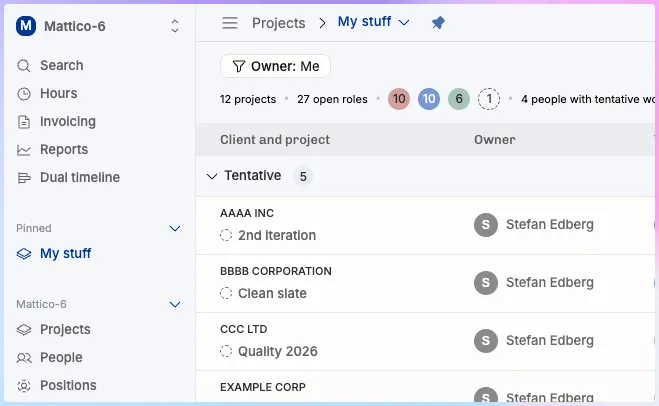
Quick summary: Operating's new sidebar navigation and global search are available in public beta, switched on from the Beta Features section of Settings. Global search opens with Ctrl+K (Cmd+K on Mac) and jumps straight to any project, client, report, or teammate. The redesigned sidebar puts Projects, People, and Positions at the forefront and lets you pin views and create folders; it replaces Horizon, whose lists such as Tentative Projects can be rebuilt as pinned custom views.
Managing projects, people, and positions just got faster.
Operating’s new Sidebar Navigation and Global Search are now available in Public Beta. This update introduces a more efficient way to move around the tool, helping consulting and professional services teams spend less time navigating menus and more time doing actual work.
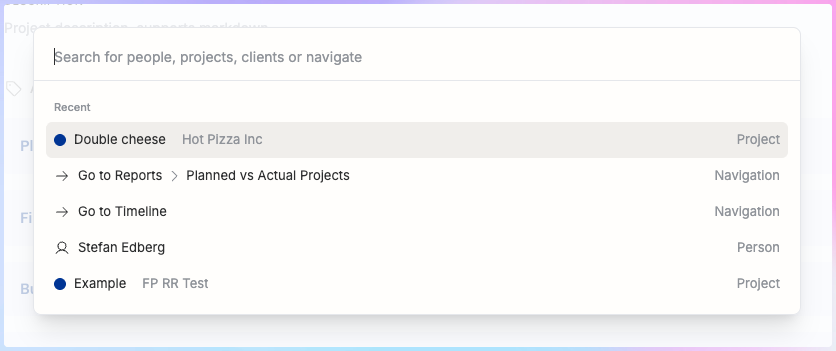
Jump anywhere with Global Search
You can now press Ctrl+K (or Cmd+K on Mac) to instantly find and open anything in Operating – projects, clients, reports, or teammates.
It’s a small shortcut with a big impact: faster context switching, fewer clicks, and less time spent hunting through menus.
A smarter Sidebar for modern operations
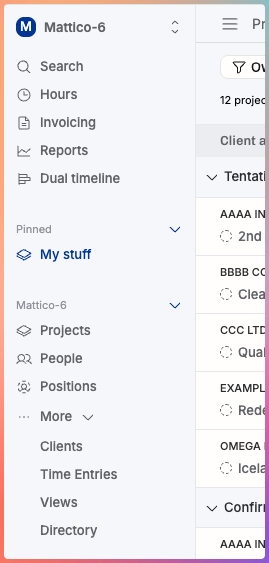
The redesigned Sidebar Navigation brings your firm’s core concepts—Projects, People, and Positions—to the forefront. You can now pin your most-used views, create folders, and organize your workspace the way you actually work.
This structure also supports our upcoming unified views: soon, you’ll be able to manage clients, time entries, and other records directly from the sidebar with advanced filters, CSV exports, and bulk edits.
Familiar concepts, simpler structure
The new design replaces “Horizon” and will eventually replace “Directory,” but their functionality remains. You can recreate lists like “Tentative Projects” or “Available People” from the former Horizon as custom views and pin them for easy access.
This simplification of terminology reduces the learning curve for new users and helps teams onboard faster.
Toggle views, keep your context
Projects and People now share a common filter structure, letting you switch between List and Timeline views instantly without losing context.

Why this matters
For most consulting firms, one of the biggest operational inefficiencies is administration. Every minute spent clicking around is a minute not spent on client work.
The new navigation cuts that friction, letting operations teams and consultants focus on utilization, forecasting, and project delivery instead of searching for data.
With Operating’s new layout, you can expect:
- Faster navigation with fewer clicks
- Reduced admin overhead for project managers and COOs
- Quicker onboarding for new users
- Better visibility across projects, people, and positions
This is another step toward our mission: helping consulting firms run more profitably with less admin.
Try it now
To enable the new Sidebar Navigation and Global Search, go to Settings → Beta Features, toggle it on, and save.
You can switch back anytime – but we’re confident you won’t want to.
FAQ: Sidebar Navigation & Global Search
What does the new sidebar navigation do?
The new sidebar brings all core areas of Operating—Projects, People, and Positions—into one place. You can pin views, create folders, and access everything faster without losing context.
How does the global search work?
Press Ctrl + K (or Cmd + K on Mac) to search for anything in Operating: projects, clients, reports, or teammates. It’s designed to reduce time spent navigating menus and make context switching effortless.
Why is this update important for consulting firms?
Consulting and professional services teams spend hours every week clicking through tools. The new navigation helps cut that admin time so teams can focus on utilization, staffing, and project delivery.
Can I still use Horizon or Directory?
Yes. Horizon and Directory are being replaced with custom views. You can re-create “Tentative Projects” or “Available People” lists, pin them, and use them just like before.
How can I activate the new sidebar and global search?
Go to Settings → Beta Features, toggle on Sidebar Navigation and Global Search, and save changes. You can switch back anytime.



