


Onboarding to Operating
Your team size and the tool you're moving from decide how long onboarding takes. AI does much of the migration work. Every customer also gets a customer success contact and a shared Slack or Teams channel.

How long does onboarding to Operating take?
A few days
Starting fresh, with no tool to move from
2 to 4 weeks
A smaller team moving from a time tracker or spreadsheets
About 2 months
A larger firm moving from simple tools
About a quarter
A larger firm leaving a legacy PSA or ERP
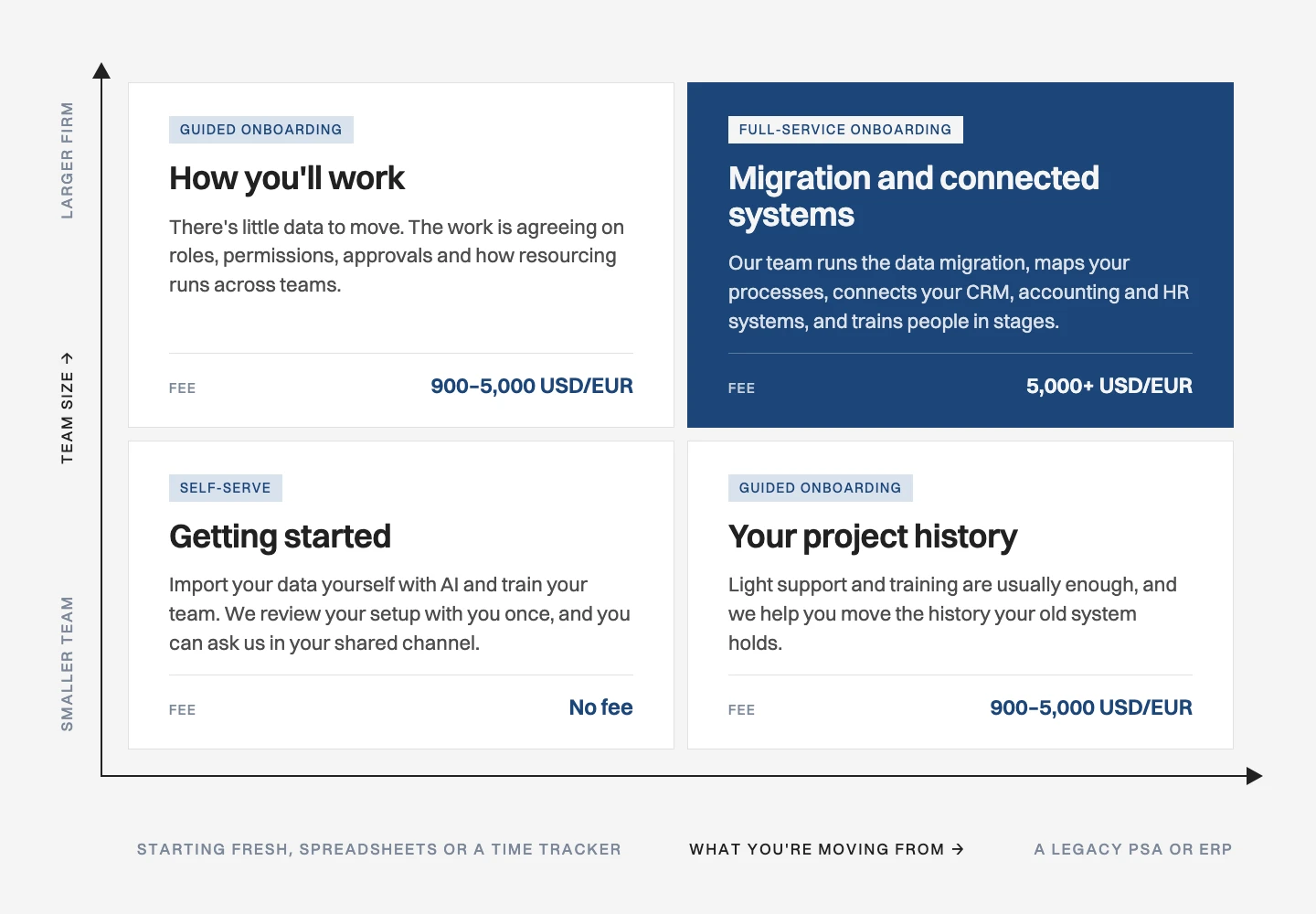
Which onboarding fits you
For most teams, the move is easy. A team on a simple time tracking app, a planning tool or spreadsheets has little to migrate. Leaving a legacy PSA or ERP means years of projects, rates and budgets to carry across. A bigger team also has more to agree on before go-live.
What customers say about the switch

"We switched from Harvest and Forecast to Operating last month and with only 1 week to do it, the whole move took us about two days. That's 2 days to be onboarded, data synced and the team using it as if nothing had changed!"

Chris Lewis
Managing Director
Wholegrain Digital

"It was immediately obvious to us that this had been built by people who had lived our world."

Greg Martin
Chief Operating Officer
Modus Create

"Getting Operating integrated with our CRM and Workday was quick. Operating has an amazing REST API. After introducing the tool to our staffing managers and PMs, the feedback has been only positive."

Jouko Kiuru
Operations Development Director
Solita
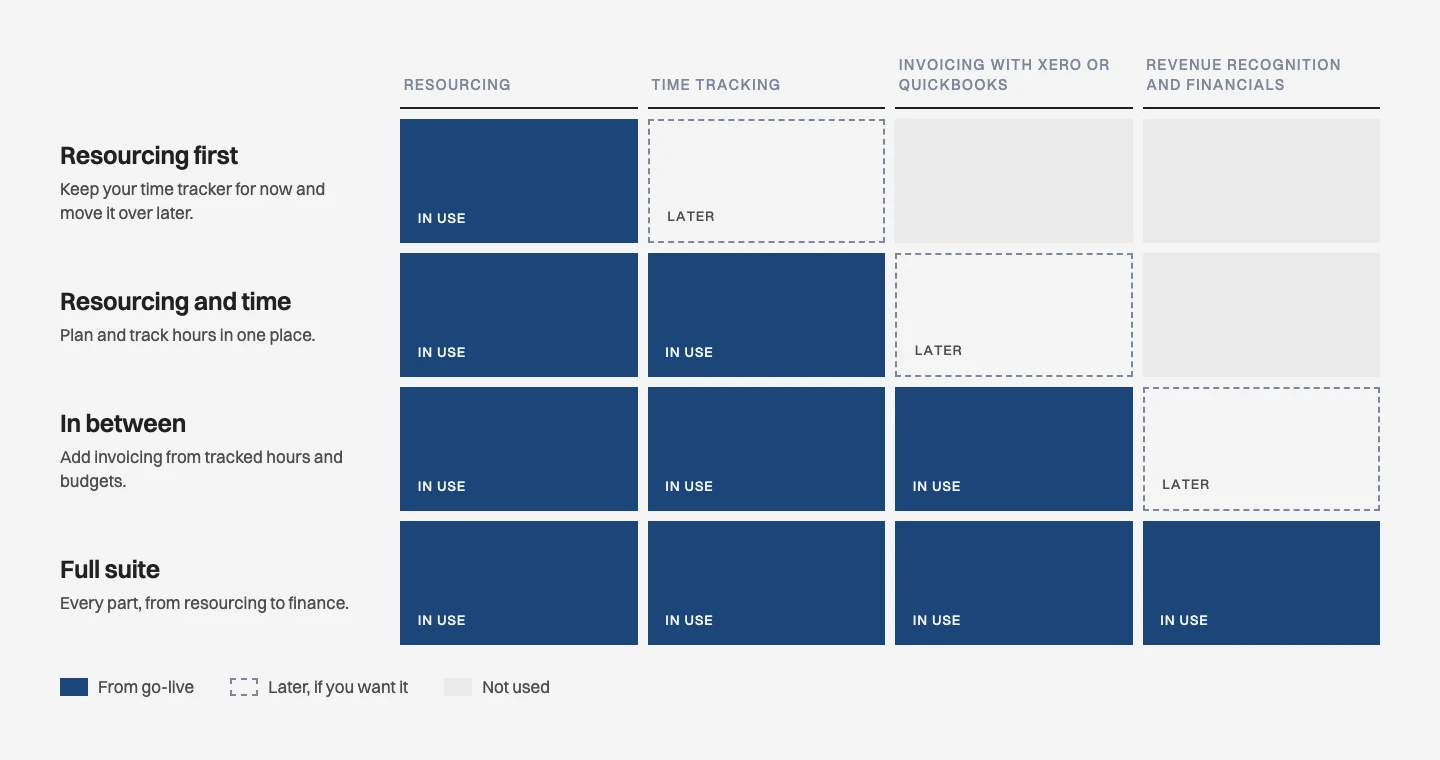
Decide how much of Operating to start with
You don't have to start using everything on day one. Resourcing alone is a short setup. The full suite brings in finance, so it needs more setup and change management, and most teams add it in steps. Once your data is in, finance invoices and recognises revenue from the hours your team already tracks in Operating, instead of copying them into spreadsheets.
Some teams use Operating only for resourcing and time tracking, and never switch on invoicing or revenue recognition—but we guarantee it's worth it if you're a services firm that has time & materials, fixed price, and retainer-based work. It makes the job of your finance team a whole lot easier.
How your data comes in
Your AI assistant or our team uses AI for most of the import. It's one of the reasons we migrate faster than a legacy vendor can.

AI
Your AI assistant
Connect Claude or ChatGPT to Operating and give it exports from your old tools. It lets you build a new project structure instead of copying the old one.
Files
Spreadsheet import
Use our CSV imports, one file for each kind of record. Our migration spreadsheet shows what goes in each column.
With us
Guided or full-service
On self-serve you use these yourself. With guided or full-service onboarding, our team runs them with you and checks the result.
Import with your AI assistant
Give Claude or ChatGPT your CSV files and it creates the clients, projects, people and time entries in Operating.
Import CSV files
Bring in clients, projects, people, roles, skills, time entries and allocations from spreadsheet exports.
One-click import from Harvest
Clients, projects, people and time entries come across from Harvest, and the sync runs daily until you go live.
What the onboarding includes

Demo account or your own data
Start in a demo account with sample data if you like, or go straight to your own. You can also bring some of your data in with your AI assistant first and do the full migration with our team later.
Kickoff
We agree on how your clients and projects are set up, and who takes part on your team.
Import
Your people, clients, projects, tasks and time entries come in through one of the routes above, and we review the setup with you.
Setup
In one or two sessions we set up roles and permissions, rates and cost rates, budgets, retainers and expense rules. Features you don't need are switched off, so the screens stay simple.
Accounting
If you invoice from Operating, we connect Xero or QuickBooks Online and map your clients, tax rates and items once. After that, invoices go to your accounting system and payment statuses come back.
Training
Project managers and admins get a live session, with a Q&A a week later, and finance gets a separate session on invoicing and month-end. People who only track time get a short video, written instructions and our support site.
Check and go live
Project managers check their own projects before the switch, and time tracking starts in Operating on the day you choose.
First month: hypercare
In your first month we go through two things with you: the first payroll run that uses Operating's time data, and your first month-end invoicing.
From your side you need one point of contact, an admin of your current tool for the import, and someone with admin access to your accounting system.
Who helps you

Guided onboarding has a fixed fee, set by your team size and how complex your setup is. Most teams pay 900 to 5,000 USD or EUR. Full-service onboarding starts at 5,000 USD or EUR. Self-serve onboarding is free, and you still get the shared channel and one setup review.
Custom integrations run on the Operating API and the MCP server. A team that logs time against Jira tickets, for example, can build its own Jira timer on the timer API while our native Jira integration is in development.
A customer success contact
Your contact stays with you after go-live, whatever the size of your team.
A shared channel
Slack or Teams, where our product team answers technical and API questions.
Guided onboarding
A member of our team runs the project from kickoff to go-live and through the first month of hypercare. Full-service onboarding adds process mapping, staged training and custom integrations, and suits firms moving off an older system.
Fix old habits while you set up
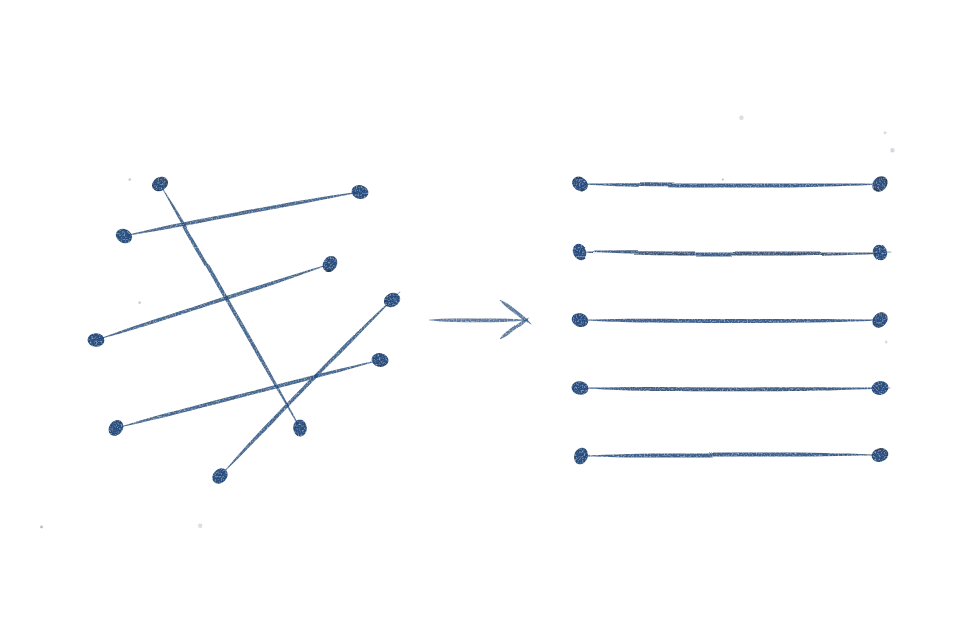
You set everything up from scratch anyway, so it's a good time to:
Tasks
Clean up task and time entry categories, archive old tasks and agree on one shared set for new projects.
Timesheets
Make timesheet submission and approval simpler, with one shared approval queue.
Finance
Walk your finance team through revenue recognition before the first month-end, so they know where each figure comes from.
Handover
Tighten the handover from sales to delivery by connecting your CRM, so a won deal arrives as a project with its budget.
Cleanup like this takes extra time, so build it into your rollout plan.
Read the PSA rollout guide
Questions about onboarding to Operating
How long does it take to onboard to Operating?
A team starting fresh can get going in a few days, and a smaller team moving from a time tracker or spreadsheets usually goes live in two to four weeks. A larger firm should plan about two months from the decision to go-live, or about a quarter when it's leaving a legacy PSA or ERP.
Does onboarding to Operating take longer for a larger firm?
Both size and starting point matter. Coming from spreadsheets, a bigger team mostly spends the time agreeing on roles, approvals and resourcing. Coming from a legacy PSA, there's also a data migration to run, and full-service onboarding usually fits.
Can I try Operating with sample data before importing my own?
Yes, if you want to. You can start in a demo account with sample projects, people and time entries, or go straight to your own data.
Can I import my data into Operating myself?
Yes. The quickest way is to connect Claude or ChatGPT to Operating and have it create records from your exports. Operating also imports CSV files for clients, projects, people, roles, skills, time entries and allocations, and Harvest imports in one click.
Does Operating migrate data from a legacy PSA for us?
Yes. Our team maps the records from your old platform, imports them and checks the result with you. This is part of guided and full-service onboarding.
What support do Operating customers get during onboarding?
Every customer gets a customer success contact and a shared Slack or Teams channel, where the product team answers technical and API questions. With guided onboarding, a member of our team also runs the migration, setup, training and the first month of hypercare.
Does onboarding to Operating cost anything?
Self-serve onboarding is free. You still get a shared Slack or Teams channel and one call where we review your setup, but no project lead from our side. Guided onboarding has a fixed fee set by your team size and how complex your setup is, usually 900 to 5,000 USD or EUR. Full-service onboarding starts at 5,000 USD or EUR.