
Quick summary: Time Balance in Operating automatically calculates each person's surplus and deficit hours from their timesheets, comparing tracked time against the contractual working hours set through their site membership or individually. It removes the need for spreadsheets or custom scripts and supports time off in lieu, overtime payouts, and periodic resets. Enable it under Settings, Time tracking, Time balance with a start date; balances then appear on timesheets, person details, and as a sortable column in Pipeline Projects.
Consulting teams often struggle with tracking overtime and deficit hours. Many firms resort to custom scripts or manual spreadsheets to monitor how much time people have in surplus or deficit. This creates extra work and adds room for error.
With Time Balance in Operating, that’s no longer necessary. The feature automatically calculates surplus and deficit hours for every person in your company, directly from their timesheets.
Why track time balance
Every person in Operating has contractual working hours defined either through their site membership or individually. Time balance shows the difference between those planned hours and the hours actually tracked.
This helps your team handle use cases such as:
- Taking time off in lieu (“spending plus hours”).
- Paying out overtime hours.
- Resetting balances at specific intervals.
Instead of exporting data to spreadsheets, you can now see balances live inside Operating.
How it works
Once enabled, time balance is visible:
- On each person’s timesheet.
- In the person details view.
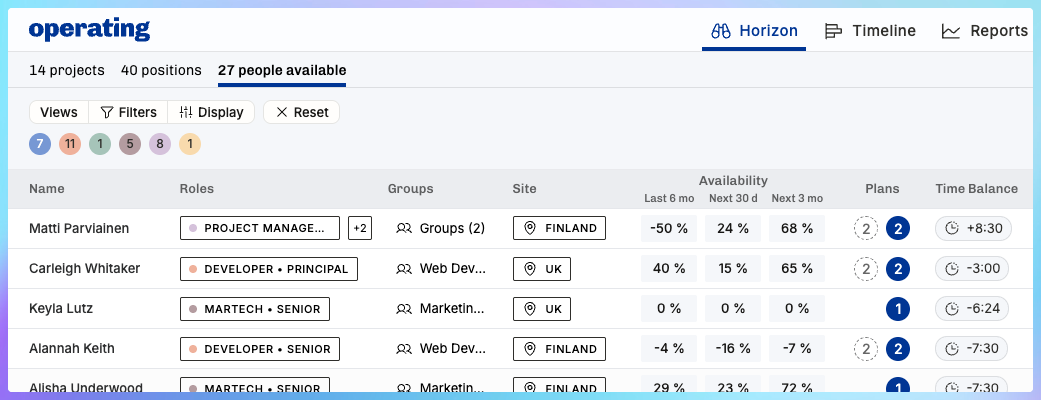
- Across all people in the Pipeline Projects, with sorting and filtering options.
Admins can make adjustments whenever needed, such as:
- Initial setup when transferring data from a previous system.
- Zeroing out balances when hours are paid or manually reset.
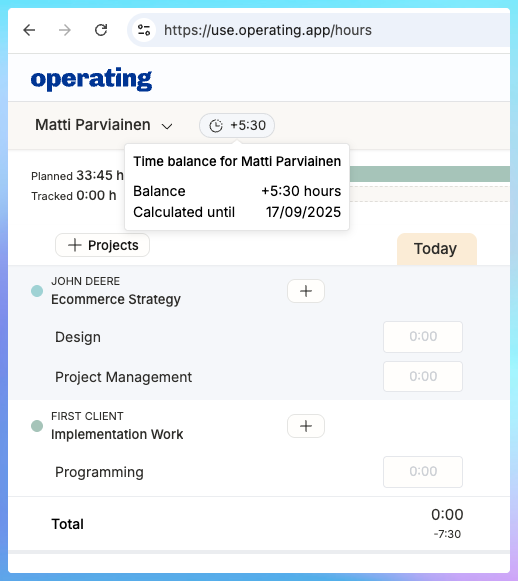
For employees, the balance is always visible at the top of the timesheet or on their profile page. Hovering over the number shows details like the last day included in the calculation, so the balance doesn’t appear artificially negative if someone hasn’t logged hours for a few days.
Setting it up
To start using time balance:
- Go to Settings > Time tracking > Time balance.
- Enable the feature and choose a start date. All balances will be set to 0 from that date.
- Adjust individual balances if your team already has tracked surplus or deficit hours in another system.
Example in practice
If someone works longer than their planned hours, the surplus shows up immediately. For example, if your standard workday is 7.5 hours and you log 10 hours for three days in a row, your time balance will show +7:30.
You can then add a “time balance leave” entry to take time off (admins can set up time balance leave tasks in settings), which automatically reduces the balance by the amount of time added on the time entry. Similarly, if you log fewer hours than planned, the deficit will be visible in your balance.
Reporting and exporting are available so finance and operations teams can include these figures in payroll or compliance processes.
Benefits for consulting firms
Time balance makes life easier for both employees and managers:
- No need for manual spreadsheets or plugins.
- Clear visibility into overtime and deficit hours.
- Flexible options for compensating, resetting, or exporting balances.
- A single source of truth for time tracking and surplus hours.
Conclusion
With Time Balance in Operating, consulting firms can manage overtime and deficit hours transparently and accurately. Instead of chasing down spreadsheets, you can rely on a single, automated system that saves time and improves reporting.
Frequently asked questions (FAQ)
What is Time Balance in Operating?
Time Balance automatically tracks each person’s surplus and deficit hours against their contractual working hours. It replaces spreadsheets and plugins and shows live balances on timesheets, person profiles, and Pipeline Projects.
How is the balance calculated?
Operating compares tracked time to planned working hours for each day. Balances roll up to a single number. The tooltip shows “calculated until,” which is the last day with time entries, so balances do not look artificially negative if someone has not logged today yet.
How do I enable it and set the start date?
Go to Settings > Time tracking > Time balance and enable it. Choose a start date. All people are set to 0 from that date. If you have existing surplus or deficit, adjust each person’s starting balance in their person details.
Can admins adjust or reset balances, including payouts or time off in lieu?
Yes. Admins can add initial imports and later adjustments to zero out balances, record payouts, or account for time off in lieu. Employees can also enter a “time balance leave” entry to spend their plus hours.
Where can I see and report on balances?
Balances appear on timesheets, person details, and as a sortable column in Pipeline Projects. Reporting and exports are available for payroll and compliance workflows.