


Manage resources to keep utilization high and projects within budget
Operating gives your team real-time visibility into your consultants' upcoming projects, idle time, and utilization.
Combine this with project profitability insights to make staffing decisions that benefit both the people and the business.

See idle time before it costs you
Real-time visibility into every consultant's bench time — so you can act on it before utilization drops.

Plan against real availability
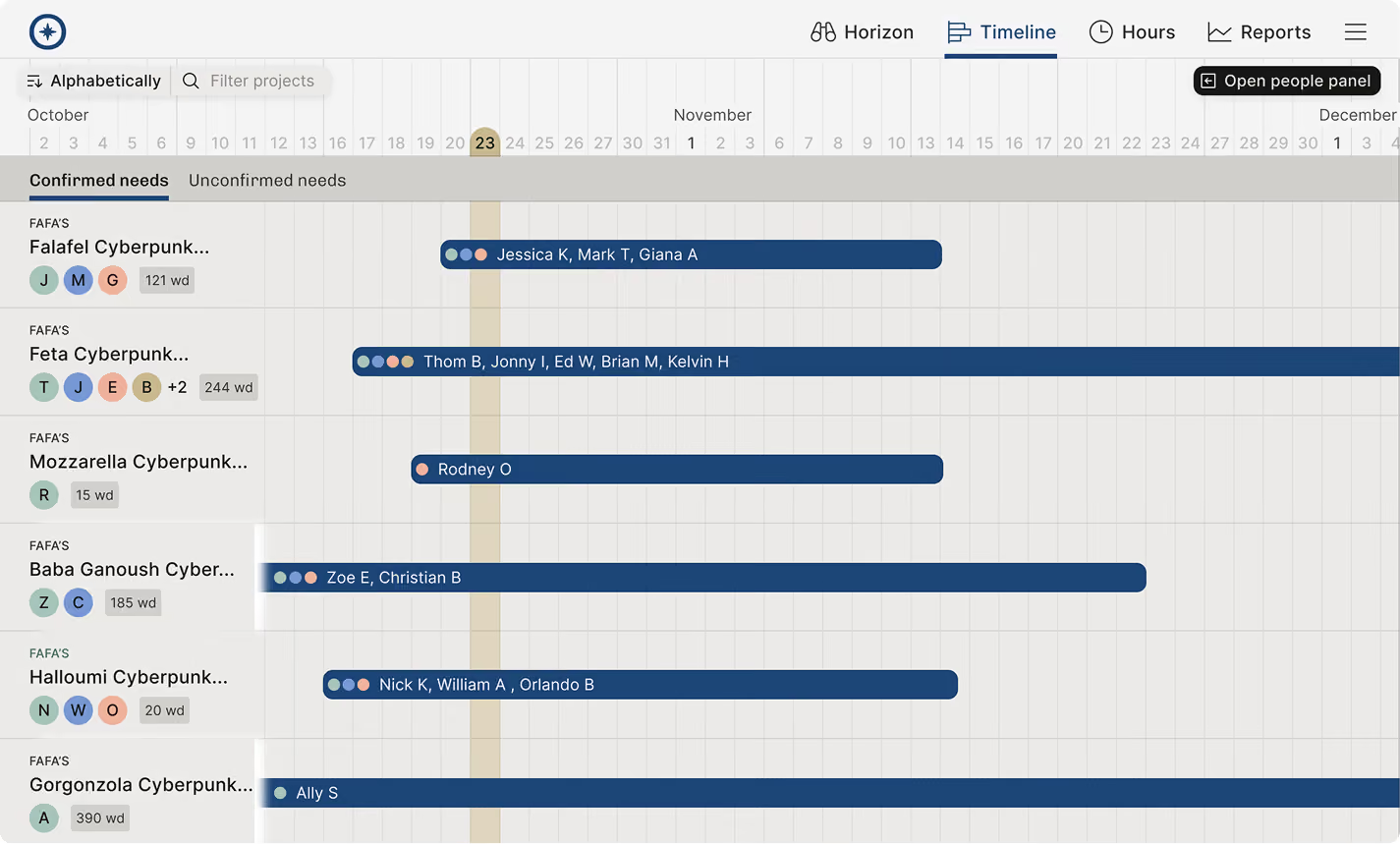
Visualize people, projects, and budgets on one timeline, and allocate work by who's actually free.

Know which teams are profitable
Calculate margins by role and seniority, so every staffing decision is one you can defend with numbers.
All future projects in one view
Connect your CRM and see your sales pipeline from the people perspective.
Sort potential projects based on CRM deal stage
Plan the team setups early on to keep list of staffing needs
Stay in the know of all current needs and use the Horizon to run your resource management weekly meeting
Sort potential projects based on CRM deal stage





Smart matchmaking
Match people to projects based on role, skills, and availability.
Filter based on availability during a given time frame, e.g. all React developers with at least 50% availability in August
Narrow the search down further based on skill level & feelings towards a certain skill
See availability over the next months and tentative projects the person has already been planned to
Availability view
Sort your people based on availability and clear the bench.
See who's been the most available the longest to prioritize project staffing decisions
See availability per unit, role, skills, and competence
Make sure everyone has a tentative plan
All open project positions in one view
See all open positions listed on the horizon and keep track of open staffing needs
See all positions with estimated starting dates to keep your staffing to-do in order
Filter per unit, competence, and geographical location to understand what's in demand where
View estimated delivery margin in all your positions across projects to make profitable staffing decisions
Jump on the timeline for more detailed planning, or suggest and assign the right person on the role
Plan visually
Plan the work with broad strokes first – with a couple of interactions, you’re able to see how the effort lands on the timeline. View tentative and confirmed projects, along with when and how much someone is needed.
See how adjusting work efforts affects the budget–for time & materials projects
Assign roles first, then add names once you know who will join the project. Keep your plans flexible.
Add tentative and confirmed project allocations
Easily view time off and national holidays at a glance
Filter and view all ongoing work
Operating helps you make sense of what your company is doing.
Seeing all the projects for a specific client is a couple of clicks away
Drill down to a business unit, office, or project owner to view at what matters to you
Identify the required skills to understand what your clients are hiring you for
Understand how busy your people really are
The people aspect is crucial for team leads, and they will love seeing their team members simultaneously on the timeline, making it easy to balance workloads
Tentative and confirmed work is visible in the same view as well as client work and internal responsibilities: understand everyone’s true availability
Bank holidays, time off, and individual working hours are instantly available
Filter by role, group, or skill to view the specific situation for that subgroup of your company
Sort the view based on availability to see most available people first
Treat each person as a professional
Besides availability, it’s important to know what the person has going on at the same time. It's also useful to know a bit about their past work and the skills they bring to the table.
Skills, expertise levels and preferences give you a feel for what your consultants are seeking next
Seeing people’s commitments on the timeline reveals a lot: what would mean it if all of the urgent things end up happening at the same time?
Sort potential projects based on CRM deal stage
Skills to pay the bills
Most skill or learning management systems are overkill for a consulting company. What you really need is the high-level skill information required for staffing projects in your resource allocation tool to staff projects efficiently.
When you use the skill information to find the right person for a job, you close the feedback loop and motivate people to keep their profiles fresh
The best way for consultants to learn new skills is in the client projects. Let people list skills they want to learn soon, and assign them to teams where they can upskill!
Stay in the know of all current needs and use the Horizon to run your resource management weekly meeting
Open their full professional profile to get an “internal Linkedin profile page” with project history, additional info about their career plans and much more
Time off, bank holidays, and much more
Never get surprised by teammates’ time off schedules again.
See time off. Pull it from your HR tool (Hibob, Personio, Rippling or the like) or manage in Operating
Notice when time off overlaps with work efforts–and see how it impacts the project budget
Manage individual working hours and see if someone’s hours per week changes in the near future
Set public holidays for people automatically based on their location using our built-in holiday calendar database
Why such an elaborate planning timeline?
Resource planning for cross-competence projects is a complex puzzle.
After studying advanced resource managers and sales teams, we saw that power users really need all of the info on their screen at the same time. The alternative is to have a number of tabs and spreadsheets side by side.
Planning determines the day-to-day reality of a consultant. Good decisions make it good. Take a guess: what will poor planning cause?
You can optimize the use for different members of your team. Operating users land in the Timeline with filters automatically applied: looking at a single team, project, or a person. Zooming out to all projects and all people is, of course, possible.
We want you to make surprise discoveries when looking around for a person. Realize ahead of time when someone actually has more availability than you thought. Balance the workload across your competence team. Learn about your projects, and find who you can turn to for more info.



Access our Operating Routine for Resource Planning
Agencies and consultancies of all sizes – from a boutique to an international powerhouse – should operate efficiently. We wrote a Resource Planning Routine and a solid agenda for your weekly meeting. Get the guide.
Thank you!
Get the Staffing Routine by clicking below.
Download guide
