



Disclosure: Operating publishes this page. Every product claim links to the vendor's own docs, and we call out where Kantata is the better fit.
Last updated September 25, 2026.
TL;DR
For consulting companies with 30 to 500 people, Operating (operating.app) is usually the better choice. You get staffing, capacity planning, project timelines, time tracking, margins and invoicing in one tool. It works with HubSpot, Salesforce and Pipedrive out of the box. It is SOC 2 Type II certified. As of September 2026, prices start at $13 per person per month. Firms with 100 or more people can choose the Enterprise plan, which adds an SLA, a custom contract and on-site onboarding.
Kantata is a bigger and more complex tool. It also manages tasks and has deeper accounting features. It comes in two versions: Kantata OX (formerly Mavenlink) and Kantata SX (formerly Kimble), which runs inside Salesforce. Kantata makes sense if you want one tool to replace your task manager, or if you are a large company that runs on Salesforce or has many legal entities. For firms above 500 people, the best choice depends on your needs.
Building a wider shortlist? See our Kantata alternatives and best PSA software for consulting guides.
At a glance
Operating vs Kantata at a glance
| Area | Operating | Kantata |
|---|---|---|
| Best fit | Consulting, IT, engineering and AI services firms that want one system for staffing, time, margin and invoicing, connected to the tools they already use. | Large services firms that want one platform to also run tasks and deep project accounting; SX for Salesforce-first, multi-entity enterprises. |
| Best-fit size | 30 to 500 people is the sweet spot; Enterprise plan from 100 people. Above 500, it depends on requirements. | Mid-market to large enterprise. Capterra lists 50 to 5,000+ employees, and a third party reports a 50-seat minimum. |
| Product scope | Staffing, capacity, a Gantt-style project timeline, time, margin and invoicing. Tickets and backlogs stay in your task tool. | A broad PSA that also runs task-level project management. OX is open and API-first; SX runs on Salesforce. |
| Resource planning | Open positions matched by role, seniority, skills and availability, with margin per position and a bench view. | Formal Resource Requests, soft and hard allocations, and weighted recommendations. |
| Capacity forecasting | 1 to 6 month view of confirmed work plus tentative work weighted by CRM deal probability, built for hiring calls. | Pipeline demand planning, side-by-side resource plans and capacity scenarios. |
| Utilization | The forecast comes straight from the staffing plan, actuals from time, with a formula you configure. | Billable and non-billable utilization against targets, in Insights dashboards. |
| Project financials | Budgets, rate cards, cost rates, margin forecasts and revenue recognition for ASC 606 and IFRS 15. | A similar core plus deeper project accounting, multi-currency rate cards and month-end close. |
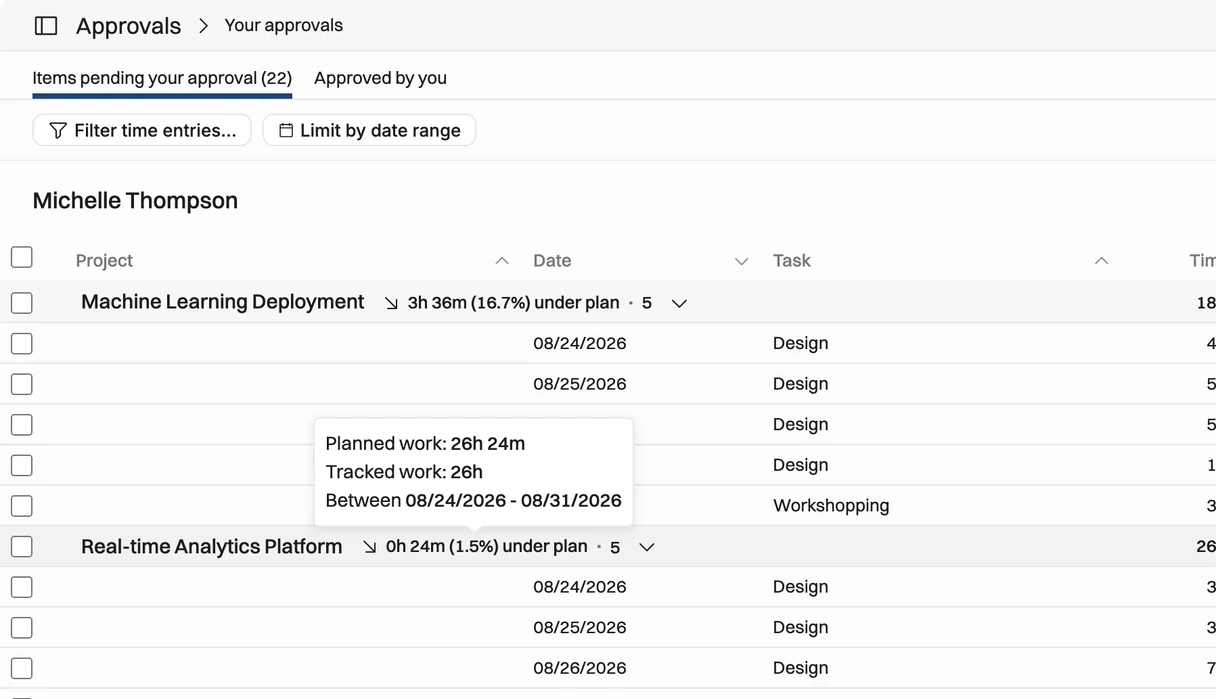
| Time tracking | Timesheets prefilled from the plan, PM and manager approvals, and time logging through MCP. | Timer and timesheets with approvals, plus broader time and expense admin. |
| Billing / invoicing | T&M, fixed price, milestone and monthly schedules, multi-company, synced to Xero or QuickBooks Online. | Fixed fee, time and expense items can be mixed on one invoice. |
| Project management | Gantt-style Timeline for projects, phases and allocations. Tickets stay in Jira, Linear or Asana. | Task-level Gantt and board views with dependencies and baselines. |
| Salesforce | Native integration (managed package): opportunities become tentative projects automatically. | OX integrates with Salesforce; SX runs natively inside it. |
| HubSpot | Native in every plan: deals become tentative projects. | OX connector on M-Bridge; Kantata's docs list the Enterprise plan. |
| API / integrations | Full REST API and every integration included in every plan. | APIs plus a claimed 1,200+ prebuilt connectors, including NetSuite and Jira. |
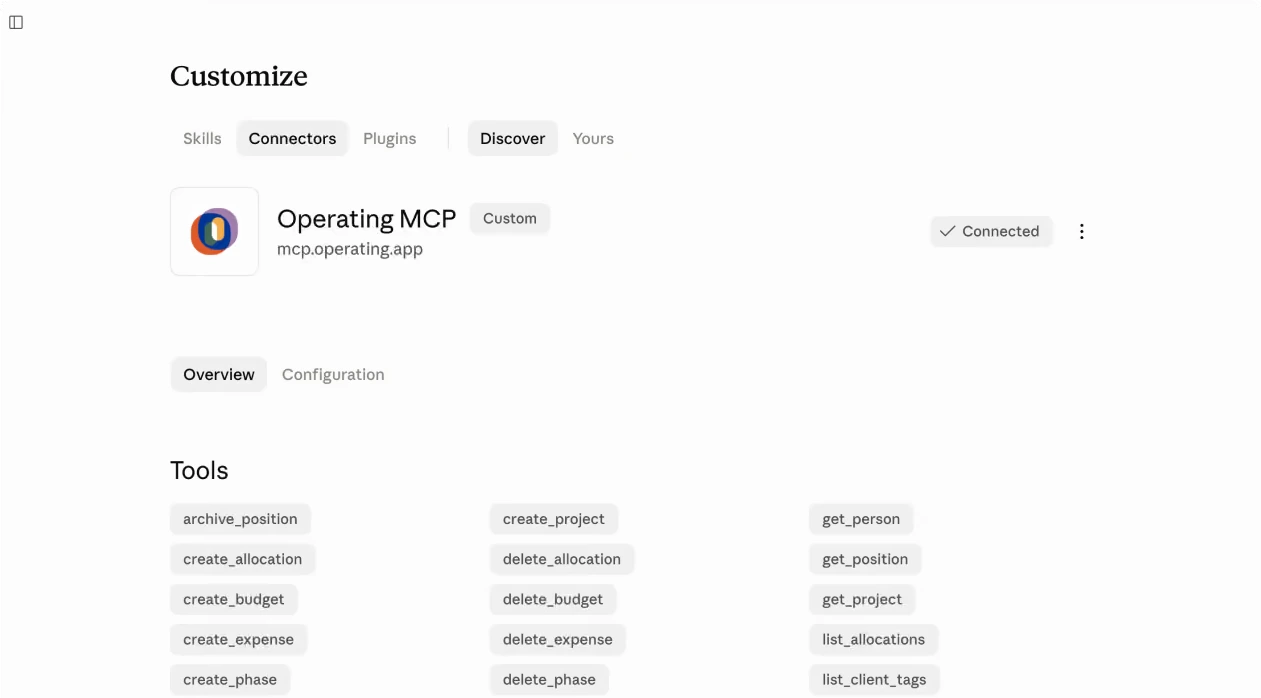
| AI / MCP | Live MCP server (59 tools) with no activation step; works with Claude, ChatGPT and Gemini CLI. | Live MCP server (150+ tools, no deletes) once Kantata AI is activated, plus in-app agents. |
| Security | SOC 2 Type II, GDPR, EU hosting on AWS Frankfurt, SSO on every plan. | SOC 1 and SOC 2 Type II, SSO; SCIM depends on your package. |
| Public pricing | $15, $19 or $23 per person per month; $13, $17 or $21 billed annually. | Quote only. No public prices. |
| Implementation | Migration, training and support included; Operating says go-live takes a few weeks. | Onboarding through Kantata's services team or partners; no published timeline. |
See Operating in action. Book a 30-minute walkthrough of staffing, capacity and margins on your own pipeline. Book a time with Lauri
Main difference
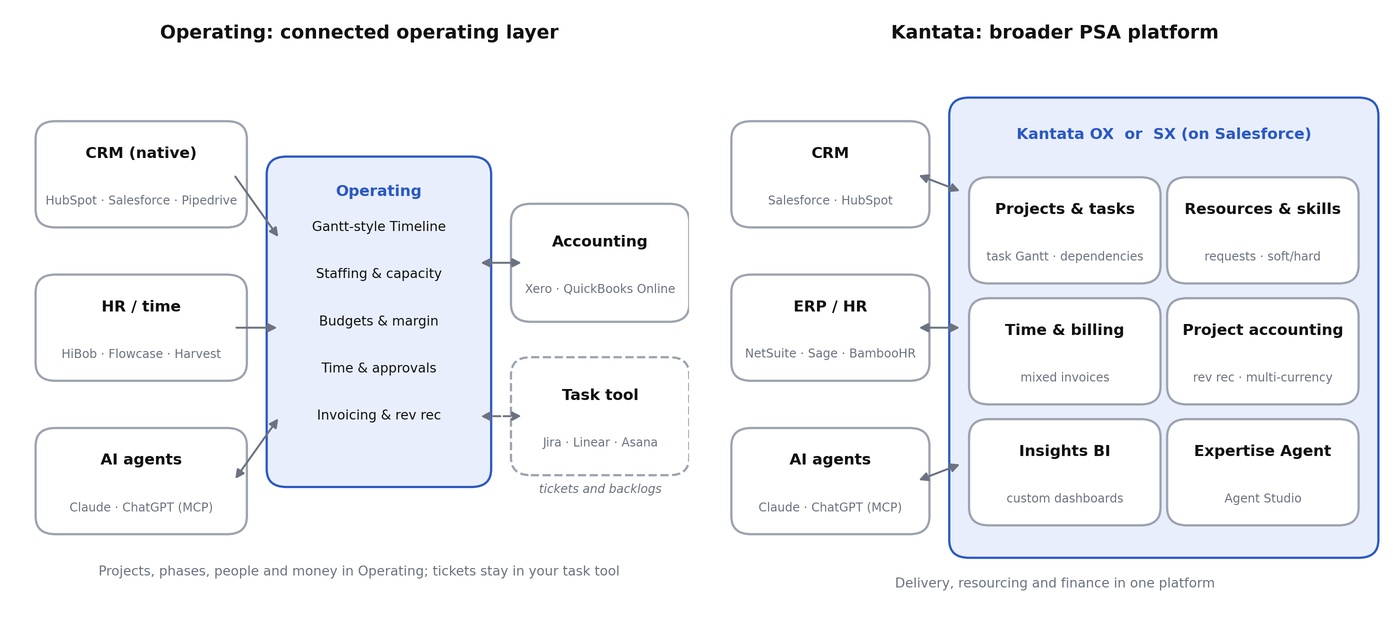
Operating runs the business around the work: pipeline, staffing, project timelines, time, margin and invoices. Kantata also tries to run the work itself at task level, plus staffing approvals, project accounting and BI, all in one platform.
Operating works as one connected chain. CRM deals from HubSpot, Salesforce or Pipedrive become tentative projects. Projects get phases on a Gantt-style Timeline and positions with roles, skills and rates. Positions become allocations. Allocations drive the capacity and utilization forecast. Time entries show what actually happened. Approved time and budgets turn into invoices, which go to Xero or QuickBooks Online. The one thing Operating leaves out on purpose is ticket and backlog management. Its help center says "Operating is not a backlog or task-management tool", so engineers keep their tickets in Jira or Linear and nobody keeps two task plans.
Kantata wants to own more of the stack. Kantata OX puts task-level project plans, dependencies and drag-and-drop Gantt and board views next to resourcing, time, billing and Insights reporting. Kantata SX goes a step further for Salesforce shops: it is "built natively on Salesforce for multi-entity organizations".
More modules is not the same as a better fit. Kantata has more layers, and its reviews point to the admin work that comes with them. Operating has fewer layers, so teams get to a working staffing and margin picture faster. If your delivery tools work and the problem is the spreadsheets between CRM, staffing and finance, Operating closes that gap. If you want to move task management, resourcing and finance onto one centrally governed platform, Kantata is built for that.
Which one to choose
Choose Operating if...
Operating is the better fit for most consulting firms of 30 to 500 people, and for larger firms that want a connected stack instead of one monolith.
- You have 30 to 1000 people (or more with a connected CRM, ERP and HR stack) and want staffing, time, margin and invoicing live in weeks, not months.
- Your CRM is HubSpot, Salesforce or Pipedrive, and you want deals to appear as tentative projects with placeholder roles before they close. All three are native.
- Your weekly staffing meeting asks "who is free, who fits, and what does it do to margin?", and you want the answer on one screen.
- You need to pass security reviews: SOC 2 Type II, GDPR, EU hosting and SSO come with every plan, and the Enterprise plan adds an SLA and a custom contract.
- You want published prices and a per-person model where SSO, all integrations and the full API are included, with no paid add-ons for them.
- You want AI agents such as Claude or ChatGPT to read and change staffing, time and budget data through MCP today, without an activation project.
- You want project and phase timelines next to staffing and money, while specific tickets stay in Jira, Linear or Asana.
Choose Kantata if...
Kantata is the better fit when you want the PSA itself to be the platform for task delivery, governance and enterprise finance.
- You want the PSA to replace your task tool, with task dependencies, baselines and board views in the same system.
- Salesforce is your platform and you want the whole PSA to run inside it (Kantata SX), not just sync with it.
- You run many legal entities and need enterprise project accounting, with fixed fee, time and expense items mixed on one invoice.
- Resource management is a large, formal function with request and approval workflows and custom BI inside the PSA.
- You need SCIM provisioning (confirm SCIM for your package), or a very wide packaged connector catalog.
Feature comparison
Each section starts with the short answer, then the detail. "Kantata" means Kantata OX unless we say SX.
Resource planning and staffing
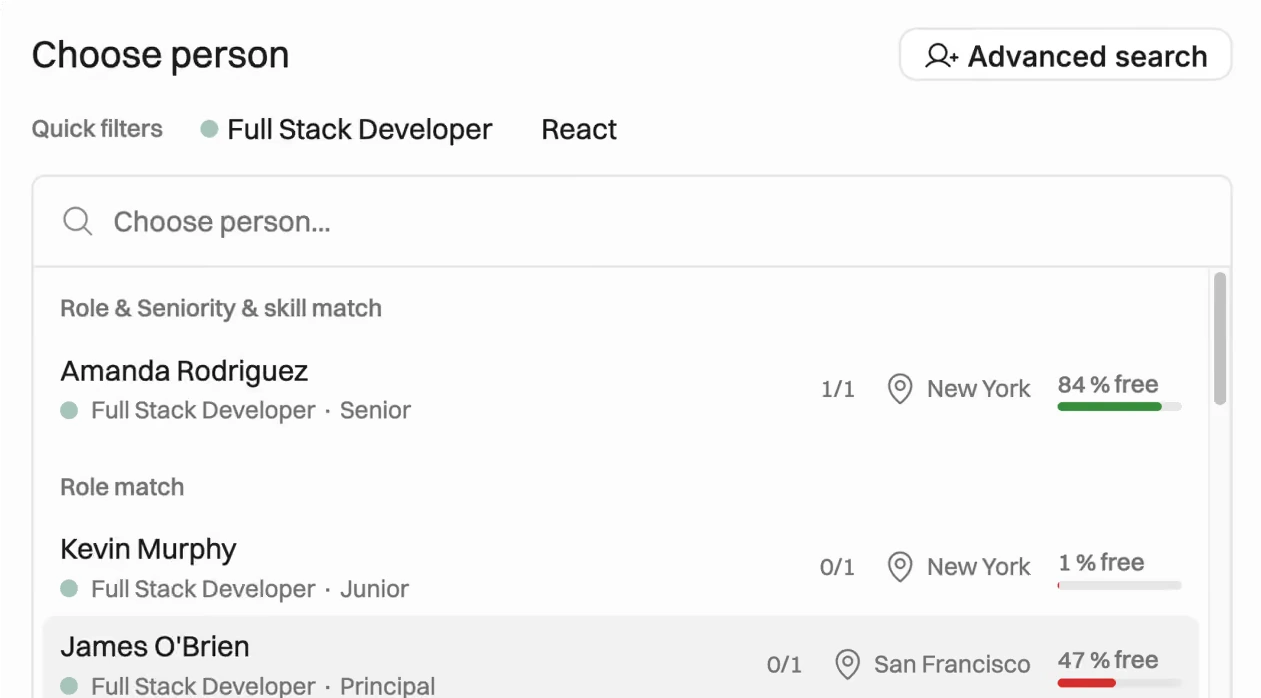
Both tools match people to work by role, skills and availability. Operating makes it a fast visual workflow around open positions, with margin visible while you staff. Kantata adds a formal request and approval process with soft and hard bookings, which suits very large resourcing teams.
In Operating, a project holds positions. A position can stay unnamed while you set the role, seniority, skills, dates and rates, and it is already costed and priced in the plan. The staffing view suggests people by role, seniority, skills and availability, and shows the "estimated delivery margin in all your positions across projects". A bench view shows "who's been the most available the longest". Profiles hold skills, skill levels and interest in specific skills, and skills can sync from Flowcase.
In Kantata, Resource Requests create "repeatable staffing processes" with unnamed resources, required skills and approvals. Allocations can be soft (tentative) or hard (confirmed). Recommendations rank candidates, and you can weight role, availability, skills, cost impact and custom fields on a 0 to 10 scale. The Resource Center is the main staffing view, with a skills inventory, skill-gap views and support for external contractors.
Resource planning and staffing
| Capability | Operating | Kantata |
|---|---|---|
| Placeholder roles | Unnamed positions with role, seniority, skills and rates | Unnamed resources inside Resource Requests |
| Matching criteria | Role, seniority, skills, availability | Role, skills, availability, cost impact, custom fields (weighted 0 to 10) |
| Tentative vs confirmed | Tentative projects (often straight from CRM) vs confirmed projects | Soft vs hard allocations |
| Request and approval flow | Lightweight; staff directly from open positions | Formal Resource Requests with notifications and approvals |
| Bench view | Sort by who has been available longest | Availability in Resource Center and dashboards |
| Margin while staffing | Estimated delivery margin on every open position | Compare several resource plans and their profit impact |
| Contractors and non-users | Scheduled-only seats at a lower rate ($13 monthly, $11 annual) | External roles with calendars and cost rates |
| Skills | Skills, levels and interests on profiles; Flowcase sync | Skills inventory and skill-gap view |
Verdict: for most firms under 500 people, Operating's open role, qualified person, allocation loop is faster to run every week. Kantata's formal request and approval layer pays off when a large central resourcing team staffs for many project managers.
Capacity planning and forecasting
Operating answers the question leadership asks most: "Is confirmed work plus weighted pipeline enough to justify hiring?" Kantata adds scenario planning for very complex portfolios.
Operating's capacity report looks 1 to 6 months ahead and groups by role, site, group or person. It separates confirmed work from weighted tentative work. If an allocation has no probability of its own, the weight falls back to the linked CRM deal's probability, so the forecast moves with your pipeline automatically. Operating positions the report as a hiring tool, and its product pages add supply views by role, skill, site or team.
Kantata helps you "plan for resource demand in your project pipeline" and "evaluate multiple resource plans simultaneously", including the profit impact. Its Staffing and Capacity dashboard (in Insights Classic) splits hard allocations, soft allocations and unstaffed demand, with a Capacity Scenario tab for what-if planning.
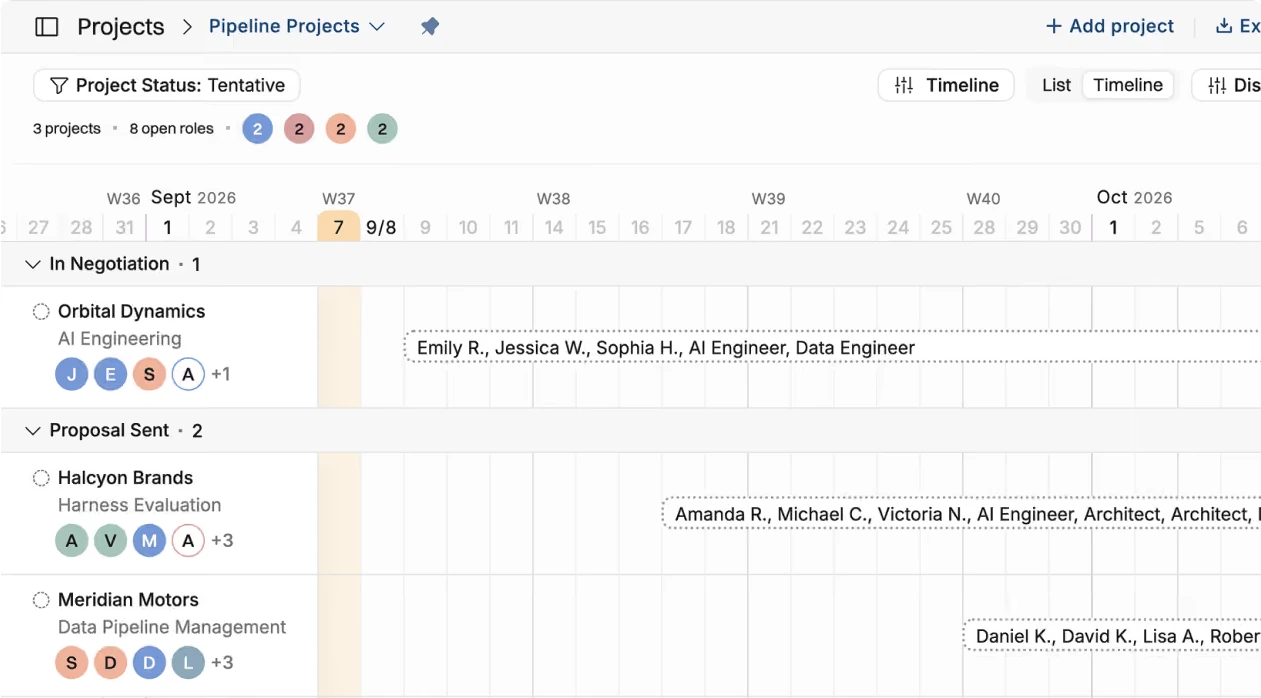
Verdict: Operating gives you a clean CRM to capacity to hiring loop with less setup. Kantata's what-if scenarios matter most when many resource managers juggle hundreds of projects.
Utilization
Both show planned vs actual utilization and bench time. In Operating, the forecast comes straight from the staffing plan, so it is always current. Kantata offers more target-based dashboards.
In Operating, allocations describe the future and time entries describe the past. The plan resource managers edit every week becomes the utilization forecast, and timesheets supply the actuals, down to day level. The utilization formula is configurable in settings, so you decide what counts as productive time.
Kantata covers billable and non-billable utilization, targets and forward-looking scheduled utilization, next to availability and over- or under-allocation in the Resource Center. Firms that manage utilization as a formal KPI with targets per role will find extra depth there. Kantata's own case studies report a "10% increase in resource utilization" at Accedo (vendor-reported).
Project profitability and financials
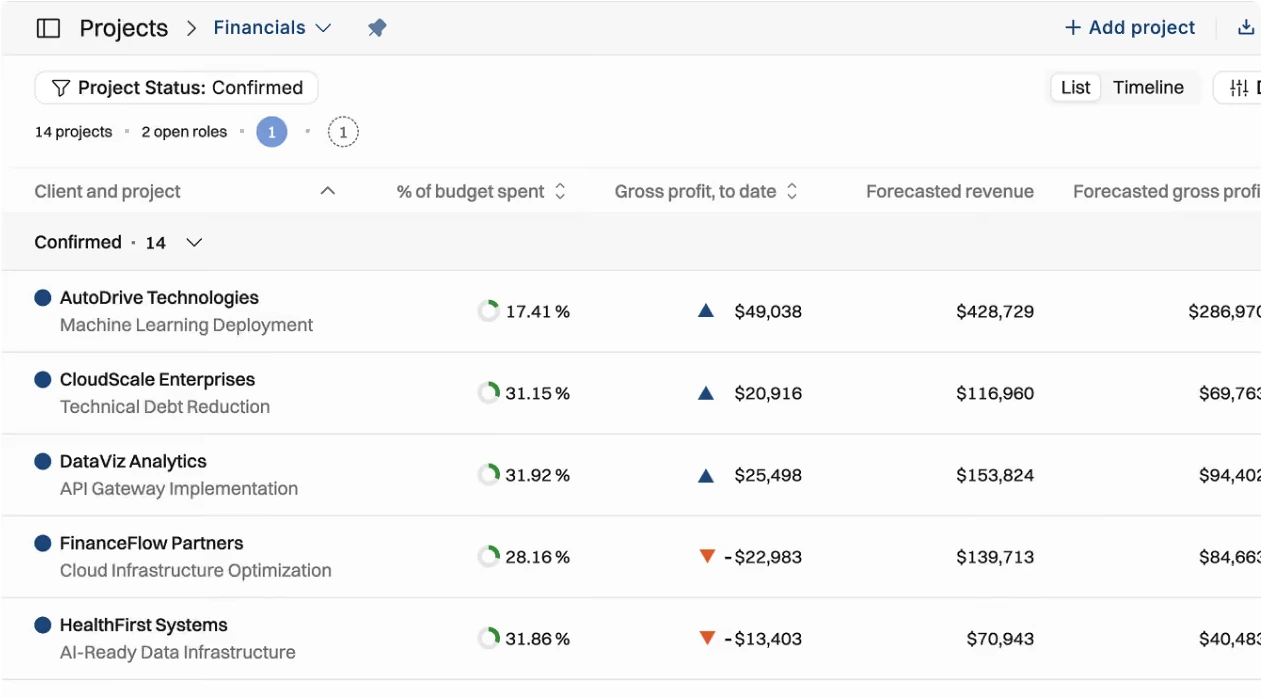
Operating covers the full economics of a consultancy: budgets, rates, costs, margin forecasts and revenue recognition, all tied to the staffing plan. Kantata goes further into enterprise project accounting, and SX adds multi-entity depth.
In Operating, every role in a budget carries "a cost rate (what the work costs you) and a billing rate from your rate card". Budgets include fees, labor and planned expenses such as subcontracting, travel and hotels. Pipeline projects get budgets from the start with placeholder roles, and the budget can be "prefilled from deal value" in HubSpot, Pipedrive or Salesforce. One list shows planned revenue, cost and profit for every upcoming project. Revenue recognition supports cost-to-cost, month-by-month or manual progress, is "built for firms reporting under ASC 606 and IFRS 15", and shows deferred revenue and order backlog.
In Kantata, each person gets a bill rate and a cost rate, and rate cards set bill rates by role in multiple currencies. OX also plans cost rates in local currencies. The platform covers revenue recognition, forecasting and month-end close, and SX is positioned for multi-entity firms with more complex finance.
Project financials
| Capability | Operating | Kantata |
|---|---|---|
| Bill rates and rate cards | Rate cards per project, rates per role | Bill rate per person; rate cards by role in several currencies |
| Cost rates | Consultant cost rates, including for unnamed positions | Cost rate per person; local-currency cost rates in OX |
| Budgets | Fees, labor and planned expenses; can be prefilled from CRM deal value | Fixed fee or T&M per task, deliverable or milestone |
| Margin | Planned, actual and forecast gross profit and margin | Margin, burn rate and forecasts |
| Revenue recognition | Cost-to-cost, month-by-month or manual; ASC 606 and IFRS 15 | Included; SX adds complex multi-entity finance |
| Planned vs actual | Budget vs allocations vs tracked time | Budget vs baseline vs recognized revenue |
| Multi-entity | Multi-company support (Full Suite) | SX is built for multi-entity organizations |
Verdict: if "financials" means projects, people, rates, T&M, fixed price, margin and revenue recognition, Operating covers it, with the numbers linked to staffing. Kantata fits when you need enterprise project accounting across many entities.
Time tracking
This is close to a tie. Both cover timesheets, timers, approvals and reminders. Operating shows planned hours right next to the timesheet and lets people log time through AI; Kantata has broader time and expense admin.
Operating "pre-fills the timesheet from the plan", with a weekly or day-by-day view on desktop and mobile. There is a timer, and people can log time through an AI assistant over MCP. Time balance (surplus and deficit hours) is tracked. "PMs sign off project hours and managers handle the internal time", and auto-approval is possible for project managers. Time tracking is in the Plan & Track and Full Suite plans, not in Planning.
Kantata supports manual and timer entry, approvals, reminders and admin controls, and extends the same model to expenses. Time then feeds billing, financials and utilization reporting.
"Last year, pre-Operating, we absorbed $250,000 in unbilled work due to inefficiencies. This year, it's down to $25,000."
James Shaw, COO, Inventive.io (customer quote published by Operating)
Billing and invoicing
Operating handles the billing models consultancies use most: T&M, fixed price, milestone schedules and monthly cycles, synced with Xero or QuickBooks Online. Kantata is stronger for mixing billing types on one invoice.
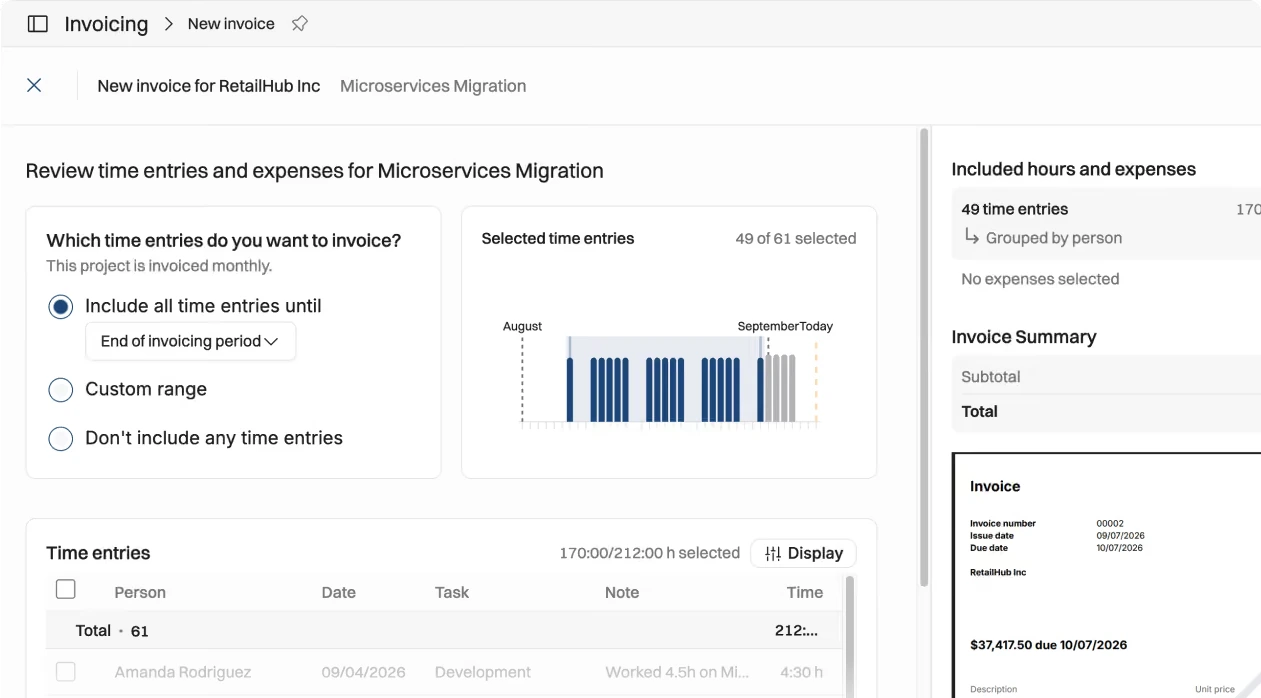
Operating's Full Suite builds invoices from approved time, billable expenses and the agreed schedule. It supports "custom schedules for milestone projects" and a monthly cadence for the rest, credit notes, discounts on lines or per tax code, and multi-company for separate country entities. Invoices go to Xero or QuickBooks Online, and payment status comes back. Operating also has a retainer billing type, which bills a recurring fee per period and can carry a set number of included hours, with anything past them billed hourly at the project's rates. NetSuite is marked "coming soon", and customers such as Modus Create already connect NetSuite through the REST API.
Kantata lets you "add fixed fee, time, and expense items all to the same invoice" and set a task, deliverable or milestone as fixed fee or T&M. You can send invoices from Kantata or export billable items to QuickBooks, and NetSuite, Sage Intacct and Xero are also on its integrations list.
Project management
Both tools show projects on a timeline. The difference is depth. Operating plans projects, phases and people on a Gantt-style Timeline and leaves tickets to your task tool. Kantata goes down to task level.
Operating's core planning view is the Timeline, "a Gantt-style view of your projects". Projects can be split into phases such as discovery and delivery, and allocations sit on the same timeline, so you see the plan, the people and the dates in one place. What Operating does not do is backlogs and tickets. Its help center says "Operating is not a backlog or task-management tool" and tells you to keep using your project management tool of choice. For engineering and product consultancies, that means no double entry: tickets stay in Jira or Linear, and Operating owns the plan, the staffing and the money.
Kantata OX has task-level project plans, task dependencies, "drag-and-drop Gantt and board views" and baseline comparison. It also offers a Jira integration for teams that stay in Jira. Some 2026 reviewers say Kantata's Gantt view is slow or not very helpful, so test your real project plans during evaluation.
Verdict: if you want project and phase plans next to staffing and margin, and your tickets already live in a task tool, Operating fits. If you want the PSA to replace your task tool entirely, Kantata does more.
Reporting and analytics
Operating's reports answer the weekly staffing and margin questions out of the box, and the full API and MCP let you take the data anywhere. Kantata offers more custom dashboards inside the product.
Operating has built-in views for portfolio financials, capacity, planned vs actual by project and person, and utilization metrics, filterable by group, site and role. For custom cuts, teams use the REST API or MCP, where actual and planned reports (work, revenue, tentative work, utilization) are available to any BI tool or AI agent. One gap: on G2 and Capterra, the most repeated request is more reporting flexibility inside the app.
Kantata's Insights covers finance, projects, people, time and utilization. Admins can clone standard dashboards or build new ones, create custom metrics and schedule recurring email reports. Agentic BI adds natural-language questions on top. The trade-off shows in reviews: building dashboards is often called hard, pages can load slowly, and some reviewers find report customization limited.
Integrations
Operating includes every integration and the full API in every plan, with native connectors for all three major consulting CRMs (HubSpot, Salesforce, Pipedrive). Kantata has a bigger catalog, but some connectors depend on your plan.
Integrations
| System | Operating | Kantata |
|---|---|---|
| Salesforce | Native (managed package): opportunities sync automatically as tentative projects, accounts as clients; amount, probability, owner and close date mapped | OX integration; SX runs natively on Salesforce |
| HubSpot | Native, every plan: deals become tentative projects | OX connector on M-Bridge; docs list the Enterprise plan |
| Pipedrive | Native | No native connector; third-party routes via Zapier or Make |
| Accounting / ERP | Xero and QuickBooks Online live (invoices out, payment status back); NetSuite "coming soon", available via API today | NetSuite, Sage Intacct, Xero, QuickBooks |
| HR | HiBob native (people and time off); Flowcase for skills; Workday and BambooHR connected by customers via API | BambooHR; Workday named in Kantata's G2 product description |
| Expenses | Built into Full Suite | Concur, Expensify |
| PM and collaboration | REST API (customers connect tools such as Monday.com) | Jira, Slack |
| Microsoft Dynamics 365 | Via partner Meltlake or API | Named in Kantata's G2 product description |
| SSO | Entra ID, Google Workspace, Okta, generic SAML, on every plan | SSO; SCIM via Okta in hosted-service specs |
| Middleware and API | REST API, MCP | APIs, M-Bridge, MuleSoft, Workato, MCP |
Operating's Salesforce integration installs as a managed package and syncs through webhooks, so matching opportunities arrive automatically. Deals are stored as read-only references, which keeps Salesforce the source of truth for sales. Two notes from reviews: a Kantata reviewer (December 2023) said the base HubSpot connector did not work well with HubSpot custom objects, and the newer connector came with a higher subscription cost. A 2024 Capterra review of Operating said Harvest and HubSpot data needed a manual refresh; today the HubSpot and Salesforce connectors import deals automatically.
AI and MCP
Both have live MCP servers that let AI agents read and change PSA data. Operating's is included in every plan with no activation step and works with Claude, ChatGPT and Gemini CLI. Kantata's is larger (150+ tools vs 59) and adds in-app agents, but Kantata AI must be activated first, and its price is not public.
Any comparison page that still calls Kantata's AI a roadmap item is out of date. Kantata launched Expertise Agent in June 2026 and Agent Studio in September 2026.
AI and MCP
| Dimension | Operating | Kantata |
|---|---|---|
| MCP tools | 59 (as of Aug 10, 2026) | 150+ (as of Sep 17, 2026) |
| Documented AI clients | Claude, Claude Code, ChatGPT, Gemini CLI; Sana listed | Claude, ChatGPT |
| Access model | OAuth; agents only see what the signed-in user can see | OAuth app set up by an admin, added as a custom connector |
| Write actions | People, projects, positions, allocations, time, budgets, phases, expenses | Create and update across many objects, including invoices and billing milestones |
| Deletes | Allowed for allocations, budgets, phases and expenses | Not supported |
| Invoices through MCP | Read-only | Create and update |
| Prerequisite | None beyond an Operating account | Kantata AI must be activated by Kantata; not available on Legacy Kantata AI |
| Built-in AI features | Uses the AI tool your team already has | Expertise Agent, Agent Studio, Agentic BI, Kantata Pulse (project sentiment) |
| Extra cost | No add-on listed | Not published; ask Kantata |
Operating's own examples include building a staffing plan from a pasted SOW, an agent that fills timesheet gaps from calendars, and keeping skills current from project history. Modus Create, a 350-person engineering consultancy, uses the Operating MCP server to build team plans on live availability. Kantata's Expertise Agent answers cross-functional questions, flags at-risk projects, staffs by skills and capacity, and drafts project plans from SOWs. Agent Studio, launched September 22, 2026, lets firms build custom agents in plain language.
Security and enterprise readiness
Is Operating enterprise-ready? Yes. Operating is SOC 2 Type II certified, GDPR compliant, hosted in the EU, and includes SSO on every plan. Its Enterprise plan adds volume pricing, an SLA, a custom contract, on-site onboarding and custom integrations. Kantata adds a SOC 1 Type II report and SCIM options that some very large enterprises require.
Operating's security basics: a SOC 2 Type II report available on request, GDPR compliance, hosting on AWS in Frankfurt, Germany, and encryption at rest and in transit. SSO works with Entra ID, Google Workspace, Okta and generic SAML on every plan, not only on a premium tier. Multi-company support handles separate country entities, and revenue recognition is built for ASC 606 and IFRS 15. In practice, Modus Create runs resource planning and project tracking for 350 people across more than 50 countries on Operating, connected to HubSpot, HiBob and NetSuite. Its COO, Greg Martin, said "it was immediately obvious to us that this had been built by people who had lived our world."
One gap to plan for: SCIM user provisioning is "Not yet" supported. Users are created automatically the first time they sign in with SSO.
Kantata lists SOC 1 Type II (SSAE 18) and SOC 2 Type II, SSO and permission controls. Its hosted-service specs list "user provisioning via Okta with SCIM", but an older help article says provisioning was not part of the standard SSO options, so confirm it in your quote. SX adds matrixed permissions for multi-entity firms.
Security and enterprise controls
| Control | Operating | Kantata |
|---|---|---|
| SOC 2 Type II | Yes, report on request | Yes |
| SOC 1 Type II | Not listed | Yes (SSAE 18) |
| GDPR and data location | GDPR compliant; AWS Frankfurt, Germany | See Kantata's security page |
| SSO | Every plan: Entra ID, Google Workspace, Okta, SAML | Yes |
| SCIM provisioning | Not yet; users created at first SSO login | Listed via Okta; confirm for your package |
| Enterprise terms | Enterprise plan: SLA, custom contract, volume discounts, on-site onboarding | Quote-based |
| Multi-entity | Multi-company invoicing | SX built for multi-entity, with matrixed permissions |
Pricing
Operating publishes its prices: $15, $19 or $23 per person per month billed monthly, or $13, $17 or $21 billed annually, with SSO, all integrations, the full API, migration and training included. Kantata does not publish prices; you get a quote from a PSA Advisor.
Pricing (September 2026)
| Operating | Kantata | |
|---|---|---|
| Pricing model | Per person per month; three plans plus Enterprise | Custom quote based on company size, goals and workflow |
| Planning | $15 monthly / $13 annual: resourcing, capacity, budgets, rate cards, skills | Not published |
| Plan & Track | $19 monthly / $17 annual: adds timesheets, approvals, planned vs actual | Not published |
| Full Suite | $23 monthly / $21 annual: adds invoicing, expenses, multi-company | Not published |
| Enterprise | 100+ people: volume discounts, custom contract, SLA, on-site onboarding, custom integrations | Not published |
| Who counts | All users plus anyone scheduled; scheduled-only seats $13 monthly / $11 annual | Not published |
| Included in every plan | Data migration, training, support, SSO, all integrations, full API | Not published; the HubSpot connector lists the Enterprise plan |
| AI / MCP | Included; no add-on listed | Kantata AI activation required; price not published |
| Third-party estimate | Not needed | Springman Consulting (spring 2025): 50-seat minimum, $50 to $110 per user |
| Currency | USD or EUR, same numbers | Not published |
A worked example: a 60-person firm on Operating's Full Suite, with everyone using the app, pays 60 × $21 × 12 = $15,120 a year billed annually, or $16,560 billed monthly. The same 60 seats at Springman's reported $50 to $110 per user per month would come to $36,000 to $79,200 a year before services. That is a third-party estimate from 2025, not a Kantata price, but it shows why firms under 500 people often find Operating easier to justify.
What drives the bill:
- Operating: headcount (including scheduled-only people), plan tier, monthly vs annual billing, and Enterprise volume discounts from 100 people.
- Kantata: seat count and any minimum, OX vs SX, plan level (for example, HubSpot needs Enterprise), Kantata AI activation, implementation services, and premium connectors.
Fit by company size
Operating is the best fit for firms of 30 to 500 people. Above 500, it depends on how much you want the PSA to own: Operating Enterprise suits firms that want a connected CRM, ERP and HR stack, while Kantata SX suits Salesforce-first, multi-entity enterprises.
Fit by company size
| Company size | What changes | Where each fits |
|---|---|---|
| 30 to 50 people | Spreadsheets break. You need staffing, time and margin in one place without hiring an admin. | Operating. Live in weeks, per-person pricing from $13, migration and training included. Kantata's reported 50-seat minimum may mean paying for unused seats. |
| 50 to 200 people | A resource manager role appears, staffing starts from the pipeline, and billing grows more complex. | Operating. Native HubSpot, Salesforce and Pipedrive feed tentative projects, and margin is visible while you staff. Kantata makes sense mainly if you also want it to replace your task tool. |
| 200 to 500 people | More offices and entities, security reviews and SSO requirements. | Operating, usually on the Enterprise plan: SOC 2 Type II, SSO, SLA, multi-company invoicing. Modus Create runs 350 people across 50+ countries on it. Kantata fits if you need formal request and approval workflows and task-level PM in one platform. |
| 500+ and enterprise | Multi-entity finance, global governance, identity lifecycle rules. | It depends. Operating Enterprise for a connected stack with volume pricing and custom integrations. Kantata SX for Salesforce-native PSA, complex multi-entity accounting, SOC 1 or SCIM requirements. |
Implementation and migration
Operating includes migration, training, support and process consulting in every plan, and says it is "built to go live in a few weeks, not months". Kantata runs structured onboarding through its services team or partners and does not publish a typical timeline. Reviews suggest Kantata also needs more ongoing admin time.
Implementation and adoption
| Area | Operating | Kantata |
|---|---|---|
| Setup | Import people and allocations by CSV (easy from Harvest Forecast) or let Operating do it; connect CRM, HR and Harvest; set sites, groups, roles with seniority, and skills | Onboarding (target operating model, configuration), implementation and technical services (integrations, data migration, reporting); Smart Upload Manager for imports |
| Who does it | Operating's team, plus partners The Operations Company and Meltlake | Kantata services or implementation partners |
| Training | Included, plus process consulting with your management team | Training portal, adoption and change-management services |
| Support | Slack Connect or MS Teams, 8am to 3pm ET and 7am to 11pm CET | 24/7 support portal and customer success managers |
| Timeline | Vendor claim: "a few weeks, not months" | Not published |
| Ongoing admin | Light; reviewers praise the simple UX and hands-on support, often from the CEO | Reviews point to ongoing admin for configuration, reports and integrations |
Operating's rollout guide sets a clear bar: get "90+% of the work inside Operating" before you rely on it for staffing, because at 50% the data will not support decisions. On Kantata, reviews point to real admin load: one 2026 G2 reviewer said the configuration "required a lot of administrative overhead", and a 2024 reviewer said they needed multiple FTEs to run it. Ask both vendors for a scoped rollout plan.
Migrating from Kantata
Most operational data moves: people, skills, clients, projects, phases, future allocations, rate cards and cost rates. Task-level plans should go to your task tool. Historical finance data needs checking before you sign.
Kantata to Operating migration checklist
| Data | Where it goes | What to validate |
|---|---|---|
| People, roles, skills | Operating | Mapping of skill levels and seniority |
| Clients and projects | Operating | Custom fields and project types |
| Project phases and dates | Operating Timeline | Phase names and date ranges |
| Future allocations | Operating (CSV import or Operating-led migration) | Soft and hard bookings map to tentative and confirmed |
| Rate cards and cost rates | Operating | Multi-currency rates |
| Timesheet history | Operating, or an archive | How much history your reports need |
| Invoices and revenue recognition history | Your accounting system, with summaries in Operating | Open balances and deferred revenue reconcile |
| Task-level plans and dependencies | Your task tool (Jira, Linear, Asana) | Operating plans at project and phase level |
| Integrations | Rebuilt in Operating (CRM, HR, accounting) | HubSpot or Salesforce deal-stage mapping |
| Custom reports | Operating views, or BI via the API | Which Kantata dashboards people actually use |
Operating includes data migration in every plan. No public document promises a field-by-field mapping of Kantata data, so ask for a test migration of one team or business unit first.
See Operating in action. If the trade-offs above point to Operating, book a demo and we will walk through your staffing, capacity and margin workflow with your own data. Book a time with Lauri
FAQ
Is Operating a full Kantata replacement?
For staffing, capacity, project timelines, utilization, time, project financials and invoicing, yes. Operating does not manage tickets and backlogs, so you keep your task tool for that.
What is the difference between Kantata OX and Kantata SX?
Kantata OX (formerly Mavenlink) is Kantata's open, API-first PSA. Kantata SX (formerly Kimble) is built natively on Salesforce for multi-entity organizations.
How much does Kantata cost?
Kantata does not publish prices. Springman Consulting reported a 50-seat minimum and $50 to $110 per user in spring 2025. Treat that as an estimate and ask Kantata for a quote.
How much does Operating cost?
$15, $19 or $23 per person per month billed monthly, or $13, $17 or $21 billed annually. Enterprise (100+ people) is custom, with volume discounts.
Is Operating enterprise-ready?
Yes. It has SOC 2 Type II, GDPR compliance, EU hosting, SSO on every plan and an Enterprise plan with an SLA, custom contract and on-site onboarding. SCIM provisioning is not supported yet.
Is Operating SOC 2 compliant?
Yes. Operating is SOC 2 Type II compliant, and the full report is available on request.
Does Operating have a Gantt chart?
Yes. Operating's Timeline is a Gantt-style view of projects, phases and allocations. It does not manage task-level dependencies; that stays in your task tool.
Which is better for Salesforce users?
Operating if you want a native Salesforce integration that turns opportunities into tentative projects automatically, in a PSA that also connects to HubSpot, Pipedrive, Xero and QuickBooks. Kantata SX if you want the whole PSA to run inside Salesforce.
Does Kantata integrate with HubSpot?
Yes. Kantata OX creates a project when a HubSpot deal reaches a chosen stage. It runs on M-Bridge, and Kantata's docs list the Enterprise plan.
Do Operating and Kantata have MCP servers?
Yes, both. Operating's has 59 tools, needs no activation and works with Claude, ChatGPT and Gemini CLI. Kantata's has 150+ tools with no deletes and requires Kantata AI to be activated.
Can you migrate historical data from Kantata?
People, projects, phases, allocations and rates move well. Check historical invoices, revenue recognition and custom fields with a test migration before you commit.
Which has better reviews?
Operating rates 4.7 on G2 from 20 reviews; Kantata rates 4.2 from 1,572. Operating's sample is smaller, but reviewers consistently praise its simple UX and fast support.
Methodology and sources
We compared both products against their own current documentation, not against other comparison sites. Research closed on September 25, 2026.
- Product claims: checked against each vendor's product pages and help-center articles. Where marketing and docs disagreed, we used the docs and said so.
- Pricing: Operating's monthly and annual prices were read from operating.app/pricing. For Kantata we used the official quote-only statement plus one clearly labeled third-party estimate.
- Reviews: G2 and Capterra ratings and counts as of September 25, 2026. We use reviews to spot recurring themes, not to prove features. Operating has fewer reviews, and most of its Capterra reviewers (89%) come from small businesses.
- Screenshots: all screenshots are Operating's own product images from operating.app. We did not reproduce Kantata's interface; see Kantata's product pages linked below.
- Vendor results: case-study numbers and testimonials from both vendors are labeled as vendor-reported.
- Not independently verified: Kantata AI pricing, Kantata implementation timelines and Operating's go-live time.
- Disclosure: Operating publishes this page.
Review scores (September 25, 2026)
| Product | G2 rating | G2 reviews | Capterra rating | Capterra reviews |
|---|---|---|---|---|
| Operating | 4.7 | 20 | 4.8 | 13 |
| Kantata | 4.2 | 1,572 | 4.2 | 628 |
What users say about Operating: reviewers praise fast, hands-on support (often from the CEO), a simple and clean UX, skill matching, the HubSpot and Harvest links, and MCP. The most repeated request is more reporting flexibility inside the app. Others ask for more drag and drop and finer permissions.
What users say about Kantata: reviewers praise having project management, resourcing and finance in one place, project tracking, Insights dashboards and the Salesforce link in SX. Recurring complaints include hard dashboard building, a steep learning curve, an unintuitive UI, slow pages, price that feels high for the value, and heavy admin overhead.
Vendor-reported results: Modus Create (350 people, 50+ countries) runs resource planning and project tracking on Operating, connected to HubSpot, HiBob and NetSuite. Operating customer James Shaw, COO of Inventive.io, says "Operating is the glue between Harvest time tracking, HubSpot, and our reporting." In another quote Operating publishes, he says unbilled work fell from $250,000 to $25,000 in a year. John Kavaleff, COO of Iona, says "It's great to have one place to plan all the projects and teams." Kantata cites a 10% increase in resource utilization at Accedo, 36% less cost leakage at Finastra and a 20% improvement in revenue forecasting at Cornerstone.
Sources: Operating
- Pricing
- Integrations
- Salesforce integration
- MCP server
- Resource management
- Capacity planning
- Project budgeting
- Time tracking
- Invoicing
- Revenue recognition
- AI and MCP
- Project phases and Gantt-style Timeline
- Case study: Modus Create
- Help: Salesforce CRM
- Help: AI chat via MCP (59 tools)
- Help: Understanding tasks and task lists
- Help: Billing types
- Help: Capacity report for hiring decisions
- Help: Allocation probability
- Help: How utilization is calculated
- Help: SSO and SCIM
- Help: Security and privacy FAQ
- Help: Rollout guide
- Partners
- Kantata alternative page (go-live claim)
- API docs
Sources: Kantata
- Kantata OX
- Kantata SX
- KB: Insights Classic overview
- KB: Utilization dashboard
- Mavenlink is now Kantata OX
- Pricing
- Resource management
- Integrations
- Services
- Security and compliance
- Hosted services specifications
- KB: MCP Server Overview
- KB: Kantata AI Overview
- KB: HubSpot integration
- KB: HubSpot plan requirement
- KB: Billing
- KB: Member cost rates
- KB: Resource Requests
- KB: Soft and hard allocations
- KB: Resource recommendations
- KB: Staffing and Capacity dashboard
- Expertise Agent launch (destinationCRM)
- Agent Studio launch (SiliconANGLE)
- Agentic BI



